Dax Function: PERMUT
 Reviewed by Neetu Singla — Founder, Lets Viz Technologies — AI & Data Consultant. Last reviewed June 5, 2026.
Category: Statistical Functions
The PERMUT function in Power BI is a DAX function used to calculate the number of permutations of a given number of items from a larger set. A permutation considers the arrangement of items, meaning the order of selection is important.
Purpose of the Function
Determine the total possible arrangements (permutations) of a subset of items from a larger set.
Type of Calculations
Performs combinatorial calculations to analyze the number of ordered combinations.
Practical Use Cases
- Solving problems in probability and statistics.
- Calculating possible sequences for business scenarios like task arrangements, resource allocations, or logistics.
- Supporting decision-making in scheduling, inventory, or optimization models.
PERMUT(<number>, <chosen>)</chosen></number>
| Parameter | Type | Description |
|---|---|---|
<Number> | Scalar | The total number of items in the set. Must be a non-negative integer. |
<Chosen> | Scalar | The number of items to choose from the set. Must be a non-negative integer ≤ <Number>. |
How Does PERMUT Dax Works
Mathematical Principle
The number of permutations is calculated using the formula:
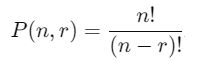
n: Total number of items.
r: Number of items chosen.
n!: Factorial of nn (the product of all integers from 1 to nn).
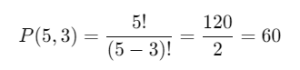
Example:
For n = 5, r = 3:
What Does It Return?
Returns a scalar value representing the number of permutations of
<Chosen>items from<Number>total items.If the parameters are invalid (e.g., non-integer or
<Chosen>><Number>), the function returns an error.
When Should We Use It?
Order-Sensitive Arrangements: Scenarios where the order of items matters, such as ranking, task assignments, or positional arrangements.
Combinatorial Analysis: Exploring possibilities in sampling or sequencing.
Optimization Models: Evaluating permutations to find the most efficient outcomes.
Examples
Basic Usage :
Find the number of ways to arrange 3 items from a set of 5:
PERMUT(5, 3)
Output: 60
Column Usage
Calculate permutations for different scenarios dynamically in a table:
ADDCOLUMNS(
Scenarios,
"Permutations",
PERMUT(Scenarios[TotalItems], Scenarios[ChosenItems])
)
Use Case: Adds a column displaying the number of permutations for each scenario.
Advanced Usage
Combine with other DAX functions for conditional permutation calculations:
CALCULATE(
PERMUT(Table[TotalItems], Table[ChosenItems]),
Table[Category] = "Logistics"
)
Use Case: Calculates permutations for logistics scenarios dynamically filtered by category.
Tips and Tricks
Check Parameter Validity: Ensure that
<Chosen>≤<Number>and both are non-negative integers.Factorial Growth: Be cautious of extremely large values, as factorials grow rapidly and may cause overflow errors.
Filter Contexts: Leverage filtering to calculate permutations for specific subsets of data.
Performance Impact of PERMUT DAX Function:
For large datasets, pre-aggregate values or reduce input sizes to improve performance.
Avoid unnecessary recalculations by storing intermediate results in variables or calculated columns.
Related Functions You Might Need
Want to Learn More?
For more information, check out the official Microsoft documentation for PERMUT You can also experiment with this function in your Power BI reports to explore its capabilities.
Unlock the true power of Power BI by transforming your data into actionable, insight-rich outcomes with the support of our skilled consulting team. Whether you require assistance with intricate DAX functions, the creation of user-friendly and visually engaging dashboards, or optimizing your data models for peak efficiency, our Power BI experts deliver solutions customized to your organization’s specific needs. Visit our Power BI Consulting Services page to learn how we can help your business make better, data-informed decisions.
It calculates the number of permutations of a subset of items from a larger set, considering the order of arrangement.
PERMUT considers the order of items, while COMBIN does not.
No, both <Number> and <Chosen> must be non-negative integers.
The function returns an error as it is mathematically invalid.
Use filters, variables, or summarizations to reduce the size of input data.
Need Power BI help in a real engagement?
Our team writes DAX like this every day for SaaS finance and ops teams. Refresh monitoring, change requests with a 2-business-day SLA, and a named analyst on retainer — or scoped hourly help if you just need a fix.
Named analyst2-day SLAFrom $5K/mo
