Dax Function: LINEST
 Reviewed by Neetu Singla — Founder, Lets Viz Technologies — AI & Data Consultant. Last reviewed June 5, 2026.
Category: Statistical Functions
The LINEST function in Power BI performs linear regression analysis by calculating statistics that describe a linear trend. It can be used to determine the relationship between dependent and independent variables in a dataset.
Purpose of the Function
To provide coefficients for the best-fit linear equation based on given data.
Type of Calculations
Regression coefficients and additional statistics for the linear trend.
Practical Use Cases
- Forecasting and trend analysis in sales, finance, or operations.
- Exploring the strength and direction of relationships between variables.
- Data modeling and predictive analysis.
LINEST(<y-values>, <x-values>, [const], [stats])</x-values></y-values>
| Parameter | Type | Description |
|---|---|---|
<Y-values> | Column | The dependent variable (values being predicted). |
<X-values> | Column | The independent variable(s) (predictor values). |
[const] | Boolean | Determines whether to force the intercept to 0. Default is TRUE. |
[stats] | Boolean | Specifies whether to return additional regression statistics. Default is FALSE. |
How Does LINEST Dax Works
The LINEST function computes the equation of a straight line:
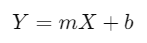
Where:
m: Slope (rate of change of Y with respect to X).
b: Intercept (value of Y when X=0).
If const = TRUE, the intercept (b) is calculated. If const = FALSE, b=0.
Regression Model
Calculates the coefficients m and b for the best-fit line minimizing the sum of squared differences between observed and predicted Y-values.
Optionally, provides statistical measures like R2R^2 (coefficient of determination), standard errors, and more when
stats = TRUE.
What Does It Return?
The LINEST function returns a table containing the following components based on the input parameters:
Regression coefficients for the independent variable(s).
If
stats = TRUE, additional statistics, including R2, standard error, and others, are included.
When Should We Use It?
Forecasting: To predict future values based on a linear trend.
Correlation Analysis: To evaluate the strength and direction of relationships between variables.
Predictive Modeling: In scenarios where a linear relationship is hypothesized.
Data Insights: To uncover trends in datasets, such as sales growth or operational efficiency.
Examples
Basic Usage :
Calculate the slope and intercept of a linear trend for sales data:
LINEST(Sales[Revenue], Sales[Year])
Column Usage
Apply regression analysis to a dataset with multiple predictors (e.g., year and advertising spend):
LINEST(Sales[Revenue], Sales[Year] + Sales[AdSpend], TRUE, TRUE)
Output: Coefficients for the predictors, the intercept, and additional regression statistics.
Advanced Usage
Combine LINEST with other DAX functions for dynamic analysis:
SUMX(LINEST(Sales[Revenue], Sales[Year], TRUE, TRUE), [Value])
Use Case: Calculate cumulative regression coefficients or trend insights.
Tips and Tricks
Normalize Data: Ensure the input data is scaled to avoid distortion due to large variations in magnitude.
Filter Data: Use DAX filters to isolate relevant data points for the regression.
Interpret Coefficients: Understand what each coefficient represents in the context of your data.
Performance Impact of LINEST DAX Function:
Large Datasets: Pre-aggregate data if the dataset is large to improve performance.
Multiple Predictors: Ensure all predictors are independent to avoid multicollinearity issues.
Related Functions You Might Need
TREND: Provides predicted values based on a linear trend.
FORECAST.LINEAR: Predicts a value based on a linear trend.
CORREL: Measures the strength of a linear relationship between two variables.
Want to Learn More?
For more information, check out the official Microsoft documentation for LINEST You can also experiment with this function in your Power BI reports to explore its capabilities.
Unlock the full capabilities of Power BI and elevate your data insights with our specialized consulting services. Whether you need guidance on advanced DAX functions like those highlighted here, support in designing interactive dashboards, or expertise in optimizing data models for enhanced performance, our experienced Power BI consultants are equipped to deliver customized solutions for your business. Explore our Power BI Consulting Services page to discover how we can help your organization make smarter, data-driven decisions.
It calculates regression coefficients and optional statistics for a linear trend.
LINEST provides regression statistics, while TREND predicts values based on the regression.
Yes, it supports multiple independent variables for multivariate linear regression.
When you want to force the intercept to 0, such as for specific financial models.
If stats = TRUE, it provides R2, standard error, and other regression statistics.
Need Power BI help in a real engagement?
Our team writes DAX like this every day for SaaS finance and ops teams. Refresh monitoring, change requests with a 2-business-day SLA, and a named analyst on retainer — or scoped hourly help if you just need a fix.
Named analyst2-day SLAFrom $5K/mo
