Dax Function: COMBINA
 Reviewed by Neetu Singla — Founder, Lets Viz Technologies — AI & Data Consultant. Last reviewed June 5, 2026.
Category: Statistical Functions
The COMBINA function in Power BI calculates the number of combinations (with repetitions allowed) for selecting a specified number of items from a set. It is useful when the same item can be chosen multiple times.
Purpose
To compute combinations where repetition of items is allowed.
Type of Calculations
Combinatorial mathematics, considering duplicate selections.
Practical Use Cases
- Scenarios involving grouping with replacement, such as creating combinations of flavors, materials, or resources.
- Probability and statistics problems where elements can appear more than once.
- Inventory or SKU analysis in business when repeat items are possible.
COMBINA(number, number_chosen)
| Parameter | Type | Description |
|---|---|---|
number | Scalar | The total number of items. Must be a non-negative integer. |
number_chosen | Scalar | The number of items to choose, including repetitions. Must be a non-negative integer. |
How Does COMBINA Dax Works
The formula used by the COMBINA function is:
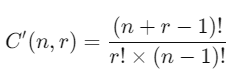
Where:
nn is the total number of items (
number).rr is the number of items chosen at a time (
number_chosen).(n+r−1)! denotes the factorial of (n+r−1), which is the product of all positive integers up to (n+r−1).
Example Calculation
For COMBINA(5, 3):

What Does It Return?
The function returns an integer value:
Represents the total number of combinations possible when selecting
number_chosenitems fromnumberitems, allowing repetitions.The result is always a non-negative integer.
When Should We Use It?
When calculating combinations where duplicate selection of items is allowed.
Useful in inventory modeling, customer choice analysis, or menu planning.
To determine the total number of outcomes in repeated-selection probability problems.
Examples
Basic Usage :
Calculate the number of ways to choose 3 items (with replacement) from a set of 4:
COMBINA(4, 3)
Output: 20
Column Usage
Apply the function dynamically to data in columns:
COMBINA(Table[TotalItems], Table[ChosenItems])
This computes combinations for each row based on the values in TotalItems and ChosenItems.
Advanced Usage
Combine COMBINA with conditional functions:
IF(COMBINA(10, 4) > 50, "High Combinations", "Low Combinations")
This evaluates the combinations and categorizes them based on a threshold.
Tips and Tricks
Include Repetitions: Use
COMBINAspecifically when repetitions are allowed; for combinations without repetitions, useCOMBIN.Input Validation: Ensure input parameters are non-negative integers to avoid errors.
Factorial Limits: Large values for
numberornumber_chosenmay lead to factorial overflow; pre-compute or approximate for large datasets.
Potential Pitfalls
Parameter Constraints: Ensure
numberandnumber_chosenare logical for the context. Negative or non-integer values will result in errors.Performance on Large Data: Factorial-based calculations can be resource-intensive for large numbers.
Performance Impact of COMBINA DAX Function:
Efficient for small to medium datasets.
For large datasets, pre-compute combinations to optimize performance and avoid factorial overflow.
Related Functions You Might Need
Want to Learn More?
For more information, check out the official Microsoft documentation for COMBINA You can also experiment with this function in your Power BI reports to explore its capabilities.
Unlock the full capabilities of Power BI and elevate your data insights with our specialized consulting services. Whether you need guidance on advanced DAX functions like those highlighted here, support in designing interactive dashboards, or expertise in optimizing data models for enhanced performance, our experienced Power BI consultants are equipped to deliver customized solutions for your business. Explore our Power BI Consulting Services page to discover how we can help your organization make smarter, data-driven decisions.
It calculates the number of combinations with repetitions allowed.
COMBINA allows repeated selections, whereas COMBIN does not.
The function returns 1, as there is only one way to select nothing.
No, both number and number_chosen must be non-negative integers.
It is used in inventory management, customer choice modeling, and scenarios where repetition is allowed.
Need Power BI help in a real engagement?
Our team writes DAX like this every day for SaaS finance and ops teams. Refresh monitoring, change requests with a 2-business-day SLA, and a named analyst on retainer — or scoped hourly help if you just need a fix.
Named analyst2-day SLAFrom $5K/mo
