Dax Function: LINESTX
Category: Statistical Functions
The LINESTX function in Power BI is a DAX function used to perform linear regression analysis across data tables. It calculates the slope, intercept, and other statistics describing the linear relationship between a dependent variable and one or more independent variables, evaluated over a table or expression.
Purpose of the Function
To evaluate linear regression dynamically across a dataset by processing rows in a table.
Type of Calculations
Regression coefficients, trendline equations, and statistical measures for data relationships.
Practical Use Cases
- Trend analysis and forecasting using dynamic data subsets.
- Understanding relationships in grouped or filtered datasets.
- Advanced data modeling for predictive analytics.
LINESTX(<table>, <y-expression>, <x-expression>, [const], [stats])</x-expression></y-expression></table>
| Parameter | Type | Description |
|---|---|---|
<Table> | Table | The table or table expression containing the data to analyze. |
<Y-Expression> | Expression | The dependent variable (values being predicted). |
<X-Expression> | Expression | The independent variable(s) (predictor values). |
[const] | Boolean | Determines whether to force the intercept to 0. Default is TRUE. |
[stats] | Boolean | Specifies whether to return additional regression statistics. Default is FALSE. |
How Does LINESTX Dax Works
Mathematical Principle
LINESTX calculates the parameters of a linear equation:
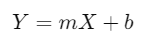
Where:
m: Slope (rate of change of Y with respect to X).
b: Intercept (value of Y when X = 0).
Evaluation
Processes rows in the specified
<Table>.Evaluates the
<Y-Expression>and<X-Expression>for each row.Computes coefficients and optional statistics.
Flexible Table Context
Because LINESTX operates on tables, it adapts to row context, enabling dynamic subgroup analyses and filtering.
What Does It Return?
The LINESTX function returns a scalar value or a table, depending on the configuration:
With Default Settings: Slope and intercept values for a linear equation.
With
stats = TRUE: Additional statistics such as R2, standard error, and others, returned in a table format.
When Should We Use It?
Dynamic Group Analysis: When linear regression needs to be calculated for specific groups or segments in the data.
Complex Models: When the relationship between variables involves dynamic expressions rather than static columns.
Forecasting: To create predictive models using real-time or grouped data.
Examples
Basic Usage :
Calculate a regression model for sales based on year:
LINESTX(Sales, Sales[Revenue], Sales[Year])
Column Usage
Evaluate regression coefficients for groups dynamically:
CALCULATE(
LINESTX(
Sales,
Sales[Revenue],
Sales[AdvertisingSpend]
),
Sales[Region] = "North America"
)
Output: Regression coefficients for the North America region.
Advanced Usage
Combine LINESTX with other functions to create interactive measures:
AVERAGEX(
GROUPBY(
Sales,
Sales[Region]
),
LINESTX(CURRENTGROUP(), Sales[Revenue], Sales[Year], TRUE, TRUE)
)
Use Case: Calculate average slopes across multiple regions for comparative analysis.
Tips and Tricks
Dynamic Context: Use with
CALCULATEto apply custom filters and slice datasets.Performance: For large datasets, pre-aggregate data to optimize performance.
Multiple Predictors: Use calculated columns to create combined predictors if needed.
Performance Impact of LINESTX DAX Function:
Large Datasets: The table processing can be computationally expensive for large datasets. Use aggregations or filters to limit the rows processed.
Complex Expressions: Simplify
<X-Expression>and<Y-Expression>to reduce evaluation time.
Related Functions You Might Need
Want to Learn More?
For more information, check out the official Microsoft documentation for LINESTX You can also experiment with this function in your Power BI reports to explore its capabilities.
Unlock the full capabilities of Power BI and elevate your data insights with our specialized consulting services. Whether you need guidance on advanced DAX functions like those highlighted here, support in designing interactive dashboards, or expertise in optimizing data models for enhanced performance, our experienced Power BI consultants are equipped to deliver customized solutions for your business. Explore our Power BI Consulting Services page to discover how we can help your organization make smarter, data-driven decisions.
LINESTX operates on a table with dynamic expressions, while LINEST uses static column data.
Yes, you can use expressions to define complex predictors.
Yes, it’s effective for forecasting trends within dynamic or filtered datasets.
Use FILTER or pre-aggregated data to limit the size of the input table.
Absolutely. Combine it with CALCULATE, SUMX, or AVERAGEX for advanced scenarios.