AI Automation for SMBs: What It Is and How to Start
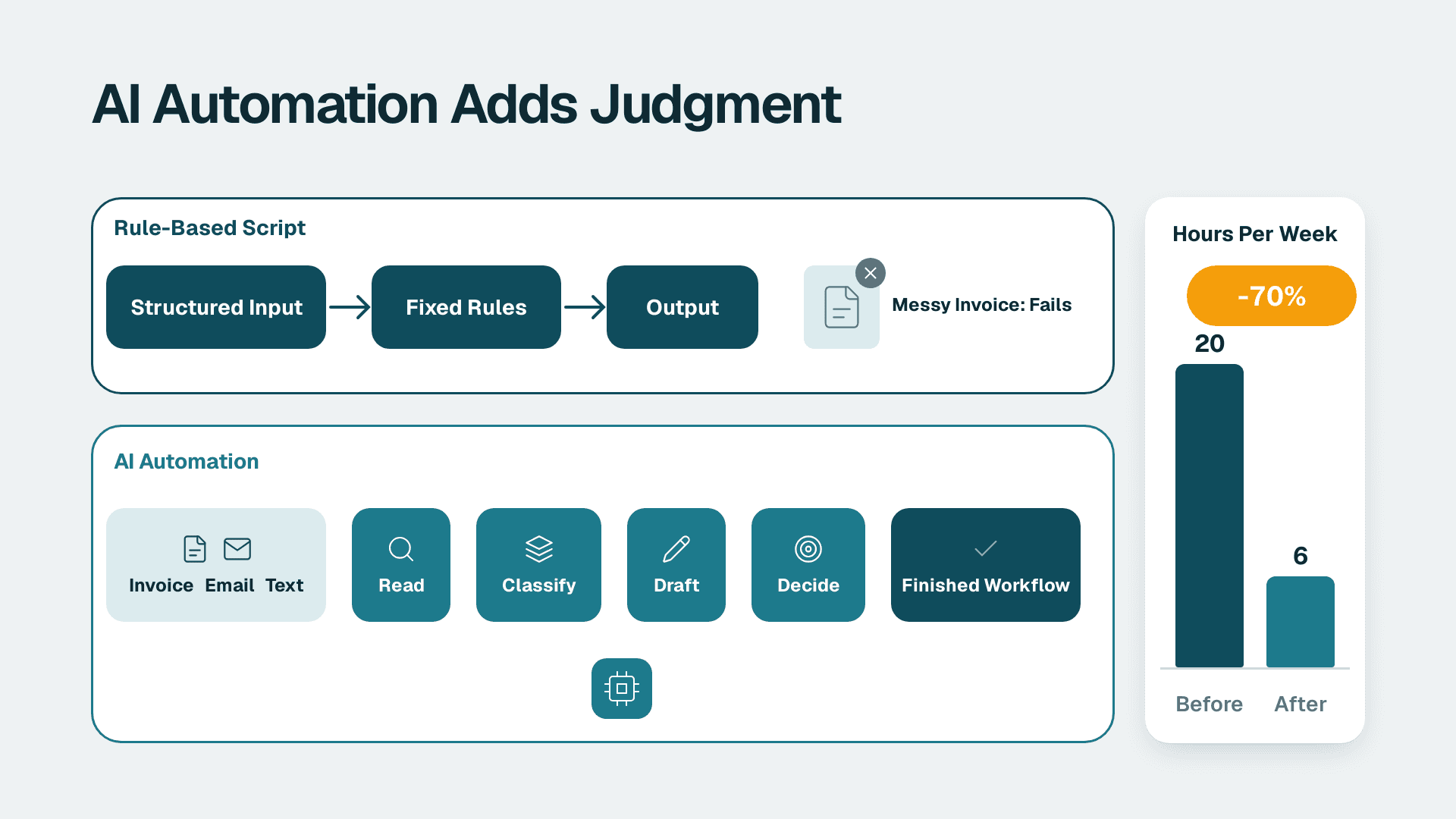
AI automation is the use of artificial intelligence, such as machine learning and language models, to run business tasks that used to need human judgment, then chain those tasks into end-to-end workflows. Unlike rule-based scripts, it copes with messy inputs like invoices, emails and free text. A small or mid-sized business can start with one workflow and reach production through a partner, without hiring in-house.
Key Takeaways
- AI automation adds judgment (reading, classifying, drafting, deciding) to the repetitive clicking that older automation handled.
- It pays off fastest in finance, sales and operations, where work is high-volume, document-heavy and rule-bound.
- Start with one workflow in one team, measure it, then expand. Do not begin with a company-wide programme.
- Data quality, ownership and human review decide whether a pilot survives contact with production.
- An SMB can reach production using a mix of off-the-shelf tools and an outside partner, with no in-house AI hires.
What is AI automation, and how does it differ from plain automation?
AI automation means pairing automation tools with AI models so software can handle tasks that involve reading, interpreting or choosing, not just repeating fixed steps. Traditional automation follows rules you write in advance. AI automation learns patterns from data and applies them to inputs it has not seen before.
One major enterprise vendor describes AI automation as combining machine learning and natural language processing, with large language models bringing significant improvements to both. It lists two training styles that matter in practice. Supervised learning uses labeled data, such as emails marked spam or not spam. Unsupervised learning finds structure in unlabeled data, such as grouping customers into segments for marketing.
The same source notes that agentic AI can improve from experience through reinforcement learning or model retraining with human-in-the-loop feedback, unlike traditional automation that follows a fixed set of rules. For a business owner, the practical meaning is simple: a rules-based workflow breaks when an invoice arrives in a new layout, while an AI-assisted one can read it anyway and flag what it is unsure about.
This is also why the phrase automation and AI is now used almost interchangeably with intelligent automation. Teams that want a structured path from idea to delivery often lean on AI automation consulting to scope the first workflow, but the concepts below apply whichever route you take.
What are AI automations in everyday terms?
An AI automation is a single workflow that uses AI for at least one step. Examples include a system that reads incoming supplier invoices and drafts the ledger entry, one that triages support emails and drafts replies, or one that scores new leads and routes them to the right salesperson. Each is small, specific and measurable, which is exactly what makes them good starting points.
How does AI in automation differ from RPA and scripts?
Robotic process automation (RPA) repeats digital tasks such as clicking, moving files or copying data, while AI in automation adds the ability to understand content and make judgment calls. AWS defines AI automation as using AI to expand what RPA can do, which is a useful way to think about it: RPA is the hands, AI is the eyes and some of the judgment.
The same source lists the building blocks used in an AI automation solution: multimodal AI, retrieval-augmented generation (RAG), prompt engineering and smart assistants. It also notes that optical character recognition translates handwritten text into machine-readable information, which is why scanned paperwork is no longer a dead end.
Two terms are worth knowing because vendors use them constantly:
- A foundation model is a pre-trained model that learns from vast data and can complete several tasks across industries. It can be trained further on specific functions and internal data.
- Retrieval-augmented generation (RAG) extends a foundation model to a specific domain or an organisation's internal knowledge base without retraining the model. Paired with vector search, Oracle notes, RAG lets automations answer questions with accuracy grounded in enterprise data.
RAG matters for SMBs because it means you do not need to train a model on your own data. You point a general model at your documents and policies, and it answers from them.
| Approach | Handles | Breaks when | Typical SMB use |
|---|---|---|---|
| Scripts and macros | Fixed, predictable steps | Any input format changes | Nightly file moves |
| RPA | Structured, repetitive screens and files | The interface or layout changes | Copying data between two systems |
| AI automation | Unstructured content, variable inputs, judgment calls | Source data is poor or unowned | Invoice reading, lead scoring, email triage |
| Agentic workflows | Multi-step goals with tool use | Guardrails and review are missing | Research, reconciliation, drafting with approval |
Oracle also calls this field intelligent automation, and lists automated document processing, medical image processing and fraud detection systems as typical examples. For most SMBs in non-regulated sectors, document processing is the one that matters first.
Where does AI automation pay off in finance, sales and operations?
AI automation pays off where work is high-volume, document-heavy and governed by clear rules, which describes most of finance, a large share of sales administration and much of operations. Gains come from removing handling time and rework, not from replacing whole roles.
Finance: close, reconciliation and audit prep
Finance teams spend large amounts of time matching, coding and checking. AI can read invoices and receipts, propose account coding, flag duplicates and draft variance commentary for a human to approve. Recent research from Receipts AI reports that firms adopting AI see a 40% reduction in audit costs through AI automation. Treat that as a directional signal rather than a promise, since results depend on how clean your records already are.
Audit-readiness is the quieter benefit. If every automated step leaves a log, review notes and approvals become easier to evidence. Our guide on month-end close review notes and audit trail shows how to build that discipline in. For a view of how vendor-built finance agents behave in practice, see what finance-focused AI agents actually do and still cannot replace.
A US SaaS finance team, for example, might automate invoice intake and expense coding first, because SOC 2 expectations already push them to keep approval trails. The logging they need for the audit doubles as the control for the automation.
Sales: lead handling and follow-up
Sales automation fails more often from over-engineering than from weak technology. The workable pattern is narrow: enrich new leads, score them against past wins, draft a first reply for a rep to edit, and write the outcome back to the CRM. Our walkthrough on simplifying sales automation when it takes too much work covers how to cut a sprawling setup down to the few steps that earn their keep.
A UK fintech sales team, to take a hypothetical, would add a rule that no automated message goes out without a person approving it, partly because GDPR requires a lawful basis for processing personal data in outreach.
Operations: documents, scheduling and reporting
Operations teams gain from reading purchase orders, classifying tickets, summarising shift reports and keeping dashboards fresh without manual exports. Reporting is often the cleanest first target because the output is easy to check. See how to build an AI automated reporting pipeline for the mechanics.
A Canadian manufacturing company might begin with supplier delivery confirmations and quality reports. If those documents contain employee or customer personal information, PIPEDA obligations apply to how the data is stored and shared with any AI service.
| Function | Good first workflow | Human check | Easy to measure |
|---|---|---|---|
| Finance | Invoice and receipt capture with coding suggestions | Approver confirms before posting | Minutes per invoice, error rate |
| Sales | Lead enrichment, scoring and first-draft replies | Rep edits and sends | Response time, lead-to-meeting rate |
| Operations | Purchase order and delivery document reading | Exception queue reviewed daily | Cycle time, rework count |
| Reporting | Scheduled commentary on KPI movement | Analyst signs off | Hours spent on manual updates |
How do you do AI automation for beginners?
Beginners should pick one repetitive, rule-governed workflow, run it as a pilot in a single team, measure the result and expand gradually. This mirrors Microsoft's suggested steps for getting started with AI automation, which are worth following almost word for word.
1. Identify high-volume, repetitive tasks with clear rules. Ask each team lead which task they would hand off tomorrow if they could. Count how often it happens and how long it takes.
2. Choose tools by task complexity. Use RPA-style tools for structured workflows and AI-powered tools for tasks that involve judgment or variability.
3. Start with a pilot in one team or department. A small blast radius keeps mistakes cheap and learning fast.
4. Measure impact. Track time saved, error rates and employee feedback, and record a baseline before you switch anything on.
5. Expand gradually. Add the next workflow only when the first one is stable and someone owns it.
Before step one, check whether your data can support the work. A short AI readiness self-score for small businesses helps you find gaps in data, people and process. If the workflow touches your finance or operations system, run an ERP data quality check before AI implementation, because automating over bad master data only produces wrong answers faster.
Which tools should a beginner look at?
Tool choice depends on what the workflow touches and who will maintain it. A ranked rundown by use case is in our comparison of AI automation tools for business. If you are weighing agent builders against open workflow platforms, this head-to-head on two agent and workflow platforms sets out the trade-offs in plain terms. For concrete patterns you can copy, browse these AI workflow automation examples for business.
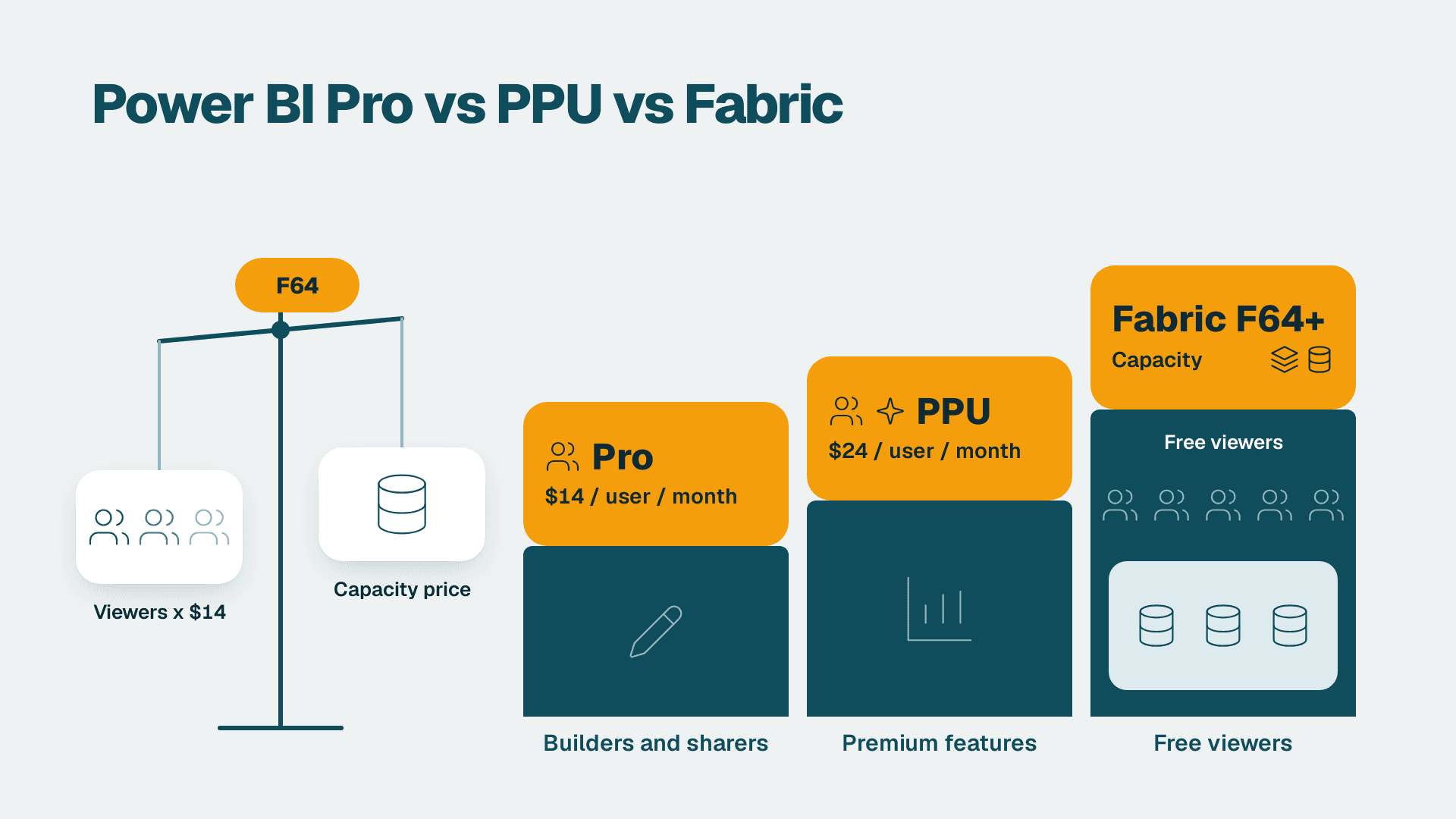
If you already run a Microsoft stack, note one licensing fact before planning Copilot features in reporting. Copilot in Power BI and Fabric needs a paid Fabric capacity of F2 or higher, or Power BI Premium P1 or higher. A Pro licence ($14 per user per month) or Premium Per User licence ($24 per user per month) alone is not enough, and trial capacities are excluded.
What does ai for automation need to work without in-house hires?
An SMB needs four things to run AI automation without hiring in-house: a clear business owner, reasonably clean data, a small set of managed tools and an outside partner for build and upkeep. None of these requires a data scientist on payroll.
The common mistake is assuming the hard part is the model. In practice the model is rented. The hard parts are the surrounding work: connecting systems, defining what a correct output looks like, handling exceptions and monitoring drift after launch.
| Capability | Who usually does it | In-house hire needed? |
|---|---|---|
| Model and infrastructure | Cloud or SaaS vendor | No |
| Workflow design and integration | Partner or a trained power user | Rarely |
| Business rules and acceptance criteria | Process owner in your team | No, but time is needed |
| Data cleanup and access | Your admin with partner guidance | Sometimes a part-time role |
| Monitoring and tuning after launch | Partner on a retainer, or a named internal owner | No |
What you cannot outsource is accountability. Every automation needs a named owner on your side who can say whether the output is right. That person reviews the exception queue, approves changes and decides when to switch a step from suggested to automatic.
The same logic applies to knowledge-heavy workflows. Using RAG, an assistant can answer staff questions from your own policies and procedures without you training anything, so a handbook, a pricing sheet or a supplier contract library becomes searchable by plain question. The quality of those source documents sets the quality of the answers, so tidy them first.
How do you take your first AI and automation workflow to production?
You take a first workflow to production by moving through four stages: prove it on real samples, run it beside the manual process, switch to supervised live use, then release it with monitoring. Each stage has an exit test, and you only advance when it passes.
Stage 1: Prove it on real samples
Gather a representative set of past inputs, including the ugly ones. Run them through the workflow and compare against what your team actually did. Agree in advance what accuracy is good enough, expressed in your own terms such as the share of invoices that need no correction.
Stage 2: Run it in parallel
Let the automation produce outputs while people continue the manual process. Compare the two daily. This is where hidden rules surface, such as the customer who always gets a different payment term, and where you catch them before they cost money.
Stage 3: Supervised live use
Switch the workflow on, but keep a person approving each output or each exception. Log every decision. Reviewers should be able to see why the system proposed what it did. This is also the stage where you confirm access controls and data handling meet your obligations under GDPR, PIPEDA or your customers' SOC 2 requirements.
Stage 4: Release and monitor
Move high-confidence cases to automatic handling and keep low-confidence ones in the review queue. Set a review cadence, track error rates and watch for drift when suppliers, products or pricing change. Our piece on the AI audit process in eight steps is a useful template for periodic checks once a workflow is live.
| Stage | Exit test | Typical owner |
|---|---|---|
| Prove on samples | Meets agreed accuracy on real past inputs | Process owner with partner |
| Run in parallel | Outputs match manual work, differences explained | Process owner |
| Supervised live | Reviewers accept most outputs, exceptions are logged | Team lead |
| Release and monitor | Error rate stable for an agreed period | Named owner plus partner |
How do you make money with AI automation, and what jobs does it create?
For a business, the return comes from time reclaimed, fewer errors, faster cycle times and capacity to grow without proportional headcount. For individuals, money comes from building and maintaining automations for others, or from moving into roles that supervise them. Both depend on the same skill: understanding a process well enough to define what correct looks like.
When readers ask what jobs they can get with AI automation, the honest answer is that most of the demand is for hybrid roles rather than pure engineers:
- Process owners and operations analysts who map workflows and define acceptance criteria.
- Automation builders who connect tools, write prompts and handle exceptions.
- Data stewards who keep source data clean and documented.
- Reviewers and controllers who approve outputs and maintain audit trails.
For an SMB, this means existing staff can grow into several of these roles with the right support, which is another reason to avoid a large upfront hire. Skills in finance, sales or operations combined with comfort around AI tools are worth more than deep model expertise.
What risks should you plan for before you automate?
The main risks are poor data, unclear ownership, over-trust in outputs and weak vendor controls. Each is manageable if you plan for it before the pilot rather than after an incident.
- Poor data quality. Models reproduce what they are given. Fix duplicates, missing fields and inconsistent naming first.
- Unclear ownership. A workflow nobody owns decays quietly. Name an owner and a backup.
- Over-trust. Keep humans in the loop for anything with financial, legal or customer impact until the error rate is proven.
- Vendor and privacy exposure. Check where data is processed and stored, whether it is used for training, and what contractual protections you have. Our AI vendor due diligence checklist for small business walks through the questions to ask.
- No audit trail. If you cannot show who or what changed a record, you cannot defend it. Microsoft Purview Audit (Standard) keeps audit logs for 180 days, so export anything you need to retain longer.
Geography shapes the compliance details but not the approach. A business serving EU or UK customers should map personal data flows for GDPR, a Canadian organisation should confirm PIPEDA consent and cross-border transfer terms, and a US company selling to larger buyers should expect SOC 2 questions in procurement. In all three cases, the same habits help: minimise the data sent to a model, log decisions and keep a human accountable.
---
About Lets Viz: Lets Viz has delivered analytics, AI and automation work since 2020 for clients including US healthcare organisations, UK fintech firms, Canadian manufacturers and global SaaS companies, and holds a 5.0 Clutch rating. Our team designs, builds and supports automation that small and mid-sized businesses can run without building an in-house AI department.
If you want help choosing and delivering your first workflow, see our AI automation consulting service.
Sources
- What Is AI Automation? (Salesforce)
- AI Automation | Microsoft Copilot
- What is AI automation? (AWS)
- What Is AI Automation? Enhancing Business Efficiency (Oracle)
Facts and prices checked October 2026.