Power BI Embedded: Share Reports With Clients Without Licences
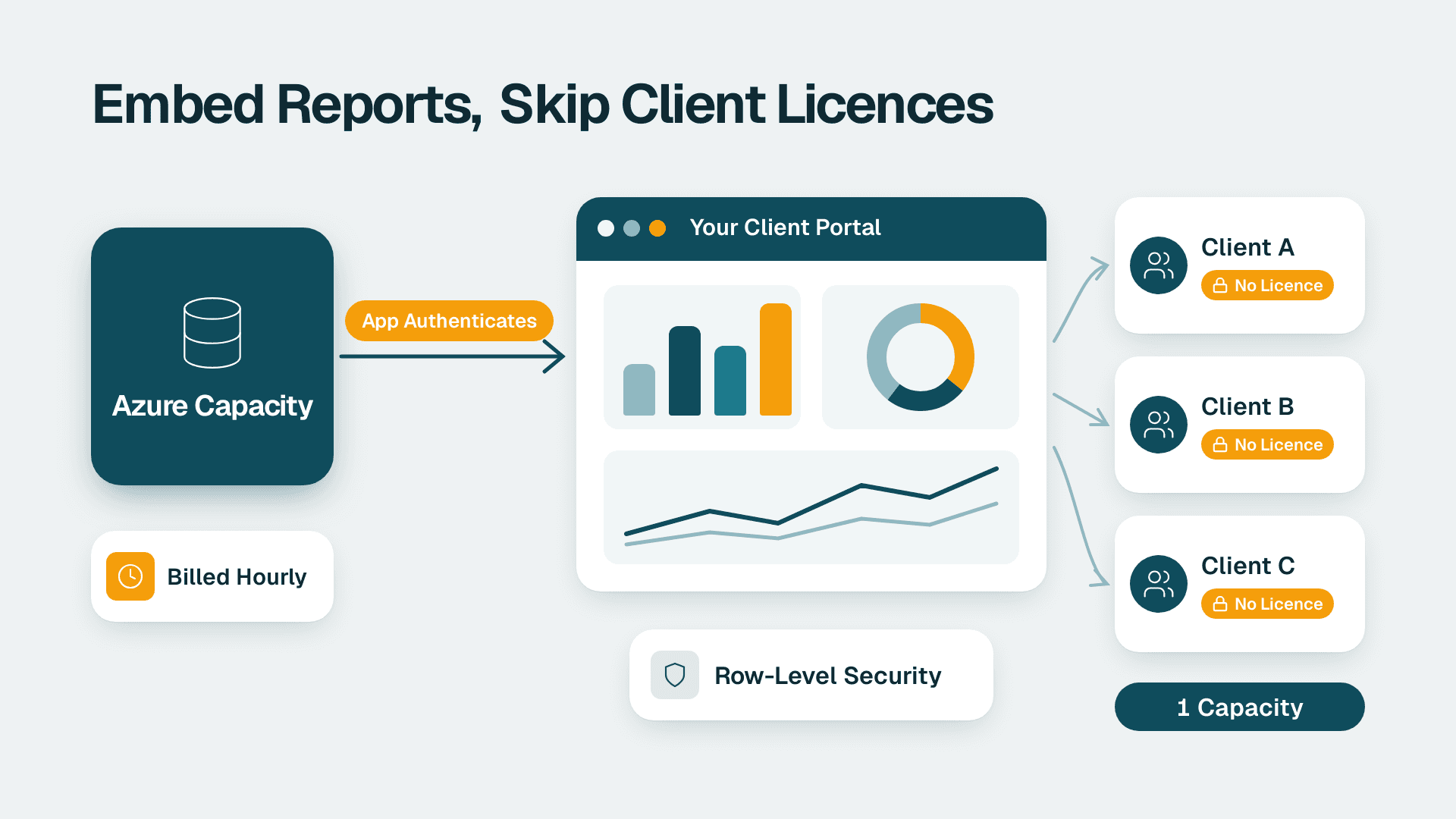
Power BI Embedded lets you show reports to customers or clients inside your own portal or app without buying each of them a Power BI licence. You pay for a dedicated Azure capacity instead, billed by the hour, and your application authenticates on behalf of every viewer. It fits external audiences; internal staff usually need standard licences.
Key Takeaways
- Power BI Embedded removes per-viewer licensing for external audiences by moving the cost to a capacity you rent from Azure.
- The model is called "embed for your customers" (app owns data), and your application handles identity and row-level access.
- Cost is driven by node size and hours running, not by the number of clients, so it rewards steady and growing usage.
- It is the wrong tool for internal staff, who are better served by Pro, Premium Per User or a larger capacity.
- Security design, especially row-level security and tenant isolation, matters more than the embedding code itself.
What is Power BI Embedded and how does it work?
Power BI Embedded is an Azure service that lets an application display Power BI reports and dashboards to people who do not have Power BI licences. Your app signs in to Power BI as itself, requests an embed token, and renders the report in a page, so the viewer never sees a Power BI login.
Microsoft describes two embedding solutions in its embedded analytics documentation: embed for your customers (also known as app owns data) and embed for your organization (also known as user owns data). Power BI Embedded, the Azure offer built on A SKUs, is associated with the first of these. In that model, app users do not need a licence, and the app authenticates with a service principal or a master user.
The practical effect is a change in who pays and who authenticates. In a standard Power BI rollout, every person who opens a report holds a licence tied to their Microsoft Entra ID identity. In an embedded rollout, one technical identity belonging to your application holds the access, and a capacity you have purchased provides the compute.
If you are still getting oriented on the basics of the platform, the plain-English guide for business buyers covers what Power BI is before you consider embedding it. Teams that want a second opinion on architecture before committing to capacity usually bring in Power BI consulting support at this stage, because early choices about workspaces and identity are costly to reverse.
Who actually needs it?
The typical buyers are software companies adding analytics to a product, and service businesses that want to give clients a branded reporting portal. A US SaaS finance team might want customers to see their own usage and billing dashboards inside the product. A UK fintech might offer portfolio reporting to institutional clients. A Canadian manufacturer might give distributors a live view of orders and stock. In each case the audience is outside the company, large or changing, and unwilling to be managed as Power BI users.
How do you share Power BI reports with clients without licences?
There are several ways to share Power BI reports with clients, and only some avoid per-person licences. The right choice depends on whether the data is private, how many people view it, and whether you have developers available.
| Method | Viewer needs a licence? | Best for | Main limitation |
|---|---|---|---|
| **Power BI Embedded** (app owns data) | No | Client portals, SaaS products, many external viewers | Needs developers and a purchased capacity |
| **Secure embed** (iFrame or URL) | Yes, proper Power BI licence | Internal portals and intranets | Viewer can interact but not edit or save |
| **Publish to web** | No | Genuinely public data only | Anyone with the link can see it |
| **Guest access via Entra ID** | Yes, licensing still applies | A handful of named partners | Licensing and admin effort grow with every guest |
| **Exported PDFs or scheduled emails** | No | Monthly static packs | Not interactive, goes stale |
Secure embed, per Microsoft's documentation, is a no-code way to embed a report into any portal that accepts a URL or iFrame. The catch is that the viewer must hold the proper Power BI licence, so it does not solve the external-client problem. Publish to web removes the licence requirement, but it makes the report public, which rules it out for anything commercially sensitive or regulated.
That leaves Power BI Embedded as the main route when the audience is external, the data is private and the audience is large enough that licensing each person would be impractical. The question to ask is not "can we share it" but "who authenticates, and who pays for the compute."
What about guest access?
Inviting clients as guest users works for a small number of named partners, but licensing still applies to those viewers, and every added guest means more identity administration. Many teams start here, then move to embedding once the client list grows past what anyone wants to manage by hand.
What is the difference between embed for your customers and embed for your organization?
Embed for your customers serves external users through your app with no viewer licences, while embed for your organization serves employees who each hold a Power BI licence and sign in through Microsoft Entra ID. Choosing the wrong one is the most common and most expensive mistake in this area.
| Factor | Embed for your customers | Embed for your organization |
|---|---|---|
| Also called | App owns data | User owns data |
| Audience | External clients and customers | Internal employees |
| Viewer licence | Not required | Each user needs a Power BI licence |
| Authentication | Service principal or master user | Microsoft Entra ID, per user |
| Capacity | Purchased capacity required for production | Premium through Office (EM1-EM3, P1-P3) per Microsoft's pricing page |
| R and Python visuals | Not supported | Supported (region restrictions still apply) |
Two details in this table surprise people. First, R and Python visuals are not supported when you embed for customers, so any report that leans on them needs redesigning before it goes in a client portal. Second, using SaaS embedding for internal applications calls for Power BI Premium through Office rather than the Azure A SKUs, so the product you buy depends on the audience, not just the technology.
For internal audiences, the standard licence decision applies. The article on Pro, PPU and Fabric licence choices sets out how those options compare, and that comparison is usually a better fit than Embedded when your viewers are employees.
How much is Power BI Embedded?
The cost of Power BI Embedded depends on the node type you choose and the number of nodes you deploy, not on how many clients view your reports. Nodes differ by number of V-cores and RAM, and the Azure pricing page lists the current rate for each size in your region and currency.
This article does not quote node prices because they vary by region and change over time. Check the Azure pricing page for Power BI Embedded for the figures that apply to you. What is stable is how billing works:
- Power BI Embedded bills at an hourly rate based on the type of node deployed.
- Usage is computed to the second and billed hourly, so an instance that exists for 12 hours and 15 minutes shows 12.25 hours on the bill.
- An instance active for only 6 minutes shows usage of 0.1 hour.
- When the service is paused, embedded content will not load, and the service is not charged.
- You can change the node type you have deployed as needed.
Those rules create real levers. A reporting portal used only during business hours can be paused overnight, and a node can be scaled up before month-end close and back down afterwards. Both are worth scripting. The Power BI Embedded Azure Resource Manager REST API lets you create, retrieve, update and delete Power BI dedicated capacities, which is what makes scheduled pausing and resizing possible without anyone logging into the portal.
The danger is pausing at the wrong moment. Because embedded content will not load while the capacity is paused, a client opening the portal at 06:00 in London while your capacity is paused for the night will see a broken page. Time zones matter for any team serving clients across the US, UK/EU and Canada, so any pause schedule should be tested against the earliest and latest realistic usage windows.
What else adds to the bill?
Capacity is not the only cost. Users who publish BI content into a Power BI Embedded node need to be licensed with Power BI Pro, which Microsoft lists at $14 per user per month (list price since 1 April 2025). Those are your authors and developers, not your viewers. Users who view content published through Power BI Embedded do not need Power BI licences assigned to them.
Beyond that, budget for development time to build the embedding layer, identity setup, security design and ongoing support. For most mid-market teams, the people cost of the first build outweighs a month of capacity charges, which is worth knowing before anyone compares Embedded against a licence-per-client approach on price alone.
A simple way to frame it: licensing each client scales with headcount on the client side, which you do not control. Capacity scales with usage and report complexity, which you do. That shift from an uncontrollable cost to a controllable one is the real financial argument for Embedded.
When is Power BI Embedded the right model?
Power BI Embedded is the right model when your audience is external, private, larger than a handful of people, and unlikely to ever hold Power BI licences. If any of those four conditions fails, a simpler option is usually cheaper and quicker.
Use this as a quick test:
1. Is the audience outside your company? If your viewers are employees, use standard licensing or a larger capacity, not Embedded.
2. Is the data private? If it is public, publish to web may be enough, though that choice is permanent in effect while the link is live.
3. Is the audience big or changing? With five named partners, guest access may cost less effort. With hundreds of clients, managing individual licences stops being practical.
4. Do you have developer capacity? Embedding needs someone who can handle authentication, tokens and front-end integration, or a partner who can.
5. Do clients need a branded experience? If reports must live inside your own product or portal, Embedded is built for that.
When is it the wrong choice?
Embedded is a poor fit when the reports are for finance, operations or leadership colleagues, when the team has no development resource, or when usage is so light that a handful of static PDFs would do the job. It is also a poor fit when reports rely heavily on R or Python visuals, since those are not supported when you embed for customers.
A useful warning sign is a project that begins with "we want clients to see our dashboards" and has no answer to "inside what?". Embedding needs a host: a portal, an app or a web page. If no such host exists, building one is a bigger project than the reporting itself.
What about reports that clients should explore on their own?
Embedded supports interactive filtering and cross-highlighting, so clients can explore within the boundaries you set. Where clients want to build their own reports from your data, think carefully: the embed-for-customers model is primarily about consuming content you have authored, and self-service authoring by external parties raises governance questions you should resolve first.
How do you embed a Power BI report into a website?
To embed a Power BI report into a website for external viewers, you register an application identity, give it access to a workspace, host the report on a purchased capacity, and have your server generate embed tokens for each session. The browser then renders the report with Microsoft's client library.
The parameters you will need are the domain, tenant ID, client ID, client secret, workspace ID and report ID. In outline, the work runs like this:
1. Prepare the content. Build and test the report in a workspace. Clean data upstream first; the guide to cleaning data with Power Query before modeling is worth reading, because messy source data becomes very visible once clients are looking at it.
2. Choose the authentication identity. Use a service principal for production. A master user is simpler to set up but is a weaker design for anything customer-facing.
3. Buy capacity. To purchase Power BI Embedded on the Azure website, an organization needs to create a free Azure account, then select and purchase the capacity in the Azure Portal. It can also be bought through a Microsoft representative or an Azure partner.
4. Assign the workspace to the capacity. Reports not on a purchased capacity cannot be served to production viewers.
5. Generate embed tokens server-side. Never expose the client secret in browser code.
6. Apply row-level security. Pass the viewer's identity or tenant into the token request so each client sees only their own rows.
7. Test with realistic load and real client accounts before launch.
For development, you can use free embed trial tokens with a Pro licence. Production embedding, though, requires a purchased capacity, and until then a "Free trial version" banner appears at the top of the embedded report. Plan the purchase before a client demo, not after it.
How do you keep one client from seeing another client's data?
You keep client data separate with row-level security, workspace separation, or both, and you decide which before building anything. This is the design decision with the most serious consequences if you get it wrong.
There are two broad patterns. In the first, all clients share one dataset and a report, and row-level security filters rows by the viewer's identity passed in the embed token. This is efficient to maintain, since one change reaches every client, but a mistake in the security rules can expose data across clients. In the second, each client gets a separate workspace or dataset. This isolates data more strongly and is easier to explain to a client's auditor, but it multiplies the maintenance and deployment effort.
Compliance expectations differ by market, and they should shape this decision early:
- US healthcare and finance: A US healthcare analytics provider handling protected health information should treat HIPAA as a design constraint, and a SaaS finance team selling to enterprise buyers will usually be asked about SOC 2 controls. Healthcare teams weighing hosting models may also want the comparison of Report Server and the Power BI service for healthcare.
- UK and EU: A UK fintech serving EU clients has to consider GDPR, including where data is processed and how access is logged and removed.
- Canada: A Canadian manufacturer sharing supplier or customer data needs to consider PIPEDA and any provincial rules that apply.
Audit logging deserves attention too. Microsoft Purview Audit (Standard) keeps audit logs for 180 days, which may be shorter than a client contract or regulator expects. If your obligations run longer, plan to export logs somewhere you control.
These are hypothetical illustrations, not legal advice. Your own counsel and your clients' security questionnaires will define the real requirements.
Is Power BI outdated, and is it still worth embedding?
Power BI is not outdated; Microsoft continues to develop it, and embedded analytics remains a documented, supported path with a live REST API and current pricing. The better question is whether embedded analytics suits your product or portal, not whether the tool is current.
Two cautions apply. Features change quickly, so check that anything you rely on is supported in the embed-for-customers model, as the R and Python visual limitation shows. And embedding ties your client experience to Microsoft's roadmap, so keep your data model and business logic in a form you could move if you ever had to. Good modelling practice protects you either way.
If Copilot features are part of the appeal, note that Copilot in Power BI and Fabric needs a paid Fabric capacity F2 or higher, or Power BI Premium P1 or higher. A Pro or PPU licence alone is not enough, and trial capacities are excluded. Do not assume it will be available to your clients simply because you embed reports; confirm the current position with Microsoft before promising it.
What should you do before committing to Power BI Embedded?
Before committing, run a short proof of concept with one report, one client identity, and one real security rule, and measure what it takes. The goal is to learn about effort and risk, not to prove the technology works, because it does.
A sensible sequence for a mid-market team:
1. Confirm the audience is external, private and large enough to justify capacity.
2. Decide between shared dataset with row-level security and separate workspaces per client.
3. Price the capacity from the Azure page, then add developer time and Pro licences for authors.
4. Agree who owns the portal, the capacity schedule and the support process once it is live.
5. Write down what happens when capacity is paused, resized or fails, since clients will see it.
Teams that skip step 5 usually discover it during a client call. A short written runbook, with one named owner for capacity and another for report content, prevents most of the avoidable failures. If you want to measure where your reporting stands before taking on external users, the free BI readiness self-assessment is a quick starting point.
Power BI Embedded is a good answer to a specific problem: many external viewers, private data, and a wish to avoid licensing each person. When that describes your situation, it is often the most economical and controllable route. When it does not, a simpler option will serve you better.
Power BI consulting can help you decide whether Embedded fits and design the security model before you build.
---
About Lets Viz: Lets Viz is a data analytics consultancy that has delivered Power BI and wider analytics work since 2020 for clients across US healthcare, UK fintech, Canadian manufacturing and global SaaS. Our work is reviewed by practitioners who build and support production dashboards, and we hold a 5.0 Clutch rating.
Sources
- Power BI embedded analytics (Microsoft Learn)
- Power BI Embedded pricing (Microsoft Azure)
- Power BI Embedded REST API (Microsoft Learn)
Facts and prices checked November 2026.