Autonomous AI Agents: What Autonomy Really Means in Business
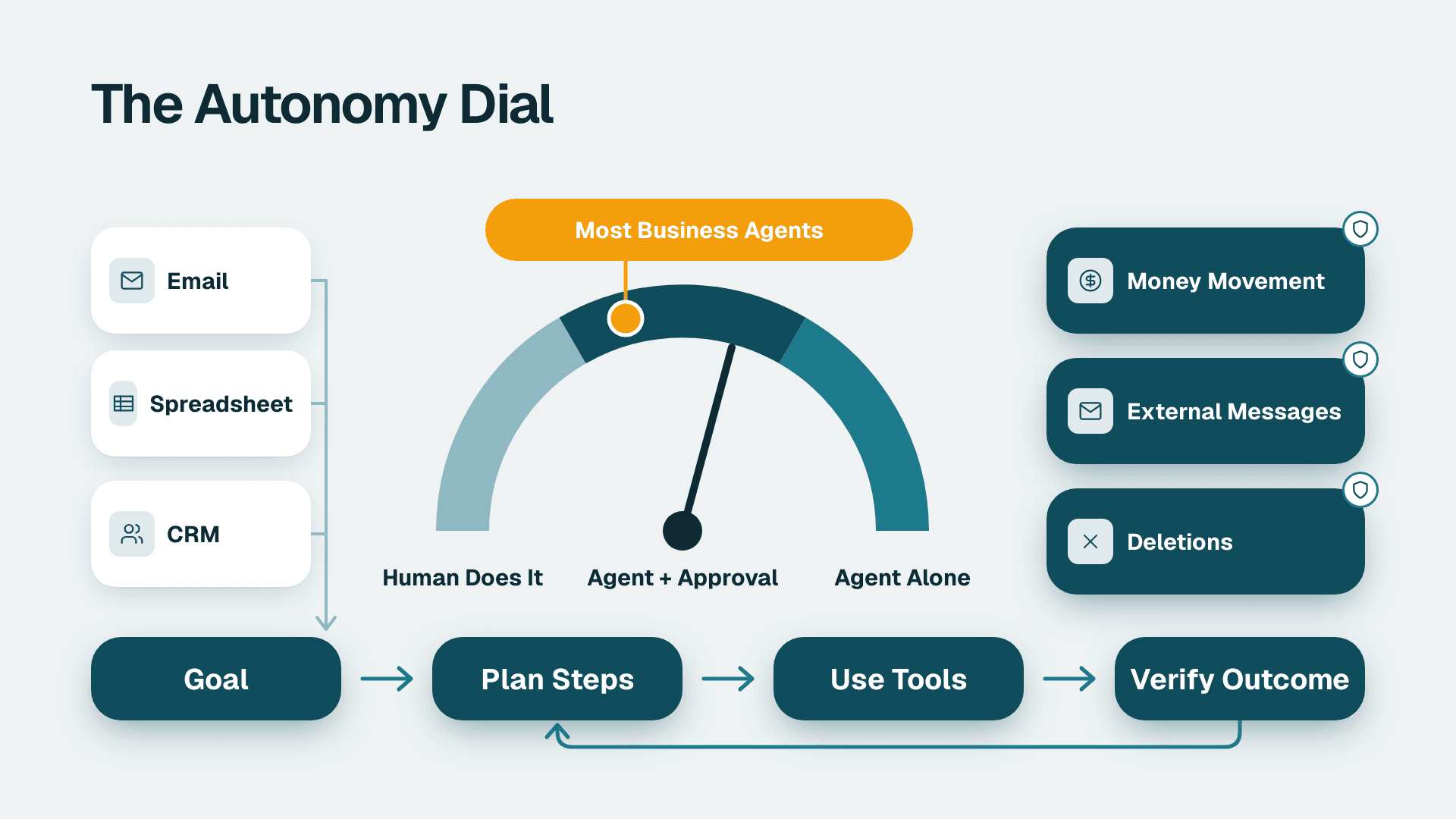
Autonomous AI agents are software systems that pursue a goal by choosing and carrying out multi-step actions on their own, using tools such as email, spreadsheets or a CRM. In business, autonomy is a dial, not a switch: the agent acts alone inside limits you set, and people keep approval over anything costly, external or hard to reverse.
Key Takeaways
- 'Autonomous' describes how much an agent decides on its own, not whether humans are absent. Most useful business agents sit in the middle of the dial.
- Keep a person in the loop for money movement, external messages, deletions and any judgment call with unclear rules.
- Agents report outputs, but you need to verify outcomes. A task marked done is not proof that the work happened.
- Core guardrails are least-privilege access, action limits, full logging, human approval gates and a kill switch.
- Start with low-risk, reversible workflows and widen autonomy only after the agent earns it in measured results.
What Are Autonomous AI Agents in Business Workflows?
Autonomous AI agents are software systems that take a goal, decide the steps and use business tools to complete them with little step-by-step instruction. The word describes how much a system decides on its own. One enterprise framework describes them as autonomous or semi-autonomous software systems built for business environments and powered by large language models, and the 'semi' in that definition is the part buyers tend to skip.
The contrast with tools most teams already run is useful. A rule-based automation does exactly what it was told: when a form arrives, copy the row into a sheet. A chatbot answers when asked. An agent sits one step further along. It watches for a trigger, reads context, chooses among several possible actions, acts, and then checks what happened. One practitioner definition frames agents as programs that respond to states and events in their environment independent from direct instruction by the user. Another describes the shift as reactive tools becoming proactive ones, the 'doers' rather than the 'responders'.
For an ops leader, the practical question is rarely whether to allow autonomy. It is how much, for which task, and inside which limits. That design work is the core of AI automation consulting, and it is easier when you begin from the fundamentals covered in our guide to AI automation for SMBs and how to start.
What does 'autonomous' not mean?
It does not mean unsupervised, unaccountable or infallible. An agent that books meetings without asking you is autonomous in a narrow sense. It is still your company's representative, and your company answers for what it does. The legal and reputational responsibility never transfers to the software.
It also does not mean general intelligence. Business agents are narrow. They are good at a defined job with defined tools, and they degrade quickly when asked to improvise outside that job.
How Autonomous Are Autonomous AI Agents Today?
Most business agents today operate at a middle level of autonomy: they act on their own for routine cases and hand exceptions to a person. Thinking in levels helps you decide where each workflow belongs, instead of arguing about the single word 'autonomous'.
| Level | What the agent does | What the human does | Typical example |
|---|---|---|---|
| 1. Suggest | Drafts or recommends | Decides and acts | A proposed reply to a customer email |
| 2. Act with approval | Prepares the action and waits | Approves each action | A draft invoice reminder held for review |
| 3. Act within limits | Acts alone inside set limits, escalates exceptions | Reviews exceptions and samples | Routing and tagging support tickets |
| 4. Act and report | Acts broadly and logs everything | Audits after the fact | Updating low-value records in bulk |
| 5. Self-directed | Sets its own sub-goals and picks its own tools | Little or none | Rarely appropriate for core business processes |
For small-to-mid-market companies, the sweet spot is levels 2 and 3. Level 2 captures most of the time savings because the agent does the slow part, gathering and drafting, while a person spends seconds approving. Level 3 suits tasks where mistakes are cheap and reversible.
Levels 4 and 5 deserve scepticism. They need mature monitoring, and most teams do not have it in the first year. A founder who sees a demo of a fully self-directed agent is seeing the best case on a curated task, not the average Tuesday inside a real finance or operations stack.
Note also that autonomy is set per task, not per agent. The same agent can act freely when tagging a support ticket and still need approval when issuing a refund. Good designs make that distinction explicit in configuration rather than leaving it to the model's judgment.
Where Is Human-in-the-Loop Still Needed?
A person should stay in the loop wherever an error is expensive, public or irreversible, and wherever the rules are unclear. Agents are strong on volume and consistency. They are weaker on judgment, context outside their data, and knowing when they are wrong.
Which decisions should always have an approval gate?
Four categories earn a human checkpoint almost everywhere:
- Money movement: payments, refunds, credits, discounts and pricing changes.
- External communication: anything sent to a customer, partner or the public under your name.
- Destructive or hard-to-reverse actions: deleting records, merging accounts, closing tickets permanently.
- Ambiguous judgment: exceptions, disputes, complaints and anything where the policy does not clearly say what to do.
Jurisdiction adds another reason. A UK or EU services firm that lets an agent make decisions about individuals should check how GDPR treats solely automated decisions with significant effects, and keep a human review step where it applies. A Canadian manufacturer remains accountable under PIPEDA for personal information an agent handles on its behalf. A US healthcare or finance team will face HIPAA or SOC 2 expectations on access control and audit trails. This article focuses on non-regulated workflows, but the same checkpoint design carries over when regulated data enters the picture.
What does a working human-in-the-loop design look like?
Our own content engine is a plain example. It drafts five SEO articles a night on cron, covering research, writing, images and internal links, and holds every one as a draft for human review. Nothing auto-publishes. The agent does the heavy lifting; a person owns the decision to go live.
The second lesson is why the review matters. Our interlinking agent claimed it had found anchor text in our articles. A spot-check showed only 3 of 30 anchors actually existed in the text, so the AI was hallucinating roughly 90% of them. We rebuilt it to verify every anchor against the real article before patching anything. The fix was not a better prompt alone. It was a verification step that does not trust the model's own claims.
Build your gates the same way. Put the approval where the damage would occur, and make the approver's job easy: show the proposed action, the evidence behind it and a one-click approve or reject.
Why Must Autonomous Agents Verify Outcomes, Not Outputs?
Because an agent can report success without anything having changed. An output is what the agent says it did. An outcome is the measurable change in the real system, and only the outcome matters to your business.
Our own automation once fooled us in exactly this way. 26+ auto-generated site-performance fix tasks sat marked resolved while Google's Core Web Vitals report stayed flat at 405 flagged URLs. Resolved only meant a human had read the recommendation, not that code shipped. The status field measured activity, not results.
The lesson applies to every workflow you hand to an agent:
- Define done as an observable change. 'Invoice reminder sent' is an output. 'Invoice paid or replied to within the agreed window' is an outcome.
- Check against a source the agent does not control. Read the ledger, the CRM or the analytics report directly, not the agent's summary of them.
- Sample regularly. Pull a handful of completed items each week and trace them end to end.
- Alert on flat lines. If the agent reports ten fixes and the metric does not move, treat that as a defect, not a delay.
This is also where your reporting stack earns its keep. If a metric is the proof of outcome, a dashboard that shows it plainly makes verification routine. Our guide to building a KPI dashboard leadership actually uses covers how to make those checks visible.
What Guardrails Should You Set Before Going Live?
Set five guardrails before an agent touches production: scoped permissions, action limits, complete logging, approval gates and a kill switch. Together they make mistakes small, visible and reversible.
| Guardrail | What it controls | Practical setting |
|---|---|---|
| Least-privilege access | What the agent can read and change | Read-only first; write access only to named objects |
| Action limits | How much damage one run can do | Caps on records edited, messages sent or amounts touched per run |
| Logging and audit trail | Whether you can reconstruct what happened | Every prompt, tool call and result stored with a timestamp |
| Approval gates | Which actions need a person | Required for money, external messages and deletions |
| Kill switch | How fast you can stop it | One documented step that pauses the agent and its triggers |
How should you scope access and data?
Give the agent its own service account, never a shared human login, and grant the narrowest rights that let it do the job. Start read-only. Add write access one object at a time after the read-only phase has shown the agent behaves.
Data exposure is the same question in a different form. Teams often ask whether a large language model can connect to a Power BI semantic model safely. The answer depends on configuration: limit it to a governed, read-only model, respect row-level security so the agent sees only what the asking user may see, and keep sensitive columns out of scope. Per Microsoft's documentation (2026), Copilot in Power BI and Fabric needs a paid Fabric capacity F2 or higher, or Power BI Premium P1 or higher; a Pro or PPU licence alone is not enough, and trial capacities are excluded. If you are weighing licences, our comparison of Power BI Pro, PPU and Fabric sets out the differences.
For GDPR and PIPEDA, document what personal data the agent can reach, why, and where it is processed. Minimising what the agent can see is the cheapest compliance control you have.
How should you log and monitor agent behaviour?
Log enough to answer 'what did it do, why, and with what data' weeks later. Store the instruction, the tools called, the inputs, the outputs and the approver where one was involved. If your agents act inside Microsoft 365, note that Microsoft Purview Audit (Standard) keeps audit logs for 180 days per Microsoft's documentation, so export anything you need for longer retention.
Monitoring should watch behaviour, not only errors. Sudden spikes in volume, repeated retries, unusual hours and rising escalation rates are early warnings. An agent that quietly loops can burn through a budget or flood a customer's inbox long before anyone files a ticket.
What are sensible action limits and escalation rules?
Cap the blast radius of a single run. Examples: no more than a set number of records edited per run, no outbound email above a daily limit, no financial action above a stated threshold without approval. A US SaaS finance team might let an agent send first-touch reminders on overdue invoices below a modest threshold while routing disputes and large balances to a person. That is a hypothetical, but the pattern is general: low value and reversible goes to the agent, high value or contested goes to a human.
Write escalation rules in plain language the agent can follow and a manager can read. When the agent is unsure, the default must be to stop and ask, not to guess.
What should the kill switch look like?
It should be one step, documented, and tested. Decide who can pause the agent, how its triggers are disabled and how in-flight work is handled. Rehearse it once before launch. If you route agent actions through workflow tools, such as flows that fire from a dashboard alert, make sure the pause covers the trigger as well as the agent itself. Our explainer on Power Automate, what it does and where its limits are is a useful companion when you wire those triggers.
Which Workflows Suit Autonomous AI Agents First?
The best first workflows are high-volume, rule-bound, low-stakes and easy to reverse. They let you learn how the agent behaves while the cost of an error stays small.
Good candidates include triaging and tagging inbound requests, drafting first replies for review, reconciling records against a clear rule, summarising meetings into tasks and preparing weekly reports from a governed data source. A UK fintech's operations team, for instance, might start with ticket triage and draft replies, because a wrong tag is trivial to fix, whereas a wrong payment is not.
Poor first candidates include anything involving contract terms, pricing exceptions, hiring decisions or customer disputes. These depend on judgment and context the agent does not hold.
A related question comes up often: should people ask an agent questions in natural language, or keep traditional dashboards? Use natural language for ad hoc, exploratory questions and for people who will never learn a BI tool. Keep dashboards for the numbers everyone must see the same way every time. The two complement each other, and the dashboard is often the verification layer for the agent's work.
For concrete departmental ideas, see our rundown of high-ROI AI agent use cases by department and the collection of AI workflow automation examples for business. For a sense of how broad the field has become, a community-maintained catalog of agent projects shows the range, from coding helpers to research assistants, though a project listed there is not a production-ready business tool by default.
How Do You Roll Out an Autonomous Agent Step by Step?
Roll out in stages, widening autonomy only when measured results justify it. A staged path keeps risk low and gives you evidence for the next decision.
1. Pick one workflow. Choose a narrow, reversible task with a clear owner and a measurable outcome.
2. Write the policy in plain language. State what the agent may do, what it may not, and when it must escalate.
3. Run at level 1. The agent suggests; people act. Compare its suggestions with what a person would have done.
4. Move to level 2. The agent prepares actions and waits for approval. Track approval rate and the reasons for rejections.
5. Move to level 3 for the safe subset. Let the agent act alone on the cases where approvals were almost always granted, with action limits in place.
6. Verify outcomes weekly. Check results against the system of record, not the agent's report.
7. Review and widen, or roll back. Expand scope only when outcome metrics hold. If they slip, step back a level.
Before step 1, check that your data is fit for purpose, because an agent amplifies whatever it reads. Our AI readiness test and the guide to running an ERP data quality check before AI implementation cover the groundwork.
A Canadian manufacturing company running this sequence on, say, supplier-email triage would spend its first weeks at level 1, learn where the agent misreads part numbers, fix the data or the instructions, and only then let it route messages unaided. The slow start is what makes the later autonomy safe.
What mistakes do teams make most often?
The common ones are granting broad write access on day one, measuring activity instead of outcomes, skipping logs and launching without a kill switch. A fifth is treating the agent's confidence as evidence. Language models sound equally sure when they are right and when they are wrong, which is why verification has to sit outside the model.
---
About Lets Viz: Lets Viz is a data analytics and automation consultancy that has helped teams build reliable reporting and AI workflows since 2020, serving US healthcare, UK fintech, Canadian manufacturing and global SaaS organisations. We hold a 5.0 Clutch rating and run our own content engine on the same human-in-the-loop principles described here.
If you want a practical review of which workflows can safely move up the autonomy dial in your business, explore AI automation consulting.
Sources
- Autonomous Enterprise AI Agents: Definition and Framework
- Autonomous Agents And How To Use Them
- Autonomous Agents: The Next Frontier of Productivity
- Awesome AI Agents catalog
Facts and prices checked November 2026.