Zoho Recruit: In-House ATS or Agency CRM, and the People Handoff
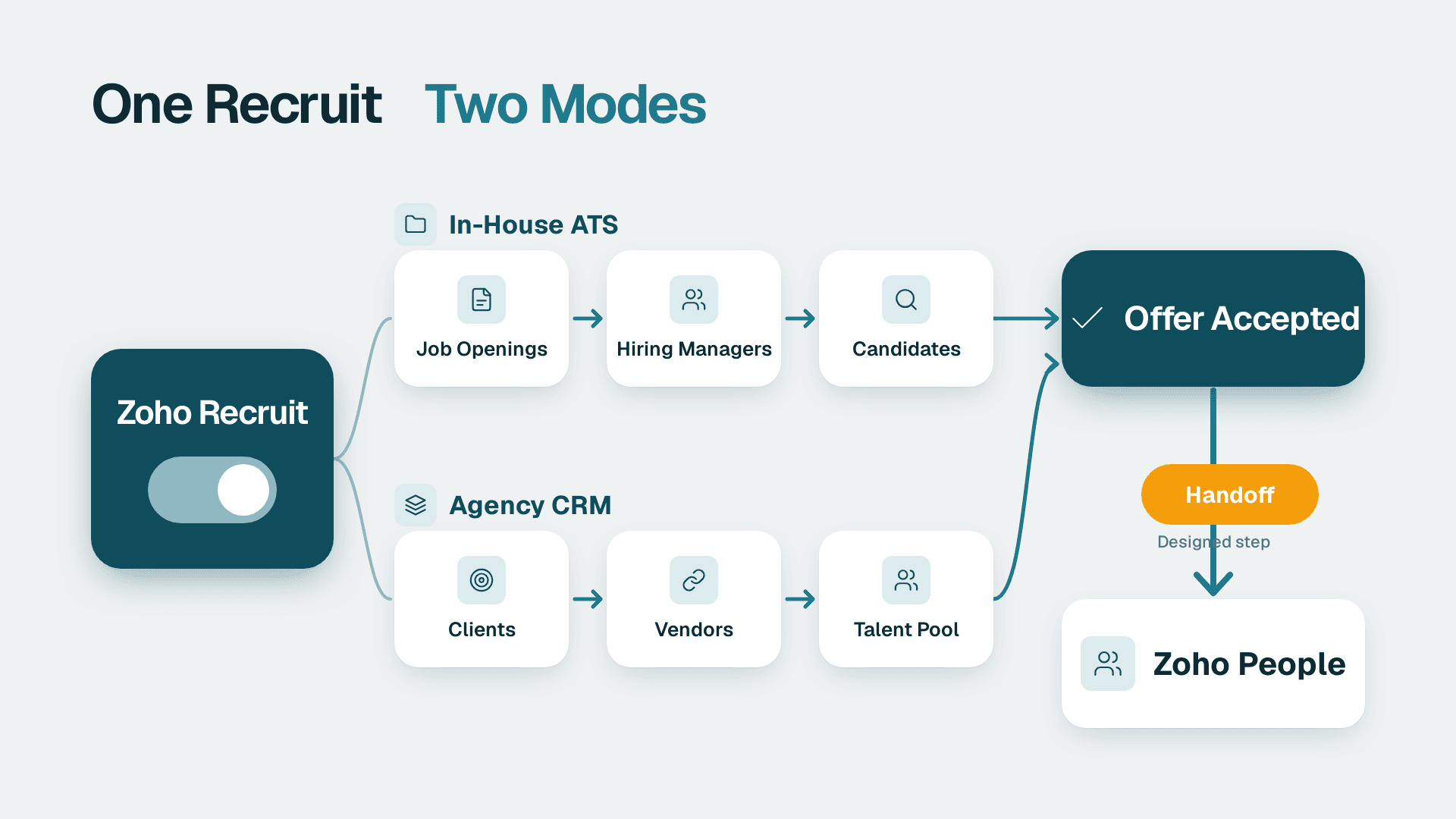
Zoho Recruit works as both. It combines an applicant tracking system (ATS) for corporate hiring teams with a candidate CRM for staffing agencies, and you choose the mode by how you configure it. It does not hire for you after the offer: moving a new hire into Zoho People is a step you design deliberately.
Key Takeaways
- Zoho Recruit bundles an ATS and a recruitment CRM, so the same product serves in-house teams and agencies.
- In-house teams centre on job openings and hiring managers; agencies centre on clients, vendors and a reusable talent pool.
- The handoff to Zoho People is a designed step, not an automatic one: decide the trigger, the fields and the owner before go-live.
- Pricing is per user and Zoho lists a 15-day free trial, so test your real hiring flow before committing.
- Candidate records are personal data, so retention and consent rules (GDPR, PIPEDA, US state laws) belong in the setup.
What is Zoho Recruit used for?
Zoho Recruit is a cloud-based hiring platform that gives HR teams and recruitment agencies digital tools to fill roles quickly, with no on-premise software or data storage required, according to Zoho's Recruit product page (2026). In practice it covers the full path from posting a job to extending an offer.
For a small business running the wider Zoho suite, that means one more module that shares a vendor, a login and a data model with the tools you already use. If you are still deciding how much of the suite to adopt, the pillar guide What Is Zoho One and Is It Worth It for Small Business? lays out the trade-offs. If you want help scoping the hiring module alongside CRM, Creator, Books and Desk, our Zoho consulting services cover that kind of rollout planning.
The core capabilities
Zoho describes the product as having two halves. The ATS side is aimed at faster sourcing and a better hiring process through automated workflows. The recruitment CRM side offers tools to nurture passive job seekers and build relationships with candidates over time.
Beyond that, the vendor lists these building blocks:
- Multi-channel job posting: careers sites, 75+ free, paid and premium job boards, and social media, so a job is posted once and published in multiple places.
- Automation: Blueprints, Workflows and Custom Functions that can automate candidate communications, offer approvals and other hiring functions.
- Routine task handling: resume parsing, application updates, interview scheduling and offer letters as a candidate moves through the pipeline.
- Portals: dedicated spaces for hiring managers, clients, vendors and candidates to collaborate.
- AI assistance: Zoho's assistant, Zia, helps with job descriptions, emails, assessments, sourcing and shortlisting.
- Integrations: more than 200 applications are connected out of the box, covering video meetings, team chat, email marketing and assessment tools.
- Access: web browser on any internet-capable device, plus mobile apps for Android and iOS.
An independent review from TechnologyAdvice adds that all candidate applications land in one centralised talent pool, with candidates, clients and recruiting teams working on a common platform.
Is Zoho Recruit a legitimate tool?
Yes. It is a long-running product from an established software vendor, sold through the vendor's own site with a free trial. Zoho states that Recruit is used by over 800,000 'techruiters', which is a vendor claim rather than an audited figure, so treat it as a signal of scale and not proof of fit.
Legitimacy is not the same as suitability. The better questions are whether the workflow matches how you hire, whether your team will tolerate the interface, and whether the data flows into the rest of your stack cleanly. Independent reviewers note that, according to users, the interface can feel clunky and hard to navigate. That is worth testing during the trial with the people who will live in the tool every day, usually recruiters and coordinators, not the person who bought it.
Does Zoho Recruit work as an in-house ATS or a staffing agency CRM?
It works as either, because the platform includes both an ATS and a candidate relationship management layer. TechnologyAdvice describes it as an ATS and CRM in a single recruitment platform serving both in-house recruiters and staffing agencies. The difference is in which objects you put at the centre of your configuration.
| Dimension | In-house ATS setup | Staffing-agency CRM setup |
|---|---|---|
| Central object | Job opening for your own company | Client, job order and candidate pool |
| Main users | Recruiters, hiring managers, HR | Recruiters, account managers, vendors |
| Success measure | Time to hire, offer acceptance | Placements, fill rate per client |
| Portals used most | Hiring manager and candidate | Client, vendor and candidate |
| Candidate pool role | Silver medallists for future roles | Core asset reused across clients |
| Hand-off after hire | Employee record in an HR system | Placement record, billing and sometimes payroll |
| Typical risk | Over-customising simple hiring | Pipeline and client data split across tools |
Using it as an in-house ATS
An in-house team usually has a modest number of open roles, a handful of hiring managers and a need for consistency. The practical setup is short: define a standard pipeline, such as applied, screened, interview, offer and hired; build one Blueprint that enforces the stages; and automate the repetitive messages.
Suppose a 40-person US software company hires six people a year. It does not need a sprawling configuration. It needs one careers page, one pipeline, interview scheduling that does not depend on email chains, and an offer approval step so that compensation never goes out without sign-off. Zoho's workflow tooling is designed for exactly that kind of structured sequence.
The recruitment CRM side still earns its place for in-house teams. Passive candidates who were a near miss this quarter can be tagged and nurtured for the role that opens next quarter, instead of disappearing into an inbox.
Using it as a staffing-agency CRM
An agency has a different shape. Its revenue depends on matching a reusable pool of candidates to a changing list of client job orders. That makes the candidate database, the client relationship and the vendor relationship the core assets, which is where the CRM layer and the client and vendor portals matter most.
Consider a hypothetical UK agency placing contractors for several clients. Each client wants to see submitted profiles and give feedback without being given access to the whole database. Portals address that need. The agency's own risk is different from an in-house team's: keeping client, candidate and billing information consistent across systems. If the agency already runs Zoho CRM for sales, it should decide early whether client accounts live in one place or are mirrored, because duplicated client records are the most common source of messy reporting.
Which mode fits your business?
A useful test is to ask who the customer is. If the 'customer' is your own hiring manager, treat the product as an ATS. If the customer is an external client paying for placements, treat it as a CRM. Mixed cases exist, such as a firm that hires for itself and also runs a small recruiting practice. For those, keep the two pipelines clearly separated so reporting does not blend internal hires with billable placements.
How do hires hand off from Zoho Recruit to Zoho People?
The handoff works best as a deliberate, trigger-based step: when a candidate reaches the hired stage, their core details are used to create an employee record in Zoho People. Zoho Recruit and Zoho People both sit in the same suite, and the Zoho People overview, Zoho People: Leave, Attendance, Performance, Recruit, Payroll, covers the HR side of that relationship.
A caution on specifics: the vendor page used for this article does not document the exact field mapping between the two products, so confirm what your edition supports in the trial before you promise a fully automatic transfer to the business. Plan for three possible mechanisms and pick the simplest that works.
| Handoff method | How it works | Best for | Watch out for |
|---|---|---|---|
| Built-in suite connection | Use any native Recruit-to-People link available in your edition | Teams that want the least maintenance | Confirm which fields actually transfer |
| Workflow or Custom Function | A rule on the hired stage pushes data to People | Teams needing custom mapping | Someone must own and test the code |
| Zoho Flow | A flow listens for the status change and creates the record | Teams already automating across apps | Error handling when a field is missing |
For the third route, the article on Zoho Flow and how to automate work across Zoho and other apps explains the trigger-and-action model in more depth.
What to define before you automate
Most handoff failures are process failures, not technical ones. Settle these points on paper first:
1. The trigger. Is it the move to 'offer accepted' or to 'hired'? Choosing 'offer accepted' creates employee records for people who later withdraw.
2. The owner. Who confirms the start date, manager, department and location? A recruiter usually should not be the one entering payroll-relevant data.
3. The required fields. Legal name, start date, role, manager, employment type and work location are the usual minimum. Fields that are mandatory in People must be mandatory in Recruit's hired stage.
4. The duplicate rule. Decide how to treat rehires and internal transfers, so a returning employee does not get a second profile.
5. The paperwork. Offer letters and signed documents need a defined home, so they are not left behind in the hiring module.
Capturing onboarding data cleanly
The handoff is also the right moment to collect information the offer stage never needed, such as emergency contacts, tax and right-to-work details, and bank information for payroll. A structured form is safer than an email thread. The guide to building Zoho Forms that feed CRM and Creator shows the pattern, and the same logic applies to an onboarding form that feeds the employee record.
If your business needs something no standard module offers, such as a custom onboarding checklist with approvals from IT, finance and the line manager, a small no-code app can sit between the two systems. The explainer What Is Zoho Creator Used For? No-Code Apps Explained describes where that approach fits and where it adds needless complexity.
A staffing agency's different handoff
For an agency, 'hired' usually does not mean 'becomes my employee'. The candidate becomes a placement with a client. The record that matters may be an assignment with a start date, bill rate and end date, which feeds invoicing. Only if the agency employs the contractor directly does the handoff touch an HR or payroll system. Treat the agency handoff as a placement-to-billing flow first and a people-records flow second.
How much is Zoho Recruit per month?
Zoho licenses Recruit on per-user pricing plans and offers a 15-day free trial with no forced contracts and no credit card required. The product page does not list specific plan names or prices and refers readers to its pricing page, so this article does not quote a monthly figure. Check the live pricing page for your region, because currency, tax and available editions can differ between the US, UK/EU and Canada.
What matters more than the headline price is who needs a seat. Pricing by user means the count of recruiters, coordinators and anyone who edits records drives the bill. Hiring managers who only review candidates and leave feedback may be better served by the portal route than by a full licence. Confirm that distinction with Zoho during the trial, because it can change the total cost materially for a business with many occasional reviewers.
How to use the 15-day trial well
A two-week window is short, so run it against a real role, not a demo. A practical checklist:
- Post one live job to your careers page and one outside job board.
- Move at least three real candidates through the full pipeline.
- Build one Blueprint and one automated email.
- Invite one hiring manager and one client or vendor to a portal, if relevant.
- Test the hired-stage handoff with a dummy employee in Zoho People.
- Export a report and check that it answers the questions your leadership asks.
What are the limits and common complaints?
The main reported weakness is usability. TechnologyAdvice notes that, according to users, the interface is clunky and difficult to navigate. The practical response is to limit the number of custom fields, keep views simple and train users on a small set of saved filters, not to expose the entire configuration to everyone.
A second limitation is not about the software at all: automation amplifies whatever process you already have. Blueprints, workflow rules, assignment rules and custom schedulers will faithfully enforce a confusing pipeline. Fix the process on a whiteboard first.
Third, remember that the 75+ job board reach is a feature of what the platform can publish to, not a guarantee of candidate quality. Paid and premium boards carry their own costs and results, so measure which channels produce hires, not just applicants. A recruitment dashboard in Zoho's reporting tools, or in a BI tool fed by exports, can answer that.
Should you recruit Zoho Recruit into a wider Zoho suite rollout?
It depends on how much of the suite you already run. If your CRM, accounting and support desk sit in Zoho, adding Recruit keeps vendor management simple and avoids a separate login and data model for hiring. If your HR function is a single part-time person hiring twice a year, a lighter approach, such as a careers page and a shared spreadsheet, may serve you better until volume justifies a system.
For teams adding Recruit to an existing stack, sequence the work. Start with the pipeline and careers page, then the portals, then the People handoff, and only then the more elaborate automation. Bringing marketing in later is straightforward: if you want to nurture a talent pool with newsletters, see the walkthrough on running CRM-synced campaigns in Zoho Campaigns for how audience syncing is typically organised.
What data-protection rules apply to candidate records?
Candidate profiles are personal data, and an applicant tracking system is where a lot of it accumulates: CVs, contact details, interview notes and sometimes assessment results. The rules differ by market, so the configuration should not be identical everywhere.
- UK and EU: a UK or EU employer or agency should treat candidate data under GDPR, which includes having a lawful basis, being transparent about use and setting retention limits for unsuccessful applicants. A talent pool that keeps profiles 'just in case' needs a documented reason and a deletion schedule.
- Canada: a Canadian company handling applicant information should consider PIPEDA, which centres on meaningful consent and limiting use to the purposes disclosed.
- United States: requirements are more fragmented, with state-level privacy and employment rules, plus sector obligations. A US healthcare employer may need to think about HIPAA where candidate or employee health information is involved, and a US finance or SaaS firm may be asked about SOC 2 controls over where HR data lives and who can access it.
The practical steps are the same everywhere: limit who can see sensitive notes, set a retention period, log where data is exported, and make the handoff to the HR system a controlled transfer so records are not copied into spreadsheets. Before storing data for a market with strict residency expectations, ask Zoho for current documentation on data centre locations and compliance, instead of assuming.
How do you set up Zoho Recruit step by step?
A short, ordered plan keeps a small team from over-building.
1. Decide the mode. In-house ATS, agency CRM or a clearly separated mix.
2. Map the pipeline. Use five to seven stages, named in plain language.
3. Set permissions. Recruiters, hiring managers and external portal users see different things.
4. Build one Blueprint. Enforce the stage order and require the key fields at each step.
5. Automate the repetition. Application acknowledgements, interview invites and rejection messages are the usual first wins.
6. Connect your calendar and meeting tools. The platform's out-of-the-box integrations cover this for most teams.
7. Design the People handoff. Choose the trigger, fields and owner, then test with a dummy record.
8. Report on what you decide with. Time in stage, source of hire and offer acceptance are enough to start.
Before building anything elaborate, it is worth running a readiness check on your processes. The free BI readiness self-assessment is a quick way to see whether your reporting foundations can support hiring metrics you will trust.
Zoho consulting services - if you are weighing Zoho Recruit against your current hiring process and want the handoff to Zoho People designed properly from the start, our team can scope the rollout with you.
---
About Lets Viz: Lets Viz is a data analytics and business-systems consultancy that has supported clients since 2020, serving US healthcare, UK fintech, Canadian manufacturing and global SaaS teams. We hold a 5.0 Clutch rating and focus on practical, well-documented implementations across the Zoho suite and BI tools.
Sources
Facts and prices checked November 2026.