AI Agents for Business: High-ROI Use Cases by Department
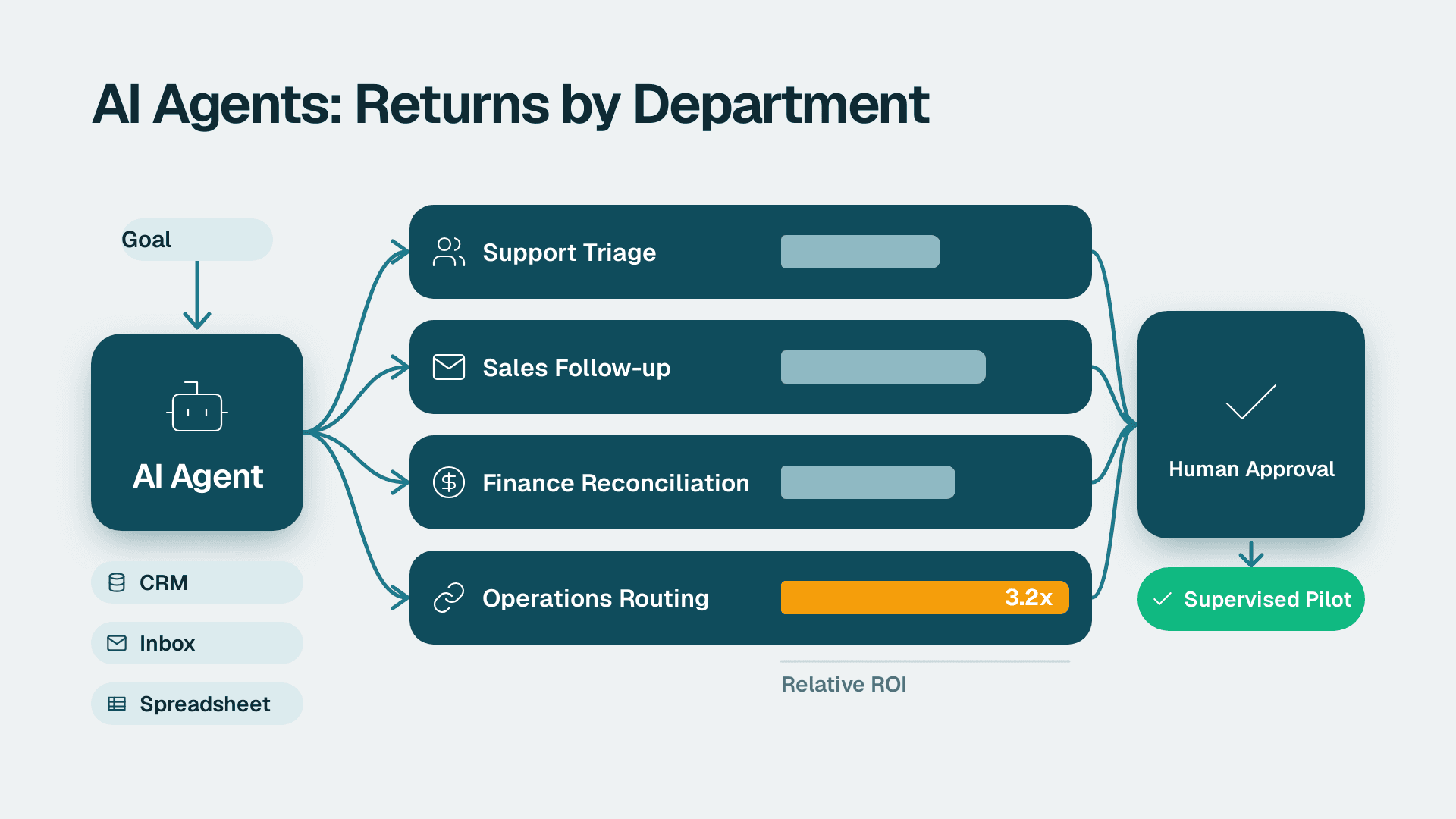
AI agents for business are software systems that take a goal, use tools such as your CRM, inbox or spreadsheets, and complete multi-step tasks with limited supervision. The highest-return uses for small and mid-market firms are support triage, sales follow-up, finance reconciliation and reporting, and operations routing, started as supervised pilots with human approval on every consequential action.
Key Takeaways
- An AI agent plans and acts across several tools, while a chatbot only answers; that difference decides where the return comes from.
- Start with one high-volume, rule-heavy workflow in one department, not a company-wide rollout.
- Keep a human approval step on anything that sends money, messages customers or changes records.
- Judge every agent on verified outcomes (did the work actually land?), not on how busy its activity log looks.
- Clean data and clear process ownership matter more than which platform you pick.
What can an AI agent do for my business?
An AI agent can read inputs (emails, tickets, invoices, spreadsheets), decide on the next step, call the tools needed to take it, and report back for review. According to BCG's overview of AI agents, agents automate tasks, analyze data and collaborate with humans, which is a useful way to frame the job: they do the legwork, and people keep the judgment.
The practical test is whether the work has a clear trigger, a clear finish line and a predictable set of tools. A new support ticket arrives, the agent classifies it, drafts a reply from your help centre and routes the hard cases to a person. A supplier invoice arrives, the agent matches it to a purchase order and flags the mismatches. Work like that suits an agent. Work that depends on a fuzzy goal, on politics or on information nobody has written down does not.
If you are still deciding whether a process is ready, the AI automation consulting approach starts with the same question: which workflows are repetitive enough, and documented enough, to hand over safely. Teams that want a quick self-check first can use the 45-point AI readiness self-score for small business.
How is an AI agent different from a chatbot or a workflow automation?
A chatbot responds to a question. A workflow automation follows a fixed path you drew in advance. An AI agent chooses its own path within limits you set. That flexibility is the value and the risk: an agent can handle messy inputs that would break a rigid rule, but it can also take a wrong turn that a fixed rule never would.
| Approach | Handles messy input | Decides its own steps | Best for |
|---|---|---|---|
| Chatbot | Yes, for answers | No | FAQs, first-line questions |
| Fixed workflow automation | No | No | Stable, predictable processes |
| AI agent | Yes | Yes, within guardrails | Variable, multi-step tasks with tool use |
Most mid-market firms end up with a mix. Fixed automations handle the stable core, and agents take the exceptions around the edges. For concrete patterns, see these AI workflow automation examples for business.
Which departments get the best return from AI agents for businesses?
The best returns come from departments with high volume, repeatable decisions and a measurable queue: customer support, sales operations, finance and general operations. Marketing and HR benefit too, but the outcomes are harder to measure, so they make weaker first projects.
| Department | Typical agent task | Human checkpoint | Main risk |
|---|---|---|---|
| Customer support | Triage tickets, draft replies, update the CRM | Approve replies on sensitive topics | Confident wrong answers |
| Sales | Qualify leads, research accounts, draft follow-ups | Approve outbound messages | Off-brand or inaccurate outreach |
| Finance | Match invoices, chase variances, prepare reporting packs | Approve postings and payments | Silent errors in the numbers |
| Operations | Route requests, monitor queues, flag exceptions | Approve changes to orders or schedules | Bad data causing bad routing |
| HR and IT service | Answer policy questions, log requests | Approve access and case decisions | Exposing personal data |
Customer support
Support is the usual starting point because the volume is high and the answer set is bounded. An agent reads each incoming ticket, tags it, pulls the relevant help article or order record, and drafts a reply. A person approves anything involving refunds, complaints or account changes. The measurable outcomes are first-response time, resolution time and the share of tickets a person had to rewrite.
Sales and marketing
Sales agents do the research and admin that reps skip when they are busy: enriching a lead, summarising the last conversation, drafting a follow-up and logging the activity. Keep sending under human control at first. If your team is drowning in manual steps, this guide on simplifying sales automation when it takes too much work is a good companion read.
Finance and reporting
Finance suits agents because the work is structured, but errors are expensive, so approvals matter most here. Typical tasks include matching invoices to purchase orders, preparing month-end variance commentary and refreshing management reports. Suppose a US SaaS finance team wants an agent to draft variance commentary each month. The agent can pull figures from the reporting model, write the first draft and cite the source tables, while the controller approves it. If that team operates under SOC 2 controls, the agent's access and actions need to be logged like any other system user's.
If you report through Power BI, one licensing point is worth knowing before you plan around built-in assistants. Copilot in Power BI and Fabric needs a paid Fabric capacity of F2 or higher, or Power BI Premium P1 or higher. A Pro licence ($14 per user per month) or Premium Per User licence ($24 per user per month) alone is not enough, and trial capacities are excluded. For the wider picture of where this is heading, read what agentic BI actually does.
Operations and supply chain
Operations agents watch queues and flag exceptions: a late shipment, a purchase order that does not match a receipt, a request stuck with the wrong approver. A Canadian manufacturing company, for instance, might use an agent to monitor order status across a spreadsheet and an ERP, then alert a planner when a promise date is at risk. Where personal information is involved, such as customer contact details, PIPEDA obligations apply to how the agent stores and uses it.
What is the best AI agent for business?
There is no single best AI agent for business. The best choice depends on where the work lives (your CRM, ERP, helpdesk or spreadsheets), who will maintain the agent, and how much control and logging you need. Judge platforms on integrations, approval controls and auditability before you judge them on demos.
Most options fall into three routes:
| Route | Who builds it | Strength | Watch out for |
|---|---|---|---|
| Agent features inside tools you already use | Existing admins | Fast, low setup, existing permissions | Limited to that tool's data and actions |
| No-code or low-code agent platform | Ops or analyst staff | Flexible, connects many apps | Needs an owner and ongoing testing |
| Custom-built agents | Developers or a consultancy | Fits unusual processes exactly | Higher build and maintenance effort |
To see how one platform describes the building experience, Relevance AI's agent page lists three ways to build agents: a drag-and-drop visual canvas, plain-language building with its Invent assistant, and building through MCP from coding tools. It also states that it connects to 1,000+ apps. These are vendor claims, and the same page reports customer results (for example, one customer saving 40 hours weekly and another generating a $7M pipeline with 35+ agents) that you should treat as vendor-reported, not as results you will see.
For tool comparisons, see the ranked list of best AI automation tools for business in 2026, or the head-to-head on OpenAI Agent Builder vs n8n if you are choosing between a model-vendor builder and a workflow tool.
What are the best AI agents for small businesses?
Small teams usually do best with agents built into software they already pay for, plus one flexible no-code platform for the gaps. A Forbes roundup of AI agents for small business frames the appeal as automating workflows without a technical team. That is realistic for narrow tasks, but someone still needs to own the agent, review its output and fix it when a connected tool changes.
What do enterprise AI agents need that smaller teams can skip?
Enterprise AI agents need formal access control, audit trails and approval workflows, because many people and many systems are involved. A smaller firm can start lighter, but it should not skip the principle behind each control. The question to ask any platform is which of these it supports natively.
The Relevance AI page is a handy example of the checklist larger buyers expect. It lists data residency, PII masking, audit logs, no training on your data, role-based access control, SSO/SAML, human-in-the-loop approvals and version control. Not every mid-market firm needs all of it, but three are worth insisting on at any size:
- Audit logs, so you can see what the agent did and why.
- Human-in-the-loop approvals, so risky actions wait for a person.
- Role-based access, so the agent can touch only what its task requires.
On retention, remember that logs are only useful while they exist. In Microsoft environments, Purview Audit (Standard) keeps audit logs for 180 days, so plan for exporting anything you may need beyond that.
How do GDPR, HIPAA and PIPEDA affect AI agents for businesses?
These laws affect what data the agent may see and where it is processed. A UK fintech firm, or any company with EU customers, should map which personal data an agent touches and whether processing stays within GDPR requirements. Canadian organizations should do the same under PIPEDA. In the US, HIPAA applies only if you handle protected health information, and this article focuses on non-regulated sectors, so involve your compliance lead before pointing an agent at that kind of data. Our guide to an AI vendor due diligence checklist for small business covers the questions to ask each provider.
How much do AI agents cost and how long do they take to deploy?
Cost has four parts: platform or licence fees, model usage, integration work, and the staff time to supervise and maintain the agent. Platform pricing changes often, so confirm current figures with each vendor before you budget. The part teams underestimate is supervision, because an agent without an owner decays quickly.
A realistic pilot timeline, as a planning guide and not a promise, looks like this:
| Phase | What happens | Rough shape |
|---|---|---|
| Scoping | Pick one workflow, define success, map data and permissions | Days to a couple of weeks |
| Build and connect | Configure the agent, connect tools, write instructions | A few weeks |
| Supervised run | Every output reviewed by a person, errors logged | Several weeks |
| Decide | Expand, adjust or stop based on measured results | A short review |
The supervised run is where most of the learning happens. Budget for it, and do not shorten it because the first few days look good.
Why does data quality decide the result?
An agent is only as reliable as the records it reads. If customer names are duplicated, product codes are inconsistent or the ERP disagrees with the spreadsheet, the agent will act on the mess with great confidence. Before building anything on ERP data, run through the steps in how to run an ERP data quality check before AI implementation.
How do you start with AI agents without breaking things?
Start with one workflow, give the agent narrow permissions, keep a person approving every consequential action, and measure verified outcomes weekly. Expand only after the agent has earned trust on the first workflow. Mastra's guide to what agents can reliably automate takes the same stance, covering where agents fall short and how to deploy and test them safely.
A simple sequence works for most teams:
1. Pick the workflow. Choose high volume, low risk and easy to measure. Support triage and invoice matching are common picks.
2. Write the standard. Define what a correct result looks like, in terms a reviewer can check.
3. Limit access. Give the agent read access first, then write access to a single system.
4. Add approvals. Anything that sends, pays or deletes waits for a person.
5. Measure the outcome. Track whether the work landed, not whether the agent reported finishing.
6. Review and widen. Add scope only when error rates are low and understood.
Why must you verify outcomes and not outputs?
Because an agent reporting success is not the same as success. At Lets Viz we learned this firsthand: 26+ auto-generated site-performance fix tasks sat marked resolved while Google's Core Web Vitals report stayed flat at 405 flagged URLs. Resolved only meant a human had read the recommendation, not that code shipped. The lesson we took is that agents must verify outcomes, not outputs. Build the check into the workflow: after the agent says it updated a record, have a separate step confirm the record changed.
Which mistakes sink early agent projects?
- Automating a broken process, which only makes the problem faster.
- Giving the agent broad write access on day one.
- Skipping a named owner, so nobody notices when quality drifts.
- Measuring activity (tasks completed) and not results (problems solved).
- Treating the pilot as finished the moment it works once.
Audits help here too. A periodic review of what your agents did, covered in how to conduct an AI audit in 8 steps, catches drift before customers do.
What is the 30% rule of AI?
The 30% rule of AI has no single agreed definition. It is usually described as an informal rule of thumb about how much of a task to hand to AI, so treat it as a loose heuristic and not a standard. A sound practical reading: do not aim to automate a whole job at once. Hand over a defined slice, such as drafting or data gathering, keep people on judgment and exceptions, and widen the slice only as results justify it.
Can AI agents really make you $10,000 a month?
No reliable method guarantees that, and anyone promising a fixed income from AI agents is selling something. For a business, the more honest framing is savings and capacity: hours returned to staff, faster response times, and fewer errors. Quantify those against your own baseline before and after the pilot, and ignore headline figures that do not show their method.
---
About Lets Viz: Lets Viz is a data analytics and AI consultancy that has delivered Power BI, Tableau, Zoho and AI automation projects since 2020 for clients including US healthcare organizations, UK fintech firms, Canadian manufacturers and global SaaS companies. We hold a 5.0 Clutch rating, and our guidance comes from running automated agents on our own content engine, including the failures we had to fix.
If you want help choosing and piloting your first agent, talk to our AI automation consulting team.
Sources
- BCG: AI Agents: What They Are and Their Business Impact
- Relevance AI: AI agents
- Forbes: 10 AI Agents Every Small Business Should Use Now
- Mastra: AI Agents for Business: What They Automate
Facts and prices checked October 2026.