AI Readiness Assessment for Small Business: A 45-Point Self-Score
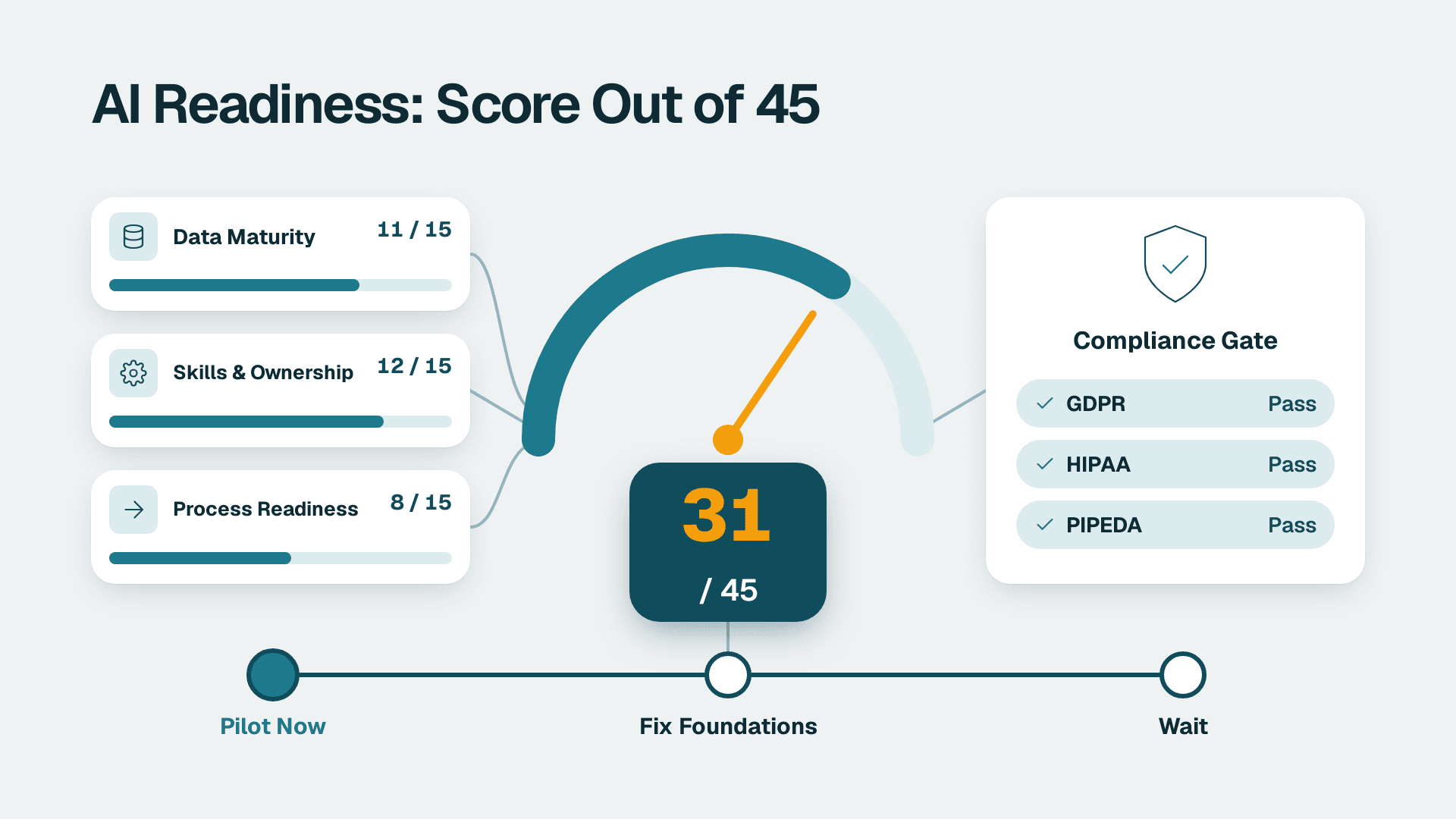
This AI readiness assessment for small business gives you a 45-point self-score covering data maturity, skills gaps and process readiness, plus a GDPR, HIPAA and PIPEDA pass/fail gate. Expect one focused working day with two or three people in the room. The output is a single decision: pilot now, fix foundations first, or wait.
Key Takeaways
- The score runs from 0 to 45 and is built from three areas: data maturity, skills and ownership, and process readiness (15 points each).
- The weakest-area rule overrides the total. If any one area scores below 6, you start with foundations, whatever the sum says.
- Any compliance Fail on a regime that applies to you moves you back one band until it is cleared.
- The output is one pilot with a written charter, plus a ranked backlog of the processes behind it.
What Do You Need Before You Start?
You need a spreadsheet, two or three informed people, and read access to your main systems. Nothing here requires special software or a budget.
- A spreadsheet (Excel or Google Sheets) with four tabs: Processes, Data, Skills, Compliance. You will build them as you go.
- Two to three participants: an ops leader or COO who knows how work actually flows, whoever administers your systems (ERP, WMS, CRM, accounting), and a founder or finance lead who can answer questions about contracts and customer data.
- Admin-level view of your main systems, so you can check where data lives, who has export rights, and what the audit trail looks like.
- A list of your customer and employee data types: names, emails, addresses, order history, payment references, health-related fields (if any).
- Your customer contract template and any data processing terms you have signed with software vendors.
- Two to four hours of recent timesheets or task estimates for the processes you suspect are wasteful. Rough numbers are fine.
Step 1: Which Processes Are Wasting the Most Time?
The processes worth testing are the recurring, manual ones, ranked by weekly hours. Open the Processes tab and create these columns: Process name, Owner, Times per week, Minutes per time, People touching it, Systems touched.
1. Ask each participant to name every recurring task that involves copying data between systems, re-keying from email or PDF, chasing approvals, or building a report by hand.
2. Write one row per task. Typical entries in this segment: order entry from emailed purchase orders, carrier status updates, inventory reconciliation, invoice matching, weekly utilisation reports, marketplace listing updates.
3. Fill in the frequency and duration columns with honest estimates. Do not research; guess in round numbers and mark guesses with a question mark.
4. Add a final column, Weekly hours, with the formula `=C2*D2*E2/60` (times per week x minutes x people, divided by 60). Copy it down.
What you should see: a ranked list of 8 to 15 rows. Sort by Weekly hours, largest first. The top three rows are your candidate pilots. If you cannot name at least five tasks, run the automation audit checklist first, because it gives you a structured way to surface hidden work.
Step 2: How Mature Is Your Data? (5 Questions, 0-3 Each)
Data maturity is how reliably your records can be found, read and exported. Open the Data tab. For your top three candidate processes, answer each question below and score it 0 (no), 1 (partly, with workarounds), 2 (mostly), or 3 (yes, reliably). Score the weakest of the three processes, not the average. Weak spots are what stall projects.
1. Single source of truth. Is there one system that holds the authoritative record (customer, SKU, order, shipment), or do people reconcile between spreadsheets?
2. Structured capture. Is the input a database field or a form, rather than free text in email, a PDF, or a photographed document?
3. Consistent identifiers. Do customers, SKUs, and carriers carry the same ID or code in every system that touches them?
4. Export access. Can someone with admin rights export the data (CSV, ODBC, API) without asking the vendor for help?
5. History. Do you have at least 12 months of usable records for this process, with errors you know about and can describe?
In the spreadsheet, put the five scores in cells B2:B6 and total them in B7 with `=SUM(B2:B6)`.
What you should see: a Data score out of 15. A score under 6 usually means the first project is cleanup, not AI. Scores of 6 to 10 mean a narrow pilot is possible if you accept manual exception handling.
Do not let tool names distract you. Whether you eventually use a workflow builder, a Microsoft Fabric setup (which bundles several components such as data storage, pipelines, and reporting), or a packaged vendor product, the questions above are the same. Tools move data; they do not fix a missing source of truth.
Step 3: Who Owns the Work, and Do You Have the Skills? (5 Questions, 0-3 Each)
Skills readiness is about named people and available hours, not job titles. Open the Skills tab and use the same 0-3 scale.
1. Process owner. Is there one named person who can explain the process end to end and has authority to change it?
2. System administrator. Is there someone, in house or on retainer, who can create API keys, manage user permissions, and read error logs?
3. Data literacy. Can at least one person in the team read a table of results and spot when numbers look wrong?
4. Time budget. Can the process owner give about four hours a week for the next 8 weeks without dropping core work?
5. Review habit. Does your team already review outputs (for example, spot-checking invoices) rather than trusting them blindly?
Total the five scores in a Skills score cell.
What you should see: a score out of 15. Question 4 is the one that kills most small-firm projects, so if it scores 0 or 1, write the reason beside it. A low skills score does not block adoption; it tells you whether you need a managed arrangement rather than a do-it-yourself build.
When you compare outside help, ask each provider to state its pricing model in writing: fixed fee, monthly retainer, hourly, or usage-based. Ask what happens when a workflow fails at 2 a.m., and who pays for platform charges. If a tool bills per execution or per task, ask how those are counted, because a workflow with ten steps can count very differently depending on the vendor. Our AI vendor due diligence checklist walks through the questions in order.
Step 4: Are Your Processes Ready for Automation? (5 Questions, 0-3 Each)
A process is ready when its steps are written down, its rules are stable and its failures are caught by a human. Open a new tab called Process and score again, per candidate process.
1. Written steps. Could a new hire follow a written procedure for this task, or does it live in one person's head?
2. Stable rules. Are decisions made by rules you can state in a sentence (for example, if a PO is over a set value, a manager approves), rather than by gut feel each time?
3. Low variation. Do at least 70 percent of cases follow the standard path, with exceptions you can list?
4. Clear success measure. Can you define done, such as order posted in the ERP with no corrections within two days?
5. Safe failure. If the automated step produces a wrong output, is there a human check before the customer, carrier, or bank sees it?
Total into a Process score.
What you should see: a score out of 15. Process questions 2 and 3 matter most. AI can handle messy inputs such as emailed orders, but it cannot invent business rules you have never agreed on. If a candidate scores under 6 here, document the process before spending anything on tooling.
Step 5: Which GDPR, HIPAA and PIPEDA Checkpoints Apply to You?
The compliance gate is pass/fail, not scored, and a single Fail on a regime that applies to you pauses the project until fixed. Open the Compliance tab. This is not legal advice; use it to decide whether to involve counsel.
5a. Decide which regimes apply
For each regime, write Applies, Does not apply, or Unsure in column B:
- GDPR: applies if you offer goods or services to people in the EU or UK, or monitor their behaviour, regardless of where you are based. An ecommerce store shipping to Europe is the common trigger.
- PIPEDA: applies to commercial handling of personal information in Canada, so Canadian customers, staff, or a Canadian subsidiary bring it in.
- HIPAA: applies to covered entities and their business associates handling protected health information. If you serve healthcare clients and receive patient data, you may be a business associate. If you would rather not take that on, the simplest checkpoint is to exclude health data from the project scope entirely.
5b. Answer the shared checkpoints
For each regime marked Applies or Unsure, answer Pass or Fail:
1. Data inventory. Can you list which personal data fields the AI tool will see? (Fail if you cannot.)
2. Purpose and minimisation. Can you send only the fields needed, with names or IDs masked where possible?
3. Vendor terms. Does the tool's contract state that your inputs are not used to train public models, and does it offer a data processing agreement? For HIPAA, a signed business associate agreement is required before any protected health information is shared.
4. Location. Do you know where data is processed and stored, and is there a legal transfer mechanism for cross-border flows (GDPR and PIPEDA both care)?
5. Access and deletion. Can you retrieve, correct, or delete one person's data on request?
6. Audit trail. Can you show who ran what and when? If you use Microsoft 365, note that Microsoft Purview Audit (Standard) retains audit logs for 180 days (Microsoft documentation, 2026), so export them if your policy needs longer.
What you should see: a grid of regimes against checkpoints, with every cell Pass, Fail, or Not applicable. For the Fabric-specific controls behind several of these checks, see Microsoft Fabric data governance for HIPAA, GDPR, and PIPEDA.
If your first pilot uses no personal data at all (carrier lane analysis, SKU demand forecasting at aggregate level), mark all three regimes Does not apply and record why. That is a valid and common outcome in wholesale and manufacturing.
Step 6: What Does Your AI Readiness Assessment for Small Business Score Mean?
Your total places you in one of three bands, and the weakest-area and compliance overrides can move you down. Open a Summary tab and pull in the three totals.
1. In B1 enter `=Data!B7` for Data, in B2 `=Skills!B7` for Skills, in B3 `=Process!B7` for Process.
2. In B4 enter `=SUM(B1:B3)` for the Total out of 45.
3. In B5 enter `=MIN(B1:B3)` for the Weakest area.
4. Read the total against this table:
| Score band | Verdict | What to do next |
|---|---|---|
| 0-15 | Foundations first | Fix identifiers, document steps, assign an owner. Spend nothing on AI tooling yet. |
| 16-30 | Narrow pilot | Pick one process where all three areas score 6 or higher and keep a human check on every output. |
| 31-45 | Ready to build | Proceed to a scoped pilot with a defined success measure and a stop date. |
5. Apply the override: if the Weakest area is below 6, treat the whole result as Foundations first, whatever the total says. A high skills score does not rescue missing data.
6. Apply the compliance override: any Fail on Compliance moves you back one band until it is cleared.
What you should see: one total, one weakest area, and one band. Write the band in plain language at the top of the sheet, for example: Narrow pilot on order entry; fix SKU identifiers in parallel.
This is a self-score, so it is only as honest as the people filling it in. If participants disagree by more than one point on a question, take the lower score and note the disagreement. Disagreement itself is information about how well the process is understood.
Step 7: How Do You Size the Waste and Choose the First Pilot?
You choose the pilot by combining weekly hours, readiness score and risk into one ranked decision. Return to the Processes tab.
1. Filter to rows where the Step 2 to 4 scores are acceptable (at least 6 in each area) and compliance is clear.
2. Multiply Weekly hours by a loaded hourly cost you know from payroll to get a weekly cost figure. Use your own numbers; do not borrow someone else's benchmark.
3. Estimate the share you realistically expect to automate. Be conservative: assume exceptions stay manual.
4. Subtract expected tooling and support costs. The structure of this calculation is laid out in the order entry automation ROI formula, which works for any repetitive back-office task.
5. Choose the single row with the best mix of hours saved, score, and low risk. Write a one-line pilot charter: process, owner, success measure, review date 8 weeks out, and the condition under which you stop.
What you should see: one named pilot with a charter, and a ranked backlog behind it. If your pilot involves Copilot in Power BI, check the conditions first: Microsoft requires a paid Fabric capacity of F2 or higher, or Power BI Premium P1 or higher, and a Pro or Premium Per User licence on its own is not enough (Microsoft documentation, 2026).
What Are the Most Common Mistakes?
The most common mistakes all inflate the score or delay the hard questions. Watch for these:
- Scoring the best process instead of the weakest. Teams pick their tidiest workflow to score and get inflated results. Always score the weakest of your top three candidates, then decide whether to drop it.
- Treating compliance as a final-stage check. Discovering at go-live that a vendor will not sign a data processing agreement forces a rebuild. Run Step 5 before shortlisting tools.
- Letting one person fill in everything. The ops leader and the system administrator often disagree on data quality. Score together and record the lower number.
- Ignoring the time-budget question. Skills score high, but nobody has four hours a week. Name the owner and remove something from their plate, or the pilot will stall in week three.
- Confusing a total score with go-ahead. A 33 with a 4 in data is still Foundations first. Always check the weakest-area rule.
How Do You Troubleshoot a Confusing Result?
Most confusing results come from process descriptions that are too broad, unit errors or an incomplete data inventory.
- Every question scores 1 or 2 and you cannot separate candidates. Your process descriptions are too broad. Split a process such as order management into specific tasks (entry, confirmation, backorder handling) and rescore each.
- The Weekly hours column shows very small numbers. You probably entered minutes per time as hours, or counted one person instead of everyone touching the task. Recheck the units in columns C to E.
- You cannot tell whether a regime applies. The data inventory is incomplete. List every system holding customer or employee records, mark the regime Unsure, and have counsel review that single list rather than the whole project.
---
About Lets Viz: Lets Viz is a data analytics consulting firm that has helped teams in wholesale distribution, logistics and 3PL, manufacturing, professional services, and ecommerce turn manual reporting and process work into reliable analytics since 2020. We hold a 5.0 rating on Clutch and work with Power BI, Microsoft Fabric, Zoho Analytics, and workflow automation tools.
If you want an outside team to run this scoring with you and hand back a prioritised pilot plan, book our AI readiness assessment (fixed price, 5 days).