Zoho Sheet for Business: Connectors, Automation, Limits
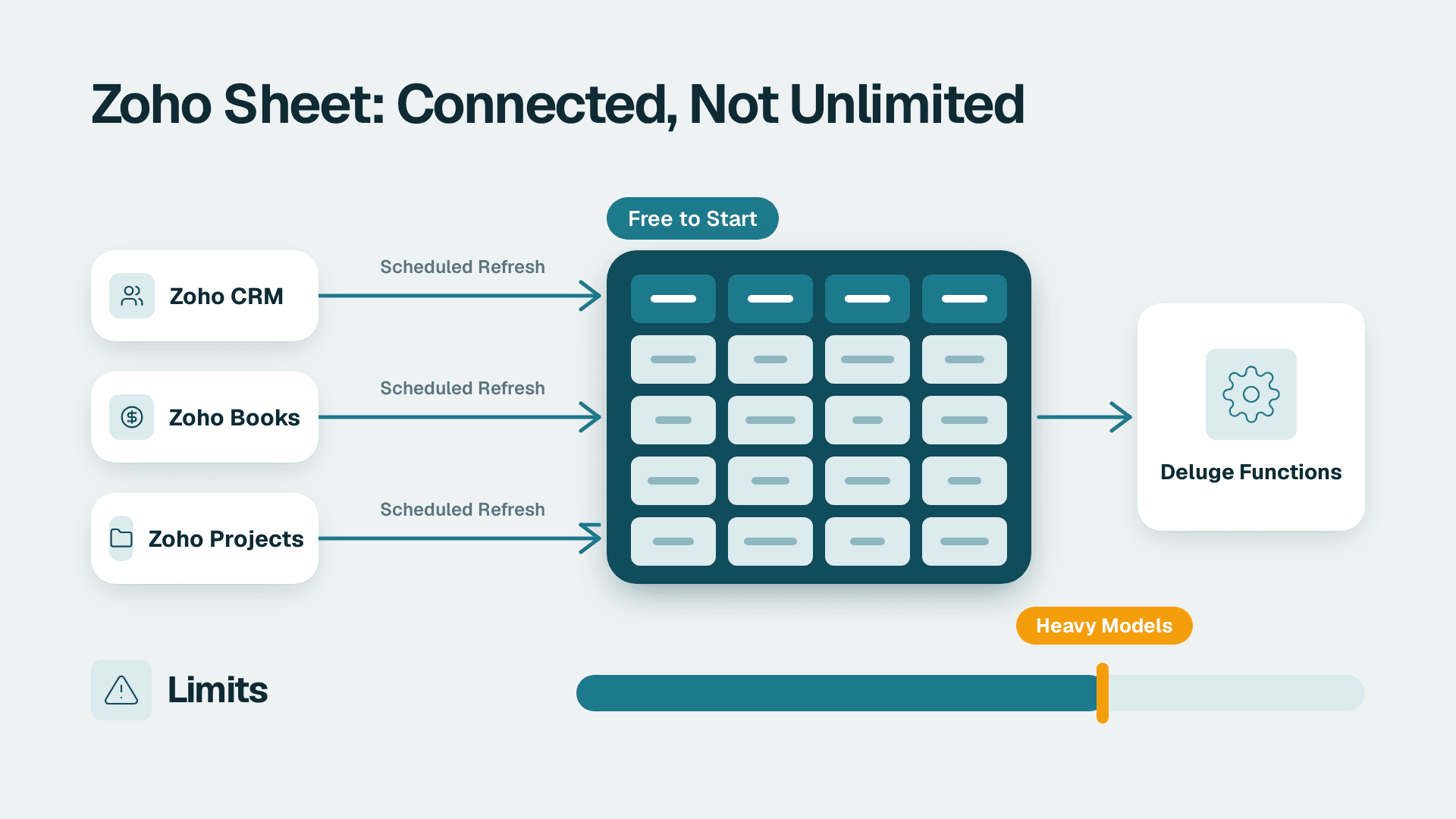
Zoho Sheet is a free-to-start, browser-based spreadsheet that fits best when your data already lives in Zoho CRM, Books, or Creator. Its strength is live data connections to other Zoho apps, scheduled refresh, and Deluge-powered custom functions. It is weaker as a stand-alone financial modelling tool, where heavy models, add-ins, and macros still favour the desktop spreadsheet.
Key Takeaways
- Zoho Sheet's real advantage is connectivity: it pulls data from Zoho CRM, Books, and Projects and can refresh linked data sets on a schedule.
- Automation runs through Deluge custom functions and Zoho Flow, not through a large add-in marketplace.
- Finance teams should test model size, function coverage, macros, and audit needs before moving core reporting.
- For recurring dashboards across many sources, pair Sheet with a BI tool rather than stretching the spreadsheet.
- Run a two-week pilot on one real workbook before you standardise.
What is Zoho Sheet and where does it fit in the Zoho suite?
Zoho Sheet is an online spreadsheet application that sits in the Zoho Office Suite alongside Writer (word processor) and Show (presentations), within an ecosystem that Zoho describes as 55+ apps. In practice, it is the place where numbers from your CRM, accounting, and project tools meet a familiar grid.
For a small-business owner or ops lead who runs Zoho CRM, Creator, Books, and Desk, the question is rarely "is this a good spreadsheet?" in isolation. It is "does this spreadsheet remove the export-and-paste routine that eats a few hours every month?" If you are still deciding how much of the suite to adopt, the pillar guide What Is Zoho One and Is It Worth It for Small Business? covers the bundle decision. If you want help planning which apps should feed which sheets, Zoho consulting services can map that out before you build anything.
The vendor's own site, in its 2026 product description, highlights five areas:
- Real-time collaboration with web, desktop, and mobile apps.
- Nearly 40 chart types and a dynamic pivot table builder.
- Data Connections to other Zoho applications.
- Zia, the AI assistant, for formulas and data tasks.
- Automatic data cleaning and one-click duplicate detection.
None of these is unusual on its own. The combination, tied to the rest of the suite, is what makes the product relevant to Zoho One buyers.
Is Zoho Sheet better than the desktop spreadsheet your finance team already uses?
It is better for connected, collaborative, Zoho-centred work and weaker for large, macro-heavy financial models. "Better" depends on where the data starts and who edits it. Zoho Sheet wins when the source is a Zoho app; the desktop incumbent wins when the workbook is the product.
The import path matters here. Zoho states that Excel files can be imported with no loss of formatting. Treat that as a vendor claim and test it on your three most complicated workbooks, especially ones with conditional formatting, named ranges, and external links.
The table below summarises where each approach tends to fit. It reflects capability categories, not scored benchmarks.
| Need | Zoho Sheet | Desktop-first spreadsheet | Browser-first spreadsheet from a large search and ads vendor |
|---|---|---|---|
| Live pull from Zoho CRM, Books, Projects | Native Data Connections with scheduled refresh | Needs exports or third-party connectors | Needs exports or add-ons |
| Real-time co-editing | Yes, with cell locks and version restore | Available when stored in the vendor cloud | Core strength |
| Heavy models and add-in ecosystem | Limited by comparison | Strongest | Moderate |
| Scripting | Deluge custom functions | Macros and scripting in the desktop app | Cloud scripting |
| Fit for Zoho One teams | Highest | Medium | Medium |
A fair reading: if your reporting is 80 percent Zoho data and 20 percent modelling, Zoho Sheet deserves a serious trial. If it is the reverse, keep the heavy models where they are and use Sheet as the connected front end.
Is Zoho Sheet free to use, and how much does it cost?
Zoho Sheet is listed as free on the iPad App Store page, and Zoho's site invites users to create spreadsheets for free. Paid access generally arrives through a broader Zoho plan, so exact per-user pricing should be read from Zoho's current pricing page rather than from a third-party summary.
That said, "free" is only part of the cost picture. Consider three lines of cost:
1. Licences. The sheet itself may be free, but your Zoho CRM, Books, or Desk editions determine which connections and limits apply. Check each app's current plan page.
2. Migration time. Rebuilding formulas, pivots, and macros in a new tool is labour, not a licence fee.
3. Training. A team fluent in one spreadsheet will be slower for a few weeks in another.
The cheapest path is rarely the one with the lowest sticker price. It is the one where the monthly reporting routine shrinks and stays small.
How do Zoho Sheet data connectors work with CRM, Books, and Analytics?
Data Connections let a sheet gather contextual data from other Zoho applications such as CRM, Projects, and Books, and linked data sets can be scheduled to refresh automatically. That scheduled refresh is the feature that replaces the manual export cycle for most small teams.
The vendor also says the product is powered by 1,000+ integration possibilities. Read that number as a ceiling on reach, not a guarantee that every integration is deep. A native Zoho CRM connection will behave very differently from a generic third-party link.
What a typical connected workbook looks like
Suppose a 20-person services firm tracks deals in Zoho CRM and invoices in Zoho Books. A single workbook can hold:
- A CRM tab with open deals by stage and owner.
- A Books tab with invoices issued and outstanding.
- A summary tab that joins the two with formulas and a pivot.
Because the connections refresh on a schedule, the owner opens the workbook and sees current figures rather than last month's export. The pipeline definitions behind the CRM tab matter, though. If stages are inconsistent, the sheet will faithfully show inconsistent numbers, which is why a clean pipeline comes first. See Zoho CRM Pipeline: Structure Stages for Reliable Forecasts for that groundwork.
Where Zoho Analytics takes over
A spreadsheet is a good place to explore a data set and a poor place to run a dozen refreshing dashboards for different audiences. When you need row-level security, many sources, and shared dashboards, a dedicated BI layer is the better home. What is Zoho Analytics? explains that layer inside the suite, and the usual pattern is simple: use Sheet for ad hoc analysis and Analytics for the standing reports.
Cloud storage connections
Sheet also supports importing and exporting files directly from the editor with cloud drives including Google Drive, OneDrive, Dropbox, and Box. For mixed-tool teams, this lowers the friction of moving files in and out during a gradual migration. On iPad, the app can also import .csv, .tsv, and .xlsx files from the device and open, edit, and save spreadsheets from Dropbox and Box.
What automation can you build in Zoho Sheet?
Automation in Zoho Sheet comes from three places: scheduled data refresh, Deluge-powered custom functions, and workflows built in Zoho Flow. Together they cover most small-business routines, though they are not a drop-in replacement for a mature macro library.
Custom functions with Deluge
Custom Functions are powered by Deluge and can bring contextual data from applications like CRM, Books, and Projects into a cell. If your team already uses Deluge in Creator or CRM, the learning curve is shorter. For background on where Deluge-based apps come from, read What Is Zoho Creator Used For? No-Code Apps Explained.
AI help with formulas
Zia is powered by ChatGPT in Zoho Sheet to generate sample data sets, formulas, and VBA macro codes, and can help identify macro codes and formulas in an existing spreadsheet. That is useful for an ops lead who knows what they want but not the syntax. Always verify generated formulas against a known answer before relying on them, particularly in anything that touches invoicing or payroll.
Cleaning and de-duplication
The built-in Data Cleaning tool and one-click detection of duplicate or unique entries are modest features that save real time. They are especially handy before you load a messy customer list into CRM. Pair them with well-designed intake forms, as described in How to Build Zoho Forms That Feed CRM and Creator, so the mess does not return next quarter.
Cross-app workflows
When a sheet change should trigger something in another app, a workflow tool does the job better than a formula. Zoho Flow handles that pattern, and Zoho Flow: How to Automate Work Across Zoho and Other Apps walks through it.
What limits do finance teams hit with Zoho Sheet?
Finance teams most often hit limits around model size, function coverage, macro dependence, and audit expectations. None is a flaw for everyday work, but each can block a move of core reporting if you do not test it first.
1. Function coverage
Zoho Sheet includes around 350 functions and formulas. That covers the everyday set for most budgets and forecasts. If your models rely on a specific financial, statistical, or lookup function, confirm it exists and behaves identically before migrating. A single missing function can force a workaround across dozens of cells.
2. Model size and performance
Browser-based tools can slow down on very large workbooks with many cross-sheet formulas. Vendors rarely publish a single safe row count, and I will not guess one. Test with your largest real file, on the weakest laptop in the team, over a normal office connection.
3. Macros and add-ins
Zia can generate VBA macro code, but a team with years of accumulated macros should treat migration as a project, not a file import. Inventory every macro, decide which to retire, and rebuild the rest with Deluge or Flow. For a comparable look at what scripting inside a browser spreadsheet can and cannot do, see Google Apps Script: What It Automates and Where It Stops.
4. Controls and audit
Zoho lists user-specific spreadsheet permissions, lock cell/range/sheet settings, and an audit trail, plus cell-specific comments and @mentions. The collaboration tools also let you lock selected cells, restore previous versions, and see what changed since your last edit. For month-end close, that is a reasonable control set. Whether it satisfies your auditor is a separate question to ask them directly.
5. Reporting at scale
A spreadsheet is not a reporting platform. When a finance lead needs a consolidated CFO view across entities, currencies, and sources, the better answer is a BI tool with a governed data model. Microsoft lists Power BI Pro at $14 per user per month and Premium Per User at $24 per user per month (list prices since 1 April 2025). Whichever BI tool you choose, the design principles in Financial Reporting: Statements, Types and Power BI Setup apply. Accounting basics for the Zoho side are covered in Zoho Books: What It Does, What It Costs and When to Get Help.
How do compliance and data location affect the choice?
Wherever the sheet holds personal or financial data, compliance shapes the decision as much as features do. Confirm hosting region, retention, and access controls with the vendor, and document the answers.
Three hypothetical examples show how this varies:
- A US SaaS finance team preparing for a SOC 2 review would want to show who can edit revenue workbooks and how changes are logged. Locked ranges and an audit trail help, but the team still needs written procedures.
- A UK fintech firm handling customer data in spreadsheets must consider GDPR: where the data sits, who can export it, and how deletion requests flow through every copy.
- A Canadian manufacturing company sharing supplier and employee data across offices should check PIPEDA obligations on consent and cross-border transfer before moving files into any cloud tool.
In all three cases, the spreadsheet is only one place where data lives. Connected sheets that pull from CRM, Books, or HR records inherit the sensitivity of those sources. If payroll or leave data flows in, read Zoho People: Leave, Attendance, Performance, Recruit, Payroll to see what the source system holds. For US healthcare, HIPAA requirements would need a deliberate review before any patient-related data touches a spreadsheet at all.
When should you choose Zoho Sheet, and when should you not?
Choose Zoho Sheet when most of your input data comes from Zoho apps, your team edits together, and your models are modest. Avoid it as the sole home for large, macro-driven financial models or for dashboards that serve many audiences.
A simple decision checklist
Lean towards Zoho Sheet if:
- You run Zoho CRM and Books and re-key data between them.
- Your workbooks are mostly lists, pivots, and light formulas.
- You want cell locking and version restore without extra tools.
- Mobile and offline access matter: spreadsheets created on the web sync to the Windows, macOS, Android, and iOS apps, which work both online and offline.
Stay with your current spreadsheet if:
- Core models depend on macros or add-ins that took years to build.
- You need a function Zoho Sheet does not offer.
- Your auditors have approved a specific workbook process.
Add a BI layer if:
- You publish the same report to several audiences.
- You combine data from more than two or three systems.
- Leadership wants dashboards, not tabs. See How to Build a KPI Dashboard Leadership Actually Uses for that design work.
Run a two-week pilot
Pick one recurring report, such as the monthly pipeline and invoicing summary. Rebuild it in Zoho Sheet with live connections, run both versions in parallel, and compare the numbers and the hours spent. Record three things: formulas that failed to import, steps that were slower, and steps that disappeared. That short list is a far better guide than any feature table.
---
About Lets Viz: Lets Viz is a data analytics consultancy that has helped teams in US healthcare, UK fintech, Canadian manufacturing, and global SaaS build reliable reporting since 2020. We hold a 5.0 Clutch rating and work across the Zoho suite and Microsoft BI tools, so our advice reflects how these systems behave in real rollouts.
Sources
- Zoho Sheet official site
- Zoho Sheet on Google Workspace Marketplace
- Zoho Sheet for iPad on the App Store
Facts and prices checked November 2026.