What Is Zoho Creator Used For? No-Code Apps Explained
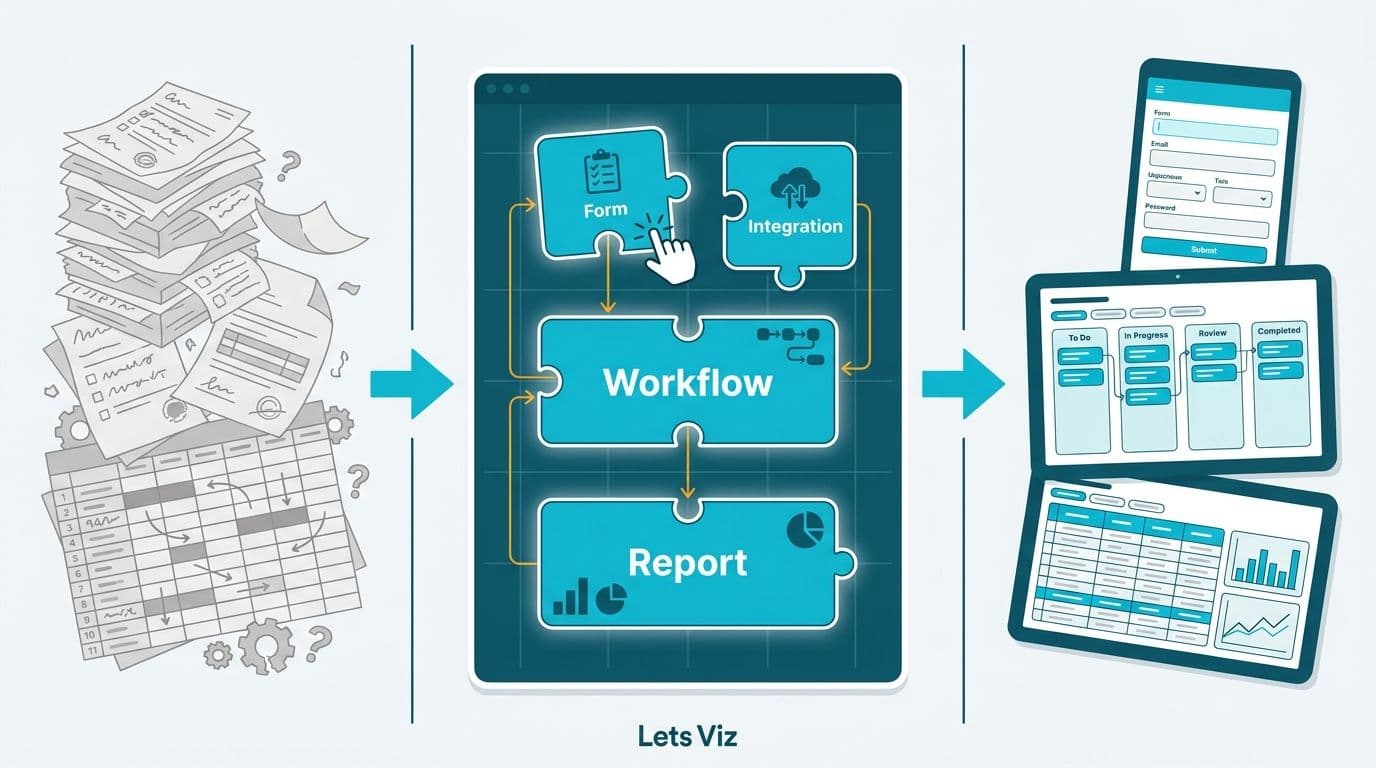
Zoho Creator is a no-code application development platform that lets non-technical staff build custom business apps, automate multi-step workflows, and manage structured data - without writing a single line of code. Mid-market teams in healthcare, finance, and operations use it to replace spreadsheets and paper-based processes with purpose-built digital tools that integrate natively with the broader Zoho ecosystem. It is not a business intelligence or dashboarding platform - that role belongs to Zoho Analytics.
Key Takeaways
Zoho Creator builds custom apps and automates workflows; Zoho Analytics visualizes and analyzes existing data - the two solve fundamentally different problems
Core use cases include patient intake forms, expense approval workflows, clinical credentialing, asset tracking, and client onboarding
Zoho Creator is included in Zoho One but can be licensed as a standalone product
HIPAA (US), GDPR (UK and EU), and PIPEDA (Canada) compliance requirements can be embedded into Creator app architecture from day one
Mid-market operations teams running a Zoho Creator vs Microsoft Power Apps evaluation should weigh pricing structure, integration ecosystem, governance overhead, and time-to-deploy - Creator typically reaches production faster for teams not already standardized on Microsoft Azure
Teams that have outgrown spreadsheets but cannot justify a full custom software build are the primary audience
What Is Zoho Creator Used For in Business?
Zoho Creator is used to build custom, database-backed applications that handle structured workflows - processes a generic SaaS tool cannot manage out of the box and that custom-coded software would be prohibitively expensive to develop. Think vendor credentialing portals, purchase-approval chains, equipment maintenance logs, field-service job sheets, and client-onboarding checklists. Each of these has a definable data model, a set of decision rules, and a user interface - exactly what Creator's drag-and-drop builder, visual workflow engine, and Deluge scripting layer are designed to deliver.
Working with experienced Zoho consulting services partners accelerates deployment significantly, because consultants bring pre-built templates, tested data models, and familiarity with the permission structures that compliance-heavy industries require.
What Zoho Creator is not: it is not a general-purpose business intelligence platform, not a CRM replacement, and not a document management system. Each of those roles is covered by a different Zoho product or by a specialized third-party tool.
Five Categories of Common Deployment
Data collection and form management. Teams replace paper forms and shared spreadsheets with Creator apps that validate input at the field level, route submissions to approvers, store responses in a relational database, and trigger automated notifications. A US outpatient clinic, for example, might replace its PDF intake stack with a Creator app that enforces HIPAA-required consent capture and timestamps every submission with a tamper-evident record.
Workflow automation. Creator's visual workflow builder sequences approvals, conditional escalations, SLA timers, and email or SMS notifications across teams. A Canadian insurance broker might use it to route claims exception reports - under a defined threshold to a case manager, above it to a VP of Claims - with a PIPEDA-compliant audit trail logged automatically at each handoff.
Field operations and asset management. Field-service teams log inspections, assign jobs, capture GPS-stamped photos, and sync data to headquarters in real time. A UK facilities-management company might deploy a Creator app to record contractor access events and generate GDPR-compliant records for the facilities director without any manual data entry.
Internal portals and staff-facing tools. HR, IT, and operations teams build staff directories, IT asset registries, onboarding checklists, and shift-handover logs inside Creator. The resulting app is accessible via URL, embeddable in an intranet, or packaged as a branded mobile app on iOS and Android.
Patient and client case management. In healthcare and financial services, Creator serves as a lightweight case-management layer. A US telehealth company, for example, might build a HIPAA-compliant intake app that captures consent, routes to the appropriate clinical team by specialty, and writes structured data into an integration layer that connects to the EHR.
According to Future Market Insights (2025), the AI consulting services market is projected to grow from USD 11.07 billion in 2025 to USD 90.99 billion by 2035 at a 26.2% compound annual growth rate. That trajectory reflects how rapidly mid-market organizations are moving from improvised spreadsheet stacks to purpose-built digital workflows - and Zoho Creator is positioned squarely in that transition.
How Does Zoho Creator Differ from Zoho Analytics?
Zoho Creator builds apps and collects data; Zoho Analytics analyzes and visualizes data that already exists. These are two distinct problems, and deploying the wrong tool is the most common planning mistake in mid-market Zoho evaluations.
| Dimension | Zoho Creator | Zoho Analytics |
|---|---|---|
| Primary purpose | Build custom apps, automate workflows | Business intelligence and reporting |
| User persona | Operations manager, process owner | Data analyst, finance director, BI lead |
| Data direction | Collect and structure incoming data | Analyze data from existing sources |
| Output | Web or mobile app, form, approval workflow | Dashboard, pivot table, AI-generated insight |
| Coding required | None (Deluge scripting optional) | None (Zia AI assists query writing) |
| Typical first deployment | Replace a manual spreadsheet process | Replace a static report or legacy BI tool |
| Works standalone? | Yes | Yes |
| Best used together? | Yes - Creator structures the data | Yes - Analytics queries Creator datasets |
The two products are complementary by design. A US health system might use Creator to capture clinical quality-audit data via mobile forms submitted by ward nurses, then pipe that structured dataset into Zoho Analytics to visualize trends by department - a pattern that aligns with the structured approach to Healthcare KPI Dashboards by Department.
For teams evaluating Zoho Creator vs Zoho Analytics for reporting: if the core need is to collect or process data that does not yet exist in structured form, start with Creator. If the data already lives in a connected system and the requirement is to report on it, start with Analytics. A common follow-on question is how to build a dashboard in Zoho Analytics once data is flowing from Creator - the short answer is that Creator exposes its datasets through a native Analytics connector, making cross-tool dashboards straightforward once the data model is stable.
Teams that plan to develop internal capability in Zoho Analytics can pursue formal certification. Preparing for the Zoho Analytics certification exam covers data modeling, connector configuration, and Zia AI features - a useful benchmark for both hiring analysts and upskilling existing staff.
How Does Zoho Creator Fit Within Zoho One?
Zoho One is a bundled suite of over 45 Zoho applications; Zoho Creator is one component of that suite. A Zoho One license includes Creator, Analytics, CRM, Books, Cliq, and dozens of other tools under a single per-user subscription price.
For a fuller analysis of the suite's overall value proposition, see What Is Zoho One and Is It Worth It for Small Business?. The practical guidance for mid-market buyers:
Buy Zoho One if you want to replace multiple point solutions across your organization - email, CRM, project management, accounting, and analytics - under one commercial agreement
Buy Zoho Creator standalone if your only need is a custom app or specific workflow that existing systems cannot handle
Use both if you are already on Zoho One and want to extend it with bespoke apps that integrate natively with CRM or accounting data
A Canadian financial services company already using Zoho CRM and Zoho Books might build a Creator app that pulls client risk-profile data from CRM, applies a PIPEDA-compliant Know Your Client documentation checklist, and pushes a summary report into an Analytics dashboard - all within the Zoho ecosystem and without a separate development project.
Real SMB Use Cases in Healthcare and Finance
Healthcare and financial services represent two of the highest-growth verticals for no-code application deployment. According to Market Research Future (2025), the Healthcare Financial Analytics Market is projected to grow at an 8.58% CAGR from 2025 to 2035, driven by regulatory change and demand for real-time operational visibility. No-code platforms like Zoho Creator are accelerating adoption by removing the traditional IT bottleneck from workflow digitization projects.
Healthcare Applications
Patient intake and consent management. A US outpatient group replaces stacks of PDF intake forms with a Creator app. Patients complete intake on a tablet or smartphone; responses are validated at the field level, timestamped, and stored in a HIPAA-compliant data layer with role-based access controls limiting who can view protected health information. The compliance team pulls audit logs on demand without IT involvement.
Clinical staff credentialing. A multi-site US health network uses Creator to track license expiration dates across several hundred clinicians. The app automatically sends renewal reminders 90 days before expiry, escalates unresponsive cases to the HR director at 60 days, and generates a compliance summary for the Chief Medical Officer at the start of each month.
Biomedical equipment maintenance. A Canadian hospital network digitizes equipment inspection forms in Creator, replacing handwritten logbooks with tamper-evident digital records that satisfy both PIPEDA and provincial health-authority inspection requirements.
For teams building out broader data privacy practices, the AI Analytics Data Privacy Risks: Healthcare Audit Guide provides a structured audit framework applicable across US, Canadian, and UK health organizations.
Finance Applications
Expense and purchase approval workflows. A UK fintech firm replaces an email-based approval chain with a Creator app that routes expense claims by amount and department, enforces two-step authorization above a defined threshold, and exports a GDPR-compliant audit log to the finance controller. Processing time drops from three days to same-day.
Client onboarding and KYC documentation. A US registered investment adviser uses Creator to manage new-client onboarding. The app tracks KYC document status, sends automated reminders for missing items, and flags incomplete cases to the compliance officer before account activation - addressing documentation completeness requirements under applicable SEC rules.
Operational risk event logging. A Canadian insurance brokerage uses Creator to log operational risk events as they arise. Each entry triggers a workflow that notifies the risk officer, assigns a severity score, and escalates unresolved items to the board risk committee within 72 hours, supporting OSFI guideline documentation requirements.
According to MedInsight's 2025 healthcare analytics review, three themes defined the year for health-sector organizations: value-based care, AI-driven analytics, and payer analytics innovation. The organizations moving fastest share a common enabler - clean, structured operational data collected through purpose-built tools rather than improvised spreadsheet stacks.
When Should Your Team Choose Zoho Creator Over a BI Tool?
Choose Zoho Creator when the core problem is data collection or process automation; choose a dedicated BI platform when the core problem is data visualization or trend analysis. Deploying the wrong tool at the wrong stage creates technical debt that is expensive to untangle.
Choose Zoho Creator if:
A manual process is currently managed in spreadsheets, email threads, or paper forms
You need a form, multi-step approval workflow, or a lightweight database application
Non-technical staff need to submit, view, or update structured records without IT support
You need a mobile-compatible data-entry interface for field or clinical teams
You are building an integration layer between Zoho CRM and an external system
Choose a dedicated BI platform if:
Data already exists in connected systems and you need to visualize trends
The primary output is a dashboard, chart set, or scheduled executive report
Users are analysts or executives consuming data, not operational staff entering it
You need advanced modeling, calculated fields, or AI-generated forecasting
For organizations navigating a broader technology evaluation, the Zoho Certified Partner vs Independent Consultant: Decision Matrix provides a practical framework for scoping which investments are worth the consulting and licensing spend.
On cost: Zoho Creator pricing starts at a modest per-user monthly rate that scales by feature tier. When factoring in Zoho Analytics consultant cost alongside Creator licensing, most teams find that a scoped consulting engagement - covering data model design, workflow logic, and integration setup - is recovered within the first quarter through time savings on the automated process.
How Does Zoho Creator Compare to Microsoft Power Apps for Mid-Market Teams?
For mid-market operations teams running a Zoho Creator vs Microsoft Power Apps evaluation, the decision typically comes down to four variables: pricing structure, integration ecosystem, governance overhead, and realistic time-to-deploy. The right answer differs depending on whether your organization is already standardized on Microsoft Azure or Zoho.
| Dimension | Zoho Creator | Microsoft Power Apps |
|---|---|---|
| Entry price (per user/month) | ~$8 (Standard); ~$20 (Professional) | ~$20 (Premium); some capacity bundled with M365 |
| Regional pricing | Single global USD rate with local VAT | GBP for UK buyers; CAD for Canada; USD for US |
| Native integration depth | 45+ Zoho apps; Zoho Flow for external connectors | Microsoft 365, Azure, Dynamics 365; 900+ connectors via Power Platform |
| Governance model | Role-based access, field-level encryption, per-app user management inside Zoho dashboard | Azure Entra ID, DLP policies, Power Platform CoE Toolkit |
| HIPAA BAA (US) | Available | Available |
| GDPR compliance (UK/EU) | UK data residency via EU West region | UK data centers via Azure UK South/West |
| PIPEDA compliance (Canada) | Canadian data center election available | Azure Canada Central and East regions |
| Typical time-to-deploy (mid-market) | 4-6 weeks with a Zoho consulting partner | 6-10 weeks; Azure tenant setup and connector licensing add lead time |
Pricing differences across regions. Zoho applies a single global USD price with local VAT adjustments, which simplifies multi-region procurement for teams operating across the US, UK, and Canada simultaneously. Microsoft prices Power Apps in local currency through its regional channels - GBP for UK buyers, CAD for Canadian organizations - which aligns with existing Microsoft enterprise agreements but adds complexity when a single ops team spans borders. Canadian and UK buyers on Microsoft 365 should audit which Power Apps connectors are already included in their license tier before assuming the Premium plan is mandatory; Dataverse and many third-party connectors require Premium regardless of M365 tier.
Integration depth. Power Apps integrates natively with SharePoint, Teams, Dynamics 365, and Azure Entra ID - a significant advantage for organizations already running Microsoft infrastructure. Zoho Creator integrates natively with the 45+ applications in the Zoho suite and reaches external systems through Zoho Flow or direct REST API calls. Teams standardized on Zoho CRM, Books, or Desk will find Creator's native connectors dramatically faster to configure than building equivalent Power Platform flows. Teams standardized on Microsoft 365 will find the reverse true.
Governance controls. Power Apps governance is administered through Azure DLP policies and the Power Platform Center of Excellence Toolkit - enterprise-grade controls that require an Azure administrator to configure and maintain. Creator's governance model lives inside the Zoho admin console: role-based access controls, field-level encryption, and per-app user management that process owners can administer without Azure expertise. For US healthcare buyers, both platforms offer HIPAA BAAs. UK teams can satisfy GDPR Article 28 processor obligations with either platform. Canadian organizations should confirm that data residency is explicitly scoped to eligible Canadian locations before go-live to satisfy PIPEDA and provincial legislation, including Alberta's PIPA and Quebec's Law 25.
Time-to-deploy. Based on typical mid-market engagements, a first Creator application with workflow automation and Zoho CRM integration reaches production in four to six weeks with a Zoho consulting partner. A comparable Power Apps application using Dataverse and Entra ID group-based access tends to run six to ten weeks, primarily because Azure tenant configuration and connector licensing approvals add lead time before the first form goes live. For ops teams under deadline pressure, that deployment gap is often the deciding factor.
The practical summary: if your infrastructure is Microsoft-first, Power Apps extends that investment naturally. If your stack is Zoho-first or platform-agnostic, Zoho Creator delivers a faster path to production at a lower per-user cost, with governance controls that non-IT process owners can manage without Azure expertise.
How Do You Get Started With Zoho Creator?
Getting started requires three decisions: which process to digitize first, what integration points exist with your current data systems, and whether to build in-house or with a consulting partner.
Zoho Creator offers a free trial with access to the full drag-and-drop builder. Most mid-market teams find, however, that the initial architecture decisions - data model design, permission structure, and workflow logic - move significantly faster with a consultant who has deployed similar applications before. Engaging a Zoho consulting partner is particularly cost-effective for first deployments because the build-phase decisions that slow in-house teams are already mapped and resolved.
A practical first step: document the process you want to digitize by listing every data field, every decision point, and every person who touches the workflow today. That map becomes the functional specification for your Creator app and reveals whether you need Deluge scripting or whether the visual builder alone is sufficient.
Compliance requirements are architecture decisions, not afterthoughts. US healthcare organizations should build HIPAA-required field-level access controls, audit logging, and data retention rules into the app from the start - not retrofitted later. UK and EU teams should confirm that data residency settings in Creator's configuration meet GDPR Article 46 transfer requirements before going live. Canadian organizations should validate that storage locations comply with PIPEDA and any applicable provincial privacy legislation, including Alberta's PIPA and Quebec's Law 25.
---
Ready to scope your first Zoho Creator deployment? Our Zoho consulting services team has helped healthcare networks, finance directors, and operations leads across North America and the UK design and build Creator applications - typically within four to six weeks from kickoff. Try Zoho Creator free to explore the builder, then bring us in when you are ready to move from prototype to production.
---
About Lets Viz: Lets Viz is a data analytics and business intelligence consultancy serving US healthcare systems, UK fintech firms, Canadian manufacturing companies, and global SaaS businesses since 2020. Recognized with a 5.0 Clutch rating, our certified consultants specialize in Zoho, Power BI, and AI-driven analytics deployments that meet HIPAA, GDPR, and PIPEDA compliance standards.