Zoho CRM Cadences: Can They Replace a Sales Engagement Tool?
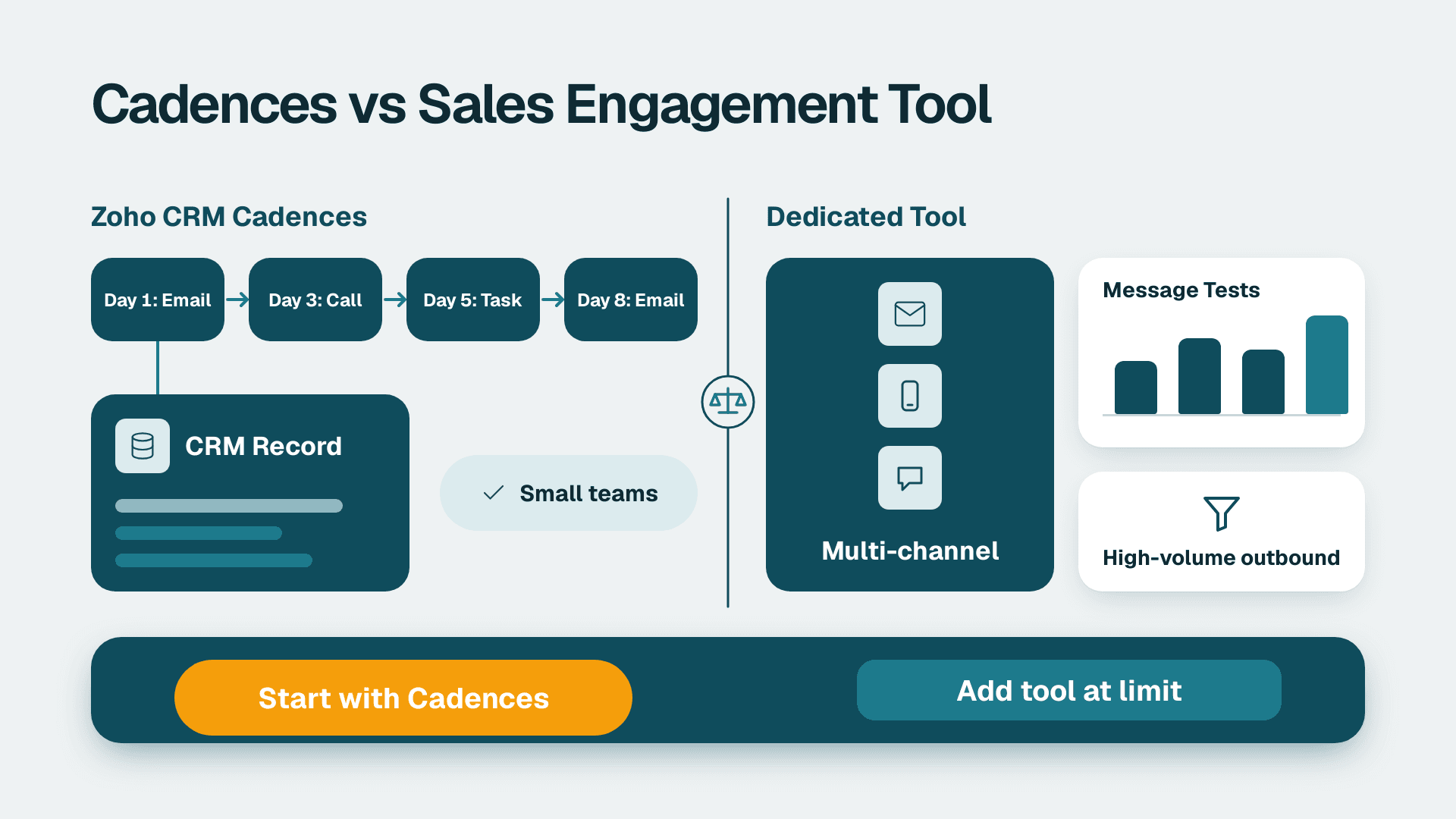
Zoho CRM Cadences can replace a separate sales-engagement tool for small teams whose follow-up is mostly scheduled emails, calls and tasks tied to CRM records. They fall short for high-volume outbound, deep message testing, large-scale multi-channel prospecting and prospect data sourcing. Most SMBs should start with Cadences and add a dedicated tool only when a specific limit starts to bite.
Key Takeaways
- Zoho CRM Cadences coordinate tasks, calls and emails in one follow-up flow, so reps stop duplicating or contradicting each other.
- For inbound-led and account-based SMB teams, Cadences usually cover the follow-up job without a second subscription.
- Edition and add-on limits change, so confirm cadence counts and channel options on Zoho's current pricing page before you design around them.
- Dedicated engagement platforms still win on outbound scale, sourcing and testing depth, not on basic follow-up discipline.
- Clean CRM data matters more than the tool: a cadence can only reach the contacts and fields it can actually use.
What are Zoho CRM Cadences and what do they automate?
Zoho CRM Cadences are structured, multi-step follow-up sequences that live inside the CRM and run against lead and contact records. They sit under the Process Management area of the product, alongside other tools that standardise how a sales team works. Per Zoho's cadences overview, the feature coordinates tasks, calls and emails so that, for example, a customer is not called about an offer they already turned down over email.
That coordination is the real value. Most small teams do not lose deals because they lack a clever sequencing algorithm. They lose them because follow-up depends on memory, a spreadsheet or whoever happens to be in the office. Cadences turn the follow-up rule into a defined path that the CRM enforces.
Because cadence design is a process question as much as a settings question, many teams get help from Zoho CRM consulting before they build more than a handful of sequences. The goal there is simply to map the sales stages first and the steps second.
Tasks, calls and emails in one flow
A cadence strings together different touch types over a schedule. A typical sequence for a new inbound enquiry might start with a same-day email, add a call task for the rep a day later, send a follow-up email after that and finish with a closing note. The rep sees calls and tasks in their normal CRM workload rather than in a second tool.
This matters for hand-offs. When the email, the call and the task all belong to one flow, the system knows what has already happened. That is what prevents the awkward situation of a prospect getting a cheerful reminder about something they already declined.
How enrollment and exit work
Cadences support both dynamic and manual modes for enrolling leads in a cadence or removing them. Manual mode suits a rep who decides case by case. Dynamic mode suits rules such as 'every new lead from this source with this status joins this sequence'.
Exit logic is just as important. Per a Zoho community thread on auto-responses, a lead is automatically unenrolled when a reply is detected, and the system attempts to recognise auto-responses such as out-of-office messages and ignore them. Treat that as a helpful default, not a guarantee, and test it with your own mail setup before trusting it at scale.
What reporting do you get?
Zoho states that cadences come with detailed reports for measuring how effective follow-up processes are. In practice this is record-level reporting built on CRM data: which records were enrolled, which follow-ups went out and what happened next. That is useful for a sales ops lead who wants to see whether follow-up is happening at all. It is a different thing from the per-message analytics some dedicated engagement tools centre on, and community discussions show users asking about open-level visibility, so check the current state of that feature against your needs.
Which Zoho CRM editions include Cadences?
Cadence availability and the number of cadences you can run depend on your Zoho CRM edition, and Zoho has published updates covering limits and add-on options. Because those numbers change, this article does not quote them. Check the live pricing page for your edition, and compare plans using our Zoho CRM pricing plans comparison for 2026.
The table below lists what to verify before you commit to a design, rather than guessing at figures.
| What to check | Why it matters | Where to confirm |
|---|---|---|
| Cadences allowed per module | Caps how many sequences you can build for leads versus contacts | Zoho pricing page and in-product limits |
| Active cadences at one time | Determines whether you can run several segments in parallel | In-product settings for your edition |
| Channel options and add-ons | Decides whether extra touch types need a paid add-on | Zoho release notes and your account view |
| Email sending limits | Affects how many follow-ups you can send per day | Zoho help documentation |
| Reporting scope | Sets how much follow-up analysis you can do natively | Reports module in your edition |
A US healthcare services firm, a UK fintech or a Canadian manufacturer will all face the same practical step: pick the edition based on how many distinct follow-up journeys you actually run, not on the headline feature list. A team with one inbound journey needs far less headroom than a team with separate flows for new leads, dormant leads, quote follow-up and renewals.
Zoho CRM Cadences vs a dedicated sales-engagement platform: where does each win?
Cadences win on simplicity and data proximity, because the sequence runs next to the lead, deal and account records. Dedicated sales-engagement platforms win when outbound volume, prospect sourcing and message testing are the core of the sales motion. The comparison below uses qualitative terms on purpose, since vendor limits vary.
| Capability | Zoho CRM Cadences | Dedicated engagement platform (typical) |
|---|---|---|
| Runs on CRM records natively | Yes, no sync needed | Usually relies on a CRM integration |
| Coordinates tasks, calls and emails | Yes | Yes |
| Dynamic and manual enrollment | Yes | Yes |
| Stops on reply | Yes, with auto-response handling | Yes |
| Prospect database and contact sourcing | Not the purpose of the feature | Often built in or bundled |
| High-volume cold outbound tooling | Not the design focus | Often a core strength |
| Message and subject-line testing | Verify against your edition | Typically deeper |
| Extra subscription and admin overhead | None beyond the CRM | Separate licence and setup |
The pattern is clear. If your pipeline is mostly warm, meaning web forms, referrals, event contacts and existing customers, the CRM already has everything the sequence needs. If your pipeline is mostly cold, meaning purchased or scraped lists and many hundreds of new prospects a week, you are buying data and throughput, and a CRM feature will feel thin.
For a broader view of how Zoho compares with a simpler pipeline tool, see our piece on Zoho CRM versus a simpler pipeline-focused tool.
When can Zoho CRM Cadences replace a separate tool?
Cadences can replace a separate tool when your follow-up problem is consistency, not scale. Three hypothetical profiles show where this holds.
Inbound-led small businesses
Suppose a 10-person US professional services firm gets leads from a website form and referrals. Their pain is that enquiries sit for two days and nobody chases a quote. A cadence that sends an acknowledgement, creates a call task and follows up on unanswered quotes solves that without any new software. Adding a dedicated platform here would mostly add a second place to look.
Teams that need follow-up inside regulated workflows
Consider a UK or EU business subject to GDPR and PECR, or a Canadian company working under PIPEDA and CASL. Keeping consent status, contact history and outreach in one system makes it far easier to honour opt-outs and answer data requests. When the sequence runs inside the CRM, the suppression logic and the record live together. A separate tool can do this too, but only if the sync is reliable, and that sync becomes something to audit.
A US healthcare-adjacent firm has a similar concern around HIPAA. Keep protected health information out of email content and sequence templates regardless of tool, and have your compliance lead approve any automated messaging.
Reviving cold leads you already own
Re-engaging inactive leads is a natural fit. Zoho's own partner support material describes cadences as a way to systematically manage and automate re-engagement of leads who have gone quiet. The contacts already exist, the history is in the CRM and the sequence is short. This is often the highest-return first cadence a small team builds.
What are the limits of Zoho CRM Cadences?
The limits fall into five areas: data quality, scale, testing depth, sourcing and compliance ownership. None is a flaw so much as a boundary of what a CRM feature is for.
Your data decides what a cadence can reach
Automation can only act on fields it can read. One client we worked with ran a supplier mass mail that kept reporting 'No emails have been sent'. The cause was that Zoho mass email only sends to the standard Email field, and their addresses lived in a custom Primary_Email field. After we backfilled the standard field, coverage went from 77 of 358 records to 283 of 358, and the resend delivered 206 of 206. That case involved mass email rather than Cadences, but the lesson carries over: before you build a sequence, audit which email, phone and owner fields are actually populated and which one the automation reads.
Scale and sending controls
Cadences are built for a rep following up their own pipeline. They are not designed as a bulk cold-outbound engine with multiple mailboxes, warm-up routines and rotation. If your plan depends on that, test the sending limits for your edition first, or accept that a dedicated tool is the right fit for that motion.
Testing and analytics depth
Record-level reports tell you whether follow-up happened. They do not necessarily tell you which subject line outperformed another across thousands of sends. Teams that want constant experimentation will find dedicated platforms more comfortable. Teams that want discipline will find Cadences enough.
No prospect sourcing
A cadence needs a contact to exist. If your sales plan starts with 'find me 500 decision makers in this segment', that is a data-sourcing job and not a sequencing job. Many SMBs solve this separately and then load the results into the CRM, where Cadences take over.
Compliance remains your responsibility
No tool makes outreach lawful on its own. US senders need to respect CAN-SPAM requirements. UK and EU senders need a lawful basis under GDPR and must follow PECR rules on electronic marketing. Canadian senders must meet CASL consent rules and PIPEDA data handling. Configure unsubscribe handling, record consent and review templates with whoever owns compliance, whichever tool you choose.
How do you set up Zoho CRM Cadences without creating noise?
Start small, tie each cadence to a clear stage and measure whether follow-up is happening before you add complexity. Here is a practical sequence.
1. Pick one journey. Choose the leak that costs the most, such as unanswered inbound leads or stale quotes.
2. Audit the fields. Confirm the email, phone and owner fields are populated, and that the one the automation reads is the one you maintain.
3. Write short sequences. Four to six touches across a few weeks is easier to manage than a sprawling schedule.
4. Choose the enrollment mode. Use manual enrollment while you learn, then move to dynamic rules once the sequence behaves as expected.
5. Test exit behaviour. Send yourself replies and an out-of-office message to see how unenrollment responds.
6. Review reports monthly. Look at which records entered, which stalled and where reps skipped tasks.
Cadences work best when they sit inside a defined process. Our guide to building a Zoho CRM blueprint for sales process automation shows how to set the stages that cadences then hook onto. If the sequence needs to trigger actions in other apps, such as a notification or a record update elsewhere, Zoho Flow is the usual route.
If your automation has grown tangled over time, our walkthrough on simplifying sales automation when it takes too much work is a useful reset before you add another layer.
Should you add a dedicated tool alongside Cadences?
Add a dedicated tool only when you can name the specific capability Cadences lack that you need this quarter. A good test is to write down the job in one sentence. 'Our reps forget to follow up' is a Cadences job. 'We need to email 2,000 new prospects a week with tested variants' is a dedicated-tool job.
Three signals suggest the time has come:
- Your pipeline depends on cold outbound rather than inbound or existing relationships.
- Reps spend more time sourcing contacts than speaking to them.
- Leadership wants message-level experimentation as a standing practice.
If none of those apply, the cheaper and tidier path is to run follow-up in the CRM you already pay for. You keep one system of record, one set of permissions and one place to answer a data request. If one of them does apply, you can still keep Cadences for warm leads and customers while the other tool handles cold outreach, provided the two do not email the same person at the same time.
---
About Lets Viz: Lets Viz is a data analytics and CRM consulting firm that has helped teams design, clean up and automate their Zoho, Power BI and wider data stacks since 2020. We work with US healthcare providers, UK fintech firms, Canadian manufacturers and global SaaS companies, and hold a 5.0 rating on Clutch.
If you want help mapping follow-up journeys, cleaning the fields behind them and building cadences that fit your sales process, explore our Zoho CRM consulting service.
Sources
- Zoho CRM Cadences - Process Management overview
- CRM Cadences recognise auto-responses - Zoho Community
- Explore How to Re-Engage with Cold Leads Using Cadences in Zoho CRM - Zoho Help
Facts and prices checked November 2026.