Zoho People: Leave, Attendance, Performance, Recruit, Payroll
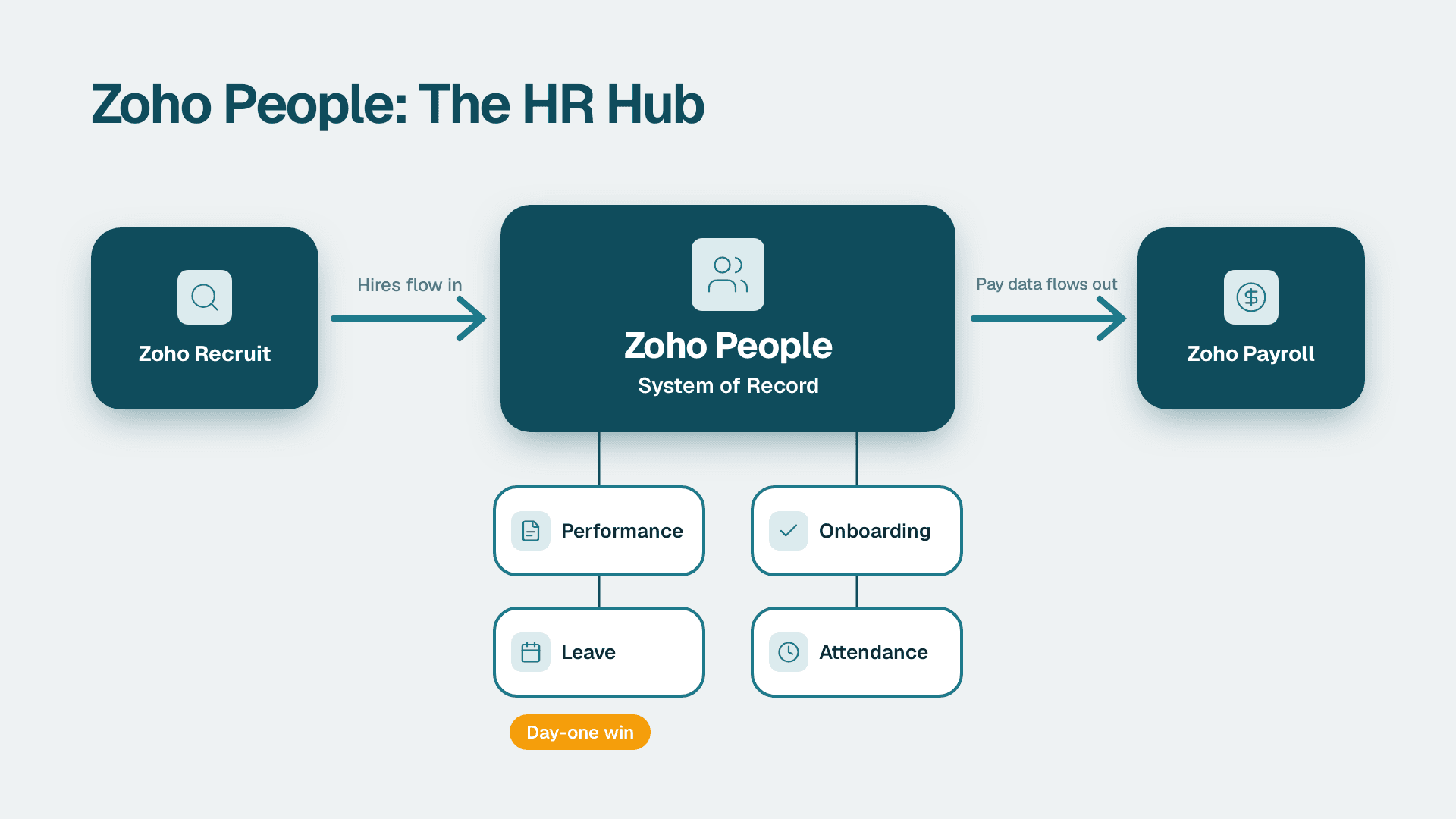
Zoho People is Zoho's cloud-based HR system. It covers onboarding, leave, time and attendance, and performance in one employee record, and it connects to Zoho Recruit for hiring and Zoho Payroll for pay runs. For a growing HR team, it works best as the system of record that Recruit feeds and Payroll reads.
Key Takeaways
- Zoho People centralises the core HR cycle: onboarding, leave, attendance, performance, learning, documents and engagement.
- Leave and attendance are the strongest day-one use cases because they replace spreadsheets and email approvals.
- Performance tools matter more as headcount grows past what a manager can track informally.
- Recruit and Payroll are separate Zoho products that integrate with People, so you can adopt them in stages.
- Inside a wider Zoho One setup, People becomes the employee data source for CRM, Books, Desk and Creator workflows.
What is Zoho People and what does it cover?
Zoho People is a cloud HR software product from Zoho Corporation. According to the official Zoho People product page (2026), it covers onboarding, time and attendance, performance, learning management, an HR help desk, document management, employee engagement and reports. Think of it as the HR equivalent of a CRM: one place where the people side of the business lives.
Zoho states that more than 50,000 businesses, over a million users and customers in more than 165 countries use the product. That is vendor-reported data, so treat it as a signal of maturity rather than a benchmark for your own results. What matters for a small or growing team is the breadth: you can start with leave and attendance and add modules as your needs grow.
The product is built around a single employee profile. Every module reads from and writes to that profile, which is why a leave request can affect attendance records and why an appraisal can reference the same job title that onboarding created. When HR data lives in separate spreadsheets, those links break. When it lives in one record, reports become straightforward.
If you are still deciding whether the wider suite is the right home for HR, the guide on whether Zoho One is worth it for small business lays out the suite-level trade-offs. Teams that want help mapping HR processes onto Zoho before they configure anything often bring in Zoho consulting services to design the structure first, since changing roles, approval chains and leave policies after go-live is more disruptive than getting them right at the start.
Which modules matter first?
Most growing teams do not need every module on day one. A practical order looks like this:
1. Core HR and employee records - the foundation everything else depends on.
2. Leave and attendance - high volume, high frustration, quick payoff.
3. Onboarding and documents - consistent first weeks and a clean paper trail.
4. Performance - goals and reviews once managers need a shared structure.
5. Engagement and learning - useful after the basics are stable.
The HR help desk and reporting features sit across all of these. They are worth switching on early because they reduce the repeated questions that otherwise land in an HR inbox.
How does Zoho People handle leave and attendance?
Zoho People manages leave and attendance as connected parts of the same employee record. Employees request time off, managers approve it, and the balances and attendance calendar update without anyone retyping data into a spreadsheet. That makes these two modules the quickest way to see value from the system.
Leave management
Leave is where most informal HR processes first break down. A spreadsheet works for ten people. At forty, with several locations, part-time staff and different entitlements, it produces disputes. A leave tracker replaces that with rules.
In practice, you define leave types, set who is eligible, decide how balances accrue and carry over, and route requests to the right approver. Employees see their own balance before they ask. Managers see who else is away before they approve. HR sees the whole picture on a calendar.
The policy design is the hard part, not the software. Decisions to settle before configuration:
- Which leave types you offer and who qualifies for each.
- Whether balances accrue monthly, annually or on a fixed grant.
- How carry-over and expiry work.
- Whether approvals go to a direct manager, a department head or HR.
- How public holidays differ by location.
That last point matters for teams spread across markets. A business with staff in the US, the UK and Canada has three different sets of public holidays and statutory expectations. Model each location separately rather than forcing one policy on everyone.
Time and attendance
Attendance covers check-in and check-out, working hours, shifts and the exceptions that follow (late arrivals, early exits, missing entries). Zoho notes that the product is available on a mobile app for Android and iOS, and the Zoho People listing on Google Play describes it as a cloud-based HR app for employees and HR professionals. For field teams or hybrid workers, mobile check-in is often the feature that makes attendance tracking realistic.
The operational value is in the exceptions. Rather than reviewing every record, HR can focus on the entries that break a rule. Clean attendance data also matters later, because payroll depends on it. If attendance is wrong, pay is wrong.
Why leave and attendance should be configured together
A half-day leave that does not reduce the attendance record, or an approved absence that still shows as unexplained, creates manual correction work every pay cycle. Configure the two modules in the same session, using the same calendar, shift and holiday definitions. Test with a handful of real employees before opening it to the whole company.
How does performance management work in Zoho People?
Performance management in Zoho People gives managers and employees a shared structure for goals, feedback and reviews. It replaces the annual scramble of rebuilding a year from memory with a record that builds up through the cycle, so the review conversation starts from evidence.
The features that matter for a growing team are the practical ones:
- Goals that employees and managers can both see and update.
- Review cycles with defined timelines and participants.
- Feedback gathered from more than one person, not just the line manager.
- History that stays attached to the employee record across years.
Zoho also lists engagement features, including eNPS surveys and engagement surveys, on its product page. These are useful as a pulse check between formal reviews. An eNPS survey asks how likely employees are to recommend the company as a place to work, and the trend over time tells you more than any single score.
What changes as headcount grows?
Under fifteen people, a founder can hold performance in their head. Past thirty or forty, that stops working. Managers evaluate differently, ratings drift, and high performers in one team are compared unfairly with those in another. A structured system does not fix management quality, but it does make inconsistency visible.
Keep the first cycle simple. A common mistake is to build a multi-section appraisal with a dozen competencies and then watch managers rush through it. Start with a small number of goals and a short written assessment, then add complexity once the habit exists.
Connecting performance to learning
The learning management module sits close to performance for a reason. When a review identifies a skills gap, the follow-up action should be recorded somewhere: a course, a mentor or a stretch assignment. If performance and development are separate systems, the follow-up rarely happens.
How does Zoho People fit with Recruit and Payroll?
Zoho People integrates with both Zoho Recruit and Zoho Payroll, but they are separate products with separate jobs. Recruit manages the hiring pipeline up to the offer. People holds the employee once they join. Payroll turns the attendance and leave data People holds into pay. The integration passes information between them so nobody rekeys it.
Zoho's product page lists integrations with Zoho Payroll, Zoho Sign, Zoho Expense and Zoho Recruit, along with common office suites and automation tools. Zoho also states that People's payroll and expense capabilities work through the integrations with Zoho Payroll and Zoho Expense, which is a useful clarification: the payroll engine is not inside People itself.
| Stage | Product | What it handles | What flows onward |
|---|---|---|---|
| Hiring | Zoho Recruit | Job postings, candidate pipeline, interviews, offers | Accepted candidate details to the employee record |
| Core HR | Zoho People | Onboarding, leave, attendance, performance, documents | Attendance and leave data to payroll |
| Pay | Zoho Payroll | Pay runs, deductions, payslips, statutory handling | Payroll results back for reporting |
| Spend | Zoho Expense | Expense claims and reimbursements | Approved claims to finance |
| Signatures | Zoho Sign | Contracts and policy acknowledgements | Signed documents to the employee file |
Recruit to People: the handover
The weakest point in most hiring processes is the handover between an accepted offer and the first day. Candidate details sit in one system, the contract in an inbox, and HR retypes it all. Connecting Recruit to People means the candidate data becomes the start of the employee record, and onboarding tasks can begin as soon as the offer is accepted.
The benefit is not only speed. It is accuracy: names, addresses, start dates and job titles enter once and stay consistent.
People to Payroll: where errors cost money
Payroll is the most unforgiving part of HR. Unapproved leave, a missing attendance record or a wrong start date shows up as an incorrect payslip. When attendance and leave are clean in People and the integration is configured, Payroll starts from reliable inputs.
Payroll rules vary a great deal by country. Tax treatment, statutory deductions and reporting obligations differ between the US, the UK and EU member states, and Canada, so confirm with Zoho's current documentation that Zoho Payroll supports your locations before you commit. Where it does not, many teams keep their existing payroll provider and use People for everything upstream. That is a legitimate setup, and it is worth deciding deliberately.
Is Zoho People Plus the same thing?
No. Zoho People Plus is a broader unified HCM suite. According to Zoho's People Plus page (2026), it covers talent acquisition, core HR, time and attendance, talent management, payroll, travel and expense, and business chat and collaboration. It also has a mobile application for Android and iOS.
The difference is packaging. Zoho People is the HR product on its own, which you connect to Recruit and Payroll as needed. People Plus bundles those capabilities as one suite. If you want to adopt step by step, People with integrations suits you. If you want one bundled HR platform from the start, compare People Plus. Check current plan details on Zoho's site rather than relying on a third-party summary, because tiers change.
Where does Zoho People sit inside a Zoho One setup?
Inside a wider Zoho setup, Zoho People becomes the source of truth for employee data. Other apps in the suite can then use that data, so a sales rep's leave can inform CRM assignment and a support agent's schedule can inform Desk routing. The value comes from connecting HR to the operational tools, not from running People in isolation.
A few examples of how that works for a business running several Zoho apps:
- CRM: deal and lead ownership can be reassigned when a rep is on approved leave, so leads do not sit untouched.
- Desk: agent availability can reflect the attendance calendar, which helps with ticket assignment.
- Books: headcount and payroll costs feed finance reporting, and expense claims reach the ledger through approvals.
- Creator: HR processes that do not fit standard modules, such as equipment requests or internal transfers, can become custom apps. The explainer on what Zoho Creator is used for shows what no-code apps look like in practice.
The connective tissue is automation. Rather than building point-to-point integrations by hand, most teams use a workflow tool to move data between apps. The article on Zoho Flow and cross-app automation covers how that works. For reporting across HR and the rest of the business, Zoho Analytics is the natural next layer, since headcount, absence and cost data are far more useful alongside sales and finance numbers.
Zoho also states that for People Plus it owns and operates its entire tech stack and data centres, with an ad-free model and granular access controls. Access controls are the part to focus on. HR data is sensitive, and the question for any setup is who can see what: a manager should see their team, not salary data for the whole company.
When should a growing HR team move to Zoho People?
The signal to move is when HR admin starts consuming time that should go to people. Typical triggers are leave disputes, payroll corrections caused by bad attendance data, inconsistent onboarding, or managers asking where review notes are. If two or three of those sound familiar, a system will pay back the effort.
Three hypothetical examples show how the decision plays out in different markets. These are illustrative scenarios, not client results.
A US healthcare services firm. Suppose a 60-person outpatient group tracks leave in spreadsheets and onboards clinicians through email. Their priority is a documented onboarding checklist and controlled access to employee files. They would need to consider HIPAA obligations for anything touching patient-related staffing information and SOC 2 expectations from enterprise customers, so role-based access and an audit trail matter as much as the leave calendar.
A UK fintech. Consider a 40-person firm hiring quickly across the UK and the EU. Here, GDPR shapes the design: what employee data is collected, how long it is retained, who can access it, and how it is deleted. Recruit's candidate data raises the same questions, so retention rules for unsuccessful applicants should be set before the first requisition goes live.
A Canadian manufacturer. Imagine a 120-person company with shift workers across two plants. Attendance and shift scheduling matter most, because they drive payroll accuracy. PIPEDA governs how personal information is handled, so the team needs clarity on consent, access requests and where data is stored.
In all three, the pattern is the same: the technology is straightforward and the policy decisions are the work. Settle the rules first, then configure.
When Zoho People is not the right move
It is fair to say when a change is premature. A team of eight with simple leave rules and no hiring plans may be well served by a lightweight process for another year. And if your organisation needs deep, country-specific payroll in a market Zoho Payroll does not cover, you will still need a separate payroll provider. The right question is not whether the product has a feature, but whether your HR problems are the kind a system solves.
How do you roll out Zoho People step by step?
A successful rollout takes a staged approach: define the structure, load clean data, configure one module at a time, pilot with a small group, then expand. Rushing all modules at once is the most common reason HR implementations stall.
1. Map your organisation. List departments, locations, reporting lines and job titles. This structure drives approvals and permissions.
2. Write down your policies. Leave types, accrual rules, working hours, holiday calendars and approval chains should exist on paper before they exist in the system.
3. Clean and import employee data. Fix duplicates, missing fields and inconsistent job titles before upload. Bad data imported fast is still bad data.
4. Configure leave and attendance first. Test with a pilot group across at least one full cycle.
5. Add onboarding and documents. Build a checklist per role type and attach policy documents for acknowledgement.
6. Introduce performance. Launch a simple first cycle, then refine.
7. Connect Recruit and Payroll. Only after core HR is stable, so integration errors are easy to trace.
8. Set up reports. Headcount, absence rates and review completion are good starters.
Settings worth checking early
| Area | What to decide | Why it matters |
|---|---|---|
| Roles and permissions | Who sees salary, personal and review data | Protects sensitive records and supports compliance |
| Approval chains | Manager, department head or HR | Avoids bottlenecks and unapproved absences |
| Leave policies | Types, accrual, carry-over, expiry | Prevents balance disputes |
| Holiday calendars | One per location | Keeps multi-country teams accurate |
| Data retention | How long records and candidate data are kept | Supports GDPR and PIPEDA expectations |
| Integrations | Which products connect and in what order | Limits rework and reconciliation |
What should you check before you commit?
Test it with your own data before you decide. Zoho offers a 30-day free trial on all Zoho People plans, which is long enough to run a real leave request cycle and a small attendance pilot. Use it to answer practical questions rather than to click through a demo.
A short evaluation checklist:
- Can you model your actual leave policies, including the awkward ones?
- Does the approval flow match how decisions get made in your company?
- Can employees complete common tasks from the mobile app without training?
- Do the Recruit and Payroll integrations cover the locations you operate in?
- Can you control access so managers only see their own teams?
- Do the reports answer the questions leadership asks?
For pricing, rely on Zoho's current plan pages. Plan names, limits and costs change, and the right plan depends on which modules you need and how many employees you have. Do not budget from an old comparison article.
Finally, plan for adoption as much as configuration. The best-configured system fails if managers keep approving leave by email. Pick a date, announce that the system is the only valid route, and give managers a one-page guide. HR systems succeed when the habit changes, not just when the software goes live.
---
About Lets Viz: Lets Viz has delivered analytics and business-systems consulting since 2020, working with clients across US healthcare, UK fintech, Canadian manufacturing and global SaaS. Our work is backed by a 5.0 Clutch rating, and our Zoho guidance comes from hands-on configuration of CRM, Creator, Books, Desk and HR workflows.
If you want help planning an HR rollout across the Zoho suite, our Zoho consulting services team can map your processes, configure the apps and connect the data.
Sources
- Zoho People - official product page
- Zoho People Plus - unified HR suite
- Zoho People - HR Management on Google Play
Facts and prices checked October 2026.