Zoho Flow: How to Automate Work Across Zoho and Other Apps
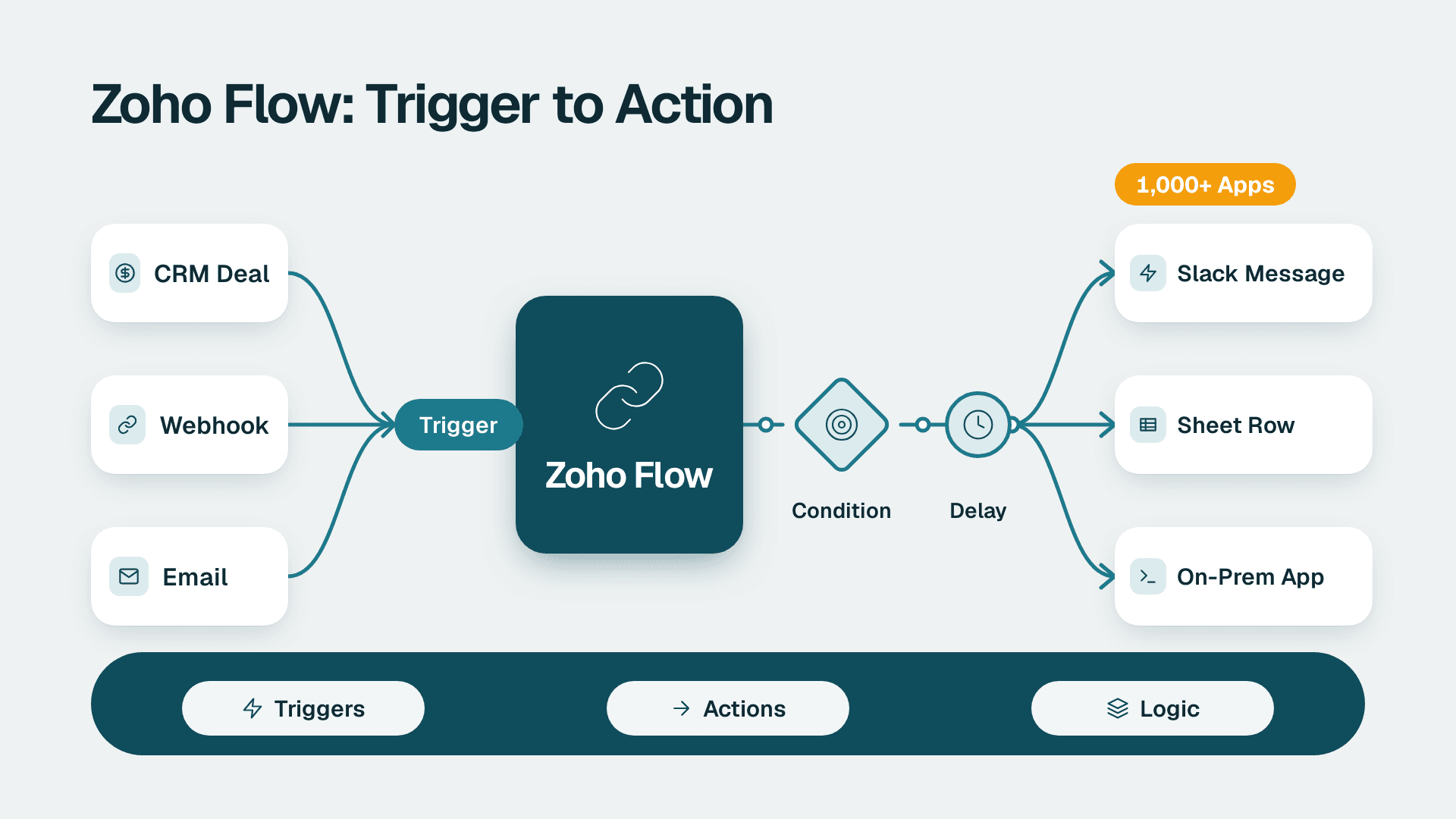
Zoho Flow is Zoho's no-code integration platform. It connects 1,000+ cloud and on-prem apps, so an event in one system, such as a new CRM deal, a webhook or an email, can trigger actions in others without manual copying. It suits cross-app automation. Heavy logic inside a single Zoho app is usually better handled with Deluge.
Key Takeaways
- Zoho Flow is built for moving data and triggering actions between apps, not for building full applications.
- Flows start from a trigger (polling, webhook, email or RSS), then run actions, branches, delays and custom functions.
- Use Flow for cross-app plumbing, Deluge for logic inside Zoho apps, and an open-source workflow tool when you need self-hosting or heavy custom code.
- Check current plan limits and pricing on Zoho's own pages before you commit, because task allowances change.
- Design for failure from day one: error branches, reruns and versioning matter more than the first successful test.
What is Zoho Flow?
Zoho Flow is an AI-powered integration platform that connects apps and automates workflows between them. Think of it as the layer that sits between your systems and moves information so people stop retyping it.
A typical small business running the Zoho suite has CRM for sales, Books for invoicing, Desk for support and Creator for custom apps. Each works well alone. The pain starts at the seams: a won deal in CRM that never becomes an invoice, or a support ticket that nobody links to the customer's account. Flow closes those seams. If you are still deciding whether the suite is right for you, our guide on what Zoho One is and whether it is worth it for small business covers the bigger picture.
People search for it in several ways: "zoho flow", "flow zoho" and "zoho flows" all describe the same product. Each automation inside it is called a flow, which is why you will often hear "zoho flows" in the plural.
Flow also reaches beyond Zoho. Its catalogue spans Zoho apps, third-party apps, AI platforms and ERP systems, and it can reach on-premises systems through its on-prem agent. If your integration needs go past a few simple connections, a specialist in Zoho consulting services can map them against your processes before you build.
Zoho also lets you describe a workflow in plain English and have Zia, its AI assistant, build a first version that you then refine in the drag-and-drop builder. Treat that as a fast first draft. You still need to check every field mapping and condition yourself.
Is Zoho Flow free, and what does Zoho Flow cost?
The mobile app is free, but the platform itself is metered by plan. Zoho Flow is sold in tiers that differ in the number of tasks, flows and features available, and those allowances change over time.
What we can confirm from Zoho's listings is narrow. The Zoho Flow iPhone app is free to download, but that only gets you a way to monitor and manage flows from your phone. It does not tell you what your workflows will cost to run. We are deliberately not quoting plan prices or task limits here, because we could not verify current figures, and a wrong number in a budget is worse than none.
When you cost a rollout, ask these questions rather than relying on a headline price:
- How many runs will your busiest flow consume in a month? A flow triggered by every new lead or every ticket reply adds up quickly.
- Which apps do you need? On the apps directory, some entries such as Calendly, BigCommerce, Bitbucket and Expensify are tagged Premium, which signals they may sit behind a higher tier.
- Do you need on-prem connections, multiple users with role-based permissions, or flow versioning? These are the features that tend to separate plans.
- Are you already paying for Zoho One? Check what your bundle includes before buying Flow separately.
A practical way to estimate: list your top five repetitive tasks, count how often each happens in a month, and multiply by the number of steps in the flow. That gives you a defensible task estimate to compare against the current plan page on Zoho's site.
How do Zoho flows work: triggers, actions and logic?
Every flow has one trigger and one or more actions. The trigger waits for something to happen, and the actions respond. Zoho Flow workflows can be triggered from polling APIs, webhooks, templated emails and RSS feeds.
That gives you four practical patterns:
| Trigger type | How it works | Good for |
|---|---|---|
| Polling API | Flow checks the app at intervals for new or changed records | Apps with a native connector, such as a new CRM contact |
| Webhook | The source app pushes an event to Flow the moment it happens | Near-real-time events from custom or third-party systems |
| An incoming templated email starts the flow, with rules to parse it | Order notifications, form alerts, vendor messages | |
| RSS feed | Flow reads new items from a feed | Content monitoring and publishing alerts |
A second Zoho Flow site lists webhooks, emails and URL polling as trigger sources, with configurable rules to parse incoming data. That parsing step is easy to underestimate. Emails and webhook payloads arrive messy, and a few well-written rules keep bad data out of your CRM.
Logic you can add between trigger and action
The builder is not limited to straight lines. Listed features include decision branches, delays, custom functions, error branching, auto and manual reruns, flow versioning and role-based permissions for teammates. In plain terms:
- Decision branches route a record down different paths, for example high-value leads to a senior rep and the rest to a nurture sequence.
- Delays pause a flow, useful for waiting two days before a follow-up task.
- Custom functions let you run code when the drag-and-drop blocks are not enough.
- Error branching defines what happens when a step fails, rather than leaving it to chance.
- Versioning lets you change a live flow without losing the version that worked.
There is also AI help in the flow itself. Zia Utilities can rephrase, summarize or extract content, which helps when a flow needs to pull a company name out of a long inbound email or summarize a ticket for a manager.
How do you build your first flow in Zoho Flow?
Start with one small, painful, repetitive task and build it end to end before touching anything else. A flow that reliably does one thing beats an ambitious one that half-works.
Here is a sensible sequence, using "create an invoice draft when a CRM deal is won" as the example:
1. Define the trigger and the outcome in one sentence. "When a deal moves to Closed Won in CRM, create a draft invoice in Books and notify the account owner." If you cannot write it in one sentence, split it into two flows.
2. Connect your accounts. Authorize each app with an account that has the permissions the flow needs, ideally a dedicated integration user instead of a personal login, so the flow does not break when someone leaves.
3. Choose the trigger and test it with real data. Pull in a sample record and confirm the fields you need are present.
4. Add the action and map fields deliberately. Map customer, amount, currency and tax fields one by one. Do not rely on auto-matching for money fields.
5. Add a decision branch for edge cases. Deals with no amount, a missing email or a duplicate customer should go to a review path, not into your ledger.
6. Add an error branch. Send a message to a named person or channel when a step fails.
7. Run a test, then publish. Test with a record that is clearly marked as a test, check the result in the destination app, and only then switch the flow on.
If you would rather start from a description, you can use the plain-English route and let Zia draft the flow. Review every step it creates as if a new hire had built it.
For teams whose first target is sales, our piece on simplifying sales automation when it takes too much work is a useful companion for choosing which handoffs to automate first.
Which apps can Zoho Flow connect, including on-prem systems?
Zoho states that Flow connects more than 1,000 apps, but sources differ on the exact count. The apps directory is headed "1000+ apps ready to connect" and offers filters such as Zoho, New, Popular, Premium and On-prem. The App Store listing, by contrast, describes 850+ applications. The safest reading is that the catalogue is large and growing, and that you should search the directory for the specific apps you depend on before you plan around them.
The feature that most separates Flow from lighter tools is on-prem support. According to Zoho Flow's site, it supports three connection combinations: Cloud to Cloud, Cloud to On-prem, and On-prem to On-prem. The on-prem examples named there are SQL databases and intranet applications, plus the ability to run command line scripts for custom actions.
That matters for businesses that still keep a database or legacy tool behind a firewall. A Canadian manufacturing company, for instance, might keep a production database on a local server while using CRM and Desk in the cloud. An on-prem agent can bridge the two without moving the database.
Here is a quick way to think about connection types:
| Connection | Example scenario | What to plan for |
|---|---|---|
| Cloud to Cloud | CRM deal to Books invoice | Permissions, field mapping |
| Cloud to On-prem | Desk ticket to a local SQL record | Installing and maintaining the agent, network access |
| On-prem to On-prem | Intranet app to a local database | Agent uptime, who owns the host machine |
Before you build, check whether the connector exposes the specific action you need. A connector for an app does not guarantee every endpoint or field is available. If it is missing, a webhook or custom function is often the workaround.
Zoho Flow vs Deluge vs n8n: which should you use?
Use Flow to connect apps, Deluge to write logic inside Zoho apps, and a self-hosted workflow tool such as n8n when you need full control over hosting and code. The right choice depends on where the logic lives and who will maintain it.
Deluge is Zoho's own scripting language, used inside CRM, Creator, Books and other Zoho apps. It is the better fit when the work happens inside one Zoho product: validating a field before save, calculating a value, updating related records or building custom behaviour in a Creator app. If your use case is closer to building an internal app, read what Zoho Creator is used for first, because Creator plus Deluge may cover it without Flow at all.
n8n is an open-source workflow automation tool. It tends to appeal to technical teams who want to self-host, write substantial custom code, or build AI agent workflows with fine control. The trade-off is that your team owns the hosting, updates, security and monitoring.
| Factor | Zoho Flow | Deluge | n8n |
|---|---|---|---|
| Best for | Moving data between apps | Logic inside a Zoho app | Self-hosted, code-heavy automation |
| Skill needed | Low to moderate | Moderate (scripting) | Moderate to high |
| Hosting | Zoho's cloud | Zoho's cloud | Yours or a managed host |
| Zoho integration | Native | Native | Via API or connectors |
| On-prem reach | Via on-prem agent | Limited to what the app exposes | Depends on where you host it |
| Maintenance owner | Business or ops team | Whoever can script | Technical team |
A few rules of thumb:
- If two or more apps are involved and the logic is simple, start with Flow.
- If everything happens inside one Zoho app, start with Deluge, or a built-in workflow rule.
- If you need to call many external APIs, transform data heavily or keep everything on your own servers, consider n8n or a similar tool.
- If you mix them, document which tool owns which job. Many teams use Flow for the plumbing and Deluge for the calculations, then pass results between them through webhooks.
The common failure is not choosing the wrong tool. It is spreading logic across all three with no map, so nobody can explain why a record changed. Keep a simple register of every automation: its trigger, its owner and what it touches.
What do Zoho Flow automations look like in the US, UK/EU and Canada?
The mechanics are the same everywhere. What changes is the compliance wrapper around the data you move. The examples below are hypothetical illustrations, not client results.
A US healthcare-adjacent services firm. Suppose a billing company uses Desk for client queries and CRM for accounts. A flow that copies ticket text into other systems could move protected health information where it should not go. In that case, the team would limit the flow to ticket IDs and status fields, and review HIPAA obligations with their compliance lead before connecting anything new.
A UK fintech or EU SaaS team. A subscription business might route sign-ups from a web form into CRM and then into Books for billing. Under GDPR, the team should know which personal data each step stores, where, and for how long. Zoho states that Flow is GDPR compliant and uses AES encryption for sensitive data. That is a helpful starting point, but it does not replace your own data-processing records. Zoho also lists a European Flow address, and EU-based teams should confirm which data centre region their account uses.
A Canadian manufacturing company. A manufacturer might sync quotes from CRM to a local ERP database through the on-prem agent. Under PIPEDA, it needs to be clear about what customer information leaves the premises and who can see it. Flow's role-based permissions for teammates help here, since not everyone who edits a flow should be able to see the data it handles.
In all three cases, the same discipline applies. Minimise the fields you move, restrict who can edit flows, and keep a record of what each flow does. For a broader review of how automated outputs should be checked, see our AI audit steps.
Is Zoho a Chinese or Indian company, and is it safe for your data?
Zoho is an Indian company. Zoho Corporation is headquartered in Chennai, India, and sells to customers worldwide, with offices in several regions including the United States.
For most buyers the more practical question is trust and security rather than origin. On that, Zoho states that Flow runs on Zoho's own cloud infrastructure with 24/7 monitoring and 99.9% uptime. These are vendor claims, so treat them as a starting point. Ask for the current security documentation, check which data centre region your account will use, and confirm how long run logs are kept. If you operate in a regulated sector, include the vendor in your standard due diligence. Our AI vendor due diligence checklist gives a six-step structure you can reuse for any automation vendor.
How do you keep Zoho flows reliable once they are live?
Treat every flow as production software. The first successful run proves little. What matters is what happens on the thousandth run, when a field is blank or an app is briefly unavailable.
Plan for failure
Use error branches to send alerts to a named owner. Zoho notes that its troubleshooting features let you restart entire workflows and rerun specific parts, which saves you from redoing work that already succeeded. Practise using reruns on a test failure so you are not learning under pressure.
Control change
Use flow versioning so you can compare and roll back. Limit edit rights through role-based permissions. Make changes in a copy, test with sample data and then publish. Many broken automations trace back to a quick edit on a live flow.
Watch your data quality
Automation amplifies whatever data you feed it. Duplicate contacts, inconsistent currency fields and free-text statuses will produce confident, wrong results at scale. If your records are untidy, fix that first. Our guide to running an ERP data quality check before AI implementation walks through the same discipline, and it applies equally to CRM and finance data.
Close the loop with reporting
Once flows move data reliably, the next question is whether the numbers are being used. Pushing clean records into reporting tools such as Zoho Analytics turns plumbing into visible results, for example showing how many leads reach invoicing and where they stall.
A short pre-launch checklist
- The flow has a named owner and a one-sentence description.
- Field mappings were checked by a second person.
- Edge cases (blank fields, duplicates) route to a review path.
- An error branch alerts a real person.
- Permissions are limited to people who need them.
- You know how to rerun a failed step and roll back a version.
- The flow is listed in your automation register.
If you follow that list, Zoho Flow becomes a quiet piece of infrastructure rather than a source of surprises. Start with one flow, prove it, document it and only then add the next.
---
About Lets Viz: Lets Viz is a data analytics and automation consultancy that has helped teams since 2020 turn scattered systems into reliable reporting and workflows. We have supported US healthcare, UK fintech, Canadian manufacturing and global SaaS organisations, and we hold a 5.0 Clutch rating.
If you want help deciding which processes to automate and how to wire them across your Zoho apps, explore our Zoho consulting services.
Sources
- Zoho Flow product page
- Zoho Flow integration platform site
- Zoho Flow apps directory
- Zoho Flow on the Apple App Store
- Zoho Flow European address
Facts and prices checked October 2026.