ERP vs CRM: What Each Owns and When You Need Both
Your leads live in a CRM, your invoices and stock live somewhere else, and you are not sure whether you need an ERP as well. The short answer: a CRM owns the customer pipeline, an ERP owns money, stock and operations, and a small Zoho team usually needs both only once orders, inventory or billing get messy. Zoho CRM with Books and Inventory covers that.
Key Takeaways
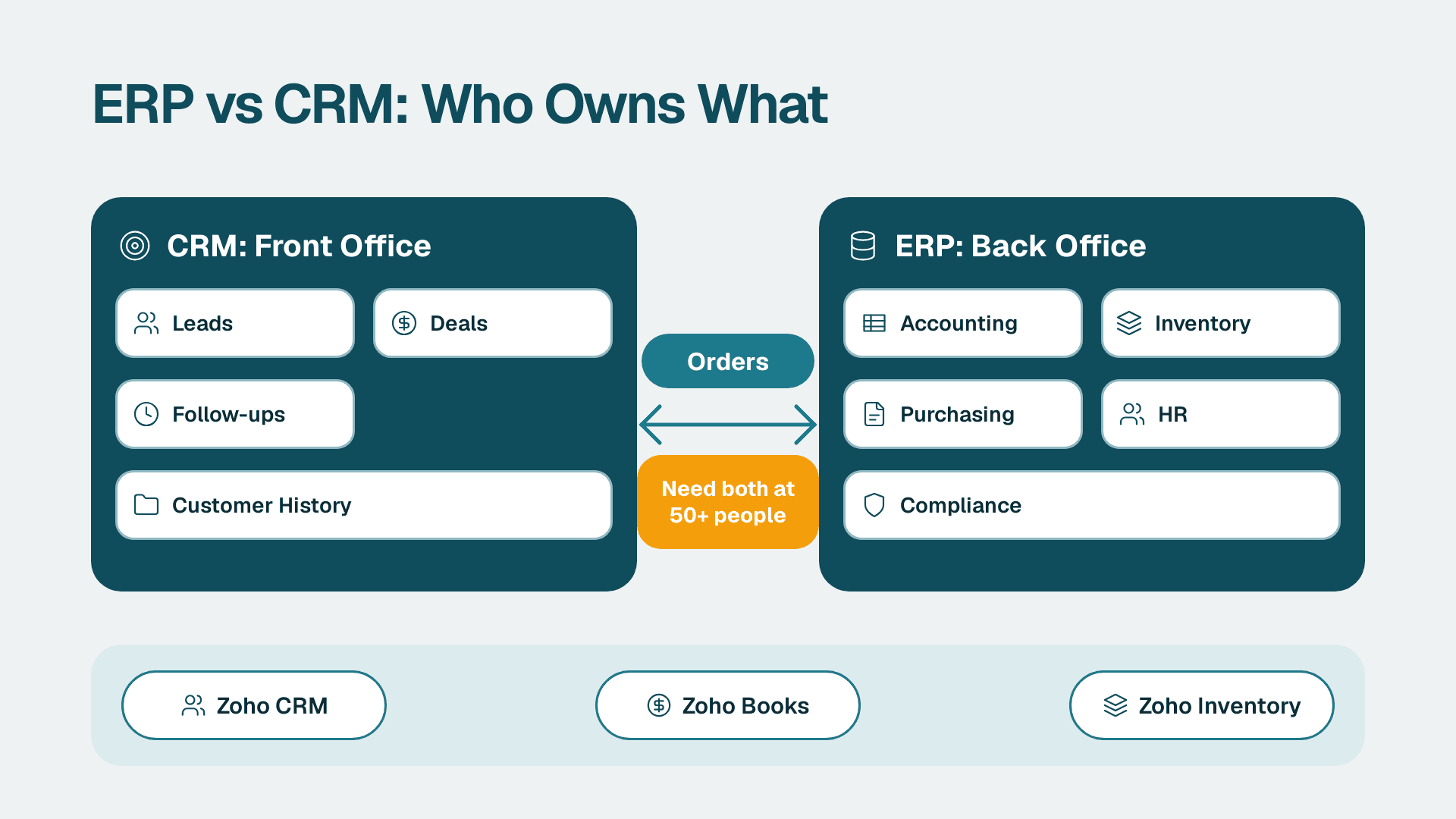
- CRM runs the front office: leads, deals, follow-ups, customer history.
- ERP runs the back office: accounting, inventory, purchasing, HR and compliance.
- Most businesses under about 50 people do not need a full ERP. They need a CRM plus accounting and, if they hold stock, inventory.
- The real risk is not choosing the wrong system. It is running both with no agreed record of who owns the customer, the item and the invoice.
- Zoho CRM connected to Zoho Books and Zoho Inventory covers both sides for most SMB sales and operations teams.
Quick Comparison
| Criteria | CRM (Zoho CRM) | ERP (Zoho Books + Inventory, or a full ERP) |
|---|---|---|
| Core job | Win and keep customers | Run finance, stock and operations |
| Main users | Sales, account managers, support | Finance, operations, purchasing, warehouse |
| Central record | Lead, contact, account, deal | Invoice, item, purchase order, ledger entry |
| Typical setup time | Days to a few weeks for a clean pipeline | Weeks for accounting and inventory; months for a full ERP |
| Learning curve | Low for reps; moderate for admins | Moderate to high; accounting rules matter |
| Cost of changing later | Low to moderate | High once transactions and stock history exist |
| Scalability risk | Messy data and duplicate records | Process rigidity and heavy implementation |
| Vendor lock-in | Moderate; exports are usually clean | Higher; financial history is hard to move |
If you are deciding how to wire the two together, our Zoho CRM consulting team scopes the build order and the data ownership rules before anything is connected.
ERP vs CRM: what does each system own?
Verdict: CRM owns everything up to the signed deal. ERP owns everything after it.
IBM describes the split in front office versus back office terms: ERP systems optimise internal processes such as finance, supply chain, project management and human resources, while CRM systems strengthen front-office work such as sales, service and marketing campaigns. That is the cleanest rule of thumb we know.
In practice:
- CRM owns: lead capture, contact and company records, deal stages, quotes, activity history, campaign response, service tickets.
- ERP owns: the general ledger, invoices and payments, purchase orders, stock levels, supplier records, payroll and HR, compliance reporting.
A sales rep should never need to open the accounting system to see a customer's pipeline. A finance lead should never need the CRM to see what is owed. When either person has to ask the other for a spreadsheet, the boundary has failed.
What is an ERP, and what are examples?
Verdict: an ERP is one system of record for how the business operates, and it scales from light accounting to full manufacturing.
ERP stands for enterprise resource planning. IBM lists the usual ERP features as financial management, supply chain and inventory management, human resources management, manufacturing and production planning, reporting and analytics, and compliance and risk management. Not every business needs all six.
For an SMB, an ERP rarely arrives as one giant platform. It is more often a small set of connected tools:
- Accounting and invoicing, for example Zoho Books.
- Stock and order management, for example Zoho Inventory.
- Expense, payroll and people tools as headcount grows.
At larger scale, companies buy a single enterprise suite with a long implementation. That is rarely the right first move for a 10 to 50 person sales and operations team. If you are weighing the accounting side, what Zoho Books does and when to get help covers it in more depth.
What are the four types of CRM systems?
Verdict: most SMBs need an operational CRM first and add the others later.
The commonly used four-way split is:
1. Operational CRM automates sales, marketing and service tasks: lead routing, follow-up reminders, pipeline stages, email sequences.
2. Analytical CRM turns customer data into reports: conversion rates, source quality, forecast accuracy.
3. Collaborative CRM shares customer information between teams so sales, support and delivery see the same history.
4. Strategic or campaign-focused CRM is used by some vendors to describe long-term customer segmentation and lifecycle work. Naming varies by source.
Zoho CRM is mainly operational, with analytics and collaboration built in. Pipeline design matters more than the label, so start with how to structure Zoho CRM pipeline stages for reliable forecasts.
Which one owns the customer data?
Verdict: CRM owns the customer relationship record. ERP owns the customer as a billing entity. Do not let both edit the same fields.
This is where most SMB integrations go wrong. The same customer exists twice: once as a contact and account in the CRM, once as a customer in the accounting system. If both can be edited freely, you get two addresses, two tax IDs and two payment terms.
A workable ownership rule:
| Field type | Owner | Direction |
|---|---|---|
| Name, owner, lifecycle stage, notes | CRM | CRM to accounting |
| Billing address, tax details, payment terms | Accounting | Accounting to CRM (read only) |
| Item names, prices, stock levels | Inventory | Inventory to CRM quotes |
| Deal value and expected close | CRM | Stays in CRM until won |
| Invoice status and balance due | Accounting | Accounting to CRM (read only) |
Write that table down before you connect anything. For a structured walk-through of the CRM side, see how to structure a CRM database in Zoho.
Which is easier to learn and faster to set up?
Verdict: CRM wins on speed and ease. ERP wins only when you already have clean processes to model.
Is CRM easy to learn? For reps, yes. Logging a call, moving a deal and setting a follow-up are tasks people pick up in a day or two. The hard part is not the screens. It is agreeing on stage definitions, required fields and who owns a lead, and that is an admin and management job.
ERP is harder for a structural reason. Accounting and stock follow rules. A wrong tax setting, an unmapped item or a bad opening balance does not just annoy someone. It misstates the books. Expect to involve whoever does your bookkeeping or accounting from day one.
A realistic build order for an SMB on Zoho:
1. Stand up the CRM with one pipeline, clean stages and required fields.
2. Import contacts and accounts once, deduplicated.
3. Set up accounting with opening balances and tax settings checked by your accountant.
4. Add inventory only if you hold or ship physical stock.
5. Connect the systems and test with a handful of real orders before switching on automation.
The trap is doing step 5 first because it feels like the exciting part. Connect last.
Where do ERP and CRM overlap?
Verdict: the overlap is quotes, orders and customer records. Pick one owner for each, and the overlap stops being a problem.
IBM notes that many deployments integrate or embed CRM capabilities within ERP platforms so data can be shared in real time across departments. The reverse also happens: many CRMs now include quotes, sales orders and light invoicing.
The overlap shows up in four places:
- Quotes. Built in the CRM, with items and prices pulled from inventory.
- Sales orders. Created from a won deal, then fulfilled from the inventory side.
- Invoices. Raised in accounting, with payment status shown back in the CRM.
- Customer records. One master, one direction of sync.
The mistake we see most often, and this is a pattern rather than a statistic, is teams duplicating item and price lists in both tools. Prices drift within a month. Keep the price list in one place and let the other tool read it.
Which costs more to run and change?
Verdict: CRM is cheaper to start and cheaper to change. ERP is cheaper to run once settled, but expensive to reconfigure.
We are not quoting prices here because plans change often. Check current tiers on the vendor's own pricing page, and see Zoho CRM pricing plans compared for how the editions differ.
The cost drivers worth planning for:
- Licences. Per user for the CRM; per organisation or per user for accounting and inventory, depending on plan.
- Implementation. Light for a CRM pipeline, heavier for inventory with warehouses, variants or multiple tax rules.
- Customisation. Custom modules, workflows and integrations add up. Our guide to Zoho CRM customisation cost for small business shows what drives it.
- Change cost. Reworking a CRM pipeline is a weekend. Reworking a chart of accounts or item structure after a year of transactions is a project.
If you are unsure whether the extra cost is justified, the instant project cost calculator gives a first estimate.
When does a growing business need both?
Verdict: you need both when the sale creates an operational obligation, such as stock to ship, a recurring invoice, a project to staff or a supplier to pay.
Signs you have outgrown a CRM on its own:
- Finance rebuilds the pipeline in a spreadsheet to forecast cash.
- Sales quotes items that are out of stock.
- Invoices are typed by hand from won deals.
- Nobody can say which customers owe money without asking accounts.
- Reports need data from the CRM and the books, and someone merges them by hand.
Signs you do not need an ERP yet:
- You sell services with simple invoicing and an accountant handles the books.
- You have no physical stock.
- Your bottleneck is lead follow-up, not fulfilment.
Being honest here saves money. A 6 person consultancy with a good CRM and basic accounting does not need an inventory module.
How does Zoho CRM plus Books and Inventory cover both sides?
Verdict: for most SMB sales and operations teams, Zoho CRM with Books and Inventory is enough ERP-style coverage without the weight of a full enterprise suite.
The split looks like this:
- Zoho CRM handles leads, deals, quotes, activities and campaign response.
- Zoho Books handles invoices, payments, bills, bank reconciliation and tax.
- Zoho Inventory handles items, stock levels, purchase orders, sales orders and shipping.
These products are designed to connect, so a won deal can turn into a sales order and an invoice, and payment status can show back on the account. Exact sync behaviour depends on your edition and how you configure it, so confirm current capabilities in Zoho's own documentation before you design around a specific field.
Where this approach stops: heavy manufacturing, multi-entity consolidation with complex intercompany rules, and industries with strict regulated traceability may outgrow it. If you recognise those, you are looking at a specialist ERP, and the CRM stays as the front end.
If you are also considering the broader bundle, what Zoho CRM Plus includes explains what is and is not in it.
When to Choose a CRM First
- You are a sales head or founder whose main problem is leads going cold, with fewer than about 20 reps.
- You sell services and invoice from a simple template or your accounting tool.
- Your pipeline lives in spreadsheets and inboxes, and forecasts are guesses.
- You need follow-up automation, source tracking and a shared view of each account.
- You have no stock, no warehouse and no purchase orders.
When to Choose an ERP (or Books and Inventory) Alongside It
- You hold stock, and quotes must reflect what you can actually ship.
- Finance rebuilds sales data by hand every month to close the books.
- You run purchase orders, supplier bills and landed costs.
- You need one view of order, invoice and payment status per customer.
- You are hiring a finance or operations lead who needs controls, not just reports.
The Verdict
For the audience this article is written for, sales ops leads and small-business owners on Zoho, start with the CRM and add Books, then Inventory, in that order as the business demands them. The CRM fixes revenue leakage fastest and is cheap to change. Accounting and stock should follow as soon as the sale starts to create operational work. Zoho CRM with Books and Inventory is the better call for most teams in this range because it avoids a heavy enterprise rollout and keeps one vendor, one login and one integration model.
The one scenario where the other path wins: if your core business is manufacturing, distribution with complex warehousing, or multi-entity finance, the ERP is the system of record and the CRM is a satellite. Start with the ERP, then connect a CRM to it.
Ready to scope it? Talk to our Zoho CRM consulting team about build order, data ownership and integration before you connect anything.
---
About Lets Viz: Lets Viz has delivered analytics, CRM and reporting work since 2020 for SMB and mid-market teams across SaaS, professional services, healthcare, retail and distribution. We hold a 5.0 Clutch rating and focus on practical builds: clean data models, reliable pipelines and dashboards people actually use.
Sources
Facts and prices checked November 2026.