AI Readiness: What It Means and How to Test It Before Copilot
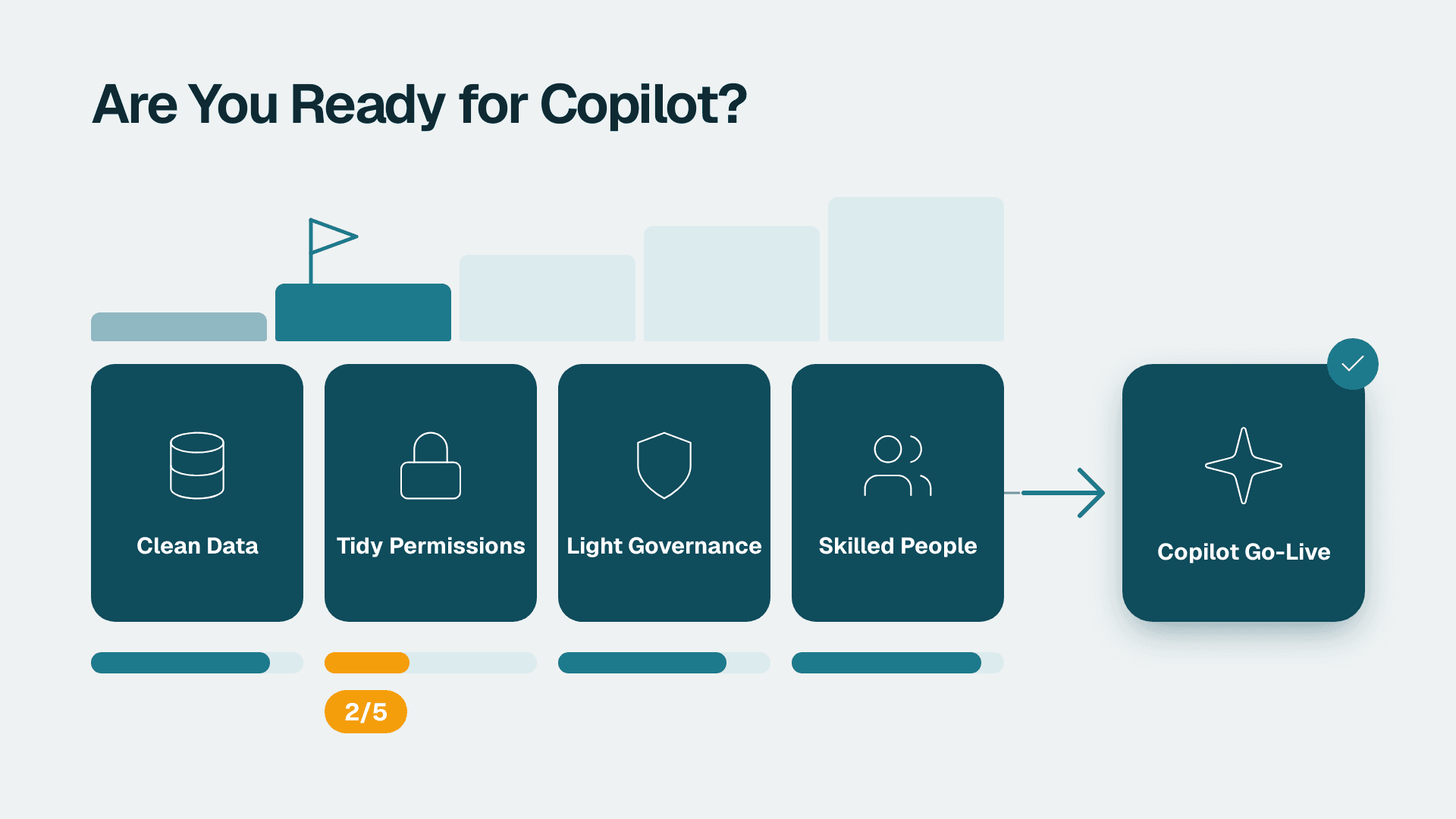
AI readiness is how prepared your organisation is to use AI safely and profitably. For a small or mid-market Microsoft 365 company, that comes down to four things: clean, findable data; tidy permissions; light but real governance; and people who know what to do with the tool. If any one of them is weak, Copilot licences will underperform.
Key Takeaways
- AI readiness is a business question first and a technology question second: can you adopt AI in a way that improves performance and stays under control?
- Four areas decide whether Copilot and AI agents pay off: data, permissions, governance and people.
- Permissions are the most common hidden blocker, because Copilot can only be as careful as your sharing settings.
- You can test readiness in about two weeks with a small pilot group, before you commit to licences for everyone.
- Agents come after Copilot basics, not before. They need a narrow job, clean data and a named owner.
What does AI readiness mean for a small or mid-market company?
AI readiness means your organisation can adopt AI tools and scale them in ways that strengthen performance and support your business strategy. It is not the same as owning licences, and it is not the same as being technically advanced.
Harvard Business School Online draws a useful distinction in its guide to knowing if your company is AI-ready. It separates AI readiness (the ability to adopt and scale AI) from AI maturity (how advanced you already are) and AI governance (responsible oversight). A 60-person firm can be highly ready with no AI experience, because its files are tidy, its access is sensible and its managers know what they want from the tool. A 400-person firm with three years of pilots can be badly unready if nobody trusts the underlying data.
The same article cites research finding that 92 percent of organizations plan to increase AI investment, while only one percent consider themselves fully mature. That gap is the point of this guide. Most companies are spending ahead of their readiness, and the cost shows up as licences that people open twice and then ignore.
Small and mid-market companies face a different version of the problem than large enterprises. You usually have no data team, one or two IT people, years of accumulated SharePoint and OneDrive sprawl, and a handful of spreadsheets that quietly run the business. None of that stops you from getting value from Copilot. It does mean you should check the foundations on purpose, rather than discover them after rollout.
If you want an independent view of where you stand, a fixed-scope Copilot readiness assessment (fixed price, 5 days) covers the same four areas described below. You can also run a first pass yourself using the checks in this article.
What are the pillars of AI readiness?
There is no single agreed list. Different frameworks name three, four or five pillars, but they overlap heavily: strategy, data and technology, people and culture, and governance and risk. The right list for you is the one that tells you what to fix next.
Microsoft's AI Readiness Wizard is based on the company's research and work with customers. It uses 10 questions across five areas, with two questions under each: Business strategy; Technology and data strategy; AI strategy and experience; Organization and culture; and AI governance and security. The result is a recommendation for the next best area to focus on, plus a few resources. Harvard Business School Online frames its assessment as four audit steps: define strategic intent, audit data and technology foundations, assess people and culture, and evaluate governance and risk management.
For a company that mainly wants Copilot to work well in Outlook, Word, Excel and Teams, we find it easier to collapse these into four practical pillars.
| Pillar | Question to ask | Warning sign | What it looks like in Copilot |
|---|---|---|---|
| **Data** | Can people find the right, current file or record? | Five versions of every document, no naming rules | Summaries and drafts built on outdated files |
| **Permissions** | Does each person see only what they should? | Broad sharing groups, open links, old guest accounts | Copilot surfaces content nobody meant to share |
| **Governance** | Who decides what AI may do, and who checks it? | No written rules, no owner, no log review | Staff improvise, and risky use goes unseen |
| **People** | Do staff know what to ask for and how to check it? | One training session, no examples for their role | Low usage, or confident use of wrong output |
Strategy sits above all four. If nobody can say which two or three tasks you want AI to improve, no amount of tidy data will produce a return. The cheapest readiness step is often a one-page list of target tasks, each with an owner.
What are the five stages of AI readiness?
Stage models differ by vendor, and Microsoft's wizard points users to its AI Strategy Roadmap for its own version. For a mid-market company, a simple five-stage working model is enough to place yourself and plan the next move.
1. Ad hoc. Individuals use consumer AI tools on their own. There is no policy and no visibility.
2. Aware. Leadership has named a few use cases and written a basic acceptable-use rule.
3. Foundations in progress. Data clean-up, permission review and role-based training are under way, with a small pilot group.
4. Operating. Licensed users have clear use cases, usage is reviewed monthly and someone owns the programme.
5. Scaling. Agents and automations run on governed data, with measured outcomes and a regular review of what to retire.
The common mistake is jumping from stage 1 to stage 5 by buying licences for everyone. Stages 3 and 4 are where the value is created, and they are mostly about habits and housekeeping rather than software.
To place yourself more precisely, our 45-point AI readiness self-score for small business gives a numeric starting point. Once you know your gaps, building an AI analytics strategy for a mid-market company shows how to turn them into a sequenced plan.
Is your data ready for Copilot and AI agents?
Your data is ready when a new colleague could find the current version of a document, price list or customer record without asking anyone. If humans cannot do that reliably, an AI assistant will not do it better.
Microsoft 365 Copilot works with the content your people already create: emails, files, chats and meeting notes. That is its strength, and also its exposure. If your SharePoint libraries contain draft contracts, superseded proposals and abandoned project folders, Copilot will treat them as candidates for an answer.
Six data checks are worth doing before any rollout:
- Find the stale content. Look for libraries and Teams that nobody has opened in a year and archive them.
- Pick a source of truth. For each key document type (pricing, policies, templates), decide where the current version lives.
- Standardise naming and folder structure for the five or six areas Copilot users will ask about most.
- Check your structured data. If your finance or operations numbers come from an ERP, run a quality check first. Our guide to an ERP data quality check before AI implementation walks through it.
- Identify the spreadsheets that run the business and note who owns each one.
- Decide what stays out. Some folders, such as HR cases or legal matters, may need to be excluded or restricted.
If you also plan to use Copilot inside Power BI, the licence conditions matter. Microsoft's documentation (2025) states that Copilot in Power BI and Fabric needs a paid Fabric capacity of F2 or higher, or Power BI Premium P1 or higher. A Power BI Pro licence (listed at $14 per user per month) or a Premium Per User licence (listed at $24 per user per month) is not enough on its own, and trial capacities are excluded. There is no F64 minimum for Copilot itself. Check this before you promise your finance team a conversational reporting tool.
Are your permissions safe enough to switch Copilot on?
Your permissions are safe enough when every person can open only the content they should, and you have tested that claim rather than assumed it. Copilot respects the access a user already has, so it makes existing oversharing much easier to find.
This is the part of AI readiness that surprises owners most. Before Copilot, a badly shared file was hard to stumble on, because you had to know where to look. With a natural-language assistant, a question like "summarise recent salary discussions" can surface a document that was technically open to everyone but practically hidden for years. The assistant did not break your security. It exposed how loose it already was.
Typical causes in a 20-500 person company:
- Sharing groups that include far more people than intended, such as an all-staff group added to a finance site.
- "Anyone with the link" sharing used for convenience and never removed.
- Guest accounts for former contractors and suppliers that were never cleaned up.
- Team owners who have left the business, so nobody reviews membership.
- Sensitive folders (HR, payroll, legal, board papers) that were never separated from general content.
The regulatory side makes this more than housekeeping. A US healthcare provider handling patient information has HIPAA obligations, and a US software firm chasing enterprise customers will face SOC 2 questions about access control. A UK or EU fintech has GDPR duties around who can see personal data. A Canadian manufacturer with employee and customer records has PIPEDA obligations. In each case, a regulator or an auditor will ask who could access the data, not who intended to.
A practical test takes an afternoon. Have an IT manager and one non-privileged pilot user try a set of probing questions, such as pay, performance reviews, acquisition plans and customer contracts. Anything that comes back and should not is a permissions fix, and each fix should be recorded.
Also confirm that you can see what is happening afterwards. Microsoft Purview Audit (Standard) keeps audit logs for 180 days, so decide who reviews them and how often, and note that anything older will be gone when an incident comes to light. Whether you need longer retention depends on your sector and your licence tier, so check that against your own obligations rather than assuming.
What AI governance does a 20-500 person company actually need?
A company this size needs a short written policy, a named owner, an approved-tools list and a simple review rhythm. You do not need a committee or a 40-page framework. You need decisions that are written down and people who know about them.
Here is a minimum viable governance set:
| Element | What it covers | Who owns it |
|---|---|---|
| **Acceptable-use rule** | What staff may and may not enter into AI tools, in one page | Operations or HR lead |
| **Approved tools list** | Which AI tools are allowed, and which are not | IT manager |
| **Data handling rule** | Which categories (client, patient, personal, financial) need extra care | Compliance lead or owner |
| **Output review rule** | Which outputs must be checked by a human before they leave the company | Department heads |
| **Agent approval step** | Who signs off on a new agent, what data it touches, who owns it | IT manager plus business owner |
| **Review rhythm** | Monthly look at usage, incidents and requests | Programme owner |
Microsoft's readiness wizard asks, under governance and security, how effective your controls are for the transparency, explainability and interpretability of AI tools and results. For a smaller company, that translates into plain questions. Can you tell where an AI-assisted answer came from? Can someone explain to a client why a figure is what it is? If not, require a human reviewer for anything client-facing or financial.
Vendor choices belong here too. If staff are quietly using unapproved tools because the approved one is awkward, governance has failed in practice, whatever the policy says. Make the approved route the easy route.
Are your people ready to use Copilot well?
Your people are ready when each role has two or three specific tasks it can do faster or better with AI, and each person knows how to check the result. Generic "how to write a prompt" training rarely achieves that.
The education nonprofit aiEDU defines AI literacy as the knowledge and skills a person needs to confidently understand, ethically use and critically evaluate AI, and defines AI readiness as the ability to apply that literacy to one's work. That definition fits the workplace well. Confidence is not enough. Staff also need the habit of questioning an answer.
Practical steps that work in mid-market teams:
1. Train by role, not by tool. A sales manager needs email and meeting follow-up examples. A finance analyst needs spreadsheet and report examples. An operations lead needs summarising and planning examples.
2. Start with tasks people already dislike. Meeting recaps, inbox triage and first drafts get adopted quickly because the benefit is obvious.
3. Name a few champions. One enthusiastic person per department who shares working examples does more than an all-hands session.
4. Teach checking as a skill. Every output needs a quick review of names, numbers, dates and tone.
5. Use real material. Our walkthroughs on using Copilot in Outlook and using Copilot in Word are written for teams starting from zero.
Resistance is usually rational. People worry about errors, surveillance or being replaced. Address those worries directly in your acceptable-use rule, and say plainly what AI use will and will not be used to measure.
How do you tell if you are ready for Copilot before you spend on licences?
Run a short, structured test with a small pilot group and score the four pillars. If data, permissions, governance and people each pass a basic check, buy licences in waves. If permissions fail, fix them first.
Use this table as a checklist.
| Area | Test | Ready when |
|---|---|---|
| **Strategy** | List the top three tasks you want to improve | Each has an owner and a measure of success |
| **Data** | Ask five people to find the current version of the same five documents | Most find the same file quickly |
| **Permissions** | Probe with a non-privileged account for sensitive topics | Nothing sensitive is returned |
| **Governance** | Ask three managers what the AI policy says | They can describe it and know who to ask |
| **People** | Watch pilot users do a real task | They can complete it and spot an error |
| **Monitoring** | Confirm who reviews audit logs and how often | A named person reviews them on a schedule |
A workable sequence for a 50 to 300 person company looks like this:
1. Days 1-2: write the target task list and appoint an owner.
2. Days 3-5: run the permissions probe and fix the worst oversharing.
3. Days 6-8: archive stale content in the libraries pilot users will rely on, and publish the one-page policy.
4. Days 9-12: run the pilot with a small, mixed group, one use case per role.
5. Days 13-14: review what worked, what did not and what the policy missed, then decide on the next wave.
The point of buying in waves is that you learn cheaply. A pilot that exposes a permissions problem costs a few licences. The same discovery during a company-wide rollout costs trust, and possibly a reportable incident.
If you want a structured outside view, the steps in conducting an AI audit cover the same ground in more depth.
When are AI agents a sensible next step?
Agents are a sensible next step once Copilot basics are working and you have a narrow, repeatable task with clean data and a named owner. An agent acts on information rather than just drafting it, so mistakes travel further.
Treat agent readiness as a stricter version of everything above. An agent that answers staff questions from HR policies needs current policies and sensible access. An agent that prepares weekly reports needs trustworthy numbers behind them. Our explainer on agentic BI and what it actually does shows where the line sits between helpful automation and risky autonomy.
Before approving any agent, ask five questions:
- What exact job does it do, and what is out of scope?
- Which data can it read, and which can it change?
- Who is the named owner when it gets something wrong?
- How will a human review its output, and how often?
- How do we switch it off?
If the answers are vague, the agent is not ready, and neither is the process around it. Start with a read-only agent on a small set of well-kept content, and widen its scope only after a month of reviewed results.
---
About Lets Viz: Lets Viz is a data analytics consultancy that has helped organisations plan and govern Microsoft 365, Power BI and AI projects since 2020, with clients across US healthcare, UK fintech, Canadian manufacturing and global SaaS. We hold a 5.0 Clutch rating, and this guide reflects the readiness checks we use before recommending any AI licence spend.
If you would like a fixed-scope, independent view of your data, permissions, governance and people before you buy more licences, see our Copilot readiness assessment (fixed price, 5 days).
Sources
- Microsoft AI Readiness Wizard
- How to Know If Your Company Is AI-Ready (Harvard Business School Online)
- aiEDU AI Readiness Framework
Facts and prices checked October 2026.