AI Governance Strategy for Companies Without a Compliance Team
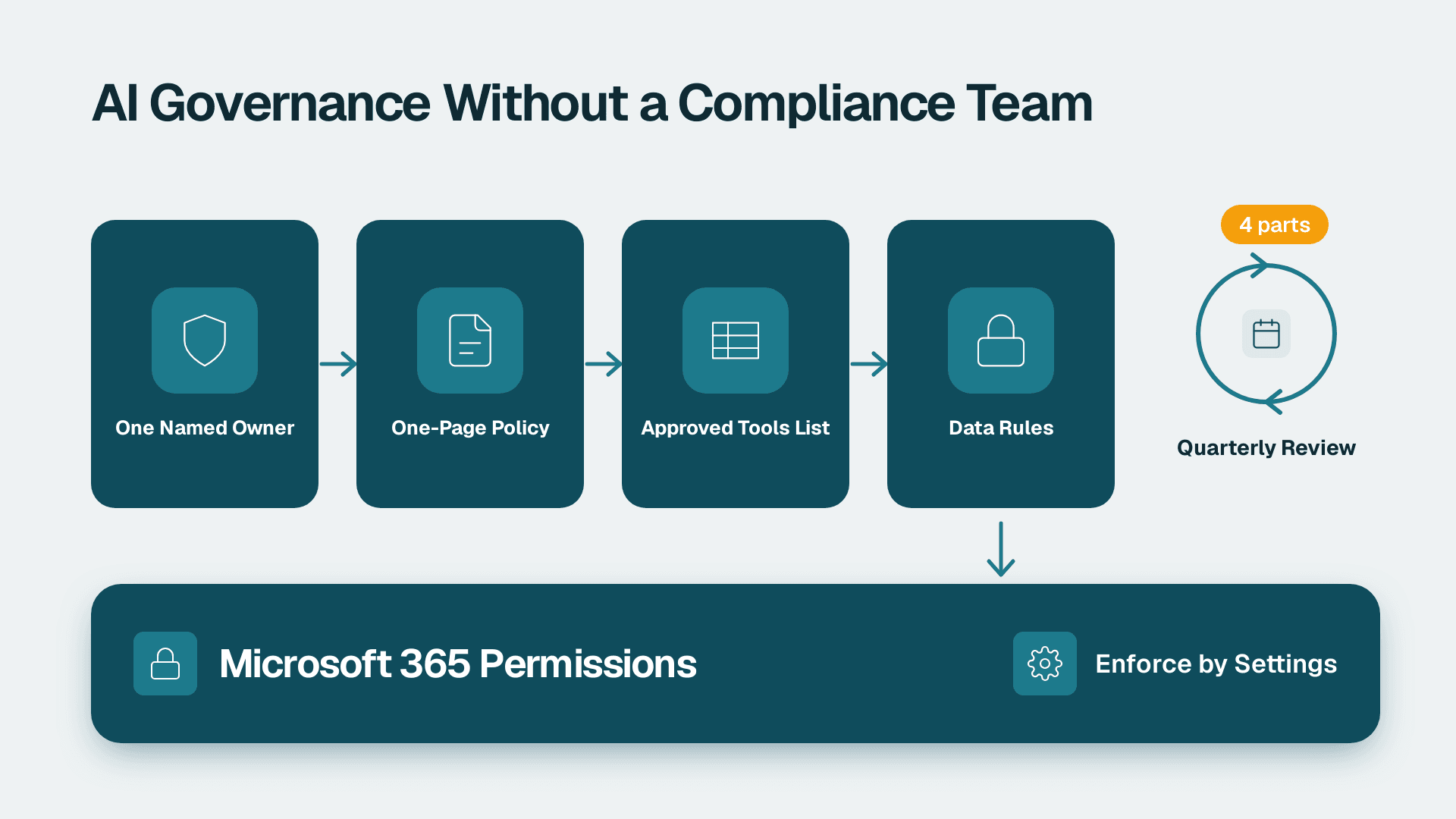
An effective AI governance strategy for a company without a compliance team has four parts: one named owner, a one-page acceptable use policy, a short list of approved tools, and clear data rules tied to your existing Microsoft 365 permissions. Keep it small enough to review every quarter, and enforce it through settings rather than reminders.
Key Takeaways
- Right-sized governance means one accountable owner, one policy page, one approved-tools list and one set of data rules.
- Copilot works within the permissions people already have, so cleaning up access matters more than writing a long policy.
- Classify data into three tiers and decide what each tier may do in AI tools.
- Treat agents and automations as new systems with owners, not as features.
- Review the framework quarterly and keep evidence in the audit logs you already have.
What is an AI governance strategy for a company without a compliance team?
An AI governance strategy is the set of decisions about who may use which AI tools, on which data, under whose accountability. In a 20-500 person company it should fit on a few pages and be run by people who already have day jobs.
Many published frameworks are written for banks and multinationals, with committees, model risk registers and lifecycle reviews. Public commentary, including the World Economic Forum's argument that effective AI governance is becoming a growth strategy, frames governance as something that lets a business adopt AI faster, not slower. That is the right lens for a smaller company. The goal is not paperwork. The goal is that staff can use Outlook, Word, Excel and Teams with Copilot confidently, because the rules are clear and the risky paths are closed.
A right-sized framework answers five questions:
1. Who owns AI decisions?
2. What are staff allowed and not allowed to do?
3. Which tools are approved?
4. What data may go where?
5. How do we know the rules are working?
Before you write anything, find out where you stand. A structured Copilot readiness assessment with a fixed price and five-day scope covers permissions, data quality and licensing, and gives the governance rules something concrete to rest on. If you prefer to start on your own, the AI readiness guide for testing your organisation before Copilot lays out the same ground.
Governance versus strategy
AI strategy decides where AI should create value, such as faster proposals or cleaner month-end summaries. Governance sets the limits that keep that value from turning into a leak, a fine or a bad decision. You need both, but governance is the one most small companies skip, and it is usually cheaper to build before rollout than to retrofit afterwards.
Who should own AI governance in a 20-500 person company?
One named executive should own AI governance, usually the COO, head of IT or managing director, with a small working group to help. Shared ownership by a committee tends to mean no ownership at all.
You do not need a new department. You need clear roles, often held by people with other jobs.
| Role | Who usually fills it | What they decide |
|---|---|---|
| Accountable owner | COO, MD or head of IT | Approves policy, tools and exceptions |
| Technical lead | IT manager or Microsoft 365 admin | Licences, permissions, labels, audit settings |
| Data stewards | One lead per department (finance, HR, sales, ops) | What counts as sensitive in their area |
| Legal or privacy contact | Outside counsel, DPO or an internal lead | Regulatory questions and incident review |
| Champions | Two or three confident users | Feedback, tips and early warning |
The accountable owner matters most. When a manager asks whether a team can paste customer contracts into a new AI tool, someone must be able to say yes or no the same day. If that person is unclear, staff will decide for themselves.
A 45-minute monthly meeting is enough
The working group should meet monthly for the first quarter and then quarterly. The agenda is short: new tool requests, incidents or near misses, permission problems found, and policy changes. Keep a one-page log of decisions. That log is your evidence if a customer, insurer or regulator ever asks how you govern AI.
If you want a baseline score before the first meeting, the 45-point AI readiness self-score for small businesses gives the group a shared starting picture.
What should an AI acceptable use policy include?
A good acceptable use policy fits on one page and tells staff what they may do, what they may not do, and who to ask. Long policies are not read, and unread policies do not protect anyone.
Include these sections:
- Purpose and scope: who the policy covers, including contractors and temporary staff.
- Approved tools: a link to the live list, not a copy that goes stale.
- Data rules: what may and may not be entered into AI tools, by data tier.
- Human review: staff remain responsible for anything they send, publish or decide, and must check AI output before relying on it.
- Prohibited uses: for example, automated decisions about hiring, firing, credit or pay without human review.
- Disclosure: when to tell clients or colleagues that AI helped produce something.
- Incident reporting: who to tell, and a promise that honest reporting will not be punished.
- Exceptions: how to request one and who approves it.
Write for the behaviour you want
The most common failure is a policy that bans everything. Staff then use personal accounts on public AI sites, which is the outcome governance was meant to prevent. Give people a sanctioned route that is easy and good enough, and the policy becomes something they follow because it helps them.
It also helps to add a short training session. In the EU, the AI Act includes an AI literacy obligation for organisations using AI systems, which has applied since February 2025, so documented staff training is worth doing even if you are not sure it is mandatory for you. In the UK and Canada it is simply good practice and supports your position under data protection law.
How do you decide which AI tools are approved?
You approve AI tools by checking a short list of criteria and sorting each tool into a tier. Approval should take days, not months, or staff will route around it.
Use five checks for any new tool:
1. Data handling: does the vendor use your inputs to train its models, and can you opt out in writing?
2. Identity and access: does it support single sign-on and your existing multi-factor authentication?
3. Data location: where is data stored and processed, and does that fit your GDPR, PIPEDA or sector obligations?
4. Admin controls and logs: can you see who used it and remove access quickly?
5. Contract terms: is there a business agreement, not just consumer terms of service?
Then sort the tool into a tier.
| Tier | Meaning | Typical examples | Data allowed |
|---|---|---|---|
| Approved | Reviewed, licensed and managed by IT | Microsoft 365 Copilot in Outlook, Word, Excel and Teams | Up to confidential, within existing permissions |
| Conditional | Allowed for specific teams or uses | A specialist tool for marketing copy or code review | Public and internal only |
| Not approved | Not reviewed, or failed review | Free consumer chatbots on personal accounts | Public information only, or none |
The reason Microsoft 365 Copilot often anchors the approved tier is that it runs inside your existing tenant, identity and security controls. Microsoft's Copilot data protection documentation (2025) states that Copilot only surfaces organisational data the user already has permission to access, and that prompts and responses are not used to train the underlying foundation models. Check the current wording for your agreement and region, but that design is why it is easier to govern than a separate tool with its own accounts.
Budget belongs in the same conversation. The Microsoft 365 Copilot subscription breakdown of cost per seat and per year helps you decide who needs a seat now and who can wait, which is itself a governance decision about exposure.
Do not forget Power BI and Fabric
If you use Power BI, the licence rules also shape governance. Copilot in Power BI and Fabric needs a paid Fabric capacity of F2 or higher, or Power BI Premium P1 or higher. A Pro or Premium Per User licence alone is not enough, and trial capacities are excluded. Knowing this prevents shadow experiments on unmanaged workspaces. Decide up front who may connect AI features to a semantic model, since a question like whether an LLM can connect to a Power BI semantic model safely comes down to the same test: does the person asking already have the right to see that data?
What data rules does Microsoft 365 Copilot need?
Copilot needs three data rules: classify your data into tiers, fix oversharing before rollout, and label what is sensitive. Copilot does not create new access, but it makes existing over-broad access much easier to discover.
Because Copilot respects permissions, a file that was accidentally shared with the whole company is now one natural-language question away from anyone in the company. Old SharePoint sites, broad Teams channels and shared mailboxes are the usual culprits. The risk was always there. Search was just harder.
Use three data tiers
Most small companies do better with three tiers than with six.
- Public: marketing material, published pricing, job adverts. Any approved tool may use it.
- Internal: policies, project notes, ordinary email. Approved and conditional tools may use it.
- Confidential: customer contracts, payroll, health records, financial forecasts, credentials. Only tools in the approved tier, and only for people who need it.
Ask each data steward to name the five or ten most sensitive locations in their area. That list becomes your first clean-up target.
Fix permissions before you scale
A practical sequence:
1. Review sharing on your largest SharePoint sites and Teams, starting with HR, finance and legal.
2. Remove company-wide and anonymous links where they are not needed.
3. Apply sensitivity labels to confidential content using Microsoft Purview, and set data loss prevention policies for the highest-risk data types.
4. Pilot Copilot with a small group, then widen access.
Bad data is a related problem. An assistant that summarises inconsistent records will produce confident but inconsistent answers, so the ERP data quality check to run before AI implementation is worth reading if finance or operations data will feed your AI work.
Make ownership explicit
Every important data set needs a named owner. The owner decides who gets access, signs off on AI use of that data, and answers questions when something goes wrong. Without ownership, permission reviews are nobody's job and drift back within months.
How do you govern AI agents and automations?
Govern agents the way you govern any system that acts on your behalf: give each one an owner, a defined purpose, limited permissions and a review date. An agent that can read mail, update records or send messages is a new kind of employee-adjacent process, not a toy.
Agents built in Copilot Studio, Power Automate or similar tools can connect to many data sources and take actions. The risk is not only what they say but what they do. A few rules cover most of the ground:
- Register every agent: keep a simple list with name, owner, purpose, data sources and connectors.
- Least privilege: give an agent access only to the sites, mailboxes and systems it needs.
- Human approval for consequential actions: payments, external emails to customers, deletions and contract changes need a person in the loop.
- Limit who can build: let trained makers publish agents, and keep the rest in a sandbox.
- Retire what is unused: expire agents that have no owner or no activity.
The AI agents for business guide to high-ROI use cases by department is a useful way to choose low-risk first projects, such as internal summarisation, before moving to agents that act externally. The same guidance applies to flows, since Power Automate's limits and when to get help are worth understanding before you let a flow touch customer data.
The practical advice from vendor-neutral engineering guidance, such as Databricks' piece on AI governance best practices for building responsible and effective AI programmes, is consistent: define accountability early, monitor what is running and keep humans responsible for outcomes. You can apply that at small scale with a spreadsheet and a monthly review.
How does AI governance work under GDPR, HIPAA and PIPEDA?
AI governance does not replace your privacy and security obligations. It shows how you meet them when staff use AI. The right rules depend on where you operate and what data you handle.
Three hypothetical examples show how the same framework adapts:
- A US healthcare services firm handling patient information needs to confirm that any AI tool touching protected health information is covered by a business associate agreement and used within HIPAA safeguards. A US finance team with SOC 2 commitments will want evidence of access controls and logging.
- A UK or EU fintech processes personal data under UK GDPR or GDPR. It needs a lawful basis for the processing, a data protection impact assessment for higher-risk uses, and clarity on where data is processed. Automated decisions that significantly affect individuals raise additional requirements.
- A Canadian manufacturer with employee and supplier data should check obligations under PIPEDA, and under provincial laws where they apply, including consent, purpose limitation and accountability for personal information handled by service providers.
In every case, the framework does the same job: classify the data, restrict AI to approved tools, record decisions and keep logs. Your legal contact should confirm the specifics. The point of a governance framework is that those conversations start from a clear inventory rather than a guess.
How do you keep AI governance working after launch?
Keep governance working by measuring a few things, reviewing quarterly and using the logs you already have. Rules that nobody checks decay quickly.
Start with evidence. Microsoft Purview Audit (Standard) retains audit logs for 180 days, according to Microsoft's documentation, so you can investigate Copilot-related activity inside that window. If your obligations require longer retention, check whether your licensing offers it and plan accordingly.
A simple 90-day plan:
| Period | Focus | Output |
|---|---|---|
| Days 1-30 | Name the owner, draft the one-page policy, list current AI use | Policy v1, tool inventory |
| Days 31-60 | Fix oversharing in the top sites, apply labels, run a small Copilot pilot | Permission clean-up log, pilot feedback |
| Days 61-90 | Train all users, publish approved tools, register agents | Training record, agent register |
Then track a short set of indicators each quarter:
- Number of tool requests and average time to decision
- Open permission issues found and closed
- Incidents or near misses reported
- Staff trained and policy acknowledgements
- Agents registered versus agents discovered
If the number of near misses reported goes up early on, that is usually a good sign. It means people trust the process enough to use it.
Common mistakes to avoid
- Writing the policy before looking at permissions. The permission clean-up does more to reduce risk than any document.
- Banning instead of enabling. Prohibition without an approved alternative pushes use into personal accounts.
- Leaving ownership vague. If everyone owns it, nobody answers the question on Tuesday afternoon.
- Treating governance as a one-off project. Tools, features and regulations change. Schedule the review.
- Buying seats for everyone at once. A staged rollout limits exposure and gives you real usage data first.
For teams that want to go deeper into method, how to conduct an AI audit in eight steps walks through a structured review you can adapt to your own environment. For a wider view of definitions and enterprise-scale controls, the Mirantis guide to AI governance best practices shows what a heavier programme looks like, which helps you decide what you can safely leave out.
---
About Lets Viz: Lets Viz is a data analytics and Microsoft consultancy that has helped organisations plan, govern and adopt analytics and AI since 2020, serving US healthcare, UK fintech, Canadian manufacturing and global SaaS teams. Our work spans Power BI, Microsoft 365 Copilot readiness and data governance, and we hold a 5.0 Clutch rating.
If you want an independent view of your permissions, data and licensing before you roll out Copilot, start with the Copilot readiness assessment (fixed price, 5 days).
Sources
- https://www.weforum.org/stories/artificial-intelligence/why-effective-ai-governance-is-becoming-a-growth-strategy
- https://www.databricks.com/blog/ai-governance-best-practices-how-build-responsible-and-effective-ai-programs
- https://www.mirantis.com/blog/ai-governance-best-practices-and-guide/
Facts and prices checked November 2026.