Microsoft 365 Copilot Subscription: Cost Per Seat and Per Year
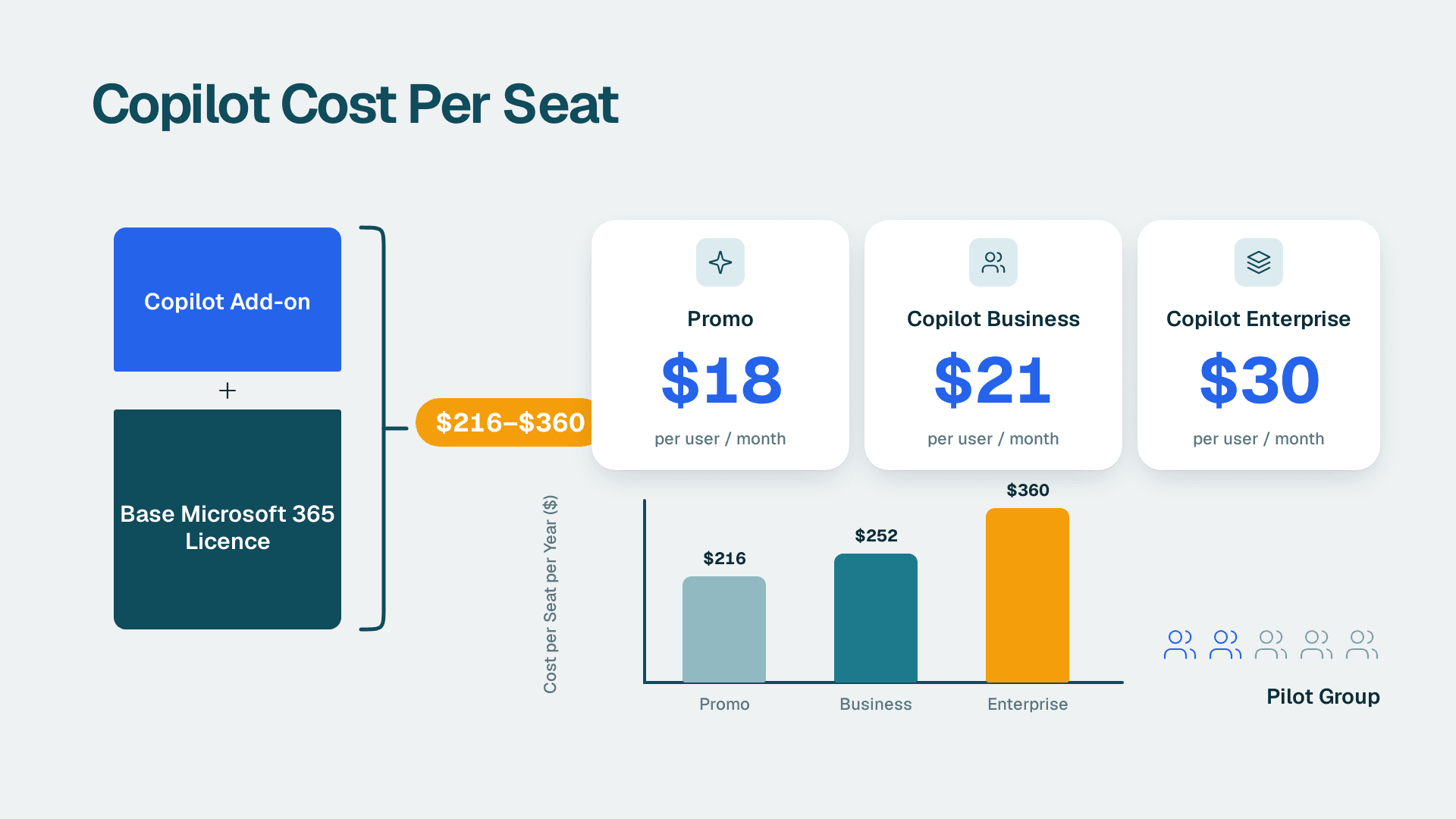
A Microsoft 365 Copilot subscription for business costs $18 to $30 per user per month, depending on plan and billing, which is $216 to $360 per seat per year. That sits on top of a qualifying Microsoft 365 licence. The cheapest way to start is a small pilot group, not a company-wide purchase.
Key Takeaways
- Copilot Business runs $21 per user per month on an annual commitment, with an $18 promotional rate for existing customers through December 31, 2026. Copilot Enterprise is $30.
- The real cost per seat is the Copilot add-on plus your base Microsoft 365 licence, so budget for both.
- Copilot Chat is included with eligible plans at no extra cost, so you can test the basics before buying a single add-on seat.
- Start with roughly a quarter of staff in defined roles, review usage at 90 days, then expand or release seats.
- Copilot in Power BI is licensed separately through Fabric or Premium capacity, not through the Copilot seat.
What does a Microsoft 365 Copilot subscription cost per seat?
The Microsoft 365 Copilot price per seat is $30 per user per month for the Enterprise tier and $21 per user per month for the Business tier on an annual commitment. Both are add-ons: neither works without a qualifying Microsoft 365 licence already in place.
Microsoft's business pricing page lists the Copilot Business add-on as originally $21.00 and now starting from $18.00. Independent pricing coverage from GoSearch explains the structure behind that: Business costs $21 per user per month with an annual commitment and $25.20 per user per month if you bill monthly. A promotional rate of $18 per user per month runs through December 31, 2026, for existing Microsoft 365 customers. Microsoft cut the Business rate from $30 per user per month on December 1, 2025, so older articles quoting $30 for small companies are out of date.
The table below turns those monthly figures into annual cost per seat. The annual figures are simple multiplication of the monthly price by twelve.
| Copilot plan | Price per user per month | Cost per user per year | Conditions |
|---|---|---|---|
| Copilot Business (promotional) | $18 | $216 | Existing Microsoft 365 customers, through December 31, 2026 |
| Copilot Business (annual commitment) | $21 | $252 | Up to 300 seats on a qualifying business plan |
| Copilot Business (monthly billing) | $25.20 | $302.40 | Same eligibility, no annual commitment |
| Copilot Enterprise (annual commitment) | $30 | $360 | Requires a qualifying enterprise licence such as E3 or E5 |
Two details matter for planning. First, the promotional rate has an end date, so a purchase made today needs a note in the calendar for what happens at renewal. Confirm the post-promotion rate with your reseller before you commit to a multi-year budget. Second, the monthly billing premium is $4.20 per seat per month. That is a fair price for flexibility during a pilot, but a poor deal once you know which seats are staying.
Why the monthly price is never the whole price
The seat price is only the add-on. Microsoft's own wording is that a separate licence for a qualifying Microsoft 365 plan is required. If you have been treating Copilot as a $21 line item, you have understated the per-seat cost of anyone who is not already licensed.
Most buyers already own the base licence, so the incremental cost really is the add-on. The exception is the person you want to bring onto Microsoft 365 for the first time, such as a field manager or a front-line supervisor on a different mail system. For them, the combined stack is the number to use.
Before you open the purchase screen, it helps to know which jobs in your business would justify a seat. A fixed-price Copilot readiness assessment is one way to map roles, data permissions and likely use cases first, so the seat count comes from evidence rather than enthusiasm.
Is Copilot included with my Microsoft 365 subscription?
Partly. Copilot Chat, a web-grounded AI assistant, is included at no additional cost with eligible Microsoft 365 plans. The full Microsoft 365 Copilot experience inside your apps and your organisation's data needs a paid add-on licence.
According to the business pricing page, adding a Microsoft 365 Copilot licence unlocks Work IQ, Copilot in Teams, Copilot in Word, Excel and PowerPoint, and the pre-built agents Researcher, Analyst and Facilitator. Copilot in Teams is marked in Microsoft's comparison as requiring a Teams licence, which is easy to miss if you have stripped Teams out of some plans to save money.
That answers the question people also ask about Office 365: an older Office 365 plan name does not change the logic. What counts is whether your plan is a qualifying Microsoft 365 business or enterprise plan, and whether the add-on is assigned to the user. Check the admin centre for the exact plan names you hold rather than relying on a marketing label.
What the included tier is good for
Copilot Chat is useful for drafting, summarising pasted text, and asking general questions with web grounding. It is where most staff should start. If a person cannot describe a task they would give Copilot in Outlook or Word, they are not ready for a paid seat. Our guides on using Copilot in Outlook and using Copilot in Word show the workflows worth testing first.
What is the difference between free and paid Copilot?
Free Copilot is a limited consumer or chat experience subject to capacity and limits, while paid Microsoft 365 Copilot adds in-app assistance, work data grounding and pre-built agents. The gap is mostly about context: paid Copilot works with your files, mail, meetings and chats, within each user's existing permissions.
Microsoft states that it offers a limited free version of Copilot subject to available capacity and limits. It also offers a one-month trial of Microsoft 365 Personal, Family and Premium, with availability, duration, eligibility and payment requirements that vary by offer and region.
Those trials relate to the consumer plans. For a company, the practical test is different: use Copilot Chat across a group for a few weeks, note which requests keep hitting the wall of 'I need it to see our documents', and those requests become your business case for paid seats.
A note on permissions and compliance
Paid Copilot surfaces what a user can already access. If your SharePoint permissions are loose, Copilot makes that visible fast. A UK or EU firm subject to GDPR, a US healthcare provider handling HIPAA data, and a Canadian organisation under PIPEDA all face the same first task: tidy access before widening AI use. Our 45-point AI readiness self-score includes permission and data checks that are worth running before any licence goes live.
Which Microsoft 365 Copilot plans exist, and what is Copilot Premium?
There are two families of Microsoft 365 Copilot plans: individual subscriptions with Copilot built in, and business add-ons for organisations. The individual plans are Personal, Family, Premium and Pro. The business route is the Business or Enterprise add-on described above.
The individual tiers, per Microsoft's individual plans page, differ as follows:
| Individual plan | Who it covers | What it adds |
|---|---|---|
| Microsoft 365 Personal | 1 person, 5 devices at once | 1 TB of cloud storage |
| Microsoft 365 Family | 1 to 6 people | AI for the subscription owner only, up to 5 devices per person, 2 TB shared storage |
| Microsoft 365 Premium | Builds on Family | Advanced Copilot chat with extensive usage, limited usage for agentic AI including advanced research and analytics |
| Microsoft 365 Pro | Builds on Premium | 5 TB shared storage, the highest usage for agentic AI, advanced Copilot chat, visual AI assistance and AI-generated audio (English only) |
The phrase Microsoft 365 Copilot premium often leads people to the individual Premium plan. It is a consumer product. It is not a substitute for the business add-on if you want Copilot working across company mail, files and Teams under your organisation's admin controls. Buying personal subscriptions on expense reports also creates a governance gap: you cannot apply company policies to them, and you cannot easily audit what data was used.
The subscription-with-Copilot idea, a Microsoft 365 subscription with Copilot already inside, is therefore best read as a consumer proposition. For work, assume the add-on model.
How much does Copilot really cost per year once the base licence is included?
For a typical small business, the all-in cost is about $384 to $516 per user per year on Business plans, and the Enterprise add-on alone is $360 before your E3 or E5 licence. The right figure to budget is the base licence plus Copilot.
The base plan prices come from the same GoSearch coverage: Microsoft 365 Business Standard is $14 per user per month and Business Premium is $22 per user per month. Microsoft's business page notes that Business Premium with Copilot includes policy-based identity and access management for up to 300 users, and Business Standard with Copilot includes core identity and access management for up to 300 users.
| Stack per user | Monthly | Annual |
|---|---|---|
| Business Standard + Copilot Business at $18 promo | $32 | $384 |
| Business Standard + Copilot Business at $21 | $35 | $420 |
| Business Premium + Copilot Business at $18 promo | $40 | $480 |
| Business Premium + Copilot Business at $21 | $43 | $516 |
| Enterprise (E3 or E5) + Copilot Enterprise | Your licence price + $30 | Your licence price + $360 |
If your company has more than 300 people, Copilot Business is not an option for the whole organisation, because that tier serves organisations of up to 300 seats. A 500-person firm should plan around the Enterprise add-on, and the higher $30 seat price, for anyone who needs it.
As a quick sense check, one idle Business seat at $21 per month wastes $252 a year. Ten idle seats waste $2,520. The licences are not expensive per head. The waste comes from buying in bulk before anyone has a use case.
What else adds to the bill besides the seat?
Three other costs commonly surprise buyers: agent building, Power BI capacity, and the staff time spent on adoption. Each sits outside the Copilot seat price.
Agents and Copilot Studio
If you want custom agents beyond the pre-built Researcher, Analyst and Facilitator, Copilot Studio starts at $200 per month per tenant for 25,000 messages. That is $2,400 a year at the entry level. For many SMBs, the pre-built agents are enough to start. Do not buy Studio until a named process owner can describe the agent's job, the data it needs and who checks its output.
Copilot in Power BI and Fabric
Finance and operations teams often assume the Copilot seat covers Power BI. It does not. Copilot in Power BI and Fabric needs a paid Fabric capacity of F2 or higher, or Power BI Premium P1 or higher. A Pro or Premium Per User licence alone is not enough, and trial capacities are excluded. There is no F64 minimum for Copilot itself. Fabric Copilot Capacity is a separate F64-and-above feature.
For context, Power BI Pro is $14 per user per month and Premium Per User is $24 per user per month, at list prices since 1 April 2025. Our comparison of Power BI Pro, PPU and Fabric walks through when each makes sense. If analytics Copilot is part of your goal, add the capacity line to the budget before you approve seats.
Adoption time
The hidden line is people's time. A seat without a training hour, a short prompt library and a manager who expects it to be used will sit idle. Allow time for onboarding in the budget even though it never appears on an invoice.
How do you size a first Copilot purchase so you don't pay for unused licences?
Buy for roles, not headcount: pick the groups with the most writing, summarising and meeting-heavy work, give them seats for 90 days, and expand only on usage evidence. For most organisations that means roughly 10 to 25 percent of staff in the first wave.
The sizing method below works for a 20-person company or a 300-person one.
1. List the tasks, not the people. Write down the ten most repetitive document, email and meeting tasks in the business. Seats go where those tasks live.
2. Run Copilot Chat first. Give everyone eligible access to the included chat tier for a few weeks. Note who uses it without being asked.
3. Choose a pilot cohort by role. Include sales leads, an operations manager, a finance analyst, an executive assistant and someone from customer support. A mix reveals where value is real and where it is not.
4. Set the success test before you start. Decide in writing what counts as value, such as faster proposal drafts or shorter meeting follow-ups, and who will judge it.
5. Buy on the commitment that fits the certainty. Monthly billing costs more per seat, so use it for the uncertain group. Use the annual rate for people who are already heavy users.
6. Review at 90 days. Pull usage by person. Reassign or release seats that are not being used. If you use Microsoft Purview Audit (Standard), remember it keeps audit logs for 180 days, so a 90-day review sits comfortably inside the retention window.
7. Expand in waves. Add the next cohort only after the first one has produced a documented result.
The next table shows what a hypothetical 100-person company would spend per year at different seat counts, using the Business rates quoted earlier. These are illustrative calculations, not results from any real engagement.
| Seats bought | Annual cost at $21 | Annual cost at $18 promo |
|---|---|---|
| 15 | $3,780 | $3,240 |
| 25 | $6,300 | $5,400 |
| 50 | $12,600 | $10,800 |
| 100 (everyone) | $25,200 | $21,600 |
Suppose that company buys 100 seats on day one and finds that only 40 people use Copilot weekly. At $21, the 60 idle seats cost $15,120 a year. Buying 25 seats first, then growing in waves, avoids most of that outlay. The same logic applies whether you are a US SaaS finance team, a UK professional services firm or a Canadian manufacturer: the unit price is similar, and the discipline of matching seats to tasks is what protects the budget.
If you want a broader frame for where Copilot sits in your wider AI plans, our guide to building an AI analytics strategy for a mid-market company covers sequencing across tools and teams.
Is Copilot worth paying for?
Copilot is worth paying for when a seat is tied to a frequent, text-heavy task and someone checks the output. It is not worth paying for as a blanket perk. Value comes from use, and use comes from clear roles, training and permission hygiene.
There is no honest universal answer, and anyone who offers one without knowing your workload is guessing. Here is a practical way to judge it for your own team. A Business seat at $21 costs $252 a year. Ask whether the person would save more than that in time, valued at their loaded hourly cost, over twelve months. For a role that spends hours each week drafting, summarising and chasing follow-ups, the arithmetic is often favourable. For a role that rarely touches those tasks, it is not.
Seats pay back fastest in these situations:
- Managers who spend large parts of the week in meetings and need accurate summaries and action lists.
- Sales and account teams that write many similar proposals and follow-ups.
- Finance and operations staff who build recurring reports in Excel and present the findings.
- Support leads who triage long email threads.
They pay back slowly where data is messy or access is loose. If your reports and records disagree, Copilot will summarise the disagreement confidently. Cleaning that up first is cheaper than buying more seats, as our guide on running an ERP data quality check before AI explains.
A short checklist before you click buy
- Confirm which qualifying Microsoft 365 plan each pilot user holds.
- Confirm Teams licensing for anyone who needs Copilot in Teams.
- Check seat count against the 300-seat Business limit.
- Note the date the $18 promotion ends and what your renewal rate will be.
- Name an owner who will review usage at 90 days.
- Decide whether Power BI capacity or Copilot Studio belongs in this budget or a later one.
Working through that list takes an afternoon and prevents most of the waste described above.
Copilot readiness assessment (fixed price, 5 days)
---
About Lets Viz: Lets Viz is a data analytics and AI consultancy that has helped organisations plan and govern Microsoft 365, Power BI and Fabric deployments since 2020, serving US healthcare, UK fintech, Canadian manufacturing and global SaaS teams. We hold a 5.0 Clutch rating, and our guidance is based on hands-on licensing, governance and adoption work with SMB and mid-market Microsoft customers.
Sources
- Microsoft Copilot plans and pricing for business
- Microsoft Copilot pricing plans for individuals
- GoSearch: Microsoft Copilot pricing
Facts and prices checked October 2026.