AI Customer Service Agents: Deflection, Handoff, Cost, Rollout
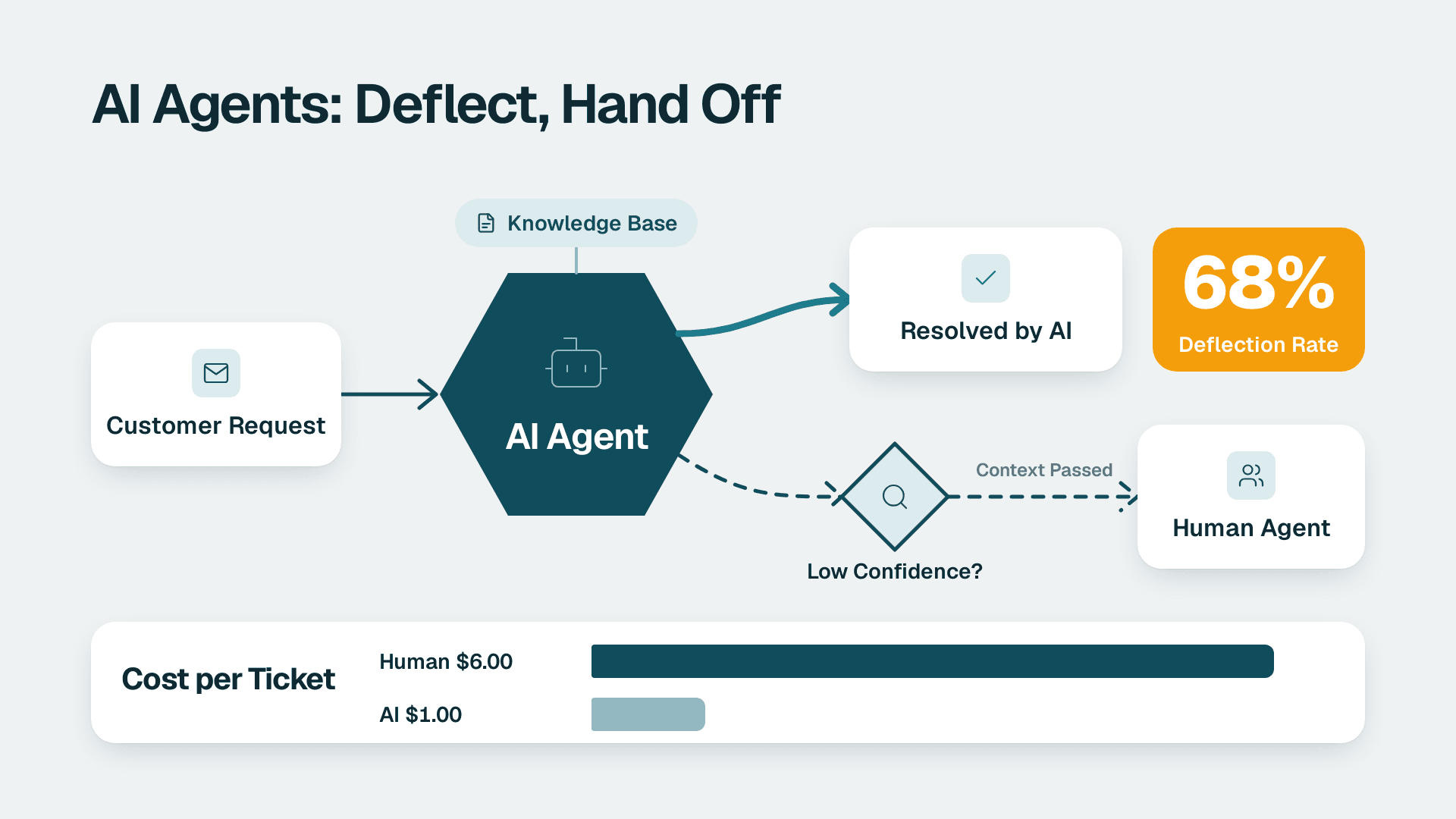
AI customer service agents are software systems that read a customer's request, pull answers from your knowledge base, and take actions such as processing a refund or updating an account without a human. They deflect tickets by resolving routine questions end to end, and they hand off to a person when confidence drops or the issue is sensitive. Pricing is increasingly charged per resolution.
Key Takeaways
- Deflection works best on repetitive, well-documented questions, so your knowledge base quality sets the ceiling on results.
- Handoff rules decide whether customers feel helped or trapped. Define them before launch, not after the first complaint.
- Cost is shifting from per-seat to per-resolution pricing, so model your expected resolution volume rather than your headcount.
- CSAT stays safe when you launch in shadow mode, start with low-risk topics, and monitor for silent failures every week.
What are AI customer service agents, and how do they differ from chatbots?
An AI customer service agent understands what a customer needs, gathers the relevant information, decides what to do, and then does it. A traditional chatbot follows a scripted menu and mostly points people to articles. The difference is action: an agent can look up an order, change a delivery date, or qualify a lead, while a chatbot can only talk about those things.
You will see the same idea described as conversational AI agents, AI agents for customer service, or conversational AI agents for businesses. The labels vary by vendor, but the working parts are consistent: a language model that interprets the request, a knowledge source it retrieves answers from, and integrations that let it act inside your helpdesk, CRM, or order system.
| Capability | Scripted chatbot | AI customer service agent |
|---|---|---|
| Understands free-text questions | Limited, keyword or menu based | Yes, interprets intent and context |
| Answers from your documentation | Only pre-written replies | Retrieves and composes answers |
| Takes actions (refund, update, route) | Rarely | Yes, through integrations |
| Handles multi-step requests | No | Yes, within the permissions you set |
| Needs ongoing tuning | Rule maintenance | Knowledge, guardrails, and monitoring |
Deciding which support queues to automate first is the same prioritisation exercise that sits behind any AI automation consulting scope, and the logic carries across departments. If you are still mapping where automation fits across the business, the guide to AI automation for SMBs and how to start gives the wider frame before you commit to a support project.
It also helps to be precise about how much independence you want the agent to have. Some teams want an assistant that drafts replies for a human to approve, while others want full autonomy on narrow tasks. The article on what autonomy really means in business is a useful way to pick that setting deliberately.
How do AI agents for customer service deflect tickets?
An AI agent deflects a ticket when it resolves the customer's issue in the conversation, so no human ticket is ever created or worked. Deflection comes from three things: recognising the question, finding a correct answer, and completing any action the answer requires.
A typical interaction runs in four stages. The agent identifies the customer's intent, gathers the facts it needs (from the knowledge base and from systems such as order or account records), decides on the right response, and then executes. If any stage fails, the conversation should move to the handoff path rather than guess.
Which ticket types deflect best?
The tickets that deflect reliably share three traits: the answer is documented, it does not change with judgement, and the action behind it is simple. Common examples across SMB and mid-market companies:
- Order status, shipping, and delivery-window questions
- Password resets and account access
- Plan, billing-date, and invoice copy requests
- Returns and refund eligibility under a clear policy
- Opening hours, booking changes, and appointment reminders
- Basic how-to questions already covered in help articles
Tickets that deflect poorly include complaints that carry emotion, disputes that need an exception, anything involving a legal threat, and problems the customer cannot describe clearly. Plan for those to reach a person.
What deflection rates should you expect?
Vendor-reported figures give a rough range, though you should treat them as best-case marketing rather than a forecast. HubSpot reports a 70% average resolution rate for users of its customer agent, with top teams reaching 90%, and a customer story from Synergym reports the agent autonomously resolves 85% of that company's support requests (HubSpot product page, 2026). Those results depend on clean content and a narrow, repetitive ticket mix, so a sensible planning assumption for your own team is to start well below those numbers and measure upward.
A subtle point on definitions matters here. HubSpot defines a resolution as support provided where the conversation was not handed to a human rep for 72 hours. That is a measure of whether a person stepped in, not whether the customer was happy. A customer who gives up and leaves silently can still be counted as resolved, which is why you should track CSAT alongside resolution rate rather than instead of it.
How does an AI agent hand off to a human without frustrating the customer?
A good handoff passes the conversation to a person with full context, at the moment the agent should stop, through the channel the customer is already using. A bad handoff makes customers repeat themselves, hides the human option, or loops them through the same answers. Handoff design affects CSAT more than raw deflection does.
What should trigger a handoff?
Write triggers as explicit rules and test them, rather than relying on the model to decide when it is out of its depth.
| Trigger | Example | What the agent should do |
|---|---|---|
| Low confidence | No matching knowledge article found | Say it cannot answer, offer a person, pass the transcript |
| Customer request | The customer asks for a human | Hand off immediately, no further questions |
| Sentiment | Repeated frustration or strong negative language | Escalate with a priority flag |
| Repeated failure | Same question rephrased two or three times | Stop and escalate |
| High-risk topic | Cancellation threat, safety issue, legal wording | Escalate regardless of confidence |
| High-value action | Refund above a set threshold | Route for human approval |
| Out of hours | No staff online | Offer a callback or a ticket with a clear response time |
What does a clean handoff include?
The receiving agent should see the full conversation, the customer's identified account, the intent the AI detected, what it already tried, and any actions it took. Tell the customer what happens next, including a realistic wait time. If your staff are offline, say so plainly and capture a contact method, since an honest delay does less damage than a silent one.
Make the human option easy to find. Burying it is a short-term deflection win that tends to show up later as a CSAT drop and a spike in repeat contacts.
What do AI customer service agents cost?
Cost has two parts: the platform you run the agent on, and the usage charges for each conversation or resolution. Pricing models are moving toward paying for outcomes, which makes costs easier to tie to results but harder to budget if volume is unpredictable.
HubSpot prices its customer agent at $0.50 per resolution for messaging, runs it on HubSpot Credits, and requires the Professional or Enterprise edition of HubSpot (HubSpot customer agent page, 2026). Sierra states that it uses outcome-based pricing, though the model and rates vary by engagement, so confirm figures directly with any vendor before you build a business case.
| Pricing model | How you pay | Best fit | Watch out for |
|---|---|---|---|
| Per resolution | A fee for each conversation counted as resolved | Variable volume, desire to pay for outcomes | Definition of a resolution; bill grows with success |
| Platform plus credits | Base edition plus consumption credits | Teams already on that platform | Required edition tier; credit overages |
| Per seat | Monthly fee per human user | Agent-assist tools used by staff | Does not scale with automated volume |
| Custom or outcome-based | Negotiated around agreed results | Larger or complex deployments | Contract terms, minimums, and measurement rules |
How do you estimate your own cost?
Use a simple hypothetical. Suppose an agent resolves 2,000 conversations in a month. At a listed rate of $0.50 per resolution, that is $1,000 in resolution fees, before the platform edition, setup work, and the staff time spent maintaining content. Compare that with the loaded cost of the tickets those conversations would otherwise have created. Your own numbers will differ, so use your real monthly ticket count and your real cost per handled ticket.
Budget for the hidden costs too: knowledge base clean-up, integration work, testing, and a named owner who reviews conversations every week. Under-resourcing that last item is the most common reason projects stall after launch.
Which conversational AI agents for businesses suit a small or mid-market team?
The right choice depends on where your tickets already live, how many channels you support, and how much engineering time you can spare. Most SMB and mid-market teams do best with a managed agent that plugs into the helpdesk or CRM they already use, rather than building from scratch.
What should you compare?
- Channels: Sierra says one agent can be deployed across chat, SMS, WhatsApp, email, voice, and ChatGPT (Sierra product site, 2026). Check that your priority channels are covered, not just chat.
- Setup effort: Some platforms build an agent from your existing standard operating procedures and call transcripts, or from a plain-English goal. Sierra describes this as its Ghostwriter feature. Others expect you to assemble the knowledge base yourself.
- Agent types: Chatbase offers customer support, sales, and product guidance agents (Chatbase site, 2026). Decide whether you want one narrow support agent or a wider set.
- Analytics and monitoring: Look for conversation review, alerting, and the ability to test changes safely. Sierra names Explorer, Monitors, Experiments, and Observability as its tools in this area.
If you would rather assemble something yourself with workflow tools, the ranking of no-code AI agent builders for ops teams compares the options and shows where each one runs out of road.
Should you choose self-hosted or cloud AI?
For most small and mid-market companies in non-regulated sectors, a cloud service is the practical default. It removes server maintenance, security patching, and model upgrades from your plate. Self-hosting makes sense when data residency rules, contractual restrictions, or unusual integration needs outweigh the extra engineering and monitoring burden. Whichever route you take, ask the same questions: where is customer data stored, who can access conversation logs, and is your data used to train models?
How do you roll out an AI customer service agent without hurting CSAT?
Roll out in stages: audit your tickets, fix the knowledge base, run the agent in shadow mode, launch on low-risk topics, and expand only while CSAT holds. The goal is to prove quality on a narrow slice before the agent meets your whole customer base.
What is a safe rollout sequence?
1. Audit your tickets. Export three to six months of conversations, group them by intent, and rank by volume and risk. Pick the high-volume, low-risk intents first.
2. Fix the knowledge base. The agent is only as good as the content it retrieves. Remove outdated articles, resolve contradictions, and write answers for the questions that have none.
3. Run in shadow mode. Let the agent draft answers that staff review but customers do not see. Measure how often a human would have sent the same reply.
4. Launch on a narrow slice. Turn it on for a few intents, one channel, or a share of traffic. Keep a visible route to a person.
5. Set the handoff rules. Use the trigger table above and test each rule with real transcripts before launch.
6. Measure CSAT by segment. Compare satisfaction for AI-resolved conversations, handed-off conversations, and human-only conversations. A blended average hides problems.
7. Expand gradually. Add intents only when the previous set is stable and the review backlog is under control.
What should you measure after launch?
| Metric | What it tells you | Warning sign |
|---|---|---|
| Resolution rate | Share of conversations the agent closes | Rising while CSAT falls |
| CSAT by segment | Satisfaction for AI versus human conversations | AI segment well below human segment |
| Handoff rate | How often the agent escalates | Sudden spike or sudden drop |
| Repeat contact rate | Customers returning on the same issue | Increase after a content change |
| Time to first response | Speed customers experience | Gains that do not translate to resolution |
| Wrong-answer rate from review | Accuracy found by human sampling | Any growth in policy or pricing errors |
How do you monitor an AI agent for silent failures?
Silent failures are the dangerous ones: the agent keeps answering, nothing throws an error, and quality quietly degrades. Typical causes include a knowledge base sync that stopped, an expired integration token that makes actions fail, a policy change that never reached the content, or a model update that shifts behaviour. Counter them with a weekly routine. Sample a fixed number of conversations, alert on sudden swings in resolution or handoff rate, check that the knowledge base last-updated date is recent, and confirm that action integrations still complete. Assign a named owner, because monitoring that belongs to everyone ends up belonging to no one.
What privacy and compliance rules apply in the US, UK/EU and Canada?
The rules depend on where your customers are and what data the agent handles. Even in non-regulated sectors, a support agent processes personal data such as names, emails, order histories, and the free text customers type, so treat it as a data-processing system from day one.
- UK and EU (GDPR): A UK retailer or EU software firm needs a lawful basis for processing, a data processing agreement with the vendor, clear retention periods, and a route for customers to ask for access or deletion of their conversation data. Be transparent when customers are talking to an automated system.
- Canada (PIPEDA): A Canadian manufacturer or services firm should be accountable for personal information it passes to a vendor, obtain appropriate consent, and be open about where data is stored and whether it crosses borders.
- United States: A US SaaS finance team faces a patchwork of state privacy laws. If conversations could contain health information, HIPAA may apply, and many business buyers will ask for a SOC 2 report from any vendor handling customer data.
Vendors publish their own compliance positions. Chatbase, for example, lists GDPR, SOC 2 Type II, and HIPAA among its compliance standards and says customer data is not used to train models. Treat statements like that as a starting point and confirm them in the contract and data processing terms rather than from a web page alone.
A short checklist before signing: confirm where data is stored, whether conversations train shared models, how long logs are retained, who at the vendor can read them, how deletion requests are handled, and what happens to your data if you leave. For a wider policy framework, the article on AI governance for companies without a compliance team shows how to set the rules without hiring specialists.
What mistakes sink AI customer service projects?
Most failed projects share a short list of causes, and almost none are about the technology itself.
- Launching on messy content. The agent confidently repeats the contradictions in your help centre.
- Hiding the human option. Deflection numbers look good while frustration shows up in reviews and churn.
- Measuring only resolution. A resolved conversation is not a satisfied customer, so pair it with CSAT and repeat-contact data.
- Giving too much authority too soon. Let the agent take small actions first, and require approval for refunds or account changes above a threshold.
- No owner after launch. Content drifts, integrations break, and nobody notices for weeks.
- Treating it as a headcount cut. The healthier framing is freeing staff for complex and relationship-heavy conversations, which also makes handoffs better.
A US ecommerce team, a UK fintech support desk, and a Canadian manufacturer's distributor line will all face the same pattern: start narrow, measure honestly, and expand only on evidence.
---
About Lets Viz: Lets Viz is a data analytics and AI automation consultancy that has delivered projects since 2020 for clients across US healthcare, UK fintech, Canadian manufacturing, and global SaaS. We hold a 5.0 Clutch rating, and our work covers reporting, workflow automation, and AI agent deployments built around each client's data and governance needs.
If you want help deciding which support workflows to automate and how to measure the results, explore AI automation consulting.
Sources
Facts and prices checked November 2026.