Microsoft Copilot Training: Free, Paid and Champion Options
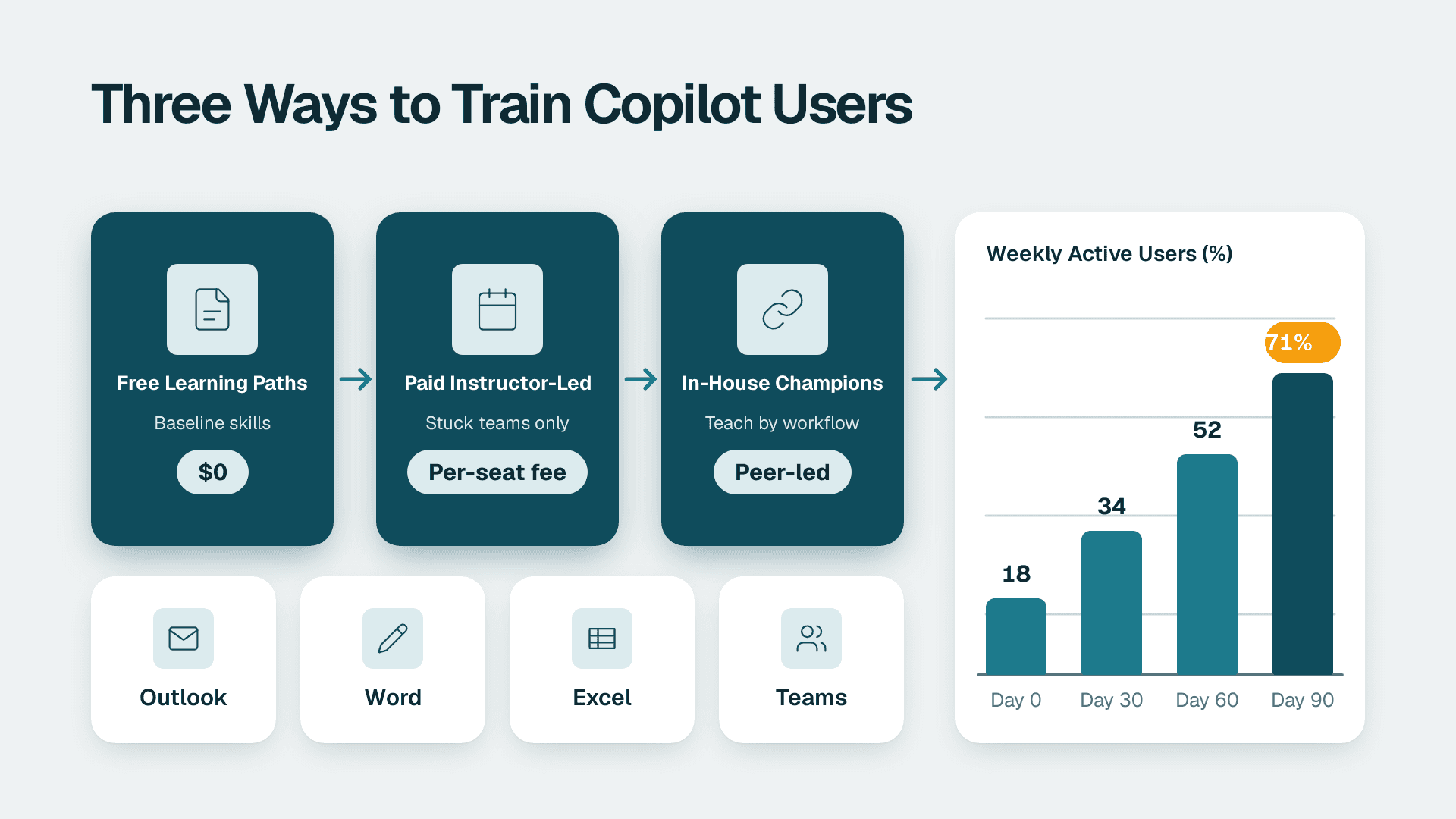
The most effective Microsoft Copilot training for a business is a blend: Microsoft's free learning paths for baseline skills, a small group of trained in-house champions who teach by department workflow, and paid instructor-led sessions only where a team is stuck. Usage changes when training is tied to real tasks in Outlook, Word, Excel and Teams, not when it is a one-off webinar.
Key Takeaways
- Microsoft's free training covers the basics well, but it is generic and nobody enforces it.
- Paid training buys structure and a live trainer, and is best used on a few teams rather than the whole company.
- In-house champions are the cheapest lever that reliably changes daily habits, because they teach your own workflows.
- Fix data access, labels and policy before you train, or staff will learn to use a tool that surfaces the wrong content.
- Measure adoption in the admin center usage reports and review it monthly, not once at launch.
What does Microsoft 365 Copilot training actually need to cover?
Good Microsoft 365 Copilot training covers three things: how to write a useful prompt, which tasks in which app are worth handing to Copilot, and what is safe to share with it. Most rollouts teach only the first and wonder why usage fades after a fortnight.
The usual failure is treating training as a launch event. People attend a one-hour demo, try Copilot twice, get a mediocre answer from a vague prompt, and return to old habits. The licence keeps billing either way. If you want a view of whether your tenant, permissions and content are ready before you spend on seats and training together, a fixed-price Copilot readiness assessment is one way to get that picture in about a week. Our guide on how to test AI readiness before Copilot shows how to run the same checks yourself.
A practical curriculum has four layers:
- Foundations: what Copilot is, where it appears, and the difference between the free chat experience and the licensed one that works across your work data.
- Prompting: a repeatable structure for asking, so results are consistent rather than lucky.
- App workflows: specific jobs in Outlook, Word, Excel, Teams and PowerPoint, plus any agents you have enabled.
- Guardrails: what data is in scope, how sensitivity labels behave, and when a human must check the output.
Different audiences need different depths. An owner needs to understand cost and risk. An IT manager needs the admin and governance side. A finance analyst needs Excel and Outlook. Training that treats all of them the same tends to bore everyone.
How can you learn Microsoft Copilot for free?
You can learn Copilot for free through Microsoft's own skilling resources, which are substantial. The catch is not quality but accountability: free material works for self-starters and fails when nobody is expected to finish it.
The Microsoft Copilot Skilling Center lists three resources for everyone: Copilot Academy, with curated learning paths designed by Microsoft experts, a Customer Hub of webinars, and instructor-led virtual training events. It also organises content by role: Leaders, Champions, IT Pros and admins, Developers, and Business users. That role split is useful, because you can hand each group a different starting point instead of one generic link. Microsoft also describes Copilot Chat as free and available with your Microsoft subscription, which makes it a low-risk place for staff to practise before they have a licensed seat.
For a true beginner, the Get started with Microsoft Copilot module on Microsoft Learn has 8 units and no prerequisites. It covers what Copilot is, setup and account types, language and accessibility support, tips for engaging conversation, and the GPT technology underneath. Staff earn a pass designation on their Learn profile by signing in and answering every assessment question correctly, which gives you a simple completion signal if you want one.
For people who already use Microsoft 365 daily, the Draft, analyze, and present with Microsoft Copilot learning path is the better fit. It has 7 modules, is rated Intermediate, and expects basic functional experience with Microsoft 365 services. It walks through prompt flows in PowerPoint, Word, Excel, Teams and Outlook and introduces Copilot Chat. The first module teaches a four-element prompting framework and covers enterprise data protection and sensitivity labels, which is exactly the pairing a business rollout needs.
The path also names the agents and features your staff will meet: the Idea Coach agent in PowerPoint, the Writing Coach agent in Word and Outlook, the Facilitator agent and Intelligent Recap in Teams, Edit with Copilot and the Analyst agent in Excel, and Draft Instructions in Outlook. Our overview of what agents are and what autonomy really means helps explain the difference between assistive features and agents that act on their own.
Microsoft also runs the AI Tour, described as a free one-day event with experts and hands-on AI experience, and Virtual Training Days covering Azure, Microsoft 365, Dynamics 365, Power Platform and Security. Those suit IT and power users more than the general workforce.
What free training does not do
Free courses do not know your business. They use sample documents, not your quarterly pack. They do not tell a sales team which of their five weekly emails Copilot should draft. And they do not follow up. If you rely on free material alone, set a completion deadline, assign a named owner, and book a practical session where people apply what they learned to a real task.
What do paid Microsoft Copilot training options cost?
Paid Copilot training is priced by the provider, the format and the group size, and rates vary widely, so we do not quote a figure here. What you are buying is structure: a live trainer, a fixed date, exercises on your content, and someone who answers questions on the spot.
The main paid formats are:
- Instructor-led workshops: a half-day or full-day session for a department, delivered remotely or on site. Best for teams with a clear shared workflow, such as an accounts payable group or a customer service desk.
- Public or open-enrolment courses: a few of your people join a mixed class. Cheaper per head for small groups, but the content is generic.
- Bespoke programmes: a blend of workshops, office hours and follow-up sessions built around your processes. The most expensive, and the most likely to change behaviour.
- Certification-style courses: useful for IT staff and champions who need a recognised credential, less so for general users.
To budget sensibly, think in terms of cost per active user rather than cost per attendee. A workshop that 30 people attend and 6 keep using is expensive, however low the sticker price. A tighter session for 10 people who each leave with two working prompts for their own job is usually better value.
Training spend also needs to sit next to licence spend. The seat price is the larger and recurring number, so it makes sense to read our breakdown of Microsoft 365 Copilot cost per seat and per year before you decide how much to put into enablement. Paying for seats that nobody has been shown how to use is the most common way to waste that budget.
Is there a Copilot certification?
Microsoft offers role-based learning, and its Skilling Center includes a course for Champions and Adoption Managers, MS-4007, which teaches how to drive user enablement using Microsoft's implementation framework. An MS-4007 video series is also available on demand from Microsoft trainers. For general staff, a certification is rarely worth the time. For your champions and IT leads, it can give a useful shared vocabulary.
What about the consumer Copilot Pro plan?
Copilot Pro is a personal subscription and is not the right basis for a company rollout. A business needs central licensing, admin controls, and enterprise data protection, which is what the work-account experience provides. If staff are paying for personal plans to get around a slow rollout, treat that as a signal to speed up your own, and as a governance question.
How do in-house Copilot champions work?
An in-house champion programme trains a handful of volunteers deeply, then relies on them to coach colleagues in the flow of work. It is usually the cheapest approach per active user, because the cost is mostly time rather than fees, and it is the one most closely tied to lasting usage.
Microsoft's own Skilling Center has a dedicated Champions track, which tells you how seriously it treats the model. A workable setup looks like this:
1. Pick one champion per 15 to 25 people. Choose respected practitioners from each function, not only IT. A champion in finance carries more weight with finance than an IT announcement does.
2. Give them protected time. Two to three hours a week for the first two months is realistic. Without it, the programme collapses under day jobs.
3. Train them first and properly. Use the Microsoft Learn paths above, the champion course, and a session on your own policies.
4. Make them teach with real work. Each champion runs short sessions on a task their team actually does: summarising a client thread, drafting a first-pass proposal, cleaning up a spreadsheet.
5. Collect what works. A shared page of tested prompts by role is worth more than any slide deck.
The weakness of champions is inconsistency. Quality depends on the individual, and champions can spread bad habits as easily as good ones. Give them a short, clear policy on what data is in scope and who to ask when unsure. Our guide to AI governance for companies without a compliance team is a practical starting point for that policy.
Microsoft Copilot training options compared
The table below summarises how the three approaches differ. Costs are described qualitatively because provider pricing varies and should be quoted for your headcount.
| Option | Typical cost profile | Best for | Main weakness | Effect on lasting usage |
|---|---|---|---|---|
| Microsoft free resources | No fee, staff time only | Baseline skills, IT pros, self-starters | No accountability, generic examples | Low alone, good as a foundation |
| Paid instructor-led training | Provider fees, scales with group size | Teams with a shared workflow, a hard launch date | One-off unless followed up | Medium, rises with follow-up sessions |
| In-house champions | Mostly internal time, plus any champion course | Ongoing habit change across departments | Uneven quality, needs protected time | High, if time is protected |
| Blended (recommended) | Free baseline, champions, selective paid sessions | Most 20-500 person organisations | Needs an owner to coordinate | Highest of the three |
If you are still deciding which assistant to roll out in the first place, our comparison of how to standardise on one AI assistant covers the decision, so training money goes into the right tool.
Where is Copilot in Outlook, and how should you teach it?
In Outlook, Copilot appears as an icon in the ribbon and as options inside the message pane, depending on your version and licence. Teaching people where to find it is the first job, because many will never discover it on their own.
A surprising amount of lost usage comes from this basic confusion. Staff who cannot find the button assume they do not have access. Build a one-page screenshot guide for your own environment, and include the version question below.
Copilot in classic Outlook vs new Outlook
Your users may be on classic Outlook for Windows, the new Outlook, Outlook on the web or the mobile apps, and the layout and some features can differ between them. Microsoft changes these details often, so check the current Copilot in Outlook documentation for your tenant rather than relying on a static table, and decide on one supported client where you can. Mixed clients are a hidden training cost: every screenshot and instruction needs to be repeated for each version. If an IT manager does one thing before training, it should be to confirm which Outlook clients the company supports and test Copilot in each.
How to summarise long email threads with Copilot in Outlook
This is the best first win for most teams, and a good opening exercise in a workshop. Open a long thread, use the Copilot summary option that appears for long conversations, and ask a follow-up such as which decisions are still open and who owns each one. Then teach the check: scan the original thread for anything the summary skipped, especially dates, amounts and commitments. Summaries save time, but they are not a substitute for reading the one message that matters.
Other quick Outlook exercises worth teaching include drafting a reply from bullet points, adjusting tone, and using Draft Instructions and the Writing Coach agent that Microsoft's learning path describes. Keep each exercise under ten minutes and tied to a real inbox.
Is Copilot safe to train staff on: GDPR, HIPAA and PIPEDA?
Staff can use Copilot within the same compliance boundaries as the rest of your Microsoft 365 data, but the tool only respects the permissions and labels you have set. Training must therefore include what Copilot can see, because it can surface anything a user already has access to.
The Microsoft Learn path above covers enterprise data protection and sensitivity labels in its first module, which is the right place to start. Beyond that, the privacy angle differs by market, and your training should reflect the regime your staff work under:
- US healthcare and finance: a hypothetical US clinic group handling patient information needs HIPAA-aware rules, such as no protected health information in free-form prompts unless the tenant configuration and agreements support it. US finance teams often add SOC 2 expectations from their own customers.
- UK and EU: a UK fintech or an EU services firm will want GDPR-aligned guidance on personal data in prompts, data subject requests, and where records are held. A short data protection impact assessment before rollout is a common step.
- Canada: a Canadian manufacturer with employee and customer records should consider PIPEDA obligations on consent and safeguarding, and any provincial rules that apply.
These examples are illustrations, not legal advice. Have your own counsel or data protection lead confirm what applies. The training point is simple: staff should know three things before they start, namely what categories of data stay out of prompts, that Copilot can only surface what they can already open, and that oversharing in SharePoint or OneDrive is a risk to fix before launch, not after. The Microsoft Copilot documentation hub for IT pros covers planning, implementing and managing Copilot in an organisation, and is the reference your admins should keep open. You can find it at Microsoft's Copilot documentation for IT Pros.
How do you know whether Copilot training changed usage?
You know by looking at usage data monthly and comparing it with who was trained, not by asking people whether they like it. The Microsoft 365 admin center includes Copilot usage and adoption reports that show how many licensed users are active and which apps they use.
A simple measurement routine for a 20-500 person company:
1. Baseline before training. Record active licensed users and the apps in use in the week before any session.
2. Tag cohorts. Note who attended which session or sits with which champion, so you can compare trained and untrained groups.
3. Review monthly. Look for active users as a share of licensed users, and which apps are used. If Outlook is high and Excel is near zero, run an Excel session.
4. Reassign idle seats. If a licensed user shows no activity after training and a follow-up, move the seat to someone who will use it.
5. Keep an audit trail where policy needs it. Microsoft Purview Audit (Standard) keeps audit logs for 180 days, so export or review anything you need for compliance inside that window.
Usage reports tell you who is active, not whether the work improved. Pair them with a short monthly question to champions: what tasks are people now doing with Copilot that they did manually before? Two or three concrete answers per team are more useful than a dashboard percentage.
If Copilot answers are weak because your underlying files, data and permissions are messy, no amount of training will fix it. Clean source data matters. Our guide on running an ERP data quality check before AI covers one common cause.
What does a sensible 90-day Copilot training plan look like?
A sensible plan runs in three phases: prepare, teach, then reinforce. It spends little money early and puts paid help where free resources fall short.
| Phase | Weeks | Actions |
|---|---|---|
| Prepare | 1-3 | Check permissions and labels, write a one-page usage policy, choose champions, confirm supported Outlook clients |
| Teach | 4-8 | Champions complete the Microsoft Learn paths, all licensed staff do the beginner module, hold one workflow session per department |
| Reinforce | 9-13 | Monthly usage review, share a library of tested prompts, add a paid session for any team still lagging, reassign idle seats |
Two habits make the biggest difference. First, ask each person to pick one recurring task in their week and use Copilot on it for a month. Narrow beats broad. Second, keep leadership visible: when an owner or ops lead shares a prompt that saved them time, others follow. If you are choosing between spending on more seats and spending on enablement, enablement usually wins until the existing seats are in regular use.
---
About Lets Viz: Lets Viz is a data analytics and Microsoft consulting firm that has helped teams adopt Power BI, Microsoft 365 and AI tooling since 2020. We have supported organisations across US healthcare, UK fintech, Canadian manufacturing and global SaaS, and we hold a 5.0 rating on Clutch.
If you want to know whether your tenant, data and permissions are ready before you invest in seats and training, start with our Copilot readiness assessment (fixed price, 5 days).
Sources
- Microsoft Copilot Skilling Center
- Get started with Microsoft Copilot - Microsoft Learn
- Draft, analyze, and present with Microsoft Copilot - Microsoft Learn
- Microsoft Copilot documentation for IT Pros
Facts and prices checked November 2026.