Best Alternatives to Copilot for Business, Ranked (2026)
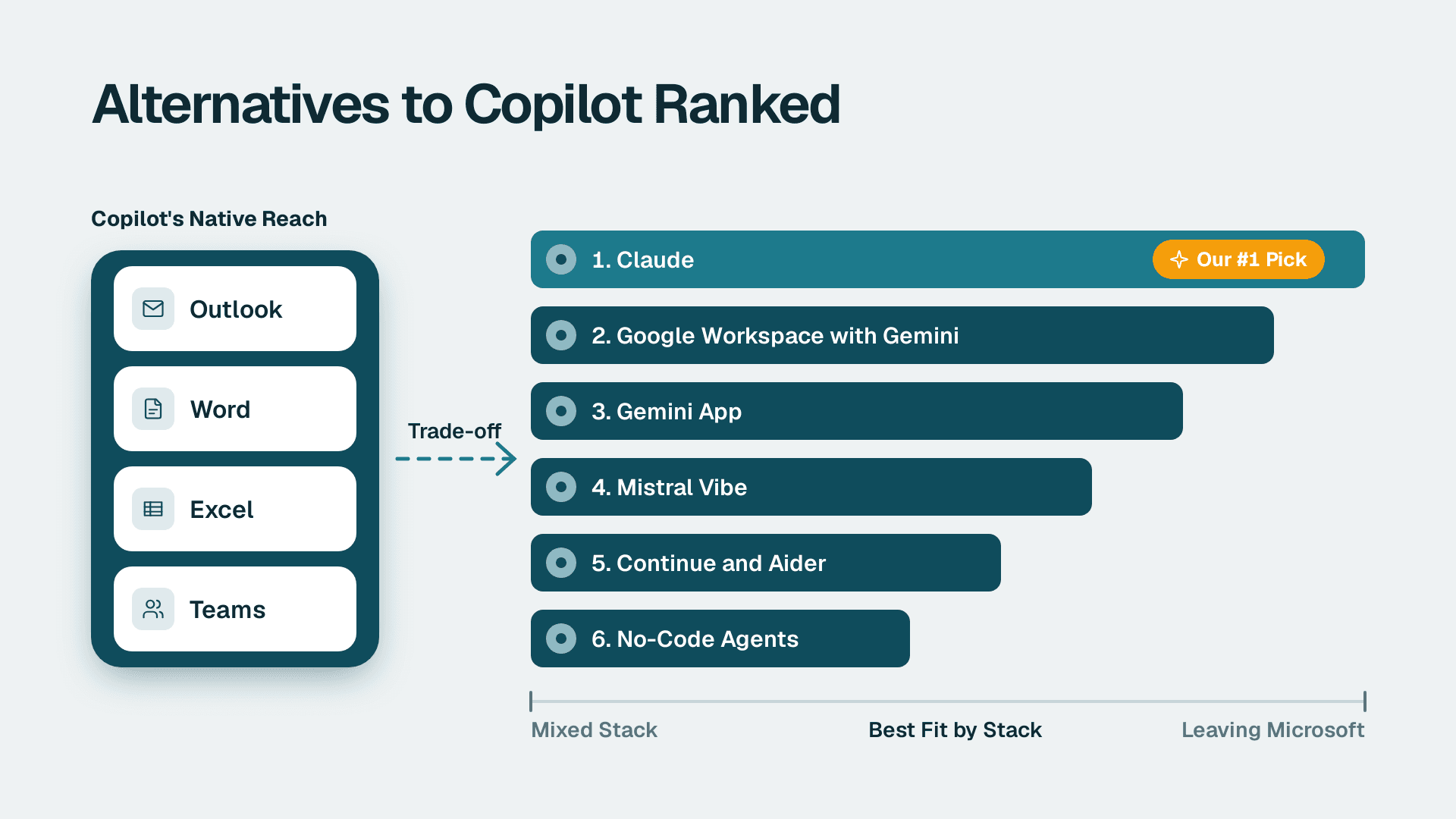
The best alternative to Copilot for most Microsoft 365 companies is Claude as a standalone assistant. It works with any stack, costs a flat per-person fee and leaves you in control of what staff share with it. Gemini is the pick if you are leaving Microsoft entirely. Neither matches Copilot's built-in reach into Outlook, Word, Excel and Teams.
Key Takeaways
- No alternative replicates Copilot's native presence inside Outlook, Word, Excel and Teams; you trade that for lower cost, flexibility or a different stack.
- Claude is our #1 pick for mixed stacks, and Google Workspace with Gemini is #2 for companies willing to leave Microsoft.
- Developer teams have free open source options, but they are not tools for operations or finance staff.
- Before you switch, run a Copilot readiness assessment (fixed price, 5 days) to find out whether the problem is the product or your data and rollout.
- Many "Copilot disappointments" are licensing, data-quality or training gaps that a different assistant would inherit.
Our Ranking Criteria
We ranked each alternative to Copilot against what an owner, ops lead or IT manager at a 20-500 person company actually needs:
- Stack fit: how well it works when your team uses a mix of Microsoft 365, Google and other tools, rather than only Microsoft.
- Cost clarity: a published, per-person price you can multiply by headcount, with no hidden infrastructure bill.
- Data control: you can decide what the assistant sees, and the vendor offers business tiers with admin controls.
- Ease of rollout: staff can be productive in days, without a long setup or a specialist hire.
- Depth of work help: how much real drafting, analysis and research it handles for non-developers.
If you are unsure how your own data and permissions would hold up under any assistant, the pillar guide on AI readiness and how to test it before Copilot is the place to start.
1. Claude: Best Standalone Assistant for Mixed Stacks
Claude is a general-purpose AI assistant for drafting, summarising, analysis and research. It has a Free plan covering chat on web, desktop and mobile, with usage that resets every 5 hours and weekly. Pro is $17 a month billed annually or $20 billed monthly.
Best for: companies of 20-200 people with a mixed toolset, where staff need a strong writing and analysis assistant without being tied to one office suite.
Pros:
- Works the same whether your files live in Microsoft 365, Google or elsewhere.
- A free plan lets you test real tasks before spending anything.
- Predictable per-person pricing that is easy to budget.
Cons:
- It is a separate window, not a button inside Outlook or Excel, so staff copy and paste or upload files.
- Business-tier admin features and prices need confirming with the vendor before you commit.
2. Google Workspace with Gemini: Best if You Are Leaving Microsoft
Google Workspace business plans include Gemini in the higher tiers, which puts AI inside Gmail, Docs and Sheets the way Copilot sits inside Outlook, Word and Excel. There is a 14-day trial. The Base plan is for up to 20 users, and Starter and Standard are for up to 300.
Best for: small companies that have not yet standardised on Microsoft, or that are already half-way to Google.
Pros:
- AI is built into the apps your team writes and meets in, which is the closest like-for-like to Copilot's design.
- A trial period lets you test before moving anyone.
- User limits per plan are clear, so sizing is simple.
Cons:
- It is a platform migration, not a plug-in. Mail, files, calendars and habits all move.
- Teams that live in Excel models or Power BI will feel the loss.
3. Gemini App: Best Low-Cost Pilot
The Gemini app is Google's standalone assistant. The US page lists a Free plan at $0 with Deep Research, Canvas, Gems and Gemini Live. Google AI Plus is $4.99 a month and Google AI Pro is $19.99 a month, listed with 4x the Free usage limits and 5 TB of storage.
Best for: a quick, cheap pilot with a handful of power users, or a company that wants a second opinion tool next to Copilot.
Pros:
- A free tier and low entry prices make experiments nearly risk-free.
- Gems let you save repeatable prompts for common tasks.
- Research and canvas features suit drafting and analysis work.
Cons:
- These are per-person plans, so you carry the governance work yourself. Decide what staff may paste in before anyone starts.
4. Mistral Vibe: Best for Data-Control Conversations
Mistral Vibe (formerly Le Chat) offers chat, deep research and a coding agent. It is listed with Free, Pro, Team and Enterprise plans, so there is a path from trial to a managed business deployment.
Best for: IT managers who want to open a data-handling conversation with a vendor that sells a team and enterprise tier, rather than only consumer plans.
Pros:
- A clear ladder from Free to Enterprise suits a staged rollout.
- Includes a coding agent next to chat and research, so one product can serve both office and technical staff.
Cons:
- The product page shows no prices, so budgeting needs a quote.
- Get data-handling terms in writing; do not assume them from the plan name.
5. Continue and Aider: Best for Developer Teams on Open Source
Continue.dev is an open source VS Code and JetBrains extension that connects the editor to any language model, local via Ollama or through an API. It is free to install and use, and model costs are separate. The author of one hands-on review reports that tab autocomplete with a local model on a 16GB MacBook returns completions in 300-600ms, versus 150-250ms for a commercial editor. Setup is estimated at 20-30 minutes, including the Ollama install and model download.
Aider is a terminal-based coding assistant under the MIT license, installed with `pip install aider-chat`, and it works with virtually any model API, including local models.
Best for: engineering teams that want code assistance with the model running on their own hardware, so code never leaves the building.
Pros:
- Free software, with the model choice entirely yours.
- Local models give the strongest data control on this list.
- Aider commits every change with a clear message, so `git revert` undoes a bad edit.
Cons:
- Aider has no IDE integration, and local models are slower than hosted tools.
- Neither helps your finance, sales or operations staff. This is a developer option only.
6. No-Code Agents and Workflow Automation: Best When the Problem Is Process
Sometimes people shop for an alternative because they want work done, not a chat window. A no-code agent or workflow tool connects your systems and runs a repeatable job, such as routing requests, updating records or chasing approvals. Our ranking of the best no-code AI agent builders for ops teams covers the field.
Best for: operations leads whose pain is manual handoffs between systems, not writing emails faster.
Pros:
- Automates a whole process end to end, rather than assisting one person at a time.
- Results are easier to measure: hours saved on a named workflow.
Cons:
- Needs process design up front, and someone must own and maintain each flow.
Quick Comparison Table
| Option | Fits mixed stack | Price signal | Data control | Best for |
|---|---|---|---|---|
| 1. Claude | High | Free plan; Pro $17-20/month | Medium (confirm business terms) | Mixed-stack teams |
| 2. Google Workspace with Gemini | High (Google-only) | Plan-based, 14-day trial | Medium | Companies leaving Microsoft |
| 3. Gemini app | Medium | Free; $4.99 and $19.99 tiers | Low-Medium (per-person plans) | Cheap pilots |
| 4. Mistral Vibe | Medium | Not published | Medium (Team and Enterprise tiers) | Vendor data talks |
| 5. Continue and Aider | Dev tools only | Free software; model costs extra | High (local models) | Engineering teams |
| 6. No-code agents | High | Varies by tool | Medium | Process automation |
Is There More Than One Version of Copilot?
Yes, and the confusion drives many bad purchases. Microsoft sells individual Copilot plans starting from $9.99 a month (listed US price), and separately sells the business Microsoft 365 Copilot that works inside your tenant. The business licence is the one that appears in Outlook, Word, Excel and Teams, and its per-seat and annual cost is broken down in our guide to Microsoft 365 Copilot cost per seat and per year.
There is also Copilot in Power BI and Fabric, which has its own requirement: it needs a paid Fabric capacity F2 or higher, or Power BI Premium P1 or higher. A Pro licence ($14 per user/month) or Premium Per User ($24 per user/month) alone is not enough, and trial capacities are excluded. That requirement surprises many buyers.
Where Is Copilot in Outlook, and Does It Differ Between Classic and New?
Staff often report "I cannot find Copilot" when the real issue is licensing or the Outlook version. The Copilot entry points sit in the ribbon and in the message compose window, but which ones appear depends on the licence assigned to the user and on whether they run classic Outlook or the new Outlook. Before you decide Copilot has failed, check three things: the user has a Copilot licence assigned, the Outlook version they use, and the update channel. Our Copilot training guide covers how to teach staff where each feature lives.
What Is the Downside of Using Copilot?
The honest downsides are practical, not mystical:
- It surfaces what you already have. Poor permissions and messy files show up in answers. That is a data-hygiene problem, and any assistant with access would expose it.
- Feature prerequisites trip people up. For example, Copilot in Excel requires AutoSave, so the file must be saved to OneDrive.
- Cost per seat adds up across a whole company, and unused licences are pure waste.
- Audit trails need planning. Microsoft Purview Audit (Standard) keeps audit logs for 180 days, so decide early if you need longer retention.
If you are weighing Copilot against a general chat assistant rather than a full replacement, read Microsoft Copilot vs ChatGPT: which to standardise on. For policy questions, our guide to AI governance for companies without a compliance team gives a workable starting point.
How to Choose
- You pay for Microsoft 365 and want to stay: keep Copilot, fix permissions and training first, and add a standalone assistant like Claude only for staff who need a stronger writing or research tool.
- Your team uses a mix of Microsoft, Google and other tools: start with Claude (#1) so the assistant is not tied to one suite.
- You are already moving to Google: choose Google Workspace with Gemini (#2) and avoid paying for two ecosystems.
- You want to test cheaply before any big decision: run a 30-day pilot with the free tiers of Claude and the Gemini app with five to ten volunteers, and measure time saved on named tasks.
- You have developers and strict code confidentiality: use Continue or Aider with a local model (#5), and treat it separately from your office rollout.
- Your real problem is manual process, not writing: look at no-code agents (#6) before buying any assistant.
If you cannot tell whether the problem is the tool or your readiness, book the Copilot readiness assessment (fixed price, 5 days) and get a clear, evidence-based answer before you spend on licences or switch platforms.
Sources
- AI Governance Strategy for Companies Without a Compliance Team
- Microsoft Copilot Training: Free, Paid and Champion Options
- What Is Power BI? A Plain-English Guide for Business Buyers
Facts and prices checked November 2026.
---
About Lets Viz: Lets Viz is a data analytics consulting firm that has helped teams turn data into decisions since 2020. We serve finance, healthcare and other mid-market organisations, with a 5.0 Clutch rating from client reviews. Our Copilot readiness work is vendor-neutral: we tell you when Copilot fits and when it does not.