Tableau Funtion: ROUND
 Reviewed by Neetu Singla — Founder, Lets Viz Technologies — AI & Data Consultant. Last reviewed July 3, 2026.
Tableau Function: ROUND
Category: Number Functions
The ROUND() function in Tableau is a numerical formatting and precision-control function that rounds a number to a specified number of decimal places.
It helps ensure numerical results appear clean, accurate, and consistent in visualizations and calculations.
Purpose
To clean and standardize numeric output
To prevent overly long decimal values in views, dashboards, and tooltips
To apply business-friendly precision (e.g., currency, percentages, KPIs)
Type of Calculations It Performs
Mathematical rounding
Decimal precision control
Numeric formatting logic
It uses traditional rounding rules:
Values ≥ .5 round up, values < .5 round down.
Practical Use Cases
Formatting financial metrics (e.g., sales, profit, currency)
Rounding calculation results for KPIs or percentages
Preparing presentation-ready numbers
Setting controlled precision in statistical or analytical results
Rounding forecast values, ratios, or scientific calculations
ROUND(number, [decimal_places])
| Parameter | Type | Description |
|---|---|---|
| angle | Numeric (scalar, column) | The angle in degrees that you want to convert to radians. Must be a numeric value. |
How It Works?
Mathematically, the conversion between degrees and radians is based on the formula:
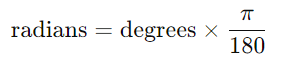
Since 180° = π radians, the function simply multiplies the degree value by π/180.
Examples of Conversion:
| Degrees | Formula | Result (radians) |
|---|---|---|
| 0 | 0 × π/180 | 0 |
| 90 | 90 × π/180 | 1.5708 |
| 180 | 180 × π/180 | 3.1416 |
| 270 | 270 × π/180 | 4.7124 |
| 360 | 360 × π/180 | 6.2832 |
What Does It Return?
Type: Number (Float)
Description: Returns the angle in radians that corresponds to the input angle in degrees.
The returned value is always in the range [0, 2π] for a full circle.
Example:RADIANS(180) → returns 3.14159265358979 (π radians)
When Should We Use It?
Use the RADIANS() function when:
Your input data is in degrees but you need to perform trigonometric operations (like
SIN,COS,TAN).You are creating circular or periodic visualizations (e.g., polar charts, circular gauges).
Performing distance calculations using the Haversine formula or other geographic models.
You are working with angles in mechanical or scientific applications that require radian-based math.
Basic Usage
RADIANS(180)
Result: 3.14159265358979
Explanation: Converts 180° to π radians.
Column Usage
RADIANS([Angle in Degrees])
Explanation: Converts each value in the [Angle in Degrees] column to radians.
| Angle (°) | Radians |
|---|---|
| 30 | 0.5236 |
| 45 | 0.7854 |
| 60 | 1.0472 |
Advanced Usage – Combined with SIN()
SIN(RADIANS([Angle in Degrees]))
Explanation: Calculates the sine of an angle given in degrees by first converting it to radians.
| Angle (°) | Sine |
|---|---|
| 0 | 0 |
| 90 | 1 |
| 180 | 0 |
| 270 | -1 |
Geographic Distance Example (Haversine Formula)
3959 * 2 * ASIN(
SQRT(
POWER(SIN(RADIANS(([Lat2]-[Lat1])/2)), 2) +
COS(RADIANS([Lat1])) * COS(RADIANS([Lat2])) *
POWER(SIN(RADIANS(([Lon2]-[Lon1])/2)), 2)
)
)
Explanation: Calculates the great-circle distance between two latitude/longitude points (in miles).
Tips and Tricks
- Always convert degrees to radians before using trigonometric functions in Tableau.
- Combine with the
DEGREES()function to convert results back to degrees if needed. - Ensure angle values are numeric — using strings will return an error.
- Be aware of cyclic patterns: results repeat every 360° (or 2π radians).
- Small rounding errors may occur for large decimal inputs due to floating-point precision.
Related Functions You Might Need
| Function | Description |
|---|---|
DEGREES(number) | Converts radians to degrees (inverse of RADIANS). |
SIN(number) | Returns the sine of an angle (expects radians). |
COS(number) | Returns the cosine of an angle (expects radians). |
TAN(number) | Returns the tangent of an angle (expects radians). |
PI() | Returns the constant value of π, often used in degree-radian conversions. |
We’ve got plenty of resources to help you master Tableau functions. For more details, check out the official Tableau documentation. Or, if you’re ready for more practice, let’s dive into related functions and build your Tableau skills further!
If you’re ready to harness the full power of Tableau and elevate your data analytics capabilities, our expert Tableau consulting services are here to guide you. Whether you need support with building advanced calculated fields, creating dynamic visual dashboards, or optimizing your data sources for peak performance, our team of experienced Tableau consultants delivers customized solutions designed for your business needs. Visit our Tableau Consulting page to discover how we can help your organization turn data into impactful, insight-driven decisions.
It converts an angle from degrees to radians, which are required for trigonometric calculations.
Functions like SIN, COS, and TAN in Tableau expect the angle to be in radians — RADIANS() ensures the input is in the correct format.
Use the DEGREES() function, which performs the inverse operation of RADIANS().
No, the input must be numeric. Using text or null values will cause an error or return NULL.
Yes, it’s a lightweight mathematical conversion function optimized for performance even on large datasets.
Working with Tableau — or thinking about Power BI?
We work both sides. Tableau-certified for production work and complex calcs, and we've shipped 12+ Tableau-to-Power BI migrations with 100% parity testing and 30–60% license savings.
Tableau-certified12+ migrations100% parity
