Tableau Function: COS
 Reviewed by Neetu Singla — Founder, Lets Viz Technologies — AI & Data Consultant. Last reviewed July 3, 2026.
Tableau Function: COS
Category: Number Functions
The COS() function in Tableau calculates the cosine of a given angle (in radians).
It’s a trigonometric function that returns the horizontal component of a unit circle at a specified angle.
Purpose
The primary purpose of the COS() function is to determine the cosine value of an angle — a core operation in geometry, physics, engineering, and spatial analytics.
It helps in analyzing cyclic, periodic, or angular data such as waveforms, rotations, and directional measurements.
Type of Calculation
COS() performs a mathematical trigonometric calculation.
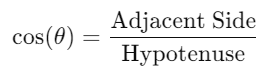
Given an angle in radians, it computes the cosine, which is the ratio of the adjacent side to the hypotenuse in a right-angled triangle:
Practical Use Cases
Calculating x-coordinates of points on circular or elliptical paths.
Converting polar coordinates to Cartesian coordinates.
Modeling periodic trends such as seasonal cycles or oscillations.
Signal analysis in sensor or telemetry data.
Simulating circular motion or direction-based transformations in Tableau.
COS(number)
| Parameter | Type | Description |
|---|---|---|
number | Numeric (scalar, column, or expression) | The angle in radians for which to calculate the cosine. Must be a real numeric value. |
How It Works?
The COS() function uses the trigonometric cosine rule to determine the horizontal projection of a unit vector rotating around the origin.
Mathematically:
where θ is the angle in radians.
If you have an angle in degrees, convert it first using the RADIANS() function:
COS(RADIANS([Angle in Degrees]))| Input (θ in radians) | Calculation | Result |
|---|---|---|
| 0 | cos(0) | 1 |
| π/2 | cos(1.5708) | 0 |
| π | cos(3.1416) | -1 |
| 2π | cos(6.2832) | 1 |
What Does It Return?
Type: Numeric (floating-point)
Meaning: Returns the cosine of the specified angle, ranging between −1 and 1.
When Should We Use It?
Use the COS() function when you need to:
Work with angles, rotations, or directional data.
Calculate x-axis positions in circular motion.
Perform spatial transformations (e.g., mapping data to circles).
Analyze cyclic trends (e.g., time series with daily or seasonal periodicity).
Build wave-based visualizations (e.g., oscillations or harmonic motion).
Basic Usage
COS(0)
Result: 1
Explanation: The cosine of 0 radians equals 1.
Column Usage
COS([Angle (radians)])
Calculates the cosine for each angle value in the [Angle (radians)] field.
For instance, if [Angle (radians)] = 1.57, Tableau returns approximately 0.0.
Advanced Usage
Convert degrees to radians and compute cosine:
COS(RADIANS([Angle (degrees)]))
This ensures accurate cosine values when working with degrees instead of radians.
Example Application – Circle Coordinates:
[X] = COS(RADIANS([Angle])) * [Radius]
[Y] = SIN(RADIANS([Angle])) * [Radius]
This formula creates the x and y coordinates for points along a circle — useful for polar plots or radial charts.
Tips and Tricks
Always ensure your angle input is in radians, not degrees.
Use
RADIANS()to convert degrees to radians before applyingCOS().Combine
COS()andSIN()to model circular or wave-like patterns.Useful in animation or motion-based Tableau visualizations.
Keep in mind that
COS()results are bounded between −1 and 1 — any other result likely indicates input format issues.
Related Functions You Might Need
SIN(number)– Returns the sine of a number (vertical projection).TAN(number)– Returns the tangent of a number.ACOS(number)– Returns the inverse cosine (arccosine).RADIANS(number)– Converts degrees to radians.DEGREES(number)– Converts radians to degrees.ATAN2(y, x)– Returns the angle between the x-axis and a point (y, x).
We’ve got plenty of resources to help you master Tableau functions. For more details, check out the official Tableau documentation. Or, if you’re ready for more practice, let’s dive into related functions and build your Tableau skills further!
If you’re ready to harness the full power of Tableau and elevate your data analytics capabilities, our expert Tableau consulting services are here to guide you. Whether you need support with building advanced calculated fields, creating dynamic visual dashboards, or optimizing your data sources for peak performance, our team of experienced Tableau consultants delivers customized solutions designed for your business needs. Visit our Tableau Consulting page to discover how we can help your organization turn data into impactful, insight-driven decisions.
The COS() function calculates the cosine of a given angle in radians.
No. The input must be in radians. Use RADIANS() to convert degrees to radians first.
It always returns values between -1 and 1.
No. If the input is null or non-numeric, the result will be null or produce an error.
It’s often used with SIN() to create circular charts, simulate motion, or represent periodic data patterns.
Working with Tableau — or thinking about Power BI?
We work both sides. Tableau-certified for production work and complex calcs, and we've shipped 12+ Tableau-to-Power BI migrations with 100% parity testing and 30–60% license savings.
Tableau-certified12+ migrations100% parity
