Tableau Funtion: RADIANS
 Reviewed by Neetu Singla — Founder, Lets Viz Technologies — AI & Data Consultant. Last reviewed July 3, 2026.
Tableau Function: Radians
Category: Number Functions
The RADIANS() function in Tableau is a mathematical conversion function used to convert an angle measured in degrees into radians.
Radians are the standard unit of angular measure used in trigonometric calculations, making this function essential when working with Tableau’s trigonometric functions such as SIN(), COS(), and TAN().
Purpose
The purpose of the RADIANS() function is to allow smooth integration of degree-based data (common in real-world datasets like geographic or engineering data) with trigonometric functions that operate using radians.
Since Tableau’s trigonometric functions require inputs in radians, RADIANS() bridges the gap between degree-based inputs and radian-based calculations.
Type of Calculations It Performs
Category: Mathematical / Trigonometric Function
Operation: Unit Conversion
Purpose: Converts angular values from degrees to radians.
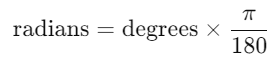
The conversion formula is based on the mathematical relationship between degrees and radians:
Practical Use Cases
Converting degree measurements to radians before applying trigonometric functions (e.g.,
SIN,COS,TAN).Performing geospatial calculations (e.g., computing distances or bearings between coordinates).
Modeling circular or periodic patterns like seasonal trends or cyclic behaviors.
Handling engineering or physics data where degree measurements are common but radians are required for formulas.
Converting surveying data, angles of elevation, or rotational movement for mathematical modeling.
POWER(number, exponent)
| Parameter | Type | Description |
|---|---|---|
| number | Numeric (scalar, column) | The base number that will be raised to the power of the exponent. |
| exponent | Numeric (scalar, column) | The power to which the base number will be raised. Can be positive, negative, or decimal. |
How It Works?
The POWER() function applies the mathematical principle of exponentiation, defined as:
POWER(x,y) = xy
Where:
x= base (the number being multiplied)y= exponent (how many times the base is multiplied by itself)
Mathematical Examples:
POWER(4, 2)→ 42 = 4 × 4 = 16POWER(9, 0.5)→ 90.5 = ( square root )POWER(2, -2)→ 2−2 = ¼ = 0.25
What Does It Return?
Type: Number (Float or Integer)
Description: Returns the result of raising
numberto the power ofexponent.
Example:POWER(2, 3) → returns 8, because 2³ = 8.
When Should We Use It?
Use POWER() in Tableau when:
You need to square, cube, or apply higher powers to numeric fields.
Modeling exponential relationships like growth, decay, or learning curves.
Applying logarithmic or power transformations in statistical analysis.
Calculating compound interest or present value in financial models.
Deriving custom mathematical formulas for advanced analytics dashboards.
Basic Usage
POWER(2, 3)
Result: 8
Explanation: 2 raised to the power of 3 equals 8.
Column Usage
POWER([Sales], 2)
Explanation: Squares the values in the [Sales] field.
| Sales | Formula | Result |
|---|---|---|
| 10 | 10² | 100 |
| 20 | 20² | 400 |
Using Decimal Exponents
POWER([Value], 0.5)
Explanation: Calculates the square root of [Value].
| Value | Formula | Result |
|---|---|---|
| 16 | 16^0.5 | 4 |
| 25 | 25^0.5 | 5 |
Negative Exponents
POWER(2, -3)
Explanation: Calculates 2-3 = ⅛
Result: 0.125
Advanced Usage – Compound Growth Calculation
[Initial Value] * POWER((1 + [Growth Rate]), [Years])
Explanation: Calculates future value after compound growth over multiple years.
Example: If [Initial Value] = 1000, [Growth Rate] = 0.05, [Years] = 3,
then the result = 1000 × (1.05)³ = 1157.625
Tips and Tricks
- Use
POWER(x, 2)instead of manually writingx * xfor cleaner, dynamic calculations. - Fractional exponents (e.g., 0.5 or 1/3) can be used for square roots and cube roots.
- Combine with
ABS()for power transformations of negative numbers. - Negative bases with fractional exponents may cause null results (undefined for real numbers).
- Ensure numeric data types — using strings or nulls will return errors.
Related Functions You Might Need
| Function | Description |
|---|---|
SQRT(number) | Returns the square root (same as POWER(number, 0.5)). |
EXP(number) | Returns e raised to the power of the given number. |
LOG(number, base) | Returns the logarithm of a number for a given base (inverse of POWER). |
ABS(number) | Returns the absolute value, often combined with POWER for normalization. |
ROUND(number, n) | Rounds results from POWER() to a specified number of decimals. |
We’ve got plenty of resources to help you master Tableau functions. For more details, check out the official Tableau documentation. Or, if you’re ready for more practice, let’s dive into related functions and build your Tableau skills further!
If you’re ready to harness the full power of Tableau and elevate your data analytics capabilities, our expert Tableau consulting services are here to guide you. Whether you need support with building advanced calculated fields, creating dynamic visual dashboards, or optimizing your data sources for peak performance, our team of experienced Tableau consultants delivers customized solutions designed for your business needs. Visit our Tableau Consulting page to discover how we can help your organization turn data into impactful, insight-driven decisions.
It raises a base number to a specified exponent, calculating exponential or power-based results.
Fractional exponents compute roots — e.g., POWER(9, 0.5) gives 3.
Yes, but only with integer exponents. Fractional exponents of negative bases return NULL.
Yes, use SQRT(number) or POWER(number, 0.5).
Not significantly — it’s efficient for most use cases unless heavily nested or used with high-precision decimals.
Working with Tableau — or thinking about Power BI?
We work both sides. Tableau-certified for production work and complex calcs, and we've shipped 12+ Tableau-to-Power BI migrations with 100% parity testing and 30–60% license savings.
Tableau-certified12+ migrations100% parity
