Tableau Function: ACOS
 Reviewed by Neetu Singla — Founder, Lets Viz Technologies — AI & Data Consultant. Last reviewed July 3, 2026.
Tableau Function: ACOS
Category: Number Functions
The ACOS() function in Tableau returns the arccosine (inverse cosine) of a given number.
It calculates the angle (in radians) whose cosine is the specified numeric input.
Purpose
The ACOS() function is used to determine the angle corresponding to a given cosine value. It’s part of Tableau’s trigonometric function family, allowing analysts to work with geometric, spatial, or mathematical data that involves angles or circular motion.
Type of Calculation
ACOS() performs a trigonometric inverse operation.
It transforms a cosine value (ranging from -1 to 1) into its corresponding angle measure in radians, within the range 0 to π (pi).
Practical Use Cases
Calculating angles in geometric or spatial analytics (e.g., bearings, directions).
Performing vector or coordinate geometry operations.
Transforming trigonometric data from cosine values to angle measures.
Building custom distance or circular models (e.g., navigation or physics dashboards).
Normalizing or analyzing waveform data in scientific or engineering analytics.
ACOS(number)
| Parameter | Type | Description |
|---|---|---|
number | Numeric (scalar, column, or expression) | The numeric cosine value (between -1 and 1) for which you want to find the corresponding arccosine angle. |
How It Works?
Mathematically, ACOS(x) returns the inverse of the cosine function.
That is:
This means:
ACOS(1)→0 radians(0°)ACOS(0)→π/2 radians(90°)ACOS(-1)→π radians(180°)
If the input value is outside the range -1 to 1, Tableau returns a NULL value, since such numbers do not have a valid arccosine.
What Does It Return?
Type: Numeric
Meaning: Returns a real number representing the angle (in radians) whose cosine equals the input.
Range: 0 ≤ result ≤ π (approximately 3.14159)
When Should We Use It?
Use ACOS() when you need to:
Compute angles from cosine values.
Work with circular or periodic data.
Analyze directional or orientation data (e.g., navigation, physics, or geometry applications).
Convert between cosine-derived measurements and their corresponding angles.
Build custom trigonometric or spatial calculations in Tableau.
Basic Usage
ACOS(0.5)
Result: 1.0472 (radians) ≈ 60°
Column Usage
ACOS([Cosine Value])
This calculates the arccosine (angle) for each record in the [Cosine Value] column, useful when your data already contains cosine outputs.
Advanced Usage
Combine ACOS() with other trigonometric functions for spatial or geometric analysis:
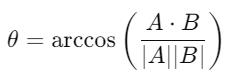
DEGREES(ACOS([Dot Product] / ([Magnitude A] * [Magnitude B])))
This formula computes the angle (in degrees) between two vectors using the dot product formula:
Tips and Tricks
esult from radians to degrees:
DEGREES(ACOS([x]))Ensure the input lies between -1 and 1, or
ACOS()will returnNULL.Combine with
COS(),ASIN(), orATAN()for full trigonometric workflows.Use in geospatial calculations or polar coordinate transformations.
Related Functions You Might Need
COS(number)– Returns the cosine of an angle.ASIN(number)– Returns the arcsine (inverse sine) of a number.ATAN(number)– Returns the arctangent (inverse tangent) of a number.DEGREES(number)– Converts radians to degrees.RADIANS(number)– Converts degrees to radians.
We’ve got plenty of resources to help you master Tableau functions. For more details, check out the official Tableau documentation. Or, if you’re ready for more practice, let’s dive into related functions and build your Tableau skills further!
If you’re ready to harness the full power of Tableau and elevate your data analytics capabilities, our expert Tableau consulting services are here to guide you. Whether you need support with building advanced calculated fields, creating dynamic visual dashboards, or optimizing your data sources for peak performance, our team of experienced Tableau consultants delivers customized solutions designed for your business needs. Visit our Tableau Consulting page to discover how we can help your organization turn data into impactful, insight-driven decisions.
The ACOS() function returns the arccosine (inverse cosine) of a number, giving the corresponding angle in radians.
Valid inputs must be between -1 and 1; otherwise, Tableau returns NULL.
ACOS() returns values in radians. Use DEGREES() to convert them to degrees.
Yes, you can apply ACOS() to numeric fields or expressions in calculated fields.
It’s commonly used to compute angles between vectors, directional measurements, or spatial orientation in data visualization.
Working with Tableau — or thinking about Power BI?
We work both sides. Tableau-certified for production work and complex calcs, and we've shipped 12+ Tableau-to-Power BI migrations with 100% parity testing and 30–60% license savings.
Tableau-certified12+ migrations100% parity
