Tableau Function: ABS
 Reviewed by Neetu Singla — Founder, Lets Viz Technologies — AI & Data Consultant. Last reviewed July 3, 2026.
Tableau Function: ABS
Category: Number Functions
The ABS() function in Tableau returns the absolute value of a number. It removes any negative sign, converting all numeric inputs to their non-negative equivalent.
Purpose
The purpose of the ABS() function is to measure the magnitude of a number regardless of its direction (positive or negative). It’s especially useful in financial, scientific, and analytical contexts where you want to focus on value differences rather than their sign.
Type of Calculation
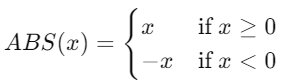
ABS() performs a mathematical transformation — it computes the absolute value of a numeric expression.
Mathematically, it transforms:
Practical Use Cases
Handling negative values in financial data (e.g., profit/loss).
Calculating variance magnitude between targets and actuals.
Measuring distance from zero for performance or deviation analysis.
Ensuring non-negative metrics in dashboards (e.g., error rates, differences).
ABS(number)
How It Works?
The ABS() function checks whether a number is negative:
If positive or zero, it returns the same number.
If negative, it multiplies the number by
-1to make it positive.
Example Formula:
ABS(-25)→25ABS([Profit])→ returns profit values as non-negative numbers.
| Parameter | Type | Description |
|---|---|---|
number | Numeric (scalar, column, or expression) | The numeric value or expression for which to find the absolute value. Can be a constant, field, or calculated result. |
What Does It Return?
Type: Numeric
Meaning: Returns a non-negative number that represents the magnitude of the input value.
When Should We Use It?
Use the ABS() function when you need to:
Eliminate negative signs while analyzing data.
Compare deviations or magnitudes between positive and negative metrics.
Aggregate metrics where direction (positive/negative) is not relevant.
Visualize balance differences without focusing on polarity.
Basic Usage
ABS(-42)
Result: 42
Column Usage
ABS([Profit])
Returns the absolute value of the profit for each record, showing only the magnitude of profit or loss.
Advanced Usage
Combine ABS() with other functions for deeper analysis:
IF ABS([Sales Target] - [Actual Sales]) > 5000 THEN "Significant Deviation" ELSE "Within Range" END
This identifies cases where the deviation from the sales target is large, regardless of direction.
Tips and Tricks
Combine with aggregation functions like
SUM()orAVG()to calculate absolute performance measures.Avoid using
ABS()on non-numeric data—it only works with numeric types.Use in parameter-driven calculations for flexible, user-controlled dashboards.
Related Functions You Might Need
ZN()– replaces null values with zero (useful before applyingABS()).SQRT()– computes square roots; often used in distance or magnitude formulas.POWER()– raises numbers to a power; can help in error or variance calculations.SIGN()– returns the sign (-1, 0, or 1) of a number, complementary toABS().
We’ve got plenty of resources to help you master Tableau functions. For more details, check out the official Tableau documentation. Or, if you’re ready for more practice, let’s dive into related functions and build your Tableau skills further!
If you’re ready to harness the full power of Tableau and elevate your data analytics capabilities, our expert Tableau consulting services are here to guide you. Whether you need support with building advanced calculated fields, creating dynamic visual dashboards, or optimizing your data sources for peak performance, our team of experienced Tableau consultants delivers customized solutions designed for your business needs. Visit our Tableau Consulting page to discover how we can help your organization turn data into impactful, insight-driven decisions.
It returns the absolute value of a number, removing any negative sign.
No, ABS() works only with numeric data types.
No, it only transforms the sign of individual values; you can aggregate afterward as needed.
ABS() gives the magnitude, while SIGN() gives the direction (-1, 0, or 1).
Yes, ABS() is often used in calculated fields for error measurement or deviation analysis.
Working with Tableau — or thinking about Power BI?
We work both sides. Tableau-certified for production work and complex calcs, and we've shipped 12+ Tableau-to-Power BI migrations with 100% parity testing and 30–60% license savings.
Tableau-certified12+ migrations100% parity
