Tableau Funtion: MAX
 Reviewed by Neetu Singla — Founder, Lets Viz Technologies — AI & Data Consultant. Last reviewed July 3, 2026.
Tableau Function: MAX
Category: Number Functions
The MAX() function in Tableau is a conditional and mathematical aggregation function that returns the maximum (largest) value from a set of numbers, dates, or strings.
It can also be used to compare two values and return the greater of the two.
Essentially, MAX() helps identify the highest numeric, date, or lexicographical value in your data.
Purpose
The purpose of the MAX() function is to:
Identify the largest value within a field, measure, or across groups.
Facilitate ranking, comparison, and threshold-based logic.
Simplify top-value calculations for KPIs, summaries, and dashboards.
Type of Calculations It Performs
Category: Aggregate / Row-level
Operation: Returns the maximum of two expressions or the maximum value in a group of rows.
Compatible Data Types: Numeric, Date, and String.
Practical Use Cases
Finding the highest sales in a dataset.
Determining the most recent date in a series.
Comparing two fields (e.g., actual vs. target).
Calculating best performance metrics (e.g., maximum profit margin).
Identifying top-performing products, customers, or regions.
MAX(expression)
MAX(expression1, expression2)
| Parameter | Type | Description |
|---|---|---|
expression | Numeric, Date, or String (scalar, column, or aggregated) | The field or value from which Tableau will find the maximum value. |
expression1 | Numeric, Date, or String | The first value or field to compare. |
expression2 | Numeric, Date, or String | The second value or field to compare. |
How It Works?
The MAX() function operates by evaluating the provided expressions and returning the highest value according to their data type:
Numeric: Returns the greater of the numbers.
e.g.,MAX(5, 10)→10Date: Returns the latest (most recent) date.
e.g.,MAX(#2023-05-10#, #2023-08-01#)→#2023-08-01#String: Returns the lexicographically highest value.
e.g.,MAX("Apple", "Orange")→"Orange"
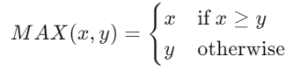
Mathematical Representation (Numeric Example):
What Does It Return?
Type: Same as the input expression (Number, Date, or String).
Meaning: Returns the maximum (largest) of the input values.
Behavior:
Returns the greater of two expressions if two are given.
Returns the largest value within a field if one expression is provided.
Returns
NULLif all compared values areNULL.
When Should We Use It?
Use MAX() when you need to:
Find the highest value in a dataset or category.
Compare two expressions and select the greater one.
Compute top performers or recent records.
Handle threshold-based logic, such as setting a floor or ceiling.
Build KPI dashboards that highlight “best” values (e.g., top revenue, latest date).
Basic Usage
MAX(100, 250)
Result: 250
Explanation: Returns the larger of the two numbers.
Column Usage
MAX([Sales])
Description: Returns the highest sales value in the dataset or within the specified partition.
| Region | Sales | Result of MAX([Sales]) |
|---|---|---|
| North | 1000 | 5000 |
| South | 5000 | 5000 |
| East | 3000 | 5000 |
Advanced Usage (Comparing Two Fields)
MAX([Actual Sales], [Target Sales])
Description: Returns whichever is higher between Actual and Target Sales.
Useful in performance or variance analysis.
| Product | Actual | Target | MAX(Actual, Target) |
|---|---|---|---|
| A | 1500 | 2000 | 2000 |
| B | 5000 | 4000 | 5000 |
| C | 3000 | 3000 | 3000 |
Nested MAX() Example (Top Performer)
IF [Sales] = MAX([Sales]) THEN [Product Name] END
Description: Identifies the product(s) with the maximum sales value.
Combining with Other Functions
MAX(SUM([Sales]), AVG([Sales]))
Explanation: Compares aggregated measures and returns the greater of total or average sales.
Tips and Tricks
Works on numbers, dates, and strings — not just numeric fields.
Combine with IF statements to build conditional logic:
IF [Sales] = MAX([Sales]) THEN "Top Performer"Use LOD expressions with
MAX()to calculate maximum values across fixed dimensions:{ FIXED [Category] : MAX([Sales]) }Be aware of aggregation context — Tableau’s computation level (row vs. aggregate) matters.
When comparing fields of different data types, Tableau may return an error.
If all values are
NULL, Tableau will returnNULL.
Related Functions You Might Need
| Function | Purpose |
|---|---|
MIN() | Returns the minimum (lowest) value. |
AVG() | Calculates the average value of a field. |
SUM() | Calculates the total of all values in a field. |
ZN() | Converts NULL values to zero, useful before applying MAX(). |
WINDOW_MAX() | Returns the maximum value of an expression within a moving window. |
We’ve got plenty of resources to help you master Tableau functions. For more details, check out the official Tableau documentation. Or, if you’re ready for more practice, let’s dive into related functions and build your Tableau skills further!
If you’re ready to harness the full power of Tableau and elevate your data analytics capabilities, our expert Tableau consulting services are here to guide you. Whether you need support with building advanced calculated fields, creating dynamic visual dashboards, or optimizing your data sources for peak performance, our team of experienced Tableau consultants delivers customized solutions designed for your business needs. Visit our Tableau Consulting page to discover how we can help your organization turn data into impactful, insight-driven decisions.
It returns the largest value among fields or expressions — numeric, date, or string.
Yes, it returns the lexicographically highest string (e.g., “Zebra” > “Apple”).
MAX() returns NULL if no valid values exist.
MAX() operates at the data or aggregate level, while WINDOW_MAX() works across table partitions or windows.
Yes. It’s often used in conditional logic to identify top-performing records or the latest dates.
Working with Tableau — or thinking about Power BI?
We work both sides. Tableau-certified for production work and complex calcs, and we've shipped 12+ Tableau-to-Power BI migrations with 100% parity testing and 30–60% license savings.
Tableau-certified12+ migrations100% parity
