Tableau Function: ASIN
 Reviewed by Neetu Singla — Founder, Lets Viz Technologies — AI & Data Consultant. Last reviewed July 3, 2026.
Tableau Function: ASIN
Category: Number Functions
The ASIN() function in Tableau returns the arcsine (inverse sine) of a given number. It computes the angle (in radians) whose sine value is equal to the input number.
Purpose
The primary purpose of the ASIN() function is to derive the angle corresponding to a sine value. It’s particularly useful in mathematical, engineering, scientific, and geospatial analyses, where calculations involving angles, rotations, or oscillations are needed.
Type of Calculation
ASIN() performs a trigonometric inverse calculation.
It converts a sine value (between -1 and 1) into an angle measure (in radians).
The output lies within the range −π/2 to π/2 (approximately −1.5708 to +1.5708 radians).
Practical Use Cases
Converting sine values into angles for trigonometric modeling.
Performing vector geometry or directional computations.
Calculating elevation or inclination angles from normalized sine values.
Modeling waveforms, oscillations, or periodic patterns.
Computing arcs or angular displacements in physics or engineering dashboards.
ASIN(number)
| Parameter | Type | Description |
|---|---|---|
number | Numeric (scalar, column, or expression) | The numeric sine value (must be between -1 and 1) for which the arcsine (angle) should be calculated. |
How It Works?
Mathematically, ASIN(x) is the inverse of the sine function.
It determines the angle whose sine equals the input value.
| Input (y) | Output (x = ASIN(y)) | Approximate Value (radians) | Equivalent (degrees) |
|---|---|---|---|
| -1 | -π/2 | -1.5708 | -90° |
| 0 | 0 | 0 | 0° |
| 1 | π/2 | 1.5708 | 90° |
If the input is outside the range of −1 to 1, Tableau returns NULL because no real number can have such a sine.
What Does It Return?
Type: Numeric
Meaning: Returns the angle (in radians) whose sine is the given input value.
Range: −π/2 ≤ result ≤ π/2 (approximately −1.5708 ≤ result ≤ +1.5708)
When Should We Use It?
Use the ASIN() function when you need to:
Derive angles from sine ratios.
Calculate angular displacement or elevation.
Build trigonometric models in Tableau (e.g., waves, rotations, circular data).
Work with coordinate transformations (e.g., converting between Cartesian and polar coordinates).
Perform geospatial calculations like finding bearings or tilt angles.
Basic Usage
ASIN(0.5)
Result: 0.5236 radians (≈ 30°)
Column Usage
ASIN([Sine Value])
This computes the arcsine (angle) for each row’s [Sine Value] field, allowing you to visualize or analyze angle distributions.
Advanced Usage
Combine ASIN() with other trigonometric functions for geometric analysis:
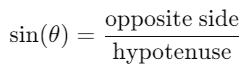
DEGREES(ASIN([Height] / [Hypotenuse]))
This formula computes the angle of elevation (in degrees) in a right triangle where:
Tips and Tricks
Always ensure the input value is within -1 and 1 to avoid NULL results.
To convert radians to degrees, use:
DEGREES(ASIN([x]))Use in combination with
COS()andTAN()for comprehensive trigonometric analysis.In geospatial analytics, use
ASIN()for latitude or angular conversion when working with spherical coordinates.
Related Functions You Might Need
SIN(number)– Returns the sine of an angle.ACOS(number)– Returns the arccosine (inverse cosine).ATAN(number)– Returns the arctangent (inverse tangent).DEGREES(number)– Converts radians to degrees.RADIANS(number)– Converts degrees to radians.
We’ve got plenty of resources to help you master Tableau functions. For more details, check out the official Tableau documentation. Or, if you’re ready for more practice, let’s dive into related functions and build your Tableau skills further!
If you’re ready to harness the full power of Tableau and elevate your data analytics capabilities, our expert Tableau consulting services are here to guide you. Whether you need support with building advanced calculated fields, creating dynamic visual dashboards, or optimizing your data sources for peak performance, our team of experienced Tableau consultants delivers customized solutions designed for your business needs. Visit our Tableau Consulting page to discover how we can help your organization turn data into impactful, insight-driven decisions.
The ASIN() function returns the arcsine (inverse sine) of a given number, giving the corresponding angle in radians.
Valid inputs range from −1 to 1. Values outside this range return NULL.
It returns results in radians. Use DEGREES() to convert the output to degrees.
Yes, you can use ASIN() in calculated fields for trigonometric or geometric computations.
It’s often used to calculate angles of elevation or inclination, or to convert sine values into angle measures in engineering or scientific dashboards.
Working with Tableau — or thinking about Power BI?
We work both sides. Tableau-certified for production work and complex calcs, and we've shipped 12+ Tableau-to-Power BI migrations with 100% parity testing and 30–60% license savings.
Tableau-certified12+ migrations100% parity
