Tableau Function: ATAN2
 Reviewed by Neetu Singla — Founder, Lets Viz Technologies — AI & Data Consultant. Last reviewed July 3, 2026.
Tableau Function: ATAN2
Category: Number Functions
The ATAN2() function in Tableau returns the arctangent of two numbers, representing the angle (in radians) between the positive x-axis and a point (x, y) in a Cartesian coordinate plane.
It’s an extension of the standard ATAN() function, as it takes two arguments (the y and x coordinates) instead of one, enabling full quadrant-aware angle computation.
Purpose
The ATAN2() function is designed to calculate the directional angle or bearing from a given point relative to the origin (0, 0).
It’s used when you need to find the orientation of a vector or point in space, such as determining direction, heading, or slope across coordinate systems.
Type of Calculation
ATAN2() performs a two-dimensional inverse tangent (arctangent) operation.
It converts two input values — typically representing the vertical (y) and horizontal (x) components of a vector — into the angle (θ) that the vector makes with the positive x-axis.
Unlike ATAN(), which only considers a single ratio, ATAN2() determines the correct angle quadrant, ensuring accurate results for all combinations of positive and negative x and y values.
Practical Use Cases
Calculating direction or bearing angles in mapping and geospatial analytics.
Converting Cartesian coordinates (x, y) into polar coordinates (r, θ).
Determining slopes or gradients in two-dimensional spaces.
Performing vector calculations in physics, navigation, or robotics data.
Modeling angular motion, rotation, or heading in engineering dashboards.
ATAN2(y, x)
| Parameter | Type | Description |
|---|---|---|
y | Numeric (scalar, column, or expression) | The vertical component or numerator (rise) in the tangent ratio. Represents the difference along the y-axis. |
x | Numeric (scalar, column, or expression) | The horizontal component or denominator (run) in the tangent ratio. Represents the difference along the x-axis. |
How It Works?
Mathematically, the ATAN2(y, x) function computes:
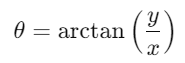
but with quadrant detection, meaning it determines the correct angle based on the signs of both x and y.
| Quadrant | x | y | Angle Range |
|---|---|---|---|
| I | + | + | 0 to π/2 |
| II | − | + | π/2 to π |
| III | − | − | −π to −π/2 |
| IV | + | − | −π/2 to 0 |
This makes ATAN2() superior to ATAN() because it handles all four quadrants correctly, not just one.
Example:
ATAN2(1, 1)→ π/4 (0.7854 radians or 45°)ATAN2(1, -1)→ 3π/4 (2.356 radians or 135°)ATAN2(-1, -1)→ -3π/4 (-2.356 radians or -135°)ATAN2(-1, 1)→ -π/4 (-0.7854 radians or -45°)
What Does It Return?
Type: Numeric
Meaning: Returns an angle in radians between the positive x-axis and the point
(x, y).Range: −π to π (approximately −3.14159 ≤ result ≤ 3.14159)
When Should We Use It?
Use ATAN2() when you need to:
Compute angles between points or vectors in two dimensions.
Determine the bearing or direction between coordinates on a plane.
Convert x and y values into polar form (r, θ).
Perform quadrant-aware angular computations for accurate directionality.
Work with map coordinates, robotic angles, or trajectory modeling.
Basic Usage
ATAN2(1, 1)
Result: 0.7854 radians (≈ 45°)
Column Usage
ATAN2([Y Value], [X Value])
This calculates the angle (in radians) between each coordinate pair [X Value] and [Y Value], allowing you to analyze directionality for each data point.
Advanced Usage
Compute the bearing (in degrees) between two points:
DEGREES(ATAN2(([Y2] - [Y1]), ([X2] - [X1])))
This determines the directional angle between two points (X1, Y1) and (X2, Y2).
If you also want the bearing in compass format (0° to 360°):
IF DEGREES(ATAN2(([Y2] - [Y1]), ([X2] - [X1]))) < 0 THEN
360 + DEGREES(ATAN2(([Y2] - [Y1]), ([X2] - [X1])))
ELSE
DEGREES(ATAN2(([Y2] - [Y1]), ([X2] - [X1])))
END
Tips and Tricks
The
ATAN2()function automatically handles signs and quadrants, unlikeATAN().Use
DEGREES()to convert radians to degrees:DEGREES(ATAN2([Y], [X]))If both inputs are 0, Tableau may return
NULL(undefined angle).Combine
ATAN2()withSQRT()for polar conversions:[r] = SQRT(([X]^2) + ([Y]^2))
[θ] = DEGREES(ATAN2([Y], [X]))Ideal for geospatial visualizations such as wind direction or coordinate mapping.
Related Functions You Might Need
ATAN(number)– Returns the arctangent of a single number.ASIN(number)– Returns the arcsine of a number.ACOS(number)– Returns the arccosine of a number.DEGREES(number)– Converts radians to degrees.RADIANS(number)– Converts degrees to radians.SQRT(number)– Useful for computing vector magnitudes.
We’ve got plenty of resources to help you master Tableau functions. For more details, check out the official Tableau documentation. Or, if you’re ready for more practice, let’s dive into related functions and build your Tableau skills further!
If you’re ready to harness the full power of Tableau and elevate your data analytics capabilities, our expert Tableau consulting services are here to guide you. Whether you need support with building advanced calculated fields, creating dynamic visual dashboards, or optimizing your data sources for peak performance, our team of experienced Tableau consultants delivers customized solutions designed for your business needs. Visit our Tableau Consulting page to discover how we can help your organization turn data into impactful, insight-driven decisions.
The ATAN2() function returns the arctangent of two numbers, giving the angle (in radians) between the x-axis and the point (x, y).
ATAN() takes one argument (tangent ratio), while ATAN2() takes two arguments (y and x) and determines the correct quadrant.
It returns radians by default. You can use DEGREES() to convert the result to degrees.
Yes, ATAN2() properly handles both negative and positive x and y values to determine the correct angle quadrant.
It’s widely used for geospatial direction calculations, coordinate conversions, and angle measurements between two points.
Working with Tableau — or thinking about Power BI?
We work both sides. Tableau-certified for production work and complex calcs, and we've shipped 12+ Tableau-to-Power BI migrations with 100% parity testing and 30–60% license savings.
Tableau-certified12+ migrations100% parity
