Tableau Function: DEGREES
 Reviewed by Neetu Singla — Founder, Lets Viz Technologies — AI & Data Consultant. Last reviewed July 3, 2026.
Tableau Function: DEGREE
Category: Number Functions
The DEGREES() function in Tableau converts an angle measured in radians into degrees.
It’s a mathematical function primarily used to make angular data more interpretable by converting the radian measure — commonly used in trigonometric functions — into the more familiar degree format (0° to 360°).
Purpose
The DEGREES() function helps users translate or present trigonometric outputs in degrees, which are easier to understand in most real-world applications such as navigation, geometry, physics, and spatial analytics.
It’s particularly useful when working with Tableau trigonometric functions that return results in radians, allowing conversion for visualization or analysis in degrees.
Type of Calculation
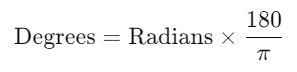
DEGREES() performs a unit conversion calculation from radians to degrees using the mathematical formula:
Practical Use Cases
Displaying angles in a readable format (e.g., for dashboards showing rotation, bearings, or direction).
Converting radian results from trigonometric functions like
ATAN(),ACOS(), orASIN()into degrees.Analyzing circular or periodic data, such as sensor or orbital data.
Geospatial modeling, converting radians (used internally by systems) to degrees for coordinate work.
Creating educational visualizations to help compare radians vs. degrees.
DEGREES(number)
| Parameter | Type | Description |
|---|---|---|
number | Numeric (scalar, column, or expression) | The numeric value in radians to be converted into degrees. Must be a real numeric value. |
How It Works?
The DEGREES() function uses a simple mathematical transformation to convert radians to degrees:
For example:
| Radians | Calculation | Result (Degrees) |
|---|---|---|
| π/6 | (π/6) × 180/π | 30° |
| π/4 | (π/4) × 180/π | 45° |
| π/2 | (π/2) × 180/π | 90° |
| π | π × 180/π | 180° |
| 2π | 2π × 180/π | 360° |
This conversion makes trigonometric outputs (which Tableau always returns in radians) more interpretable.
What Does It Return?
Type: Numeric (floating-point)
Meaning: Returns the angle in degrees equivalent to the given radians.
The output range depends on the input but typically falls between 0° and 360° for one full rotation.
When Should We Use It?
Use the DEGREES() function when:
You need to convert trigonometric outputs (like from
ACOS(),ATAN(), orASIN()) into degrees.You are working with angles, bearings, or rotations that must be expressed in degrees.
You are preparing reports or visualizations for users unfamiliar with radians.
You’re modeling circular or cyclical data and need degree-based intervals (e.g., 0°, 90°, 180°, etc.).
Basic Usage
DEGREES(PI()/2)
Result: 90
Explanation: Converts π/2 radians into 90 degrees.
Column Usage
DEGREES([Angle (radians)])
This converts every radian value in the [Angle (radians)] column to degrees for display or further analysis.
Example:
If [Angle (radians)] = 3.1416, Tableau returns 180.
Advanced Usage
Convert a calculated trigonometric value into degrees:
DEGREES(ATAN([Y] / [X]))
This returns the angle of a line or vector in degrees instead of radians — useful in geometric or directional analysis.
Example – Polar to Cartesian Conversion (reverse):
[Angle Degrees] = DEGREES(ATAN([Y]/[X]))
Tips and Tricks
- Use
DEGREES()to make trigonometric results more readable to non-technical audiences. - Combine with
RADIANS()when you need two-way conversion. - Works well with Tableau functions like
ATAN2()for angle-based visualization. - Remember: Trigonometric inputs and outputs in Tableau are always in radians.
- Avoid using on non-numeric fields — this will result in null or error outputs.
Related Functions You Might Need
RADIANS(number)– Converts degrees to radians (inverse ofDEGREES()).ATAN(number)– Returns the arctangent in radians.ACOS(number)– Returns the arccosine in radians.ASIN(number)– Returns the arcsine in radians.COS(number)– Cosine function (input must be in radians).SIN(number)– Sine function (input must be in radians).
We’ve got plenty of resources to help you master Tableau functions. For more details, check out the official Tableau documentation. Or, if you’re ready for more practice, let’s dive into related functions and build your Tableau skills further!
If you’re ready to harness the full power of Tableau and elevate your data analytics capabilities, our expert Tableau consulting services are here to guide you. Whether you need support with building advanced calculated fields, creating dynamic visual dashboards, or optimizing your data sources for peak performance, our team of experienced Tableau consultants delivers customized solutions designed for your business needs. Visit our Tableau Consulting page to discover how we can help your organization turn data into impactful, insight-driven decisions.
The DEGREES() function converts an angle from radians to degrees.
Tableau uses radians for all trigonometric inputs and outputs.
Use the RADIANS() function for converting degrees to radians.
Yes. You can use it to display trigonometric results like ATAN() or ACOS() in degrees.
Degrees = Radians × (180 / π)
Working with Tableau — or thinking about Power BI?
We work both sides. Tableau-certified for production work and complex calcs, and we've shipped 12+ Tableau-to-Power BI migrations with 100% parity testing and 30–60% license savings.
Tableau-certified12+ migrations100% parity
