Tableau Function: CEILING
 Reviewed by Neetu Singla — Founder, Lets Viz Technologies — AI & Data Consultant. Last reviewed July 3, 2026.
Tableau Function: CEILING
Category: Number Functions
The CEILING() function in Tableau returns the smallest integer that is greater than or equal to a given number.
In other words, it rounds numbers up to the nearest whole number, regardless of whether the number is already an integer or not.
Purpose
The main purpose of the CEILING() function is to ensure numeric values are rounded up — useful when you need to allocate resources, standardize values, or create grouping thresholds that avoid underestimation.
It’s particularly helpful in cases like rounding prices, time intervals, or other measures where you can’t go below a specific minimum integer.
Type of Calculation
CEILING() performs a mathematical rounding operation.
It always rounds a numeric value upward, moving toward positive infinity, to produce the next integer greater than or equal to the input.
Mathematically, it follows this rule:

where ⌈x⌉ represents the mathematical ceiling of x.
Practical Use Cases
Rounding currency or cost estimates upward (e.g., always charge the next whole dollar).
Time or date interval bucketing (e.g., rounding up to the next hour or day).
Grouping continuous data into upper-bound categories.
Resource allocation — ensuring sufficient rounding up for personnel, inventory, or quantities.
Rounding up ratios or percentages to avoid underreporting.
CEILING(number)
| Parameter | Type | Description |
|---|---|---|
number | Numeric (scalar, column, or expression) | The numeric value or expression you want to round up to the next integer. Must be a real number (integer or decimal). |
How It Works?
The CEILING() function rounds numbers upward toward positive infinity:
| Input | Calculation | Result |
|---|---|---|
| 4.1 | Rounded up | 5 |
| 7.9 | Rounded up | 8 |
| -2.3 | Rounded up (toward 0) | -2 |
| 5.0 | Already integer | 5 |
Mathematically:
If the number is positive,
CEILING()moves it up to the next whole number.If the number is negative,
CEILING()still moves it up (toward zero), resulting in a less negative integer.
Formula Example:
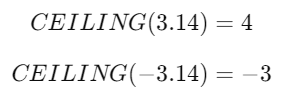
What Does It Return?
Type: Integer
Meaning: Returns the smallest integer greater than or equal to the input number.
When Should We Use It?
Use the CEILING() function when you need to:
Round numeric values upward instead of using conventional rounding.
Avoid underestimation in totals, costs, or counts.
Create upper-bound categories for numeric binning.
Standardize or bucket values for discrete grouping or labeling.
Work with ceil-based intervals in dashboards or reports (e.g., rounding up time or volume).
Basic Usage
CEILING(4.3)
Result: 5
Column Usage
CEILING([Discount])
This returns the next whole integer for each discount value.
For example, if [Discount] = 2.7, Tableau will return 3.
Advanced Usage
Combine with other Tableau functions for dynamic calculations:
Example:
Round up the ratio of sales to targets.
CEILING([Sales] / [Target])
If the ratio is 1.2, the result is 2, ensuring overperformance categories round upward.
Example (Bucketing Data):
CEILING([Sales] / 1000) * 1000
This groups all sales values into rounded thousands, always rounding upward (e.g., 3,200 → 4,000).
Tips and Tricks
Use
CEILING()instead ofROUND()when upward rounding is mandatory.For negative numbers, remember that
CEILING()rounds toward zero, not further negative.Combine with
FLOOR()to create custom rounding ranges:CEILING([Value]) - FLOOR([Value])
(Shows how far the value is from the next integer).
Pair with
INT()orROUND()for complex rounding logic (e.g., rounding to nearest 0.5 or 10).
Related Functions You Might Need
FLOOR(number)– Rounds down to the nearest integer.ROUND(number, [decimals])– Rounds to the nearest integer or decimal place.INT(number)– Truncates the decimal, removing fractional parts (does not round).ZN(number)– Replaces null values with zero before applying rounding.ABS(number)– Returns the absolute value (useful before rounding).
We’ve got plenty of resources to help you master Tableau functions. For more details, check out the official Tableau documentation. Or, if you’re ready for more practice, let’s dive into related functions and build your Tableau skills further!
If you’re ready to harness the full power of Tableau and elevate your data analytics capabilities, our expert Tableau consulting services are here to guide you. Whether you need support with building advanced calculated fields, creating dynamic visual dashboards, or optimizing your data sources for peak performance, our team of experienced Tableau consultants delivers customized solutions designed for your business needs. Visit our Tableau Consulting page to discover how we can help your organization turn data into impactful, insight-driven decisions.
It rounds a number up to the nearest integer greater than or equal to the input value.
CEILING() always rounds up, while ROUND() rounds to the nearest integer based on decimal value.
It rounds negative numbers upward (toward zero). For example, CEILING(-2.7) = -2.
No, Tableau’s CEILING() always rounds to the nearest whole number. Use ROUND() for decimal precision.
CEILING(NULL) returns NULL because the input is undefined.
Working with Tableau — or thinking about Power BI?
We work both sides. Tableau-certified for production work and complex calcs, and we've shipped 12+ Tableau-to-Power BI migrations with 100% parity testing and 30–60% license savings.
Tableau-certified12+ migrations100% parity
