Tableau Function: EXP
 Reviewed by Neetu Singla — Founder, Lets Viz Technologies — AI & Data Consultant. Last reviewed July 3, 2026.
Tableau Function: EXP
Category: Number Functions
The EXP() function in Tableau returns the exponential value of a given number.
In mathematical terms, it calculates the value of the constant e (approximately 2.718281828) raised to the power of the specified number.
It is commonly used in growth modeling, statistical analysis, and natural logarithm reversals (to undo a LN() function).
Purpose
The purpose of the EXP() function is to calculate exponential growth or transform data that follows an exponential pattern. It is often used in:
Predictive analytics
Compound interest calculations
Logarithmic transformations
Natural exponential models (e.g., population or revenue growth)
Type of Calculation
Mathematical / Exponential
Returns ex, where e is Euler’s number (2.71828).
This type of calculation is nonlinear and grows rapidly as the input increases.
Practical Use Cases
Modeling Growth Trends: Population, revenue, or investment growth over time.
Reversing Logarithms: Used as the inverse of the
LN()(natural log) function.Statistical Models: Useful in regression analysis and probability calculations.
Exponential Smoothing: For forecasting or curve fitting.
Data Normalization: Transforming skewed data for analysis.
EXP(number)
| Parameter | Type | Description |
|---|---|---|
number | Numeric (scalar, column, or expression) | The exponent to which e is raised. Can be a constant, field, or calculated expression. |
How It Works?
The EXP() function uses Euler’s number (e) as the base and raises it to the power of the input argument.
Mathematically:
EXP(x) = ex
where e ≈ 2.718281828
Examples of Calculation:
| Input | Formula | Result |
|---|---|---|
| 1 | e1 | 2.71828 |
| 2 | e2 | 7.38906 |
| 0 | e0 | 1 |
| -1 | e-1 | 0.36788 |
What Does It Return?
Type: Float (decimal number)
Meaning: The exponential value enumber.
Example:
EXP(1)= 2.71828
When Should We Use It?
Use EXP() when:
You need to reverse a logarithmic transformation (
LN()).You are working with continuous growth models (like compound interest).
You’re performing scientific or statistical calculations.
You need to model nonlinear exponential relationships.
You’re performing data normalization or transformation in predictive models.
Basic Usage
EXP(2)
Result: 7.38906
Explanation: e² = 7.38906
Column Usage
EXP([Growth Rate])
If [Growth Rate] = 0.5,
Result = e^0.5 = 1.6487
This can represent an annual growth factor for a 50% natural growth rate.
Advanced Usage
EXP(LN([Revenue]))
Result: Returns the original [Revenue] value.
Explanation: Since EXP() and LN() are inverse functions, applying them sequentially restores the original number.
Combined with Multiplication (Modeling Exponential Growth)
[Initial Value] * EXP([Growth Rate] * [Time])
Used to calculate continuous compound growth:
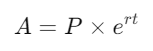
where:
P = initial amount
r = growth rate
t = time
Example:EXP(0.05 * 10) = e⁰·⁵ = 1.6487 → representing ~65% growth over 10 periods at 5% rate.
Tips and Tricks
- Combine with
LN()for log-transformations and inverse calculations. - Use
EXP()for modeling continuous (not discrete) growth. - Handle large inputs carefully — exponential growth can overflow rapidly.
- Negative inputs yield fractional results; positive inputs grow extremely fast.
- If data contains null values,
EXP()will return null as well.
Related Functions You Might Need
| Function | Purpose |
|---|---|
LN(number) | Returns the natural logarithm (inverse of EXP()). |
LOG(number, base) | Returns the logarithm of a number for any specified base. |
POWER(number, exponent) | Raises a number to a specified power (e.g., POWER(e, x) = EXP(x)). |
SQRT(number) | Returns the square root of a number. |
ABS(number) | Returns the absolute value (useful for preprocessing before applying LN()). |
We’ve got plenty of resources to help you master Tableau functions. For more details, check out the official Tableau documentation. Or, if you’re ready for more practice, let’s dive into related functions and build your Tableau skills further!
If you’re ready to harness the full power of Tableau and elevate your data analytics capabilities, our expert Tableau consulting services are here to guide you. Whether you need support with building advanced calculated fields, creating dynamic visual dashboards, or optimizing your data sources for peak performance, our team of experienced Tableau consultants delivers customized solutions designed for your business needs. Visit our Tableau Consulting page to discover how we can help your organization turn data into impactful, insight-driven decisions.
The EXP() function returns e raised to the power of a given number, used to model exponential growth or reverse logarithms.
The base is Euler’s number (e), approximately equal to 2.71828.
They are inverse functions:EXP(LN(x)) = x and LN(EXP(x)) = x.
Yes. A negative input returns a fractional result (since e-x = 1/ex ).
The result will be Null if the argument is Null or non-numeric.
Working with Tableau — or thinking about Power BI?
We work both sides. Tableau-certified for production work and complex calcs, and we've shipped 12+ Tableau-to-Power BI migrations with 100% parity testing and 30–60% license savings.
Tableau-certified12+ migrations100% parity
