Zoho for Restaurants: Which Apps You Need and Rollout Order
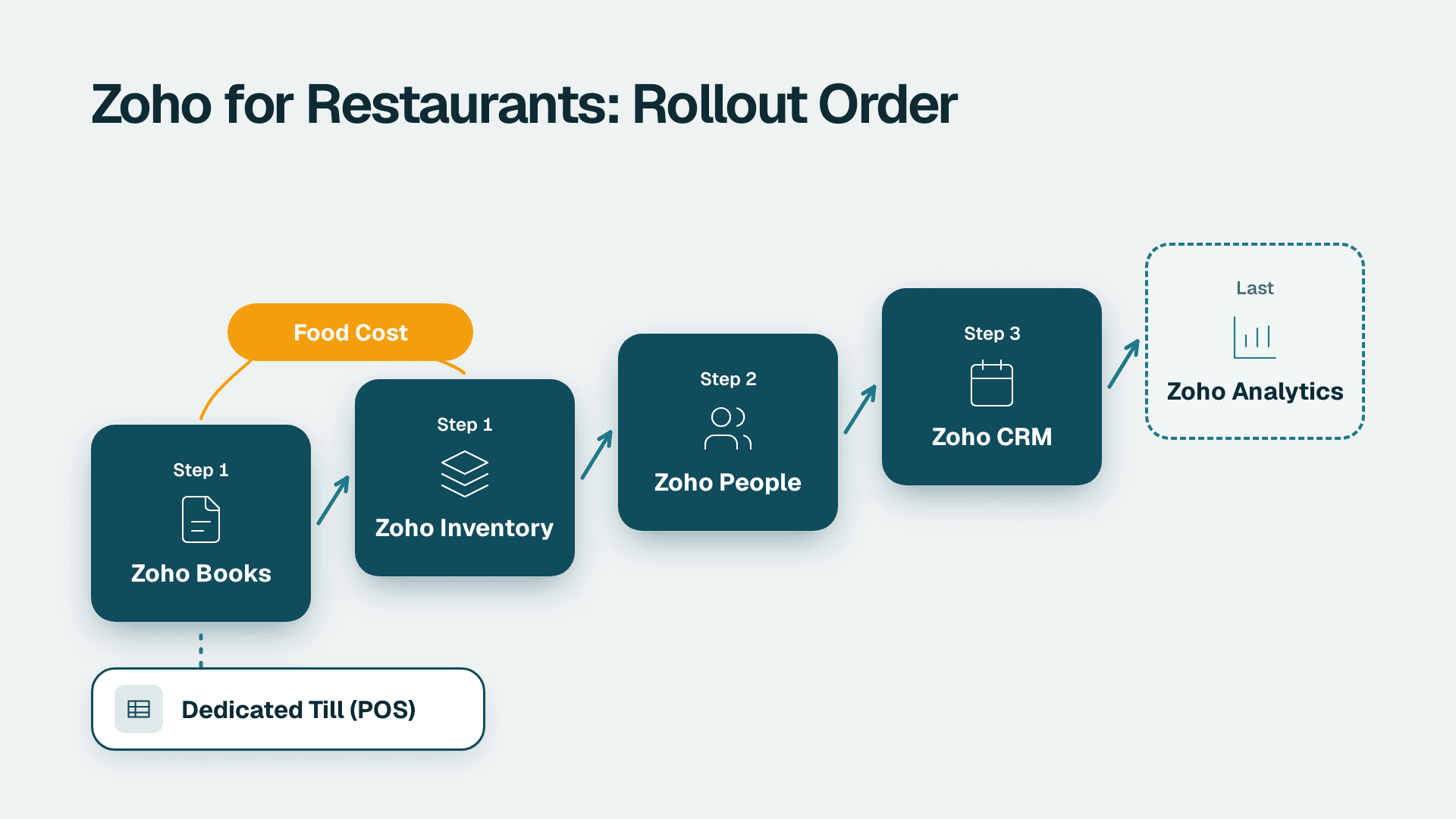
Most restaurants need four Zoho apps, not the whole suite: Books for accounting, Inventory for stock and purchasing, People for leave, attendance and HR records, and CRM for catering, events and group bookings. Analytics comes last, once the data underneath it is clean. Keep a dedicated till for point of sale and connect it to the rest.
Key Takeaways
- Start with Zoho Books and Zoho Inventory: food cost and supplier invoices are where restaurants lose the most margin.
- Add Zoho People when you have more than one site or a payroll handoff that lives in spreadsheets.
- Use Zoho CRM for catering, private dining and corporate accounts, not for walk-in diners.
- Add Zoho Analytics last, because dashboards built on messy stock and sales data only make the mess look official.
- Roll out one site first, lock the data model, then copy it to the other locations.
Does Zoho work for restaurants?
Yes, with a caveat: Zoho is a back-office and customer-relationship suite, not a restaurant-first product. It handles money, stock, people and accounts well, and it can be extended to cover front-of-house tasks, but most operators keep a specialist till for orders and card payments and let Zoho run everything behind it.
That split matters when you plan the stack. Zoho publishes industry templates and a low-code builder for hospitality, and those can cover reservations or loyalty, but the heart of a sensible Zoho set-up for a restaurant is the finance, purchasing and workforce layer. If you are weighing whether the suite as a whole is worth it, the Zoho One buyer's guide for small businesses covers the bundle-versus-individual-apps decision in more depth.
A small restaurant group is rarely short of software. It is short of connected software. The kitchen has a stock sheet, the owner has an accounting package, the manager has a rota in a messaging app and the events lead has an inbox. Each works alone, so nobody can answer a simple question such as what a plate really costs once supplier prices moved last month. Design work from a Zoho consulting practice usually starts by mapping those islands before any app is switched on, because the order you connect them in decides how much rework you face later.
Which software is used in restaurants, and where does Zoho fit?
Restaurants typically run four layers of software: point of sale, back-office accounting and stock, workforce management, and guest or account management. Zoho fits the last three layers well and can integrate with the first, but it is not usually the till itself.
The table below maps each layer to the Zoho app that covers it and says how urgent it is for a typical restaurant or small group.
| Layer | Zoho app | What it does for a restaurant | Priority |
|---|---|---|---|
| Accounting | Zoho Books | Supplier bills, bank feeds, tax, multi-currency, reporting | Start here |
| Stock and purchasing | Zoho Inventory | Ingredient lists, purchase orders, multi-location stock | Start here |
| Workforce | Zoho People | Leave, attendance, HR records, review cycles | Second wave |
| Accounts and events | Zoho CRM | Catering enquiries, private dining, corporate clients | Second wave |
| Marketing | Zoho Campaigns | Newsletters and offers synced to CRM contacts | Optional |
| Reporting | Zoho Analytics | Cross-site food cost, labour and sales dashboards | Last |
| Custom workflows | Zoho Creator | Bespoke tools for reservations, checklists, loyalty | As needed |
| Automation | Zoho Flow | Moves data between apps without manual re-entry | As needed |
Point of sale is deliberately absent from the Zoho column. Zoho Creator's hospitality page does describe building a custom restaurant point-of-sale solution with ingredient tracking, loyalty rewards and multiple payment methods, according to Zoho Creator's hospitality overview (2026). That is a real option for operators with unusual needs, but a custom till is a software project, not a switch you flip, and card-payment compliance is not something to improvise.
What does each Zoho app do for a restaurant?
Each app answers a different operating question: Books answers where the money went, Inventory answers what is on the shelf, People answers who is working, CRM answers who is booking, and Analytics answers how all of it compares across sites.
Zoho Books: the financial spine
Zoho Books takes supplier invoices, bank transactions and sales summaries and turns them into a ledger you can close each month. For a restaurant, the value is not exotic features. It is discipline: every supplier bill coded the same way, every site tagged so profit and loss can be read per location.
A US operator will care about sales tax handling by state, a UK or EU operator about VAT treatment and GDPR-safe handling of supplier and staff contact data, and a Canadian operator about GST/HST and PIPEDA for guest information. Check the current tax features for your country in Zoho's documentation before you commit, since localisation varies by region. The Zoho Books overview of features, cost and when to get help goes through the editions and the common set-up traps.
Zoho Inventory: food cost lives here
Zoho Inventory handles items, suppliers, purchase orders and stock levels across warehouses or locations. In a restaurant, treat each ingredient as an item, each commissary or kitchen as a location, and each supplier order as a purchase order that flows into Books when the bill arrives.
If you want real-time stock alerts for low quantities and expiry dates, note that Zoho's Creator restaurant template advertises exactly that, tracking inventory in real time and sending notifications for low stock and product expiry. Whether you use that template or Inventory proper depends on how far your recipes and purchasing diverge from standard stock handling. Many groups use Inventory for purchasing and add a small Creator app for daily kitchen counts.
Zoho People: the workforce record
Zoho People keeps employee records, leave balances, attendance and review cycles in one place. Restaurants have high turnover, seasonal peaks and split shifts, so a clean record of who is employed where, on what contract, is valuable before any payroll or rota tooling is layered on.
Employee data is personal data. UK and EU operators should confirm lawful basis and retention rules under GDPR, and Canadian operators should check PIPEDA obligations and any provincial rules. The Zoho People guide to leave, attendance, performance, Recruit and payroll explains which modules matter at which headcount.
Zoho CRM: for catering, events and corporate accounts
Zoho CRM is a poor fit for tracking every diner and an excellent fit for the revenue that arrives by enquiry: weddings, private dining, office catering and supplier-sponsored events. Each enquiry becomes a deal, moves through stages, and attaches to a quote and a deposit.
If catering is a meaningful share of your revenue, CRM earns its place early. If you are a single-site restaurant with walk-in trade, defer it. Once it is live, you can connect contacts to email programmes through CRM-synced campaigns in Zoho Campaigns for seasonal menus or corporate mailings.
Zoho Analytics: the reporting layer
Zoho Analytics combines data from the other apps and, where connected, from your till, so you can compare food cost percentage, labour hours and sales by location on one screen. It is the app everyone wants first and the one that should arrive last, because its output is only as trustworthy as the ledger and stock records underneath.
For a primer on what the product does and how it connects to the rest of the suite, see what Zoho Analytics is and how it works.
What is a sensible starter stack for a restaurant?
A sensible starter stack is Books plus Inventory for a single site, with People and CRM added as headcount and catering revenue grow, and Analytics only after at least one full month-end close on clean data.
Three hypothetical operators show how this plays out.
- A single-site US bistro starts with Books and Inventory only. Sales tax is the main compliance concern, and the owner wants a monthly food-cost figure before anything else.
- A three-site UK group adds People early, because staff records, holiday balances and VAT-ready accounting across sites are all pain points, and GDPR makes a controlled employee record more than a convenience.
- A Canadian catering-led operator puts CRM second, behind Books, because most revenue arrives by enquiry and deposit tracking matters more than a rota.
These are illustrations of sequencing, not results from a real engagement. The point is that the stack follows the business model, not a vendor bundle.
In what order should you roll out Zoho across locations?
Roll out in phases: finance and stock first at one pilot site, workforce and CRM second, reporting last, and only then copy the working configuration to the remaining locations.
| Phase | Apps | Scope | Done when |
|---|---|---|---|
| 1. Foundation | Books, Inventory | One pilot site | Supplier bills flow into Books and one month closes cleanly |
| 2. People and accounts | People, CRM | Pilot site, then second site | Staff records are complete and every catering enquiry is a CRM deal |
| 3. Connect | Flow, Forms, Sign | Cross-app handoffs | Data is entered once and reused |
| 4. Report | Analytics | All live sites | Food cost and labour read the same way at every site |
| 5. Scale | All of the above | Remaining locations | New site goes live from a template, not from scratch |
Phase 3 is where many projects stall, because manual re-entry between apps quietly returns. Zoho Flow moves data between Zoho apps and other tools without rekeying. Forms are the cleanest way to capture enquiries and staff requests at the source, as described in building Zoho Forms that feed CRM and Creator. For catering contracts and supplier agreements, e-signature slots in neatly, covered in setting up Zoho Sign in CRM and Creator.
The discipline that separates a clean multi-site rollout from a messy one is a shared data model: one item naming convention, one chart of accounts, one set of location tags. Agree it at the pilot site, document it, and refuse local variations until the second site is stable.
When should a restaurant build custom tools in Zoho Creator?
Build in Zoho Creator when a restaurant has a specific workflow that no packaged app covers, such as reservations, opening and closing checklists, allergen logs or loyalty schemes, and when a spreadsheet has become the system of record by accident.
Creator is a low-code platform with a visual drag-and-drop approach. Zoho's restaurant management template includes a table selection module that assigns tables to reservations and sends confirmations to guests by email or text, and the template carries a 15-day free trial, according to Zoho Creator's restaurant management software page (2026). The same page lists integrations and API connections to payment and inventory tools, which is what you need if the till stays outside Zoho.
Creator also supports importing an existing spreadsheet, and Zoho says it offers migration paths from desktop databases. That makes it a practical way to retire the stock sheet everyone is afraid to touch. For a fuller explanation of the platform, read what Zoho Creator is used for in no-code apps.
The trade-off is ownership. A custom app needs someone who maintains it. If nobody on your team will, keep to standard apps and configure rather than build.
How do multi-location and franchise operators manage reputation in Zoho?
Multi-location operators can use Zoho Publish to monitor reviews and keep listings consistent across sites from one dashboard, which is a separate concern from the finance and stock stack but matters as soon as you have more than a handful of locations.
Zoho's franchise solution describes a single dashboard to monitor Google reviews across locations, on-brand reply templates, automated replies, role assignment per location, locked key business information synced across listings, and a reputation score for comparing locations, per Zoho Publish's franchise page (2026). For a group where a franchisee in one city changes opening hours without telling head office, locking core listing data is a real operational control.
Treat this as an add-on after the core stack, not part of the first phase. Reputation tooling does nothing for margin until your ledger and stock are reliable.
What are the benefits of using Zoho for a food business?
The main benefits are integration across finance, stock, people and customers under one vendor, a single login and data model, and the ability to start small and add apps as the business grows rather than buying a heavy system upfront.
In practice that means:
- Fewer reconciliation steps, because a purchase order in Inventory becomes a bill in Books without retyping.
- One employee record that People, payroll handoffs and access controls can all reference.
- Faster onboarding of new sites, because configuration can be repeated from a documented template.
- Room to customise, because Creator and Flow cover gaps without a separate development team.
The limits are equally real. Zoho does not replace a purpose-built till in most markets, regional feature differences affect tax and payroll, and a suite is only as good as the discipline of the people entering data.
What happens to your data if you cancel or downgrade Zoho One?
If you cancel or downgrade a suite subscription, access to the affected apps changes and data retention follows Zoho's terms for each service, so you should export what you need before any change and confirm the current policy in Zoho's own documentation for your plan and region.
This matters for restaurants more than it first seems, because accounting and employee records carry statutory retention periods. A US operator may need to keep tax records for years, a UK or EU operator must balance retention duties against GDPR minimisation, and a Canadian operator faces PIPEDA expectations about safeguarding and disposal. Before downgrading, export ledgers, supplier records and HR files in a format you can open without the product, and note who owns each export.
A useful rule: never make a licence change in the same month as a financial year-end or a payroll migration. If you are still deciding between the bundle and individual apps, the guide to whether Zoho One is worth it for small business lays out the questions to ask first.
How do you choose a Zoho rollout partner and scope the work?
Choose a partner by the quality of their scoping questions, not their pitch: a good one asks about your data, your sites and your owners of change before naming a price or a timeline.
Bring these questions to any rollout conversation:
1. Which apps are in phase one, and what explicitly is out of scope?
2. Who migrates historical data, and what is the cut-off date?
3. How will the data model be documented so a second site can copy it?
4. Which integrations, especially the till, are included, and who maintains them?
5. What training do kitchen and floor managers receive, and in what format?
6. What does support look like after go-live, and who owns the configuration?
7. How are tax, payroll and privacy rules for your country handled in the design?
Vague answers to questions 2, 3 and 6 are the most common source of cost overruns. If a quote does not name what is out of scope, assume it is in your budget later.
---
About Lets Viz: Lets Viz is a data analytics and business systems consultancy that has supported clients since 2020, with experience across US healthcare, UK fintech, Canadian manufacturing and global SaaS teams. We hold a 5.0 Clutch rating and focus on practical Zoho, reporting and automation work that operations teams can maintain themselves.
Planning a Zoho rollout for one site or many? See our Zoho consulting services.
Sources
- Zoho Creator: restaurant management software
- Zoho Creator: hospitality services management software
- Zoho Publish: franchise listing and review management
Facts and prices checked November 2026.