Open-Source AI Agents vs SaaS: Cost, Control and Upkeep
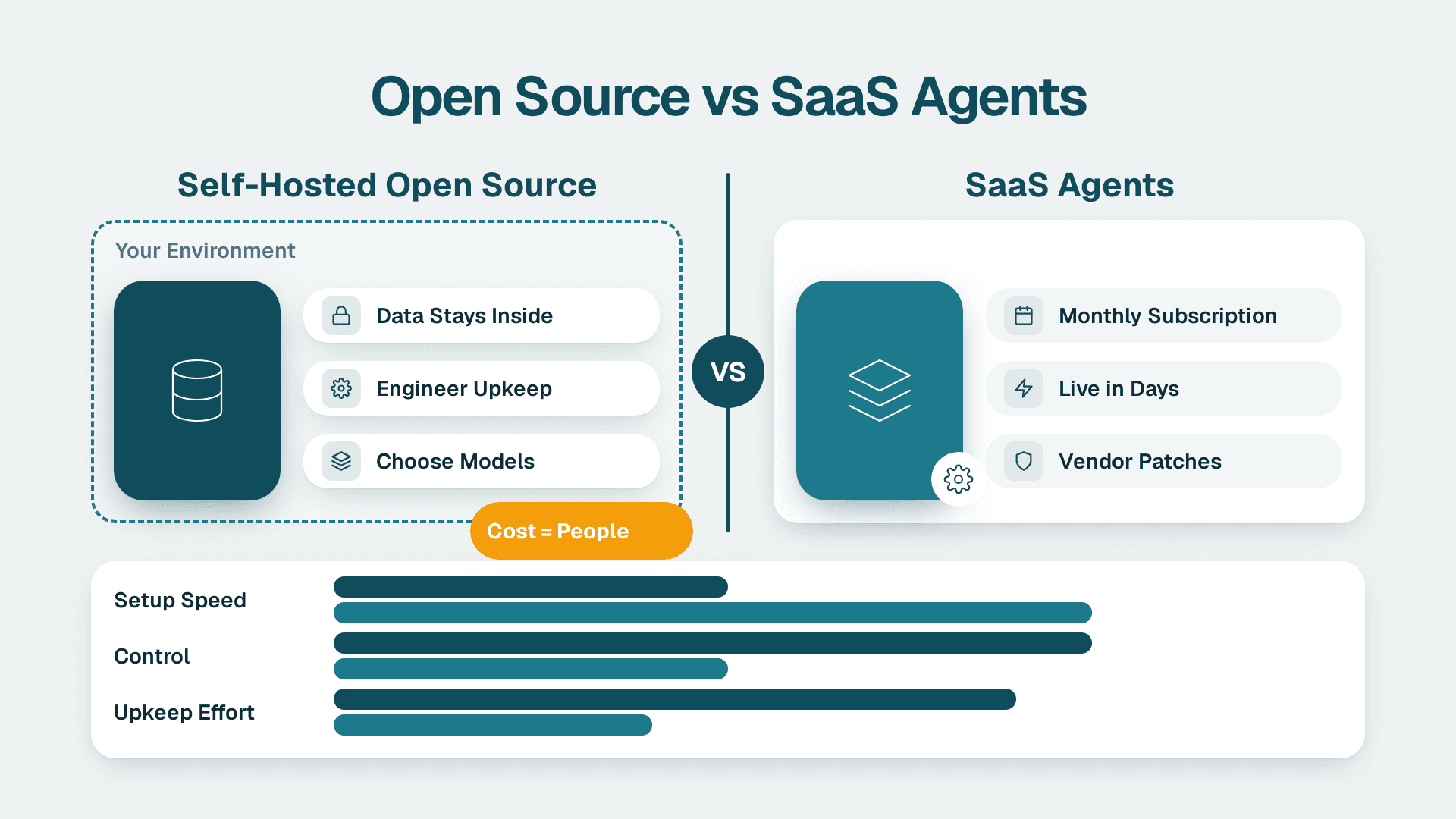
For most small teams, SaaS agents are the better starting point: you pay a subscription, skip the infrastructure and get running in days. Choose open-source AI agents when data must stay inside your own environment, when you have an engineer who will own upkeep, or when per-seat pricing stops making sense at volume.
Key Takeaways
- SaaS wins on speed and upkeep. Someone else patches, scales and monitors the platform.
- Open source wins on control. You decide where data lives, which models run and how every step is logged.
- The real cost of self-hosting is people, not licences. Budget engineer time before you budget servers.
- Either way, you must verify outcomes. An agent that reports success is not proof the work was done.
Quick Comparison
This table summarises how self-hosted agent frameworks and SaaS agent platforms differ for a team of roughly 5 to 100 people. If you want a second opinion on your own situation, our AI automation consulting team can map it for you.
| Criteria | Open-source / self-hosted | SaaS agent platform |
|---|---|---|
| Licence cost | Framework code is typically free to use; you pay for models, hosting and labour | Recurring subscription, usually per seat or per usage |
| Time to first working agent | Weeks, including hosting, secrets and access setup | Days, often hours for simple flows |
| Data control | Full: you choose region, network and retention | Shared responsibility: limited to vendor settings and contracts |
| Maintenance load | High: updates, dependency breaks, monitoring, backups | Low: vendor handles platform upkeep |
| Customisation | Deep: change the code, swap models, add custom tools | Bounded by what the vendor exposes |
| Vendor lock-in | Low: you hold the code and the workflows | Higher: workflows live in the vendor's format |
| Skills needed | An engineer comfortable with Python, containers and logs | An ops lead comfortable with a visual builder |
What Are Open-Source AI Agents, and How Do They Differ From SaaS?
Open-source AI agents are frameworks or applications whose code you can inspect, run and modify yourself. SaaS agents are hosted products where the vendor runs everything and you configure it through a browser.
GitHub's topic page defines an AI agent as a software system that autonomously perceives its environment, makes decisions and takes actions to achieve goals, typically powered by large language models. That page listed 137,370 public repositories matching the topic when we checked, which tells you two things: the ecosystem is huge, and most of it is not production-ready for a business.
Two examples show what the serious end looks like. CrewAI describes its open-source offering as an agent framework with high-level abstractions and low-level APIs for building complex, agent-driven workflows. You define an agent by its role, goal and backstory, then optionally attach tools, memory and a specific model, in YAML, in code or both. OpenHands, on the other hand, can run both closed models and open-weight models such as Kimi, DeepSeek and Qwen, locally, in the cloud or inside a VPC.
That flexibility is the point. It is also the catch: every choice a SaaS vendor makes for you becomes a choice you make yourself. If you are still deciding what an agent should be allowed to do, read our guide on what autonomy really means in business first.
Which Costs Less for a Small Team: Open Source or SaaS?
SaaS is cheaper at small scale; self-hosting only wins when volume is high or an engineer's time is already paid for. The licence line is where open source looks free, but it is rarely the biggest line.
Count four cost buckets for self-hosted AI agents:
- Model usage. If you call hosted models through an API, you pay per use either way. If you run open-weight models yourself, you pay for GPU capacity instead.
- Hosting. A small server, a database, backups and a secrets store. Modest, but never zero.
- Engineering time. Setup, upgrades, debugging and on-call. This is usually the dominant cost.
- Opportunity cost. Every hour spent keeping the agent platform alive is an hour not spent on the process you wanted to automate.
SaaS bundles most of that into one invoice. The trade-off is that pricing scales with seats or usage, so a tool that is cheap for three people can become a real line item at thirty. We covered this exact dynamic for one popular workflow tool in our breakdown of n8n pricing across cloud, community edition and self-hosting.
A useful rule of thumb: if nobody on your team already operates containers and monitors services, assume the self-hosted option costs more in year one than SaaS, even with a zero licence fee.
Who Controls Your Data With Self-Hosted AI Agents?
Self-hosting gives you the most control, but control is only worth paying for if your data actually demands it. For many non-regulated businesses, a well-configured SaaS tool is perfectly adequate.
What control means in practice:
- Location. You choose the region and network boundary. OpenHands, for example, lists deployment in your VPC or a controlled environment, isolated sandboxes for agent execution, access controls for agents and auditing of every action on its Enterprise tier.
- Model choice. You can send sensitive prompts to a model you run, or to none at all.
- Retention. You set how long logs and conversation history are kept. Hosted platforms set their own defaults; for context, Microsoft Purview Audit (Standard) keeps audit logs for 180 days, and you cannot simply extend that by wanting to.
- Tool access. You decide exactly which systems an agent can touch, and with which credentials.
If your reports touch personal data, build a short compliance checklist before choosing either path. A basic AI report generation compliance checklist for GDPR, HIPAA and PIPEDA asks the same five questions regardless of regime: what personal data enters the prompt, where it is processed, who can see the logs, how long it is kept, and how a deletion request is honoured. If you cannot answer all five for a SaaS vendor from their documentation and contract, that is a signal to self-host or to strip identifiers before the data leaves your systems. Our piece on AI governance for companies without a compliance team walks through a lightweight version of this.
How Much Maintenance Do Open-Source AI Agents Really Need?
Plan for ongoing weekly attention, not a one-off setup. This is the criterion where SaaS wins most clearly for small teams.
Self-hosted agent stacks move quickly. Frameworks add features such as CrewAI's support for MCP (Model Context Protocol) and A2A for agent collaboration, native sandbox tools for E2B and Daytona, and checkpointing that lets you replay from specific steps or fork a workflow. Those are genuinely useful, and each one also means a dependency you now track. Typical recurring work includes:
- Upgrading the framework and its dependencies without breaking existing workflows.
- Rotating API keys and reviewing which tools each agent can call.
- Watching model cost and latency as usage grows.
- Backing up workflow definitions, memory stores and logs.
- Reading failed-run logs and deciding whether to retry, fix or retire the agent.
With SaaS, the first four are the vendor's job. You still own the fifth, because no platform knows whether your business outcome was achieved.
How to Monitor Automated Reports for Silent Failures
Silent failure is the biggest operational risk in either model: the job runs, nothing errors, and the output is wrong or empty. Three habits catch most of it:
1. Check outcomes, not just runs. Compare the report against a source of truth, such as row counts or control totals, every time it runs.
2. Alert on absence. A report that did not arrive should page someone, the same way an error does.
3. Spot-check AI output against the source. Models state things confidently whether or not they are true.
We learned the third one the hard way. Our interlinking agent claimed it had found anchor text in our articles. A spot-check showed only 3 of 30 anchors actually existed in the text, so the AI was hallucinating roughly 90% of them. We rebuilt it to verify every anchor against the real article before patching anything. The lesson applies to any agent, hosted or not: verify before you let it act. Our guide to high-ROI AI agent use cases by department shows which processes are safe to hand over first.
How Do You Choose Between Self-Hosted and Cloud AI for Business Reporting Automation?
Decide on data sensitivity and team skills first, price second. Use the table below as a short decision path.
| Question | If yes | If no |
|---|---|---|
| Must the data stay in your own environment? | Self-host, or use a private deployment | SaaS is fine |
| Do you have an engineer who will own upkeep? | Self-hosting is viable | Choose SaaS |
| Do you need custom tools or model choice the vendor lacks? | Lean open source | SaaS covers it |
| Is your automation volume high and predictable? | Price both at your volume | SaaS pricing is simpler |
| Do you need it live this month? | SaaS | Either |
Two practical notes for reporting work specifically. First, if you are leaving spreadsheets, build the reliable dashboard or the single data feed first, then automate what sits on top of it. Agents layered over messy sources just produce messy summaries faster; our ERP data quality check shows how to test the foundation. Second, a good automated reporting with AI template is mostly boring: a fixed data query, a fixed layout, a short model-written commentary section, and a human approval step before anything is sent. You can build that template on either path, so the template itself should not drive the hosting decision.
If you have already narrowed the field to low-code builders, our comparison of OpenAI Agent Builder and n8n is a good next read. For the broader picture of where agents fit, start with the pillar guide, AI Automation for SMBs: What It Is and How to Start.
When to Choose Open-Source AI Agents
- You have a technical owner. A developer or data engineer on a 20-to-200-person team who already runs containers and is happy to own the agent stack.
- Your data cannot leave your environment. Customer records, contracts or internal financials that your policy keeps inside your own network or VPC.
- You need custom tools or specific models. For example, an agent that calls an internal system no vendor integrates with, or one that runs an open-weight model locally.
- Volume is high and steady. Thousands of runs a month, where per-seat or per-run pricing would exceed the cost of an engineer's maintenance time.
- You want to avoid lock-in. You would rather hold workflow definitions in code you control than in a vendor's format.
When to Choose SaaS Agents
- You have no engineer to spare. An ops leader or founder who wants an agent working in the next two weeks, with no servers to look after.
- Your use case is common. Report summaries, lead routing, ticket triage or invoice follow-up, where the vendor's built-in connectors already fit.
- Your data is low-sensitivity. Non-regulated sectors where a vendor's standard security terms are acceptable after a proper review.
- You are still experimenting. You are testing whether automation pays off and do not want to commit infrastructure before you know.
- Usage is small and uneven. A handful of users or occasional runs, where a subscription costs less than the hours self-hosting would take.
The Verdict
For a small team, start with SaaS. The maintenance load of self-hosted AI agents is real, it lands on the one or two people who can least afford it, and the licence savings rarely cover the engineering hours. Prove the process works on a hosted platform, measure the volume, and only then decide whether moving to open-source AI agents pays back. Whichever you choose, build verification into the workflow from day one: monitor outcomes, alert on missing reports and spot-check AI output against the source.
The one scenario where open source is still the better call from day one is when your data genuinely cannot leave your environment and you already have an engineer to run it. In that case, the control is the product, and the upkeep is the price you knowingly pay.
Not sure which side of the line you are on? Our AI automation consulting team will review your processes, data sensitivity and team skills, and recommend a path before you spend on either one.
---
About Lets Viz: Lets Viz is a data analytics and AI automation consultancy that has delivered dashboards, reporting and workflow automation since 2020 for operations teams across professional services, retail, logistics, SaaS and other non-regulated sectors. We hold a 5.0 Clutch rating and focus on practical builds that small and mid-sized teams can actually maintain.
Sources
Facts and prices checked November 2026.