Zoho CRM for Small Business: Editions, Setup, Pitfalls
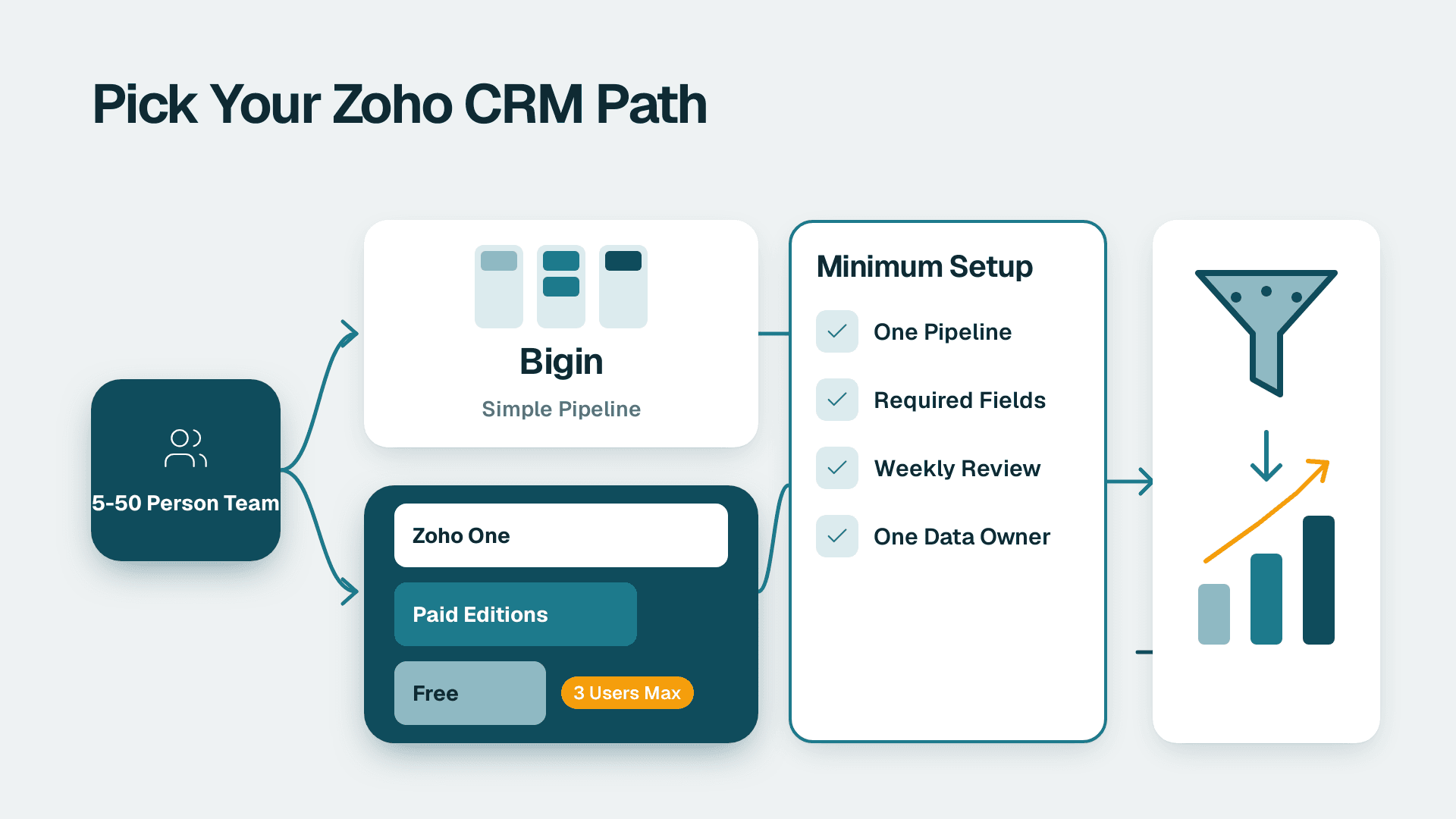
Yes, Zoho CRM suits most 5-50 person companies that run a repeatable sales process and will keep their data clean. Start free if you have three users or fewer, use Bigin if you only need a simple pipeline, and keep the first setup small: one pipeline, a few required fields and one weekly review.
Key Takeaways
- Zoho CRM fits teams of 5-50 well when the sales process is repeatable and one person owns the data.
- The free edition covers up to 3 users, so most 5+ person teams need a paid edition or Bigin from day one.
- Pick the edition by the automation and reporting you need in the first six months, not the features you might want later.
- A minimum viable setup is one pipeline, required fields, one import, one automation and one dashboard.
- Adoption dies from messy data, too many fields and no owner, not from missing features.
Lets Viz is a certified Zoho CRM consulting partner -- migrations from Salesforce, HubSpot, and Pipedrive, plus ongoing Zoho CRM optimisation for US, UK, and Canadian markets.
What is Zoho CRM, and who is it built for?
Zoho CRM is a cloud customer relationship management platform that tracks leads, contacts, deals and activity in one place, and connects to the rest of the Zoho suite. Zoho's main page says it serves 350K businesses and lists 1,200+ integrations, which is a sign of how widely it is used across company sizes.
For a small business, the appeal is practical rather than glamorous. You get a pipeline, email and call logging, workflow automation and reporting without assembling five separate tools. The 360-degree customer view pulls a lead's emails, chats, campaigns, events, social posts, deals and surveys into a single timeline, so a salesperson can see the history before a call instead of hunting for it.
The platform is also adding AI. Zoho describes pre-built agents in its Zia Agent Store and custom agents built in Zia Agent Studio. For a 5-50 person team, treat these as later improvements. They only work well on top of a clean pipeline, which is where this article focuses.
Is Zoho CRM a good fit for a 5-50 person company?
Zoho CRM is a good fit when your team sells in a repeatable way, wants automation without a large admin burden, and expects to add other business apps over time. It is a weaker fit when nobody can own the system or when the sales process changes every month.
The free edition shows what Zoho offers at the bottom end. According to Zoho's free CRM page, it supports up to 3 users, up to 5,000 records across all modules, and workflow automation for up to 5 tasks. Each organisation gets 1GB of file storage. It includes leads, deals and contact management, tasks and events, multichannel marketing, and integrations to other Zoho apps. Zoho also says it will never force users to move to a paid edition.
For a 5-person team that is a trial, not a home. For a 50-person team it is far too small. The real decision sits between Bigin and the paid CRM editions, and between simple and heavily customised setups.
A few signs that Zoho CRM suits you:
- You have a defined sales stage sequence, even if it is rough.
- You already use, or plan to use, Zoho Books, Campaigns, Mail or Projects.
- You want reports on pipeline value, conversion and lead source without an analyst.
- You can name one person who will own fields, users and data quality.
Signs it may not suit you yet: no defined sales process, deal data that lives only in people's heads, or an expectation that software will fix a weak pipeline on its own. If you want expert help scoping the build, our Zoho CRM consulting practice covers exactly this stage, but the checklist below works on its own.
Which Zoho CRM edition should a small business pick?
Pick the cheapest option that covers your first six months of real use: Bigin for simple pipelines, a lower paid edition for standard sales automation and reporting, and a higher edition only when you hit a specific limit. Choosing for imagined future needs is the most common and most expensive error.
Zoho's paid CRM editions run from Standard up to Ultimate. Exact prices and feature limits change, so check the current pricing page before you commit. Our comparison of Zoho CRM pricing plans from Standard to Ultimate goes through them in detail.
Here is a decision table based on the team situation rather than the feature list:
| Your situation | Best starting point | Why |
|---|---|---|
| 1-3 people, learning CRM habits | Free edition | Covers leads, deals, contacts and 5 automations within the free limits |
| 3-10 people, simple single pipeline, moving from spreadsheets | Bigin | Pipeline-centric and built for small businesses |
| 5-25 people, standard sales process, need reports and workflows | Lower paid CRM edition | Real automation and dashboards without enterprise overhead |
| 15-50 people, multiple teams, approvals or custom modules | Mid to upper paid edition | More customisation and process control; verify limits first |
| Sales plus finance, support and marketing on one platform | Zoho One or CRM Plus | Bundle logic matters more than per-app pricing |
Two practical rules help. First, count users honestly: include sales managers and the person who will build reports. Second, list the three automations you need in month one. If the free or lowest paid tier covers them, start there and upgrade on evidence. For a deeper view of what a build costs once you add configuration, see our guide to Zoho CRM customization cost for small business.
What is the difference between Zoho CRM and Bigin?
Bigin is Zoho's lighter CRM for micro and small businesses, built around a visual pipeline, while Zoho CRM is the full platform with deeper automation, customisation and reporting. If your process fits in one pipeline, Bigin is often enough. If you need multiple modules, complex rules or detailed analytics, choose Zoho CRM.
Zoho promotes Bigin as a pipeline-centric CRM and a simpler step for businesses graduating from spreadsheets. That description is a fair summary of who benefits. A five-person services firm tracking enquiries through proposal to signed work may never need more.
The trade-off is room to grow. Teams that start on Bigin and later need custom modules, richer workflows or cross-team reporting will migrate. That is manageable but not free of effort, so decide with a 12-month view. Our Zoho CRM vs Bigin guide for small business lays out the decision in more depth.
A short test: if you can describe your whole sales process in one line of stages and you do not need approvals, custom objects or advanced reports, start with Bigin. If you cannot, go straight to Zoho CRM.
What is the minimum Zoho CRM setup that works?
The minimum setup that works is one pipeline, a short list of required fields, one clean data import, one automation and one dashboard. Anything beyond that can wait until the team is using the system daily. Small scope is what makes adoption possible.
Step 1: Define one pipeline
Write your real stages, not aspirational ones. Five to seven stages is typical. Give each stage an exit rule, such as proposal sent or budget confirmed, so reps move deals consistently.
Step 2: Choose required fields
Require only what you will report on: deal value, expected close date, lead source, owner and next step. Every extra required field slows entry and raises the odds that reps skip the CRM.
Step 3: Import clean data once
Clean your spreadsheet before import. Deduplicate, standardise country and phone formats, and decide which field holds the primary email. Zoho describes its migration tool, Zwitch, as bringing existing sales data into Zoho CRM in just a few clicks, per Zoho's small business CRM page. The tool moves data. It does not make the data good.
Step 4: Add one automation
Pick the automation that saves the most repeated effort, usually lead assignment or a follow-up task when a deal changes stage. Prove it works before adding more. If you want to extend automation across other apps, our guide to Zoho Flow and cross-app automation is the logical next read.
Step 5: Build one dashboard
Show pipeline value by stage, deals closing this month and lead source performance. Review it in a weekly sales meeting so the data gets used. If the team never looks at the dashboard, they will stop feeding the CRM.
The table below summarises the minimum setup and what to defer:
| Setup element | Include at launch | Defer until later |
|---|---|---|
| Pipeline | One, with exit rules | Multiple pipelines by product line |
| Fields | 5-8 required fields | Dozens of optional custom fields |
| Data | One cleaned import | Ongoing enrichment tools |
| Automation | One assignment or follow-up rule | Complex multi-branch workflows |
| Reporting | One weekly dashboard | Custom analytics and forecasting |
| Integrations | Email and calendar | Marketing, finance and chat integrations |
For sequencing a larger rollout, the Zoho CRM implementation checklist, phase by phase picks up where this minimum leaves off.
How much does Zoho CRM cost and how long does setup take?
The licence is usually the smaller part of the cost. For a small team, the total includes seats, data cleanup and migration, configuration, integrations and training time. Timelines depend mostly on data quality and decision speed, not on the software.
Exact edition prices change, so use Zoho's current pricing page for licence figures and treat any number in an old article with caution. What you can plan for is the shape of the cost:
- Licences: one seat per active user, scaling with the edition you choose.
- Data work: deduplication, field mapping and import testing. Messy spreadsheets cost more here.
- Configuration: pipeline, fields, automations and dashboards. This grows with customisation.
- Integrations: email, calendar, finance and marketing connections.
- Training and change management: often forgotten, and the main driver of whether the system gets used.
A minimal rollout for a small team with tidy data is realistically a matter of weeks, not months. Expect longer if you are consolidating several spreadsheets, rebuilding a complicated approval flow or migrating from another CRM. Zoho states that customers switching from another CRM can get free migration assistance, and that Zoho CRM is free for 6 months if they are locked into a mid-contract, per Zoho's CRM overview. Confirm the current terms before you plan around them.
What mistakes kill Zoho CRM adoption?
Adoption fails when the system is harder than the spreadsheet it replaced, when the data cannot be trusted, or when nobody owns it. These are people and process problems, so they can be fixed without buying anything.
Mistake 1: Too many fields and too much customisation upfront
Teams copy every spreadsheet column into the CRM and mark half of them required. Reps then enter junk to get past the screen. Start with the minimum set above and add fields only when someone needs a report from them.
Mistake 2: Dirty data from the start
Bad data is the quiet killer, because the system looks fine until someone relies on it. One example from our own work: a supplier mass email kept reporting that no emails had been sent. The cause was that Zoho mass email only sends to the standard Email field, and the client's addresses lived in a custom Primary_Email field. After we backfilled the standard field, coverage rose from 77 of 358 contacts to 283 of 358, and the resend delivered 206 of 206.
The lesson is not about that one field. It is that a CRM can look populated while the data sits where the tools cannot use it. Audit where each key value lives before you automate anything on top of it.
Mistake 3: No owner
Someone has to approve new fields, remove unused ones, manage users and watch data quality. In a 5-50 person firm that is often a sales ops lead or an operations manager with a few hours a week. Without a named owner, the setup drifts within a quarter.
Mistake 4: Building reports nobody reviews
Dashboards only drive behaviour if they appear in a meeting. Tie the weekly pipeline review to the dashboard and ask managers to challenge any deal that has no next step. Our guide to building Zoho CRM reports and dashboards for sales shows which views are worth building first.
Mistake 5: Skipping training and leadership use
If the owner or sales head still asks for updates by message, reps will answer by message. Leaders must use the CRM as the source of truth, including for forecasts and one-to-ones.
Mistake 6: Ignoring compliance and access early
Permissions and data handling are far easier to set at the start than to retrofit. Zoho lists security features including encryption, audit logs, IP restrictions and two-factor authentication. Switch on two-factor authentication and set role-based access when you create the users, not after an incident. The regulations that apply depend on where your customers are:
- A US firm handling health-related enquiries should assess HIPAA exposure before storing any patient information in a CRM, and a US SaaS company selling to enterprises may be asked for SOC 2 evidence by buyers.
- A UK or EU business must handle contact data under GDPR, including lawful basis, consent records and deletion requests.
- A Canadian company should consider PIPEDA obligations on consent and cross-border data handling.
These are generic examples, not legal advice. Have your own advisers confirm what applies to you.
When should a small business choose Zoho One or CRM Plus instead?
Choose a bundle when CRM is only one of several systems you need, such as finance, support, marketing and HR, and you want them to share data. Choose standalone CRM when sales is the only pressing problem. Bundles reward breadth of use, not headcount alone.
Zoho One is the broad suite option, and CRM Plus focuses on customer-facing teams across sales, marketing and support. Our breakdown of what Zoho CRM Plus includes explains the difference. A simple way to decide:
- If you use only the CRM and maybe Books, buy the CRM edition you need.
- If three or more departments will use Zoho apps within a year, price the bundle against the individual apps.
- If you only want to try things, use the free edition or Bigin and revisit.
Before buying more software, make sure the existing process works. If your sales team is struggling with automation, our guide on how to simplify sales automation when it takes too much work can help you cut back before you scale.
What is the best CRM for a very small business?
For a very small business, the best CRM is the simplest one your team will actually use daily. For many, that means a free edition or a pipeline-first tool such as Bigin, with a move to Zoho CRM once automation, reporting or customisation needs grow.
The ranking lists that appear for this question, such as the top 50 CRM vendors, mostly compare feature counts. For a team of five, feature counts matter less than three things: how fast a rep can log a deal, how clean the imported data is, and whether one person owns the setup. A well-run simple CRM beats a feature-rich one that nobody updates.
---
About Lets Viz: Lets Viz has delivered Zoho, Power BI and analytics projects since 2020 for clients across US healthcare, UK fintech, Canadian manufacturing and global SaaS. We hold a 5.0 Clutch rating, and our CRM work focuses on clean data, small setups that teams adopt, and reporting leaders actually use.
If you want help choosing an edition or scoping a first build, see our Zoho CRM consulting service.
Sources
Facts and prices checked October 2026.