How to Build an n8n AI Agent Workflow: Step-by-Step
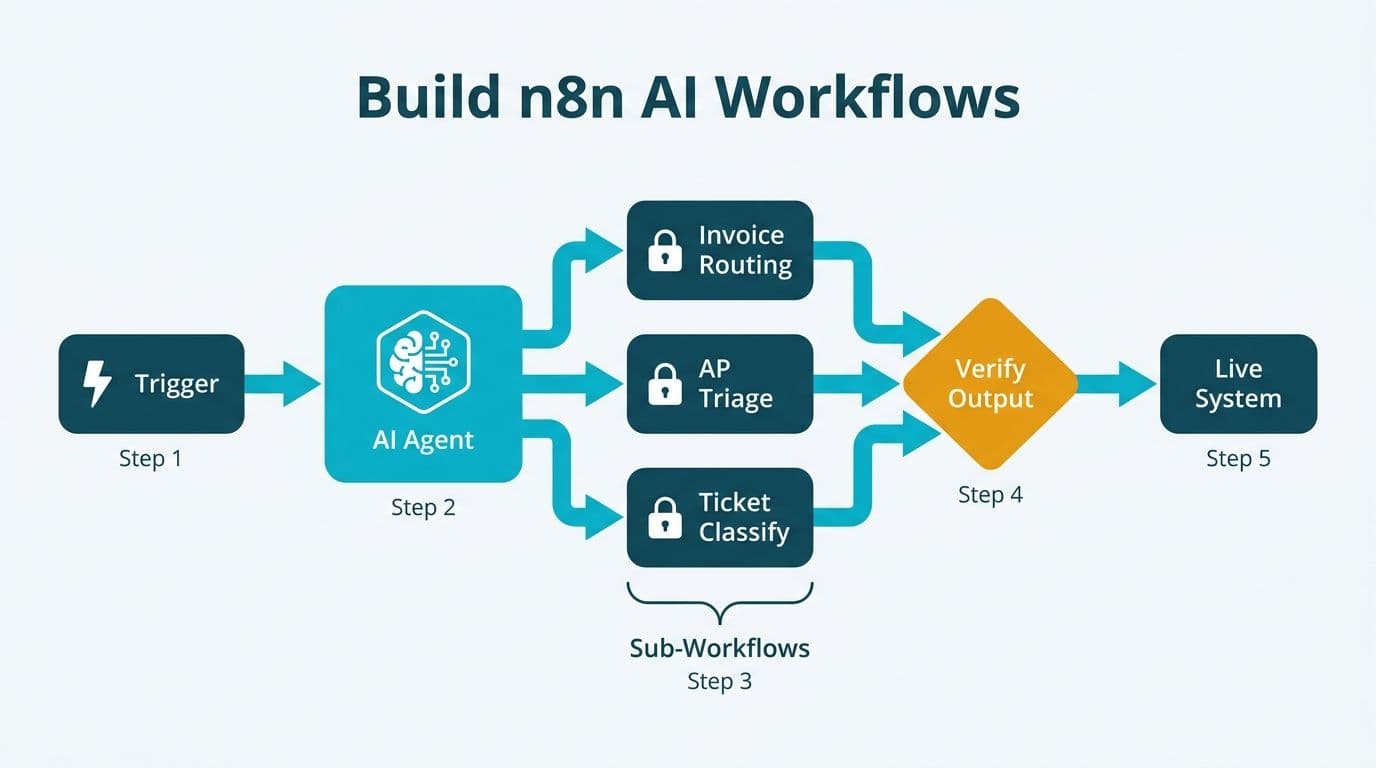
Building an n8n AI agent workflow means chaining a trigger node to an AI agent, isolating each process in a sub-workflow with its own credential scope, and enforcing a verification step before any AI-generated output touches a live system. For finance and healthcare teams, the highest-return starting points are invoice routing, accounts payable triage, and support ticket classification - each maps directly to n8n's agent architecture.
Key Takeaways
- Define your trigger, tool chain, and output contract before adding any AI agent node
- Sub-workflows isolate credential scopes and contain failures without cascading to other processes
- HIPAA (US healthcare), GDPR (UK/EU), and PIPEDA (Canadian organizations) each require access controls that credential scoping in sub-workflows directly supports
- AI agent outputs must be verified before writing to any system of record - hallucination is a production risk, not an edge case
- Accounts payable automation and invoice routing deliver the fastest, most measurable value for mid-market finance teams
What Finance Workflows Should Teams Automate with AI First?
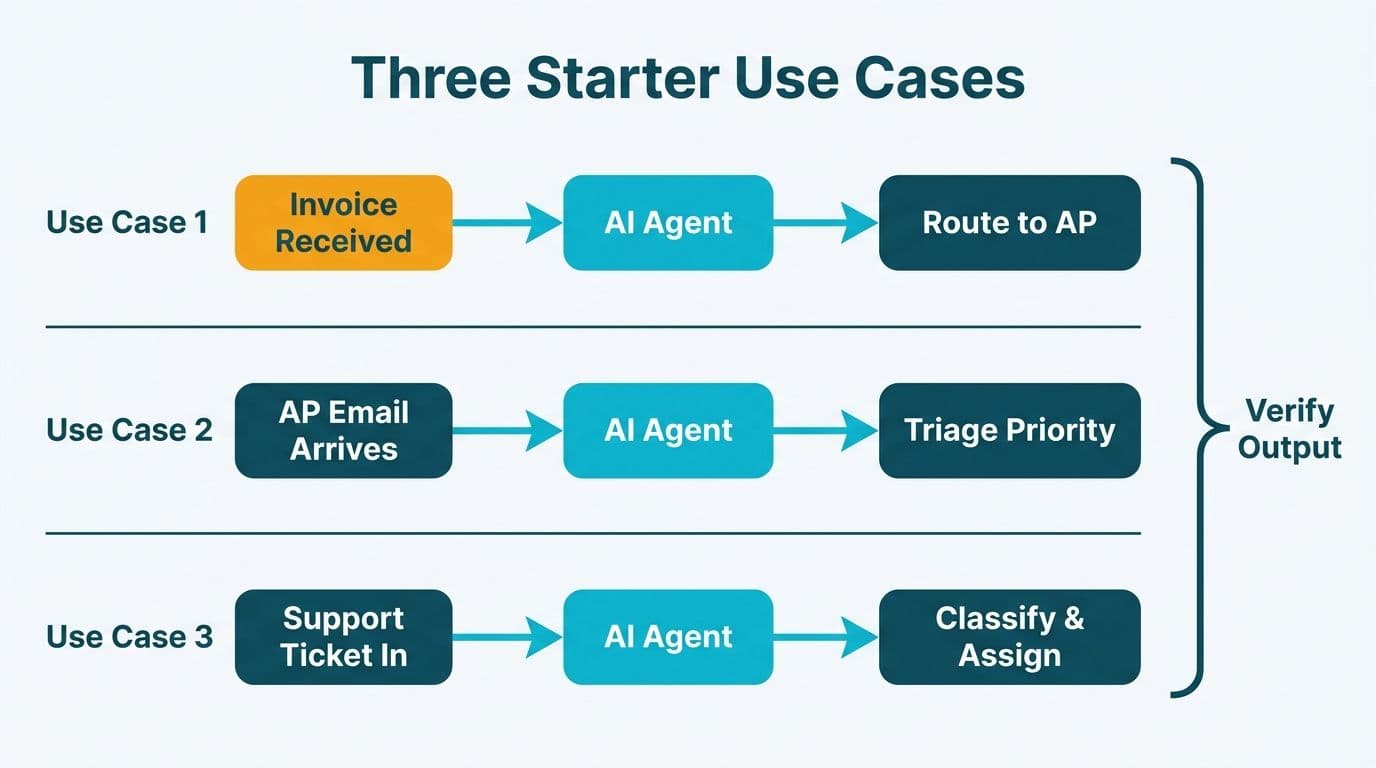
The answer is whichever process combines high volume, structured inputs, and a clear decision rule. Accounts payable, invoice routing, and expense flagging are the classic starting points - not because they are easy, but because the input (a PDF or structured form) and the output (a routing decision or GL code) are well-defined.
Teams exploring ai expense management automation for finance often start with three-way matching: purchase order, goods receipt, and vendor invoice. When all three documents are present and amounts reconcile, the AI can approve automatically. When they diverge, it routes to a human reviewer. This boundary makes the AI's role auditable - a requirement under SOX for US public companies, FRC guidelines for UK firms, and IFRS standards applicable across Canadian enterprises.
What finance workflows should teams automate with AI first? Prioritize in this order: (1) accounts payable triage, (2) expense categorization and policy enforcement, (3) month-end close checklist orchestration, and (4) account reconciliation exception flagging. Each step automated upstream saves exponential review time downstream.
For teams at the scoping stage, our AI automation consulting practice works through this prioritization before a single node is built - defining what the AI decides, what it routes, and what it never touches.
See also our companion post on n8n finance workflow automation: 5 real examples for node-by-node breakdowns of live workflows.
How Do You Build an n8n AI Agent Workflow? Step-by-Step
An n8n AI agent workflow has five layers: trigger, tool registry, agent node, sub-workflows, and output handler. Build them in that order.
Step 1: Define the Trigger and Input Schema
Every reliable workflow starts with a typed input contract. For an invoice routing workflow, the trigger might be an HTTP webhook (vendor submits via a portal), a scheduled poll of an email inbox, or an ERP event. In n8n, use the Webhook node or Schedule Trigger, then immediately pass the payload through a Set node to extract only the fields the workflow will consume: `vendor_id`, `invoice_amount`, `currency`, `due_date`, `line_items`.
Defining this schema at the entry point also prevents prompt injection via unvalidated free-text fields - a real attack vector when invoice emails arrive from external vendors.
Step 2: Register Tools in the AI Agent Node
n8n's AI Agent node (n8n official documentation, 2025) accepts a system prompt and a tool registry. Tools are the actions the agent can call: query a database, look up a vendor record, or invoke a sub-workflow. Register only the tools the agent legitimately needs for this task.
For a typical accounts payable workflow, register four tools:
- `lookup_vendor(vendor_id)` - checks vendor status and payment terms
- `fetch_po(po_number)` - retrieves the matching purchase order
- `classify_expense(line_items)` - returns GL codes
- `route_to_approver(amount, department)` - triggers the approval sub-workflow
Keep the system prompt short and deterministic. A well-scoped prompt for invoice classification looks like this:
> You are an invoice classifier. Given the fields provided, return a JSON object with `gl_code`, `approval_tier` (1, 2, or 3), and `confidence` (0-1). Do not guess. If confidence is below 0.85, set `approval_tier` to 0 to trigger human review.
This structure means every output is machine-checkable before it reaches a write-back node.
Step 3: Build Sub-Workflows for Each Tool
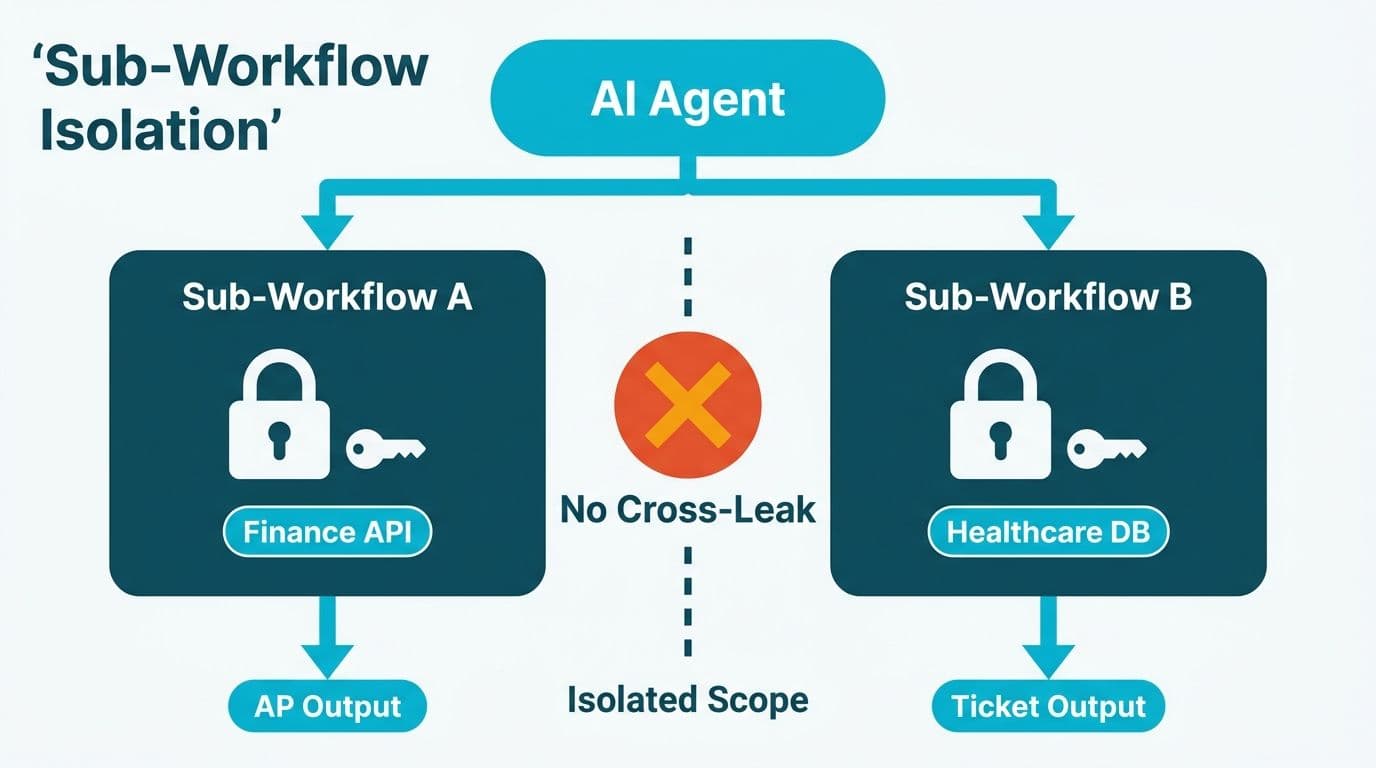
Sub-workflows are n8n's primary mechanism for reuse and isolation. Each tool the agent calls should map to a dedicated sub-workflow with its own credential scope. This matters for compliance:
- A sub-workflow that queries your ERP holds the ERP service account credential - no other workflow accesses it
- A sub-workflow that sends approval emails holds only the SMTP credential
- A sub-workflow that writes to a financial ledger can be gated behind a Manual Trigger for human review
For US healthcare organizations processing Explanation of Benefits (EOB) documents, this isolation directly supports HIPAA technical safeguard requirements for minimum necessary access. For UK fintech firms under GDPR, it documents data flow per-process. For Canadian organizations governed by PIPEDA, it limits PHI and PII exposure to the specific sub-workflow that requires it.
The n8n platform (2025) describes this pattern as workflow-as-tool: a parent workflow calls a child workflow as a function, with clearly typed inputs and outputs.
Step 4: Scope Credentials at the Sub-Workflow Level
Never share a single high-privilege credential across your entire n8n instance. In n8n, credentials can be restricted to specific workflows. The recommended production pattern:
| Credential | Scope | Reason |
|---|---|---|
| ERP service account | AP sub-workflow only | Limits blast radius if the parent workflow is compromised |
| SMTP relay | Notification sub-workflow only | Prevents unintended sends from other workflows |
| LLM API key | AI agent workflow only | Rate limiting and cost attribution per process |
| Database read replica | Reconciliation sub-workflow only | No write access from the AI layer |
Step 5: Define the Output Handler and Write-Back Contract
The AI agent's output must pass a validation node before any write operation. Use a Code node or If node to check: Is the JSON schema valid? Is confidence above the threshold? Is the GL code in the approved list?
Only after passing these checks should the workflow call the write-back sub-workflow. This is the difference between a workflow that automates work and one that automates errors at scale.
How Does AI Extract Data from Invoices and Financial Documents?
AI invoice data extraction works by passing the document - PDF, image, or structured text - to a vision-capable language model, which returns structured JSON: vendor name, line items, totals, tax amounts, and due dates. In n8n, this is typically a two-node sequence: an HTTP Request node sends the document to a document AI endpoint, followed by a Code node that parses and validates the returned JSON.
The critical difference from RPA is layout tolerance. RPA uses template-based field detection and fails when invoice formats change. An AI model handles layout variance across vendors natively. A US healthcare network processing hundreds of supplier invoices weekly, a UK fintech firm managing cross-currency vendor payments, or a Canadian manufacturing company handling bilingual English-French invoices - all present layout variability that AI handles where RPA stalls.
For healthcare teams, EOB processing follows the same pattern: extract procedure codes, amounts billed, amounts allowed, and adjustment reasons - then route exception items to a billing analyst rather than auto-posting everything. Auto-posting without review is the fastest path to claims reconciliation errors.
See our guide on AI compliance requirements for financial services for the regulatory layer that must wrap any workflow writing to a financial system of record.
RPA vs AI Automation: Which Should Finance Teams Choose?
The right answer depends on whether the process has a fixed structure or requires judgment.
| Dimension | RPA | AI Agent (n8n) |
|---|---|---|
| Input type | Fixed-format, templated | Variable, unstructured, or semi-structured |
| Layout tolerance | Breaks on layout change | Handles variance natively |
| Decision logic | Rule-based only | Reasons across edge cases |
| Auditability | Deterministic, easy to audit | Requires confidence thresholds and execution logs |
| Setup time | Fast for simple scraping | Longer - requires prompt engineering and testing |
| Compliance controls | Workflow-level credential scoping | Requires explicit sub-workflow isolation |
| Best for | ERP data entry, fixed-format reports | Invoice extraction, support triage, lead enrichment |
The practical answer for most mid-market finance teams: use RPA for deterministic, high-volume data entry such as journal entries and bank feed imports, and AI agents for classification, extraction from unstructured sources, or routing decisions. Many n8n deployments combine both - an RPA-style trigger to detect new invoices, followed by an AI agent to classify and route them. RPA vs AI automation for finance teams is rarely an either/or decision; it is an architecture question about where structure ends and judgment begins.
How Should You Handle Errors in n8n AI Agent Workflows?
Apply three verification layers - at the node, output, and sub-workflow level - and never allow an AI agent output to reach a write-back node without a confidence check. This is the single most common failure point in production AI workflow builds.
Our own experience illustrates the stakes: when building an AI-powered interlinking agent for content, a spot-check revealed that only 3 of 30 anchor text references the agent claimed to have found actually existed in the articles - the model was hallucinating roughly 90% of them. We rebuilt the workflow to verify every anchor against the real article text before writing anything. The same verification principle applies to every AI agent workflow in finance: check the output against the source of truth before any write-back.
In n8n, implement error handling at three levels:
Node-level: Use the Error Trigger node to catch failures from any node and route them to a Slack alert or incident queue rather than silently dropping them.
Output-level: After every AI agent node, add an If node that checks the JSON schema and confidence score. Route low-confidence outputs to a human review queue, not to the auto-approve path.
Sub-workflow-level: Configure Error Workflow settings on any sub-workflow that writes to a system of record, so a failed ERP write does not leave the workflow in an ambiguous state with no audit trail.
For ai automation for account reconciliation, every discrepancy flagged by the AI must be logged alongside the source records compared - so a human reviewer can confirm or override the AI's finding with full context.
How Do You Automate Month-End Close and Account Reconciliation with AI?
AI automation for month-end financial close reduces manual coordination - not by replacing human judgment on material items, but by automating checklist orchestration, exception surfacing, and status aggregation that consume analyst hours.
A typical n8n month-end close workflow runs five steps:
1. Schedule Trigger fires on the last business day of the month
2. Sub-workflow: fetch open items - queries the GL for unposted journals, unapplied receipts, and open POs
3. AI Agent node - classifies each open item by type and assigns it to the responsible team member via lookup table
4. Sub-workflow: notify assignees - sends a structured task list with due date and escalation path
5. Sub-workflow: status aggregation - polls each task twice daily and compiles a close status view for the CFO
For ai automation for account reconciliation, the AI agent compares GL balances to sub-ledger totals, flags variances above a materiality threshold, and drafts a variance explanation template for the analyst to complete. The analyst reviews, corrects if needed, and approves. Every AI suggestion and every human override is logged - creating an audit trail that satisfies SOX Section 302 for US companies, equivalent FRC controls for UK firms, and Canadian IFRS reconciliation standards.
A US healthcare system processing insurance reconciliations, a UK fintech firm closing books across multiple jurisdictions, and a Canadian manufacturing company reconciling bilingual vendor accounts all face the same core challenge: too many line items to review manually, too few analysts. AI-assisted triage lets teams focus on the exceptions that matter.
For deeper context on what generative AI delivers in financial operations, see generative AI use cases in finance: 10 real applications. For healthcare-specific configuration requirements, see our guide on n8n HIPAA-compliant workflow automation.
---
About Lets Viz: Lets Viz has been building AI-driven automation and analytics solutions for clients in US healthcare, UK fintech, Canadian manufacturing, and global SaaS since 2020. Our team holds a 5.0 rating on Clutch across AI automation, data engineering, and managed analytics engagements.
Ready to map your finance or healthcare workflows to an n8n AI agent architecture? Our AI automation consulting practice runs a structured scoping session to identify which processes are ready for AI agents, which require human-in-the-loop design, and which should remain on rule-based automation - before a single node is built.


