Zoho CRM vs Bigin for Small Business: 2026 Guide
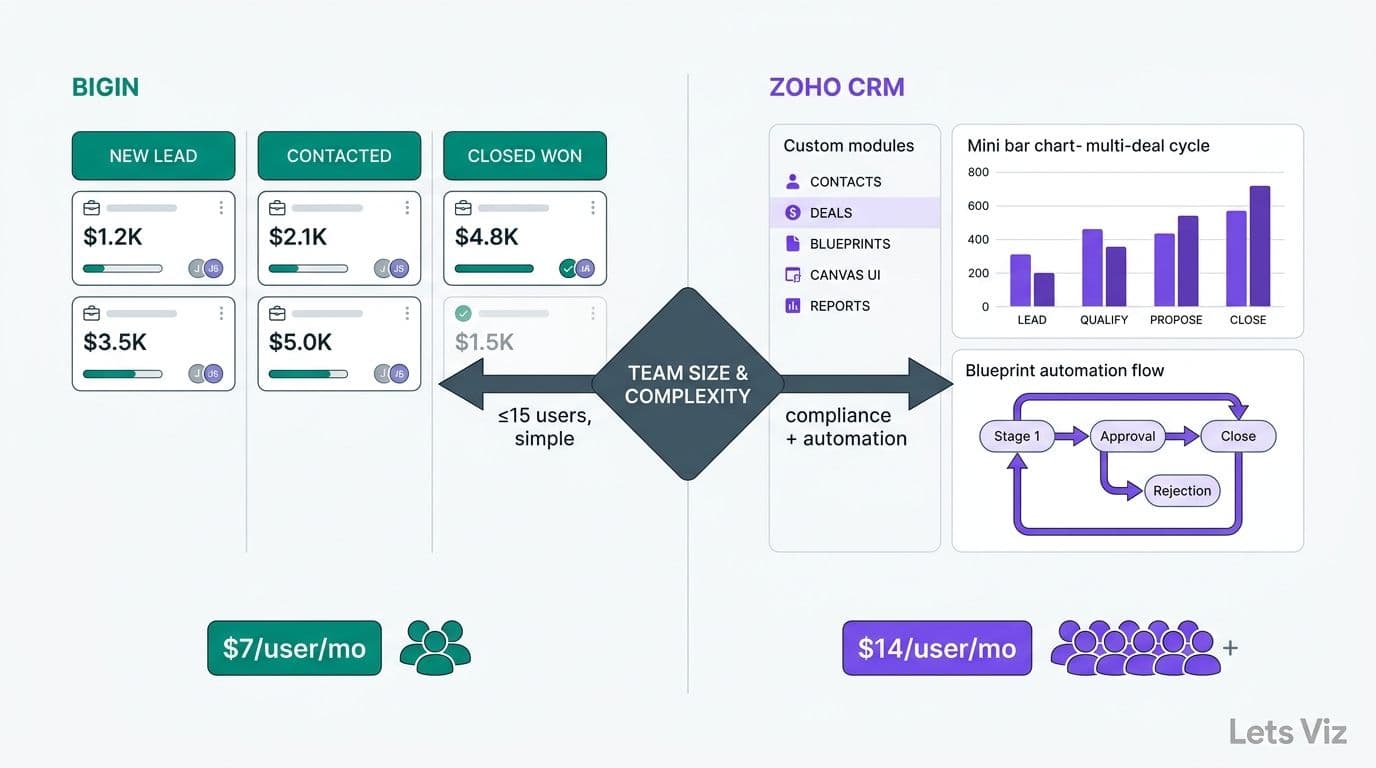
For teams under 15 users, Bigin and Zoho CRM serve fundamentally different needs within the same product ecosystem. Bigin is a streamlined pipeline tool designed for micro-businesses that need contact tracking without the complexity of a full CRM. Zoho CRM delivers custom modules, Blueprint-driven process automation, and Canvas UI - capabilities that become essential when compliance requirements, reporting depth, or multi-stage deal cycles are non-negotiable. The right choice hinges on team size, process complexity, and regulatory context.
Key Takeaways
Bigin starts at $7/user/month (Express); Zoho CRM Standard starts at $14/user/month - a gap that widens significantly with add-ons and team growth
Zoho CRM supports custom fields, Blueprint automation, and Canvas UI redesign; Bigin offers limited customization by design
Healthcare and finance teams requiring audit trails and field-level security should default to Zoho CRM Professional or Enterprise
Bigin caps at 5 pipelines and lacks module-level customization - constraints that surface quickly past 8 users
Both platforms share native Zoho integrations, but only Zoho CRM connects to Zoho Analytics at full depth
For small businesses comparing Zoho CRM vs HubSpot, Zoho CRM Professional delivers comparable automation depth to HubSpot Professional at roughly one-quarter the price - a gap that matters for UK, Canadian, and US buyers with GDPR or PIPEDA obligations
What Is the Difference Between Zoho CRM and Bigin?
Zoho CRM is a full-featured CRM platform built for growing sales teams that need structured data management, process governance, and analytics integration. Bigin is a pipeline-centric tool built deliberately lighter, targeting micro-businesses and solopreneurs who need contact and deal visibility without a steep configuration curve.
Zoho launched Bigin as an intentional entry point into its CRM ecosystem - stripping out module customization, advanced workflow rules, and AI-assisted features (Zia) to keep the interface approachable. The tradeoff is that Bigin's data model is fixed. Organizations that need to track entities beyond contacts, companies, and standard deals - such as insurance plan types, patient referral sources, or payer contract tiers - encounter structural constraints that no amount of configuration resolves.
For small businesses in healthcare and finance, that structural difference matters more than the monthly price delta. The Healthcare Financial Analytics Market is projected to grow at an 8.58% CAGR through 2035 - a trajectory tracking ahead of earlier forecasts as of 2026 (Market Research Future) - and organizations operating in that growth environment need CRM tools that produce auditable, consistently structured records to feed downstream analytics layers. Bigin's simplified schema limits that downstream integration.
Before locking in a platform, teams should confirm their analytics layer requirements. The HIPAA-Compliant Analytics Dashboard: Best Practices Checklist outlines exactly what a compliant data infrastructure requires from the CRM feeding it.
How Do Zoho CRM vs Bigin Pricing Plans Compare for Small Business?
Pricing diverges substantially once teams move past Bigin's free tier. The table below covers plans relevant to teams of 5-15 users, priced as of July 2026 and billed annually in USD:
| Plan | Platform | Price/User/Month | User Cap | Pipelines | Custom Fields | Blueprint |
|---|---|---|---|---|---|---|
| Free | Bigin | $0 | 1 | 1 | No | No |
| Express | Bigin | $7 | 5 | 1 | Limited | No |
| Premier | Bigin | $12 | Unlimited | 5 | Limited | No |
| Standard | Zoho CRM | $14 | Unlimited | Unlimited | Yes | No |
| Professional | Zoho CRM | $23 | Unlimited | Unlimited | Yes | Yes |
| Enterprise | Zoho CRM | $40 | Unlimited | Unlimited | Yes | Yes + Canvas |
For a 10-person team, the total monthly cost difference between Bigin Premier ($120/month) and Zoho CRM Standard ($140/month) is $20. That gap is narrow, but the operational capability difference is substantial: Zoho CRM Standard includes unlimited pipelines, full custom field creation across all standard modules, workflow rules, and a broader API surface for BI tool integrations.
Teams that outgrow Bigin Premier typically face a disruptive mid-cycle migration within 12-18 months of growth. Understanding Zoho CRM customization cost for small business starts with recognizing that Standard and Professional plan configuration is largely self-service - most setups are completed in a single implementation engagement rather than an ongoing retainer, which changes the total cost calculation significantly.
For a broader framework on evaluating tool costs against analytics ROI, the AI Analytics Consulting for Small Businesses: Budget Guide applies the same seat-cost methodology to CRM and BI tool selection.
What Customization Depth Does Zoho CRM Offer vs Bigin?
Zoho CRM's customization depth is one of the widest available in its price class. Bigin's is intentionally constrained - a deliberate product decision, not a limitation to work around.
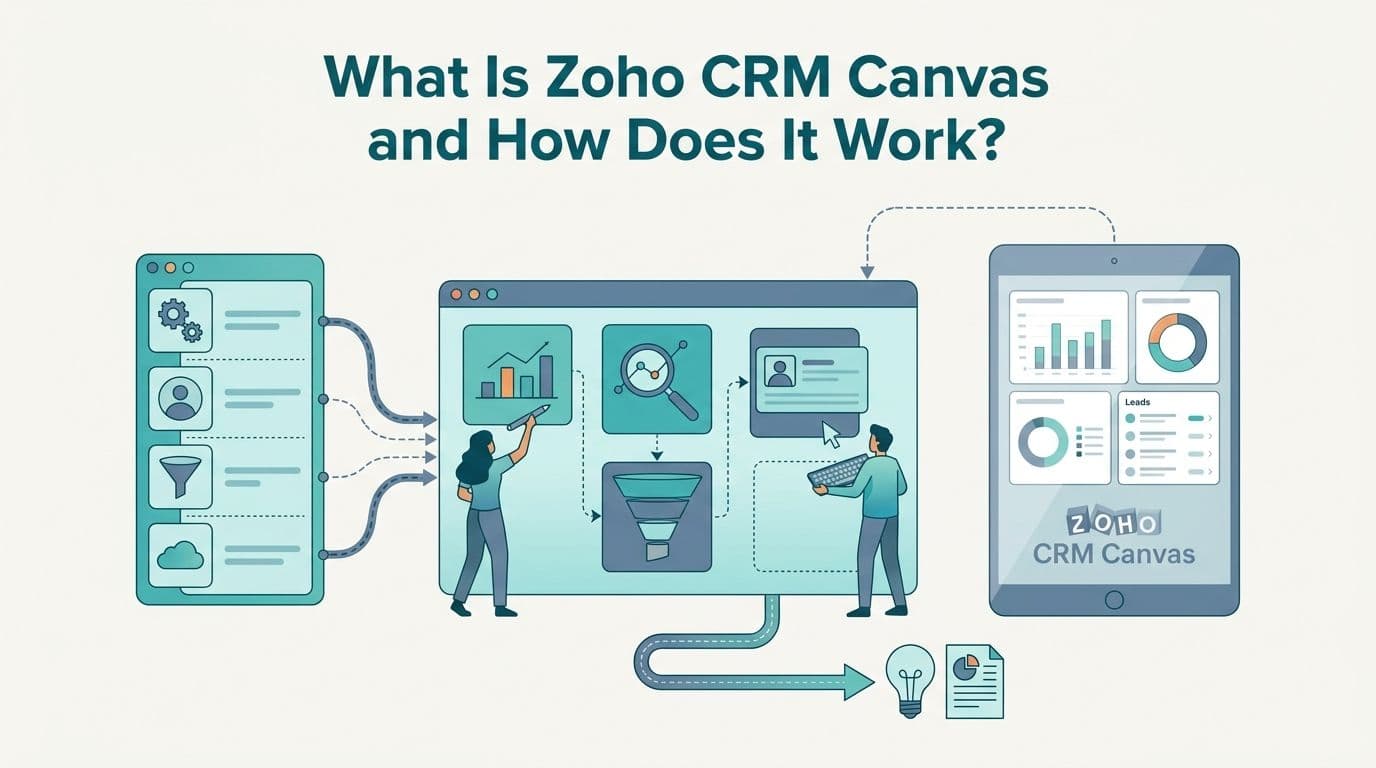
Canvas answers the question of what is Zoho CRM Canvas and how does it work. Canvas is a no-code record layout designer available on the Enterprise plan. Administrators redesign the visual structure of any contact, deal, or account record using a drag-and-drop editor. For organizations with multiple user roles - where a finance director needs different data surfaces than an account executive - Canvas creates role-specific views without custom development. It operates as a page-level template system that overrides the default record UI with a fully configured layout, including conditional field visibility and color-coded stage indicators.
Blueprint is Zoho CRM's process governance layer, available from the Professional plan. A Zoho CRM Blueprint for sales process automation maps each deal or service stage as a state machine with defined entry conditions, mandatory field completion requirements, and allowed stage transitions. This is directly applicable to regulated finance environments where documentation at each deal stage is an audit requirement, and to healthcare referral pipelines where structured handoff validation is non-negotiable.
Custom fields are available from the Standard plan. Knowing how to add custom fields in Zoho CRM is straightforward for any administrator: navigate to Setup, then Customization, then Modules and Fields. Each module has a field editor where you drag field types into layouts and set validation rules. Healthcare organizations can add fields for insurance provider, payer type, referral coordinator, or care setting without touching the API or writing a line of code.
Custom modules, available on Enterprise, let teams build entirely new record types - grant applications, insurance contracts, equipment assets - that behave as native CRM objects with their own fields, views, and related lists.
Bigin customization is limited to pipeline stage naming, a reduced set of custom fields per pipeline, and basic contact field additions. There are no custom modules, no Blueprint equivalent, and no layout design tools.
The AI consulting services market is projected to grow from USD 11.07 billion in 2025 to USD 90.99 billion by 2035 - a forecast that accelerated in 2026 as enterprise AI adoption outpaced earlier projections (Future Market Insights, 2026) - reflecting how central configurable data infrastructure has become to analytics-driven growth strategies. A CRM that limits field-level design becomes a bottleneck as firms scale their data stack into BI and AI layers. Teams planning that integration should review AI-Powered Power BI Consulting for Finance Teams to understand how CRM schema decisions affect downstream reporting.
How Do User Limits and Pipeline Caps Affect Teams Under 15 Users?
Bigin's user and pipeline caps are the most operationally consequential constraints for growing small businesses. Zoho CRM imposes neither.
On Bigin Express, the hard user ceiling is 5 seats. A healthcare practice adding a sixth care coordinator, or a finance team onboarding a second analyst, immediately outgrows this tier. Bigin Premier removes the user ceiling but restricts teams to 5 pipelines - a cap that becomes binding when separate service lines need independent deal views, or when a firm manages both inbound leads and contract renewal pipelines simultaneously.
Zoho CRM imposes no pipeline cap on any paid plan. Territory management, available from the Enterprise plan, creates team-level data partitions that keep a 12-person sales or service team organized without pipeline proliferation.
Practical seat-count guidance for teams under 15:
1-4 users: Bigin Express at $7/user/month is a practical entry point for simple pipeline visibility with minimal administrative overhead.
5-8 users: Bigin Premier at $12/user/month works for simple, linear processes. Zoho CRM Standard at $14/user/month is worth the $2/user premium for regulated industries or teams already using Zoho Books or Zoho Analytics.
9-15 users: Zoho CRM Standard or Professional. A 10-person team managing both inbound leads and contract renewal pipelines, for example, consumes 2 of Bigin's 5 pipeline slots immediately - leaving only 3 for additional service lines or regional splits. Add a single compliance checkpoint requirement and Bigin has no path forward; the $2-$11/user monthly difference for Zoho CRM Standard or Professional is recovered in the first avoided mid-cycle migration alone.
Finance directors modeling total cost of ownership should review the Managed Power BI vs In-House BI Team: Mid-Market Cost Guide, which applies the same seat-level cost analysis to adjacent tool decisions and provides a reusable framework for vendor evaluation.
Which CRM Is Better for Healthcare and Finance Teams?
For healthcare and finance teams in the US and Canada, Zoho CRM is the appropriate choice in most scenarios involving more than five users or any regulatory obligation. Bigin is a capable starting point for very early-stage practices or advisory firms, but its structural constraints become liabilities in regulated environments.
Healthcare context:
HIPAA compliance in a CRM context requires audit logs, role-based access controls, and the ability to restrict field visibility by user role. Zoho CRM Enterprise supports field-level security, hierarchical role management, and compliance export logs. Bigin offers neither field-level security nor the module-level permissions needed to restrict PHI access by role - making it unsuitable for any healthcare workflow that touches patient-identifiable data.
Healthcare organizations connecting CRM data to downstream analytics layers - tracking patient referral pipelines, payer contract outcomes, or care coordinator performance - need a CRM whose schema is configurable enough to match the analytics layer's data requirements. The What Metrics Should a Healthcare Analytics Dashboard Track? article identifies the data points a CRM must reliably supply; Bigin's fixed schema cannot consistently deliver all of them.
Finance context:
Finance teams managing multi-stakeholder deal cycles with compliance checkpoints need Blueprint. A Zoho CRM Blueprint for sales process automation enforces documentation at each deal stage - directly applicable to financial services where advancing a deal without evidence is an audit finding, not just a process gap. In practice, a Blueprint-configured Zoho CRM can require an advisor to attach a signed suitability form before a deal transitions from "Proposal Sent" to "Compliance Review," making the CRM the system of record for audit trail rather than a separate document folder that falls out of sync.
More than 100 experts representing over 50 financial services organizations identified structured data governance as a top AI-readiness requirement, with unstructured CRM data named as a leading blocker to deploying analytics and AI tools effectively (World Economic Forum, 2026). A configurable CRM with Blueprint-level controls and field-level security directly addresses that readiness gap.
How Does Zoho CRM Compare to HubSpot for Small Business Buyers in the US, UK, and Canada?
For small businesses that have HubSpot on their shortlist, the Zoho CRM vs HubSpot for small business comparison shifts substantially depending on team size, geography, and compliance obligations. HubSpot's free CRM is the most common starting point for early-stage businesses, and its Starter plan at $15/user/month competes directly with Zoho CRM Standard at $14/user/month. The pricing gap widens sharply at the next tier: HubSpot Professional starts at $90/user/month, while Zoho CRM Professional sits at $23/user/month - a difference that compounds to over $800/month for a 10-person team. For mid-market buyers comparing automation depth, Zoho CRM Professional's Blueprint-driven process governance delivers comparable stage-gate workflow control to HubSpot Professional at roughly one-quarter the cost.
GDPR and PIPEDA compliance posture is a deciding factor for buyers in the UK and Canada. Zoho CRM provides configurable data residency options, consent field management, and compliance export logs across its paid plans, with EU and UK data center routing available for teams that need to keep personal data within jurisdiction under GDPR or UK GDPR post-Brexit. Canadian buyers subject to PIPEDA benefit from Zoho's Canadian data center availability and configurable data retention policies. HubSpot offers GDPR tooling on paid plans, but data residency options for Canadian and UK accounts are more limited at the SMB tier. For UK and Canadian small businesses, Zoho CRM's compliance posture is meaningfully stronger per dollar at the Standard and Professional price points.
Migration effort is frequently underestimated by teams moving between CRM platforms. Businesses migrating from HubSpot to Zoho CRM need to account for contact and deal field mapping, workflow recreation in Blueprint or Zoho's workflow rule builder, and email template migration. Zoho provides a native HubSpot migration utility that handles contact, company, and deal record imports. Custom properties in HubSpot map to custom fields in Zoho CRM, but workflow logic must be rebuilt rather than imported - which is the right moment to restructure automation around Blueprint's stage-gate model rather than replicating HubSpot sequence logic as-is. For teams moving from Bigin to Zoho CRM, the path is simpler: Zoho's native export handles record migration, and the primary rebuild effort is custom field and pipeline reconfiguration. Most mid-market implementations complete this transition in a two-to-four week engagement.
When Should a Small Business Move from Bigin to Zoho CRM?
Move to Zoho CRM when any one of these five conditions applies:
1. Team size crosses 5 users and process complexity is growing faster than Bigin's 5-pipeline cap allows.
2. Compliance documentation is required at the deal or service stage level - Blueprint is the minimum viable tool for this use case.
3. Custom data structures are needed beyond the fixed Bigin schema: insurance types, payer tiers, contract categories, or any domain-specific entity that does not fit the standard contact/deal/company model.
4. Analytics integration is a strategic priority - Zoho CRM's native Zoho Analytics connector and open API surface are substantially broader than Bigin's, and matter significantly if the CRM is expected to feed a BI reporting layer.
5. Role-based data access is a requirement - Zoho CRM's field-level security and territory management handle multi-role access cleanly; Bigin does not offer equivalent controls.
The migration path from Bigin to Zoho CRM is supported natively within the Zoho ecosystem. Contact, company, and deal records export cleanly from Bigin and map to Zoho CRM's standard modules. Custom field configurations do not carry over automatically and must be rebuilt in Zoho CRM's module editor - which is the right moment to structure them intentionally for the analytics layer rather than replicating the Bigin setup as-is.
For teams scoping a CRM implementation alongside broader analytics work, the Outsourced Financial Analytics Services for Smarter Insights article covers how to structure CRM and BI projects under a single engagement to avoid duplicated configuration work.
If your team is evaluating Zoho CRM or migrating from Bigin, Zoho consulting services from Lets Viz can configure your CRM data model and connect it to your reporting environment from day one.
---
About Lets Viz: Lets Viz has delivered analytics and CRM implementation consulting to healthcare and finance teams across the US, UK, and Canada since 2020. Our engagements span Zoho CRM configuration, HIPAA-aligned data architecture, and Power BI reporting layers for CIOs, finance directors, and data team leads at mid-market organizations where data structure and auditability are non-negotiable requirements. We hold implementation experience across regulated industries and build CRM data models designed to feed analytics pipelines, not just manage contacts.