Zoho Analytics Consultant — Dashboards Built Inside Your Zoho Stack
We build and deploy production-ready dashboards inside Zoho Analytics — sales performance, customer retention, marketing ROI, and finance KPIs. As Zoho Analytics consultants, we connect your data sources (Zoho CRM, QuickBooks, Stripe, ad platforms), define the KPIs your leadership actually tracks, and automate weekly reporting. No spreadsheets, no manual slides.
Trusted by teams across 15+ countries
Zoho Analytics implementation at a glance
Driving measurable success through data. We help our clients achieve improved KPIs, operational efficiency, and tangible business outcomes.
30
days avg to live dashboards
100%
fixed-price engagements
8-12
KPIs defined per engagement
0
manual Excel exports after go-live
Why your Zoho Analytics isn't delivering the insights you expected
The platform isn't the issue. The architecture is. These are the three patterns we fix in every engagement.
The problem
You bought Zoho Analytics — your team is still running reports in spreadsheets
Hours lost weekly to manual exports, stale pivot tables, and broken formulas that nobody trusts
Zoho Analytics is powerful out of the box, but it needs a data architecture to match your business. Without the right connector setup and workspace design, teams default back to Excel within weeks of signup.
The problem
Sales live in CRM. Revenue lives in Books. Customers live in Campaigns. Nobody sees the whole picture.
You cannot measure CAC-to-LTV, pipeline-to-revenue, or campaign ROI without cross-source joins
The most valuable Zoho Analytics capability — data blending across multiple Zoho apps — is also the most underused. Most self-implementations connect one source. We connect all of them.
The problem
Every new report needs a ticket to IT
Self-service BI that takes days instead of minutes kills the business agility analytics was supposed to create
Analytics that require developer involvement aren't analytics — they're bottlenecks. A properly built Zoho Analytics workspace gives finance, sales, and ops genuine self-service: they build their own views without waiting on anyone.
Built for the industries we serve across the US, Canada, and South Africa
Deep Zoho Analytics expertise in three verticals — with compliance configuration for every market included in scope.
How do law firms and accountancies in the US, CA, and SA track project profitability in real time?
We blend Zoho CRM, Books, and Projects into a single workspace — matter profitability, utilisation targets, and partner-level P&L in one view. PIPEDA (CA) and POPIA (SA) compliance built in from day one.
Can Zoho Analytics handle Shopify, POS, and marketplace sales in a single dashboard?
Yes. We connect Shopify, POS, and Zoho Books — margin by SKU, inventory turnover, and multi-channel attribution from Google Shopping and Meta Ads all in one view. CASL-compliant (CA) and POPIA-compliant (SA) customer cohorts included.
How do SaaS companies get MRR, ARR, churn, and expansion revenue into Zoho Analytics?
We blend Zoho CRM and Stripe into a unified revenue model — MRR waterfall, cohort churn, and expansion all in one workspace. Ask Zia answers natural-language questions on top of live data. PIPEDA-compliant (CA) and POPIA-safe (SA) user cohort analysis included.
Dashboards
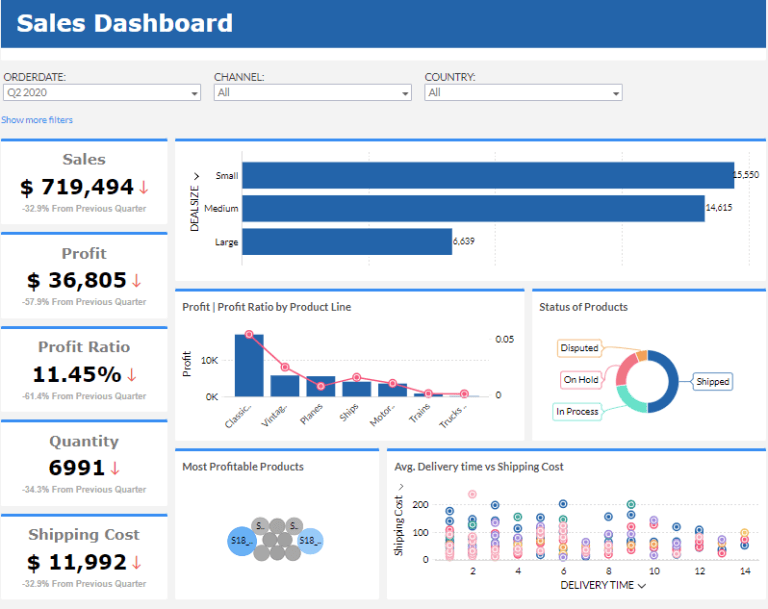
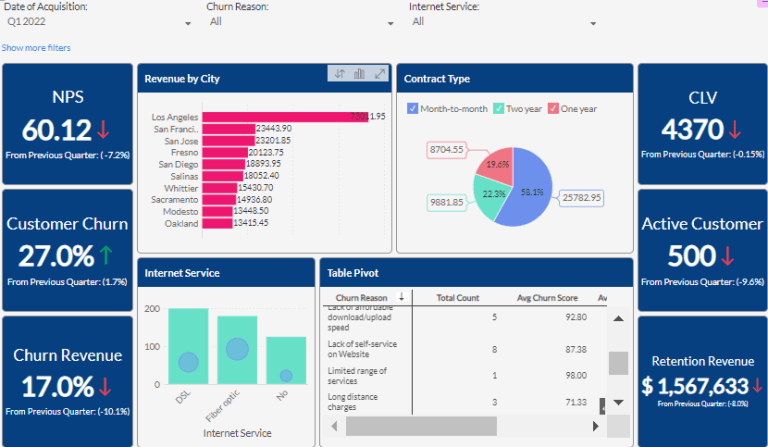
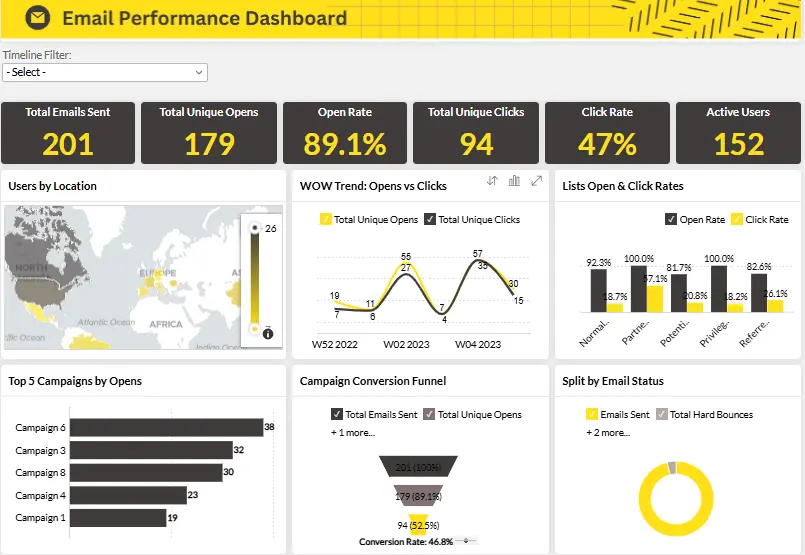
Zoho Analytics Dashboards We Build
Live examples of sales, customer retention, and marketing dashboards built inside Zoho Analytics — connected to your Zoho CRM, Campaigns, and Books data.
How a Cape Town omnichannel retailer unified 6 data sources into one live dashboard — in 21 days
The challenge
Sales data lived in Shopify, revenue in Zoho Books, customer behaviour in Google Analytics, marketing spend in Meta Ads, inventory in Zoho Inventory, and support tickets in Zoho Desk. The MD was manually compiling a weekly board report across six exports every Monday morning — taking half a day every week.
What we built
A unified Zoho Analytics workspace with data blending across all six sources. One live dashboard covering revenue, customer acquisition cost, inventory turnover, and campaign ROI — updated automatically. POPIA consent fields included on all customer-level views. Full self-service for the finance and ops teams so IT is never in the loop.
Outcomes
21 days
from kickoff to live dashboard across all 6 sources
Half-day
weekly reporting time eliminated — fully automated
6 → 1
data sources blended into one workspace, zero manual export
100%
POPIA-compliant customer data handling from day one
Why teams choose Lets Viz for Zoho Analytics
We are Zoho Analytics certified consultants and hands-on implementers. We connect, model, and deploy dashboards inside your Zoho environment — not just advise on what to build.
Zoho Analytics certified team
We are a Zoho Authorized Partner and hands-on implementers. We connect, model, and deploy dashboards inside your Zoho environment — not just advisors describing what to build.
KPIs built to your exact needs
We define the 8-12 KPIs your CEO, CFO, and CMO actually ask for in meetings and wire those directly into your dashboards. No generic templates.
First dashboard live in under 30 days
Most teams start reviewing reliable dashboards within 30 days. Leadership stops asking for manual Excel exports by week two.
Cross-functional reporting
Sales, marketing, finance, and operations see the same numbers from the same data source. No more arguments about which spreadsheet is correct.
Data stays in your Zoho environment
Dashboards live inside your Zoho Analytics account. Your data never leaves your environment — not copied into random reporting spreadsheets or third-party tools.
Automated reporting included
We set up automated scheduled reports so leadership gets Monday-morning numbers without anyone pulling a report. Alerts for KPI thresholds built in.
Zoho Analytics consultant vs. full-time BI analyst
Both can build dashboards. The question is which one makes sense at your stage and budget.
Consulting partner (Lets Viz)
- Fixed-price project or month-to-month retainer — predictable cost from day one
- First dashboard delivered in days, not months
- Zoho-only focus — deep expertise in CRM, Books, Campaigns, and data blending
- POPIA / PIPEDA compliance configuration built into scope at no extra cost
- Self-service handover + team training included — your team owns the workspace after
- Scale up or down month-to-month — no fixed headcount commitment
Staffing agency / body shop
- $5,000–8,000/month fully-loaded (salary, benefits, equipment, HR overhead)
- 60–90 days to recruit, onboard, and deliver a first report
- Usually a generalist — Zoho-specific expertise is rare and commands a premium
- Compliance setup requires additional training and legal review
- Knowledge walks out the door if they leave — vendor lock-in risk
- Fixed cost even when your analytics needs are seasonal or project-based
Zoho Analytics vs Power BI, Tableau, and Looker Studio
For SMBs already on the Zoho stack, Zoho Analytics typically wins on total cost and integration depth. Here's how the numbers look for a 20-user team.
| What matters | RecommendedZoho Analytics | Power BI | Tableau | Looker Studio |
|---|---|---|---|---|
| License cost per user / month | $30–115 / user | $10–20 / user (Pro / Premium) | $75–115 / user | Free (Google account required) |
| Typical setup cost (with consultant) | $2,000–8,000 | $8,000–25,000 | $20,000–60,000 | $3,000–8,000 |
| Native Zoho app integration | ✓ native — CRM, Books, Campaigns, Desk | Third-party connector — extra cost | No native integration | No native Zoho — manual CSV / API |
| AI / natural language queries | Ask Zia — included in all plans | Copilot — premium add-on only | Einstein Discovery — premium only | No AI layer |
| Cross-source data blending | ✓ included — unlimited sources | Limited — requires Power Query | Advanced — Tableau Prep required | Limited — single data source per chart |
| Embedded analytics option | ✓ included in Standard+ | Power BI Embedded — significant extra cost | Tableau Embedded — enterprise pricing | Looker Studio Pro only — $9/user |
| Self-service for non-technical users | Beginner-friendly — drag-and-drop | Intermediate — DAX learning curve | Technical users — steep learning curve | Intermediate — connector management needed |
| SA / CA data residency | ✓ SA + CA data centres available | Microsoft Azure (EU / US; no SA DC) | Salesforce cloud (no SA DC) | Google Cloud (no SA DC; CA available) |
| Best fit | SMBs on the Zoho stack who want self-service BI | Microsoft 365 orgs with a dedicated BI team | Enterprise teams with large analytical workloads | Google Workspace teams needing basic reporting on a budget |
From discovery to live dashboard in under 30 days
We start with your KPIs, not the tool. Every dashboard decision is backed by what your leadership team actually reviews — not a template from a demo.
Week 1 — KPI discovery & data audit
We interview your department heads to understand the 8-12 metrics that actually drive decisions. We map your existing data sources in Zoho (CRM, Books, Campaigns) and identify external sources to connect (QuickBooks, Stripe, Google Ads).
Week 2 — Data connection & modeling
We connect your data sources to Zoho Analytics, clean and transform the data, and build the unified data model your dashboards will run on. This is the layer most implementations get wrong — we get it right.
Week 3 — Dashboard build & review
First dashboard versions built and shared for review. We iterate based on your feedback — adjusting KPI definitions, date ranges, filters, and visual layout until the data tells the right story.
Week 4 — Automation, access & handover
Automated scheduled reports configured. Role-based access set so each team sees only what they need. Training session recorded and documented. Optional: monthly retainer for new dashboards and ongoing data hygiene.
The Zoho Analytics stack we work with
We connect native Zoho apps, third-party APIs, and databases — blended into one workspace.
Data Sources
Zoho CRM · Zoho Books · Shopify · MySQL
Dashboards & Reports
KPI widgets · pivot tables · scheduled reports
AI & Ask Zia
Natural language queries · anomaly detection · forecasting
Data Blending
Cross-source joins · CRM + Books + Campaigns unified
Embedded Analytics
White-label dashboards · client portals · iFrame embed
Data Management
ETL pipelines · transformations · scheduled syncs
What a Zoho Analytics engagement costs
All prices in USD. Same rates for US, South Africa, and Canada — no geo-premium. Discovery call is free.
Dashboard Starter
fixed project
Connect your first 2–3 data sources and deliver 5 production-ready dashboards.
- Connect 2–3 Zoho data sources
- 5 core dashboards built and handed over
- POPIA / PIPEDA consent fields configured
- 1 team training session (live)
- 30-day post-launch support included
Full Workspace Build
fixed project
Full Zoho analytics architecture — all apps connected, data blended, team trained.
- All Zoho apps connected and blended
- Custom workspace architecture designed first
- Ask Zia AI wired to your data
- Embedded analytics configured (if needed)
- Team training + self-service handover
- 90-day post-launch support included
Analytics Retainer
per month
Ongoing analytics support — new dashboards, data updates, and user training on demand.
- New dashboards on demand
- Data source additions and updates
- Monthly analytics review call
- User training for new team members
- Cancel anytime — month-to-month
Implementation cost varies by number of data sources, blending complexity, and embedded analytics requirements. Fixed-price quote after a free discovery call.
Wondering what this would cost you?
Answer a few questions and see an honest price range on screen — no email, no call needed.
See it in action
Real engagements. Documented outcomes.
Workforce Data Trapped in a Time-Tracking Tool
Eight Hubstaff entities. Automated daily sync. A failing 6-minute trigger fixed to run in 22 seconds. Project delivery, utilisation, and cost dashboards — rebuilt from scratch.
A CRM That Stored Data but Ran No Process
Lead scoring. Blueprint enforcement. Multi-region nurture. Full-funnel attribution. All wired inside one Zoho ecosystem — for a B2B SaaS security platform operating across 4 countries.
From Attribution Chaos to Marketing Clarity
How a wellness retreat discovered its Facebook ROAS was 70% higher than reported — and why a 27% revenue drop had nothing to do with ad creative.
Frequently Asked Questions
Find answers to common questions about our services and process.
Further reading
Guides and insights to help you make an informed decision.
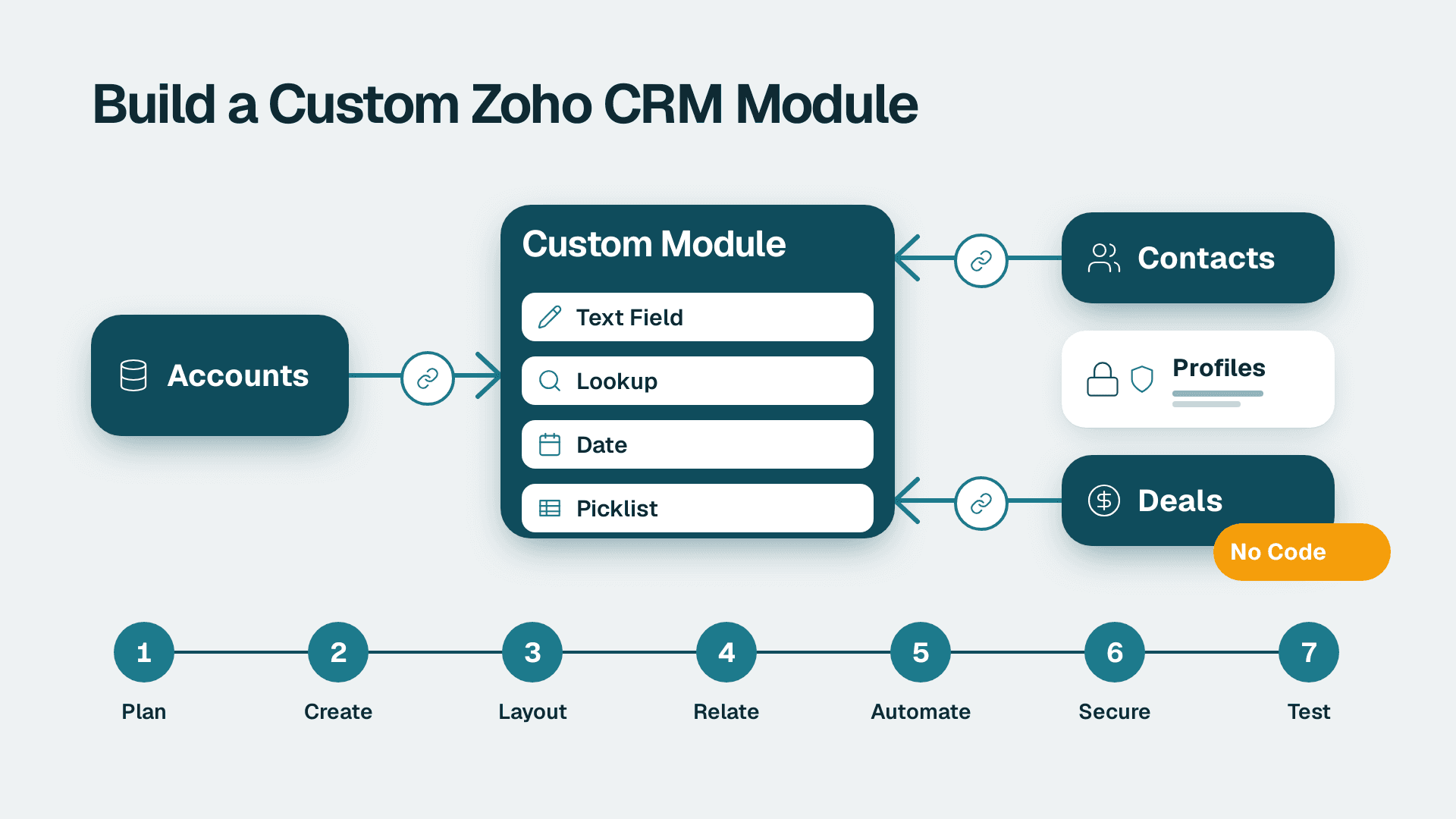
How to Create Custom Modules in Zoho CRM: 7 Steps
Learn how to create custom modules in Zoho CRM, relate them to Accounts and Deals, and lock down access. Allow 2-3 hours for a first module, plus testing time.
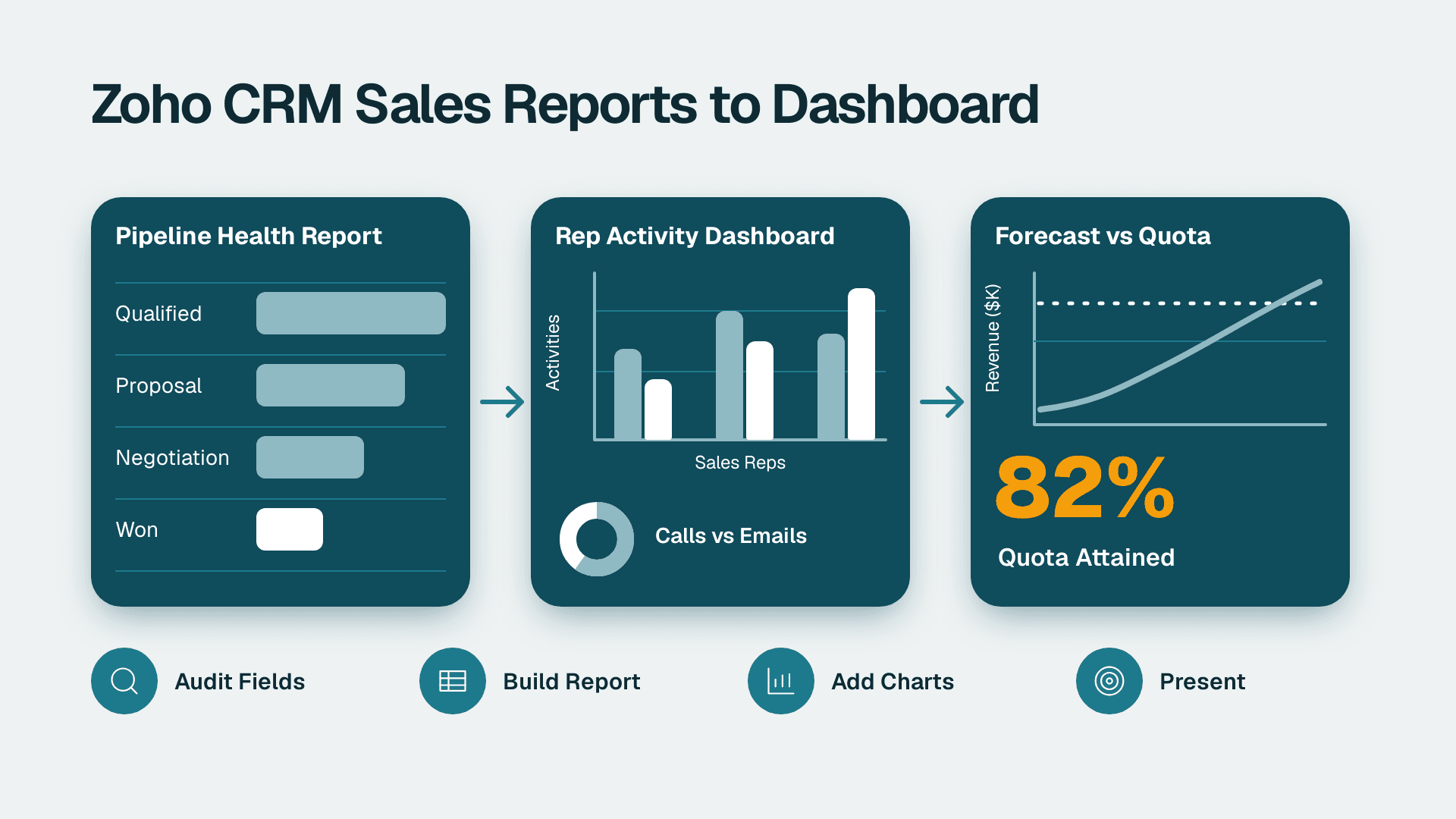
How to Build Zoho CRM Reports and Dashboards for Sales
Follow this Zoho CRM reports and dashboards tutorial to build pipeline, rep activity and forecast views for leadership. Plan on about half a day.
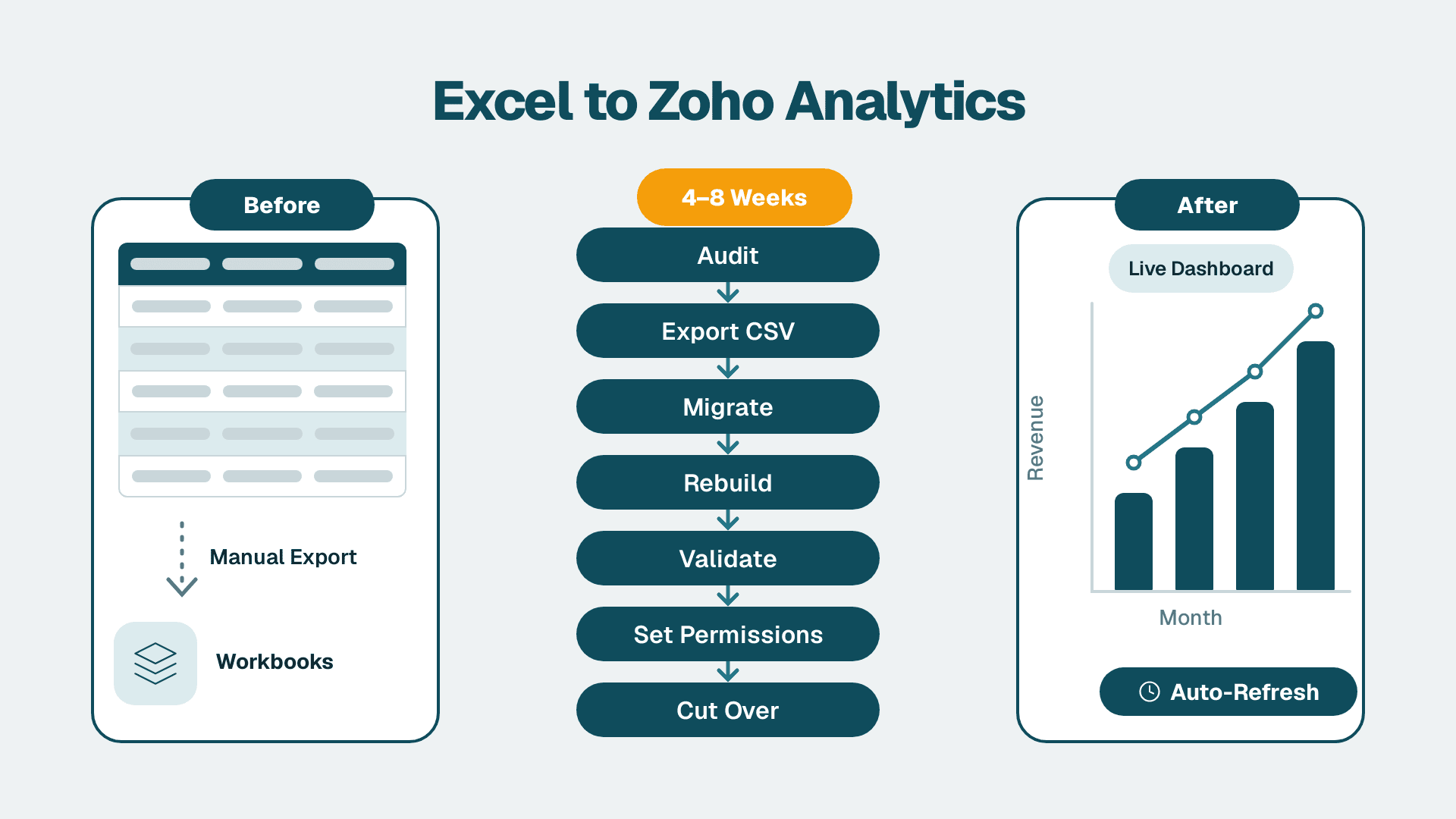
How to Migrate from Excel to Zoho Analytics
Replace Excel reporting with Zoho Analytics in 4-8 weeks. Covers data mapping, import, formula migration, validation, permissions, and go-live for ops and finance teams.