HIPAA-Compliant Analytics Dashboard: Best Practices Checklist
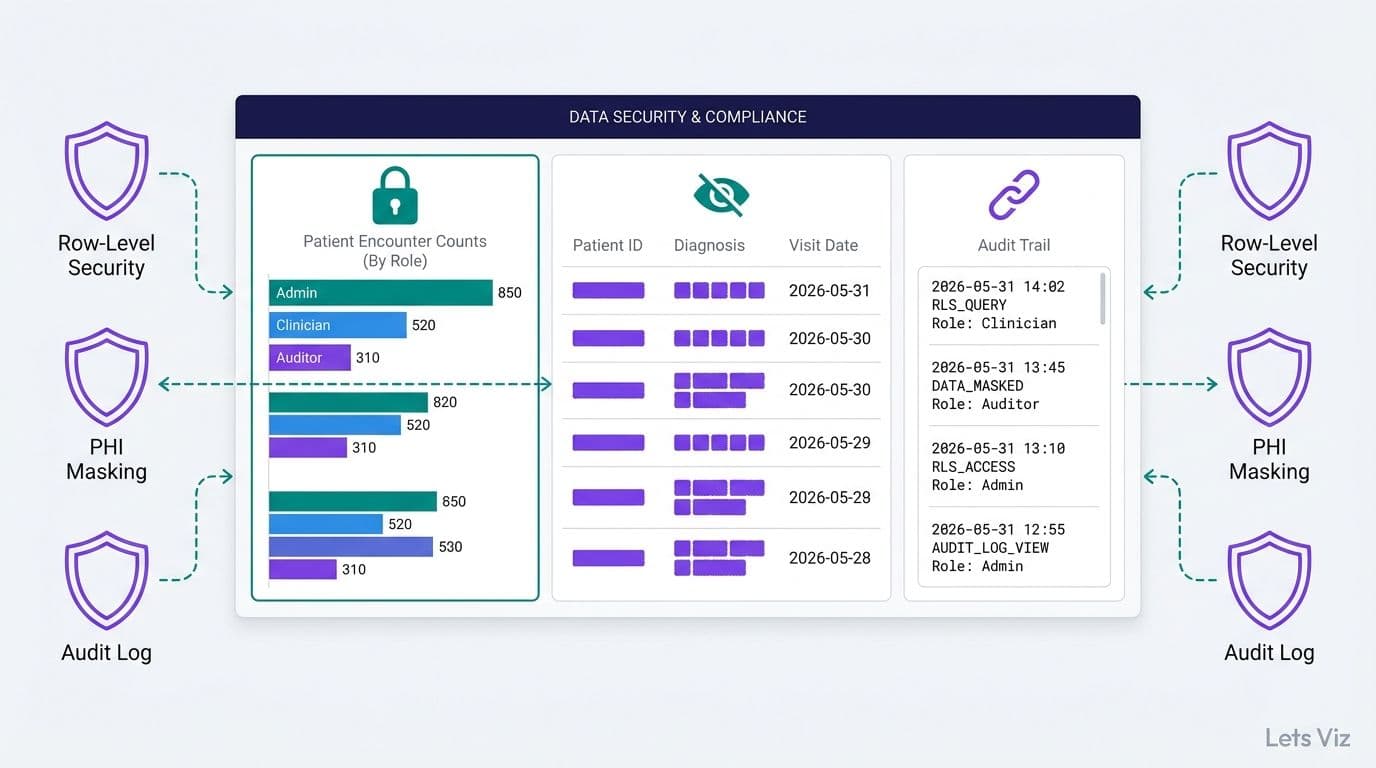
A HIPAA-compliant analytics dashboard requires three non-negotiable controls: row-level security to restrict data access by role, PHI masking to anonymize protected health information in visual outputs, and immutable audit logging to track every query and export. Without these, a BI tool becomes a HIPAA liability rather than an operational asset. This checklist covers each requirement so compliance officers and BI teams can build defensible dashboards from day one.
Key Takeaways
Row-level security must reflect your organization's role-based access matrix - not just the BI tool's default settings
PHI masking is required for any field that could directly or indirectly identify a patient, including quasi-identifiers such as ZIP codes and exact admission dates
Audit logs must capture user identity, timestamp, data viewed, and all export activity to satisfy HIPAA audit requirements
A healthcare analytics dashboard and an EMR reporting module serve different purposes - compliance obligations apply to both
Access permission reviews should happen at least quarterly; stale permissions are among the most common HIPAA audit findings
What Is a HIPAA-Compliant Healthcare Analytics Dashboard?
A HIPAA-compliant healthcare analytics dashboard is a business intelligence tool that aggregates clinical, operational, or financial data while maintaining the access controls, data protections, and audit trails required under the Health Insurance Portability and Accountability Act Security Rule (45 CFR Part 164).
Standard BI dashboards are built for visibility - they surface data broadly so decision-makers can act. Healthcare dashboards must balance that visibility against a legal requirement to limit protected health information (PHI) exposure to the minimum necessary for each role. Under HIPAA's minimum necessary standard, a billing analyst and a department director looking at the same dashboard should not see the same patient-level detail unless both roles specifically require it.
The scope is wider than most teams expect. Any dashboard that displays, aggregates, or allows export of data tied to a patient's identity, diagnosis, treatment, or payment history is processing PHI and falls under the Security Rule. That includes financial dashboards that join claims data to patient IDs, operational dashboards that track readmission rates linked to patient records, and even de-identified dashboards if the de-identification was not performed to HIPAA's published standards.
The Healthcare Financial Analytics Market is projected to grow at an 8.58% CAGR through 2035, according to Market Research Future (as of 2026), driven in part by regulatory pressure that compels hospitals to invest in reporting infrastructure that is both capable and defensibly compliant. For healthcare administrators evaluating their BI stack, that growth signal also means more vendors are competing on compliance features - making it easier to build compliant dashboards while raising the bar for what auditors expect to see.
For teams starting with Power BI, How to Build a Power BI Financial Dashboard for Healthcare covers the foundational setup that these compliance controls sit on top of.
What Are the Core HIPAA Technical Safeguards for BI Dashboards?
HIPAA's Security Rule (45 CFR § 164.312) defines four categories of technical safeguards, all of which map directly to dashboard architecture decisions.
Access Controls (§ 164.312(a)) - Unique user identification, emergency access procedures, automatic logoff, and encryption. For dashboards, this translates to federated identity (Active Directory or SSO), session timeout policies, and role-based access enforced at both the data model and visual layer.
Audit Controls (§ 164.312(b)) - Hardware, software, and procedural mechanisms that record and examine activity in systems containing PHI. Every query, filter change, and data export must be logged with enough detail to reconstruct what a user saw.
Integrity Controls (§ 164.312(c)) - Electronic mechanisms to confirm that PHI has not been altered or destroyed without authorization. In BI, this means read-only data connections to certified sources and preventing dashboard users from editing underlying data.
Transmission Security (§ 164.312(e)) - Encryption of PHI in transit. Dashboards served over HTTPS with TLS 1.2 or higher satisfy this requirement; unencrypted connections to data sources do not.
In 2026, Medinsight identified AI-driven analytics as one of three dominant themes reshaping healthcare operations, alongside value-based care and payer analytics innovation. Natural language query features — now shipping in Power BI Copilot, Tableau Pulse, and Looker Studio (as of 2026) — are accelerating the pace at which new PHI exposure pathways reach production environments, often outrunning the compliance review cycles that govern traditional report releases. In particular, agentic extensions that can autonomously schedule and distribute reports without direct user action have introduced a new audit gap: standard BI activity logs capture human-initiated exports but may not capture AI-agent-initiated ones unless query-level logging is enabled at the data warehouse layer. Each new AI feature must be evaluated against this expanded audit surface before deployment.
Before enabling any AI-assisted feature in a healthcare dashboard, review A CFO's 6-question AI risk checklist for Power BI to stress-test the compliance posture of each new capability.
How Do You Implement Row-Level Security in a Healthcare Analytics Dashboard?
Row-level security (RLS) is a mechanism that filters the rows each user can retrieve based on their identity or role. In Power BI, RLS is implemented in the data model as DAX filter expressions applied to one or more tables; those filters propagate automatically to every visual on every report page.
Define Roles Before You Model Data
The most common RLS implementation failure is building the data model first and bolting roles on afterward. Start with a role matrix that maps each job function to its data scope and PHI access level:
| Role | Data Scope | PHI Access |
|---|---|---|
| Department Head | Own department, current period | Aggregated only - no patient IDs |
| Finance Analyst | All departments, financial fields only | Claim amounts, no diagnoses |
| CFO | All departments, all financial periods | Financial aggregates only |
| Compliance Officer | All departments, audit fields | PHI with logged and justified access |
| Clinical Director | Own service line, clinical metrics | Patient-level within service line |
| Billing Specialist | Assigned cases only | Full PHI for assigned cases |
Each row in this matrix becomes an RLS role in the data model. Dynamic RLS - where the filter reads the logged-in user's identity from a People or Roles table - scales better than static roles because adding a new staff member does not require a BI developer to modify the report.
Test RLS With View As
Power BI's View As feature lets a developer or compliance reviewer impersonate any role and confirm that row filters behave as intended. A standard test sequence: impersonate a Billing Specialist and confirm that patient records outside their assigned cases return zero rows; impersonate a Finance Analyst and confirm that diagnosis codes are absent from every visual; impersonate a Department Head and confirm that no patient IDs appear in any drill-through path. Document each test result — role impersonated, filter applied, row count visible, screenshot with timestamp — as structured evidence for HIPAA audits. Every RLS configuration should complete this sequence before a healthcare dashboard goes to production.
RLS Does Not Replace Column-Level Masking
RLS controls which rows a user can see. It does not redact specific columns. A compliance officer who needs row-level access to audit data should not automatically see unmasked Social Security Numbers or full dates of birth. Column-level masking is a separate control, covered in the next section.
AI Services and Consulting for Finance and Healthcare Leaders explores how healthcare organizations are combining RLS with AI-assisted anomaly detection to flag unusual access patterns in real time.
What Is PHI Masking and When Does HIPAA Require It?
PHI masking is the technical practice of obscuring, suppressing, or tokenizing data fields that identify - or could identify - a patient. HIPAA defines 18 categories of identifiers that must be removed or masked before health data can be considered de-identified under the Safe Harbor method (45 CFR § 164.514(b)).
HIPAA's 18 Identifiers in a Dashboard Context
The 18 identifiers include obvious fields such as name, Social Security Number, and phone number - but also fields that dashboard designers regularly include as dimensions without recognizing them as PHI:
Geographic data smaller than state level - ZIP codes, addresses, and city names
Dates more specific than year - admission dates, discharge dates, dates of birth, and dates of death
Account and health plan beneficiary numbers
Device identifiers - serial numbers of medical devices linked to a patient record
For operational healthcare KPI dashboards, this means time-series charts should aggregate by month or quarter unless exact dates are operationally necessary and access is restricted accordingly. Trend lines showing admissions by day can constitute PHI if the patient population is small enough to allow re-identification.
Masking Techniques for BI Dashboards
Suppression - hide columns entirely for roles that do not need them; handled via column-level security in Power BI Premium or Analysis Services
Tokenization - replace patient IDs with non-reversible tokens; the mapping table lives outside the BI layer
Aggregation floors - suppress any cell where the count falls below a defined threshold to prevent re-identification from small counts. HHS's National Center for Health Statistics sets a minimum cell size of 10 for published health statistics; most healthcare BI teams adopt the same floor, with some applying a stricter threshold of fewer than 5 for rural catchment areas or rare diagnoses where small counts more readily enable re-identification.
Dynamic data masking - a database-level feature in Azure SQL and SQL Server that returns masked values to lower-privilege queries without altering the underlying data
The AI consulting services market is projected to grow from approximately USD 13 billion in 2026 to USD 90.99 billion by 2035, according to Future Market Insights (as of 2026). Healthcare's share of that investment is rising as organizations recognize that AI-generated dashboard insights require the same PHI governance framework as manually authored reports - and in some cases a stricter one, because AI models can surface correlations that inadvertently re-identify patients.
How to Set Up Audit Logging That Satisfies HIPAA Requirements
HIPAA requires covered entities to implement mechanisms that record and examine activity in information systems containing PHI (§ 164.312(b)). For BI dashboards, audit logging operates at two distinct layers: platform-level logs and data-layer logs.
Platform-Level Logs
Power BI captures a unified activity log recording every event: report viewed, data exported to Excel or PDF, shared link created, dataset refreshed, and role assignment changed. These logs are accessible via the Power BI Activity Log API and should be exported daily to a SIEM or external log archive. Retention target: HIPAA's broader record retention guidance is six years from creation or last use, and most organizations apply the same standard to BI audit logs.
Key fields to retain for every logged event:
User principal name (UPN) - who accessed the data
Timestamp in UTC - when
Report and dataset name - what was accessed
Operation type - viewed, exported, shared, or modified
IP address - where (useful for geofencing and anomaly alerts)
Client application - Power BI Desktop vs. browser vs. mobile
Database-Level Query Logs
Platform logs confirm that a report was viewed but not which specific rows the underlying query returned. For high-sensitivity dashboards, supplement BI logs with query-level logging at the data warehouse. Azure Synapse, Snowflake, and Databricks all provide query history with user identity, execution time, and row count returned. Matching warehouse query logs to BI activity logs gives auditors a complete chain of custody from the raw source to the end-user screen.
Alerting on Anomalous Access
Logging is only useful if it triggers action. Establish automated alerts for: exports exceeding a defined row threshold during off-hours (a practical starting point for hospital-scale dashboards is 500 rows, which distinguishes routine report exports from bulk data pulls); access from IP addresses outside corporate or approved locations; role changes made by non-administrator accounts; and multiple failed authentication attempts followed by a successful login.
For finance teams managing both clinical and cost data in the same reporting environment, What Metrics Should a Financial Reporting Dashboard Include? covers the operational metrics that sit alongside compliance data in a well-designed CFO dashboard.
HIPAA-Compliant Analytics Dashboard vs. EMR Reporting Tools: Key Differences
Healthcare IT leaders frequently ask whether the EMR's built-in reporting module satisfies the same compliance requirements as a standalone analytics dashboard. They serve different purposes, and most organizations need both.
| Dimension | HIPAA-Compliant Analytics Dashboard | EMR Reporting Module |
|---|---|---|
| Primary purpose | Cross-departmental KPI tracking and trend analysis | Clinical documentation queries and patient record reporting |
| Data sources | Multiple: EHR, billing, claims, HR, finance, operations | Single: the EMR system's own database |
| RLS flexibility | Fully configurable by role, department, and location | Role-based within the EMR vendor's permission model |
| Audit log export | Configurable; exportable to external SIEM or archive | Built-in; often not exportable outside the vendor's portal |
| PHI handling | Requires explicit masking configuration by BI team | PHI access controlled natively by the EMR vendor |
| Custom KPIs | Unlimited; calculated fields and custom dimensions supported | Limited to metrics the EMR vendor provides out of the box |
| HIPAA BAA | Required from the BI platform vendor | Covered under the existing EMR vendor agreement |
| Refresh cadence | Real-time or scheduled (minutes to hours) | Real-time within the EMR; reporting often runs as an overnight batch |
The key compliance implication: a dedicated analytics dashboard introduces a new system processing PHI, which requires its own Business Associate Agreement (BAA) with the BI platform vendor. Microsoft offers a BAA for Power BI under qualifying Online Services agreements. Organizations using other BI tools must verify BAA availability with the vendor before connecting any PHI-containing data source - operating without a signed BAA is a direct HIPAA violation regardless of the technical safeguards in place. OCR enforcement actions through 2026 show BAA gaps appearing consistently in settlement agreements, with penalties ranging from $25,000 to over $1.9 million depending on breach scope and the organization's compliance history — making BAA verification a pre-deployment requirement, not a post-launch administrative task.
What Healthcare KPI Dashboard Examples Should Finance and Operations Teams Track?
Understanding what to measure is as important as knowing how to secure it. Healthcare analytics dashboards are most commonly organized by department function, with PHI exposure calibrated to each team's operational need.
Hospital CFO Dashboard Metrics
For healthcare financial analytics dashboards serving CFOs and finance teams, the metrics that drive the most decisions are:
Days in accounts receivable (AR) - industry benchmark is under 50 days for most payer mixes; in 2026, high-performing health systems on value-based contracts are trending closer to 38–42 days as bundled payment structures reduce billing cycle variability. Medicare Advantage prior authorization rule changes effective in 2026 have further compressed decision timelines, accelerating denial resolution for high-volume commercial payers and tightening the window in which unresolved PHI-linked claims sit in billing queues.
Net patient revenue vs. budget - month-to-date and year-to-date variance by service line
Payer mix - percentage of revenue by Medicare, Medicaid, commercial insurance, and self-pay
Denial rate by payer - claims denied on first submission; target is under 5% (as of 2026); organizations deploying AI-assisted claims scrubbing are reporting first-pass rates above 96% (as of 2026), but each AI intervention on PHI-linked claim data requires the same audit logging as a human-initiated query — including the specific claim IDs processed, the scrubbing rule triggered, and the user account under which the AI agent executed
Cost per adjusted discharge - cost efficiency normalized for case mix index
Operating margin by service line - identifies which departments cross-subsidize others
Hospital Operations Dashboard Metrics
For healthcare KPI dashboards serving clinical administrators and operations leaders:
Bed occupancy rate - occupied beds divided by available beds, trended daily
Average length of stay (ALOS) - segmented by service line and payer
Emergency department throughput - door-to-provider time and left-without-being-seen rate
30-day readmission rate - CMS-reportable and directly tied to value-based care penalties
Staff-to-patient ratio - real-time and trended by shift and unit
Patient satisfaction scores - HCAHPS percentile rank by department
Each of these metrics can be displayed at varying levels of PHI exposure depending on role. A CFO sees aggregate payer mix percentages; a billing manager sees the same data broken out by account type; an auditor with appropriate clearance may access patient-level claim detail. The same dashboard serves all three - RLS and PHI masking determine what each user actually sees.
Outsourced Financial Analytics Services for Smarter Insights explains how healthcare organizations working with external BI teams can maintain HIPAA compliance throughout the engagement, from initial data access agreements to final delivery.
If your organization needs a healthcare analytics dashboard that is operationally powerful and defensibly HIPAA-compliant, Lets Viz's Managed Power BI services covers everything from data model architecture and RLS configuration to audit log setup and BAA-compliant deployment.
---
About Lets Viz: Lets Viz has delivered data analytics and business intelligence solutions for healthcare, finance, and operations clients since 2020. Our team brings hands-on experience in HIPAA-regulated BI environments, Power BI enterprise deployments, and compliance-grade reporting pipelines. We serve hospital finance teams, clinical administrators, and healthcare technology leaders who need dashboards that are as defensible to auditors as they are useful to operators.
---