Zoho CRM Implementation Checklist: Phase-by-Phase Guide
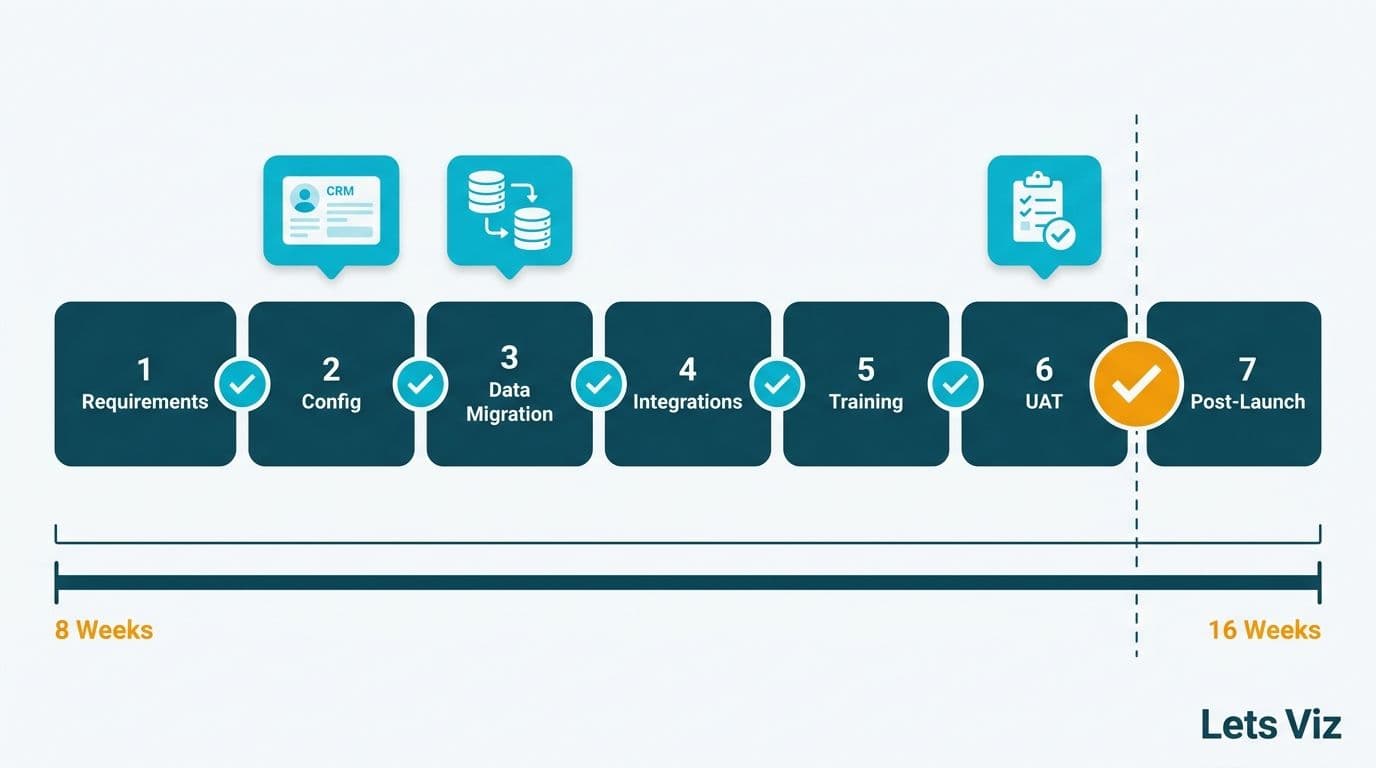
A Zoho CRM implementation checklist for a mid-market organization spans seven phases: requirements gathering, module configuration, data migration, integrations, user training, user acceptance testing (UAT), and post-launch review. Executed in sequence, a typical rollout takes 8-16 weeks depending on data volume and integration complexity. Skipping any phase - particularly UAT - is the single most common reason implementations fail within the first 90 days of go-live.
Key Takeaways
A structured 7-phase checklist provides a clear sign-off gate between phases, reducing post-go-live defects significantly.
Data migration is the highest-risk phase: clean and deduplicate source data before import, not after.
Zoho CRM workflow rules handle single-step automations; blueprints enforce multi-step, stage-gated processes.
Healthcare and finance organizations must map HIPAA (US), GDPR (UK/EU), or PIPEDA (Canada) requirements before configuring data fields and access roles.
Mid-market implementations typically cost $15,000-$60,000 with a certified partner; internal-only attempts routinely exceed that once rework is included.
Phase 1: What Does Requirements Gathering Cover in a Zoho CRM Implementation Checklist?
Requirements gathering sets the scope every later phase depends on. A missed requirement found in Phase 5 costs 5-10 times more to fix than one caught here. Dedicate at least two weeks for any team larger than 20 users.
A structured Zoho consulting services engagement starts with four discovery tracks: business process mapping, data audit, integration inventory, and a compliance review.
Business process mapping:
Document every customer-facing workflow - lead capture, qualification, proposal, close, and renewal.
Identify manual handoffs that Zoho CRM should automate.
List the KPIs each team lead reports on weekly.
Compliance review - complete before any field configuration:
US healthcare teams must identify PHI fields under HIPAA and restrict access roles accordingly.
UK and EU teams must document a GDPR lawful basis for processing contact data before importing European resident records.
Canadian organizations subject to PIPEDA must map consent fields and confirm data residency with legal counsel before import.
Integration inventory: List every tool that touches customer data - billing platforms, ERP systems, marketing automation, and support ticketing. Each integration adds 1-3 days to Phase 4.
According to Market Research Future (2026), the Healthcare Financial Analytics Market is projected to grow at an 8.58% CAGR through 2035, driven by organizations modernizing CRM and data infrastructure. For US healthcare systems and Canadian health networks, a CRM rollout connects directly to the analytics layer built on top of it.
Phase 2: How Do You Configure Zoho CRM Modules for a Mid-Market Team?
Module configuration translates requirements into a working system. Poorly configured modules produce a system users quietly bypass within weeks.
| Module | Key Decisions |
|---|---|
| Leads | Capture source, assignment rules, auto-convert threshold |
| Contacts | Deduplication strategy, relationship links to Accounts |
| Deals | Stage names, probability mapping, rotting deal alerts |
| Accounts | Hierarchy (parent/child), territory assignment |
| Custom Modules | Map only to real business objects - over-customizing creates maintenance debt |
| Roles and Profiles | Least-privilege access; separate read, write, and delete per data type |
Zoho CRM Canvas lets teams redesign record layouts without code, easing adoption for non-technical users. Configure standard layouts first, then apply Canvas to the highest-frequency views.
A UK fintech firm managing FCA-regulated client records should restrict the Contacts module so only licensed advisors can edit regulated fields - configured at the Profile level before training begins, not after go-live.
Phase 3: How Do You Import and Map Data in Zoho CRM?
Data migration is where most mid-market implementations lose weeks. The rule: clean source data before import, not inside Zoho CRM. Import tools amplify structural data problems at scale.
Pre-migration checklist:
Export all source records to a staging file and deduplicate using email plus company name as the match key.
Standardize field formats: ISO dates, E.164 phone formatting for international contacts, two-character country codes.
Map every source field to a Zoho CRM destination using Zoho's built-in mapping screen before running any import.
Run a pilot import with 100-500 records and manually inspect 20 before importing the full dataset.
Field mapping reference:
| Source Field | Zoho CRM Field | Notes |
|---|---|---|
| Company | Account Name | One Account per organization, not per contact |
| First/Last Name | Contact: First Name / Last Name | Split before import |
| Deal Stage | Stage (Deals) | Must match configured picklist exactly |
| Created Date | Created Time | Import as UTC; Zoho converts to local timezone |
| Custom Tags | Tags | Multi-value; separate with semicolons in source file |
A Canadian manufacturing company migrating 50,000 contacts from a legacy ERP should apply PIPEDA-aligned data minimization first: strip personal fields not needed for CRM operations and purge out-of-retention records at the source.
Phase 4: How Do Zoho CRM Workflow Rules and Blueprints Work Together?
Automation configuration is the phase that delivers the ROI the business case promised. Get it wrong and reps build manual workarounds within days.
Workflow rules fire when a record meets a defined trigger condition - a field change or time-based trigger - and execute a single action: send an email, update a field, assign a task.
Blueprints enforce a sequential, stage-gated process. Each stage transition can require mandatory fields, manager approvals, or logged activities before the record advances. Use blueprints when gate criteria must be verified, not just triggered.
A US SaaS finance team might use workflow rules to auto-assign inbound leads by territory, then use a blueprint to enforce that a signed NDA and a budget-qualified call note are both logged before a Deal advances to "Proposal Sent."
Workflow automation setup checklist:
Rank all manual steps by frequency and error rate; build workflow rules for the top 10 first.
Identify stage gate criteria - these become blueprint transitions.
Test every automation in sandbox before enabling in production.
Log every rule and blueprint in a configuration register for future administrators.
According to Future Market Insights (2026), the AI consulting services market reached USD 13.9 billion in 2026 and is projected to hit USD 90.99 billion by 2035, a 26.2% CAGR. Structured workflow automation is the operational foundation on which AI-assisted CRM features - predictive lead scoring, deal intelligence, pipeline anomaly alerts - are built.
Phase 5: What Does Zoho CRM User Training and UAT Need to Cover?
Training is the most under-resourced phase - typically budgeted for two days when effective adoption requires two weeks. Industry research consistently shows that poor user adoption accounts for more than 70% of CRM project failures; in mid-market Zoho rollouts, the root cause is almost always compressed training that teaches features rather than daily workflows.
Training checklist:
Role-based sessions: Sales reps, managers, and CRM admins need separate tracks covering only their workflows.
Workflow walkthroughs: Show each role their exact daily sequence, not a general feature tour.
Sandbox practice: Give users two weeks of sandbox access before go-live.
Power users: One champion per team handles first-line questions before IT is involved.
US healthcare organizations should combine HIPAA compliance training with CRM training - show users where PHI fields live, which access controls apply, and how the audit trail works in a single session.
UAT checklist:
Assign test scenarios mirroring real business cases - not records named "Test Contact 1."
Cover every workflow rule and blueprint transition.
Spot-check at least 5% of imported records against source data.
Test all integrations end-to-end and validate role-based access by logging in as each profile type.
For UK/EU teams: verify GDPR consent fields capture on all contact-creation paths.
Obtain sign-off from a business stakeholder - not IT - for each module before approving go-live.
A US mid-market healthcare group with 200 staff should run UAT for a minimum of two weeks with representatives from sales, clinical liaison, and finance.
How Long Does Zoho CRM Implementation Take, Phase by Phase?
How long a Zoho CRM implementation takes depends on company size, data quality, and integration count - but the phase-level breakdown is where schedules actually slip. The table below shows realistic duration ranges per phase for SMB teams (under 50 users) versus mid-market teams (50-500 users).
| Phase | SMB (under 50 users) | Mid-Market (50-500 users) |
|---|---|---|
| Requirements and discovery | 1-2 weeks | 2-4 weeks |
| Module configuration | 1-2 weeks | 2-4 weeks |
| Data migration | 1-2 weeks | 2-4 weeks |
| Integrations | 1 week | 2-4 weeks |
| User training and UAT | 1-2 weeks | 2-3 weeks |
| Go-live and stabilization | 1 week | 1-2 weeks |
| **Total** | **6-10 weeks** | **11-21 weeks** |
Total duration by team and integration count:
| Team Size | Integration Count | Estimated Duration |
|---|---|---|
| Under 50 users | 1-2 | 6-8 weeks |
| 50-200 users | 3-5 | 10-14 weeks |
| 200-500 users | 6+ | 14-20 weeks |
| 500+ users | Complex, multiple systems | 20+ weeks, phased rollout |
The four most common delay patterns - and how to pre-empt them:
Stakeholder sign-off lag (discovery phase): Waiting for department heads to approve requirements documents adds 1-3 weeks to nearly every mid-market project. Pre-empt it by scheduling a fixed sign-off meeting at the start of the engagement, not at the end of the discovery phase.
Dirty source data discovered at migration: Finding duplicate records or inconsistent field formats at Phase 3 forces a data remediation sprint that typically costs 2-4 weeks. Pre-empt it by running the deduplication and field audit during Phase 1, before configuration begins.
Integration scope creep: A third system added after Phase 4 has started extends the timeline by 1-3 weeks and risks destabilizing completed automations. Pre-empt it by locking the integration list at the end of requirements gathering and treating additions as change orders.
Compressed training: Training scheduled in a single week instead of across two weeks consistently produces low adoption and a flood of support requests in the first 30 days post-launch. Pre-empt it by treating the sandbox access period as part of the project schedule, not an optional extra.
Teams with deduplicated, field-mapped source data at Phase 3 consistently finish 3-4 weeks faster than those who begin data cleanup mid-migration. The Zoho CRM vs Bigin comparison covers which product fits each team size and process complexity if you are still evaluating fit before committing to a full implementation.
What Does Zoho CRM Implementation Cost for Mid-Market Companies?
Implementation cost scales with complexity, not headcount alone.
Configuration and customization: $3,000-$12,000
Data migration: $3,000-$12,000
Integrations: $2,000-$8,000 per integration
Training: $2,000-$6,000
UAT support: $1,500-$4,000
Post-launch support (90 days): $2,000-$6,000
Typical total: $15,000-$60,000+ for a mid-market rollout with 3-5 integrations. Internal-only attempts rarely land below $30,000 once rework and delayed go-live costs are counted. The Zoho CRM customization cost guide breaks down per-feature pricing in detail.
Healthcare and finance organizations should budget an additional $5,000-$15,000 for compliance validation under HIPAA, GDPR, or PIPEDA.
medinsight (2026) noted that value-based care and AI-driven analytics remain the top two investment priorities for US healthcare organizations into 2026 - both depend on clean, integrated CRM data. A delayed implementation directly holds back those initiatives.
Zoho CRM Implementation Partner vs Self-Implementation: Decision Framework for SMBs
The decision between a certified Zoho partner and a self-directed rollout reshapes every cost and timeline figure in this checklist before Phase 1 begins. Both routes work - for different organizations. The comparison below gives SMBs a structured way to evaluate which path fits their risk tolerance, internal bandwidth, and time-to-value target.
Cost, risk, and time-to-value comparison:
| Dimension | Certified Zoho Partner | In-House DIY |
|---|---|---|
| Upfront cost | $15,000-$60,000 (partner fees) | $2,000-$8,000 (licenses and tools only) |
| Hidden cost risk | Low - scope defined in contract | High - rework, delayed go-live, lost productivity |
| Time to go-live (SMB) | 6-10 weeks | 10-20 weeks (learning curve adds 4-10 weeks) |
| Configuration accuracy | High - partner brings prior build logs | Medium to low - first implementation for internal team |
| Compliance coverage | Included if partner is certified | Requires separate legal and compliance review |
| Post-launch support | Structured 90-day retainer typical | Internal team or ad hoc ticket support |
| Total cost at 18 months | $20,000-$70,000 | $25,000-$85,000 (rework typically closes the gap) |
Internal teams rarely account for the cost of a delayed go-live: each additional week of implementation represents lost pipeline visibility, manual workaround labor, and deferred automation ROI. When those carrying costs are included, the economics of a zoho crm implementation partner vs self-implementation comparison shift materially toward the partner route for teams with more than two integrations or any regulated data in scope.
Scored decision matrix - weight your situation before deciding:
Score each factor from 1 (low) to 3 (high) for your organization, then compare totals across the two columns.
| Factor | Weight | Favors Partner | Favors DIY |
|---|---|---|---|
| Internal Zoho admin headcount | 2x | 0 or 1 admin available | 2 or more dedicated admins |
| Integration count | 2x | 3 or more integrations | 1-2 simple integrations |
| Compliance requirements | 3x | HIPAA, GDPR, or PIPEDA in scope | No regulated data |
| Go-live urgency | 2x | Must launch within 10 weeks | Flexible timeline |
| Prior CRM migration experience | 1x | First migration | Prior migration completed |
| Budget ceiling | 1x | Budget above $20,000 | Budget under $15,000 |
A weighted score of 12 or more in the partner column strongly favors engaging a certified partner. A score of 10 or more in the DIY column indicates self-implementation is viable - but budget a 4-8 week buffer for the configuration learning curve and plan a dedicated internal admin from day one.
Questions to pressure-test any implementation partner before signing:
Whether you are evaluating an external partner or stress-testing an internal plan against what a partner would deliver, these six questions surface the gaps that cause post-go-live rework:
1. How many Zoho CRM implementations have you completed in our industry in the last 24 months? Request reference contacts, not just case study PDFs.
2. What is your data migration methodology? A credible partner runs a pilot import with manual spot-checks before the full migration - not after.
3. How do you handle scope changes? A fixed-price partner should have a defined change-order process; a time-and-materials engagement should cap total hours.
4. Who owns the configuration documentation after go-live? You should receive a configuration register you can hand to a future admin, not just a trained system.
5. What does your 90-day post-launch support cover? Distinguish between bug fixes (should be included) and new feature requests (typically separate scope).
6. Have you configured Zoho CRM for our compliance environment - HIPAA, GDPR, or PIPEDA? Ask for a specific prior project example, not a general yes.
For teams that choose to self-implement, these same questions become an internal audit checklist. If your team cannot answer all six with concrete examples, a hybrid engagement - partner-led configuration with internal training delivery - often reduces total cost while closing the competency gap faster than a fully independent rollout.
Phase 7: What Does a Post-Launch Review for Zoho CRM Cover?
The 30/60/90-day review cycle turns a go-live into a system that continuously improves.
30 days: Pull adoption metrics (login rate, records created per user, workflow fire count). Identify the five most common support questions - each signals a training gap or UX issue.
60 days: Analyze pipeline data quality and workflow rule performance. Run a structured user feedback survey.
90 days: Compare pre/post KPIs - lead response time, deal velocity, data entry time per rep. Identify the next automation phase from 60 days of real usage data. Schedule a blueprint review; live usage always surfaces transition gaps UAT did not catch.
For finance teams building reporting on top of Zoho CRM, the 90-day mark is the right time to connect the CRM to a downstream analytics layer. The HIPAA-compliant analytics dashboard checklist covers governance controls that should be in place before CRM data flows into regulated-industry dashboards.
---
About Lets Viz: Lets Viz is a data analytics and CRM consulting firm serving US healthcare systems, UK fintech companies, Canadian manufacturers, and global SaaS businesses since 2020. Our Zoho-certified consultants have guided mid-market organizations through full CRM implementations across regulated and high-growth environments, and we hold a 5.0 rating on Clutch. We work at the intersection of CRM configuration, analytics infrastructure, and compliance - so implementations go live with both the workflow automation and the reporting foundation already in place.
Ready to run a structured Zoho CRM implementation without the rework cycles? Our Zoho consulting services team manages every phase - from requirements gathering through the 90-day post-launch review - for mid-market healthcare, finance, and professional services organizations across the US, UK, and Canada. Try Zoho CRM free and explore the platform before your implementation begins.