Zoho CRM Customization Cost for Small Business: 2026 Guide
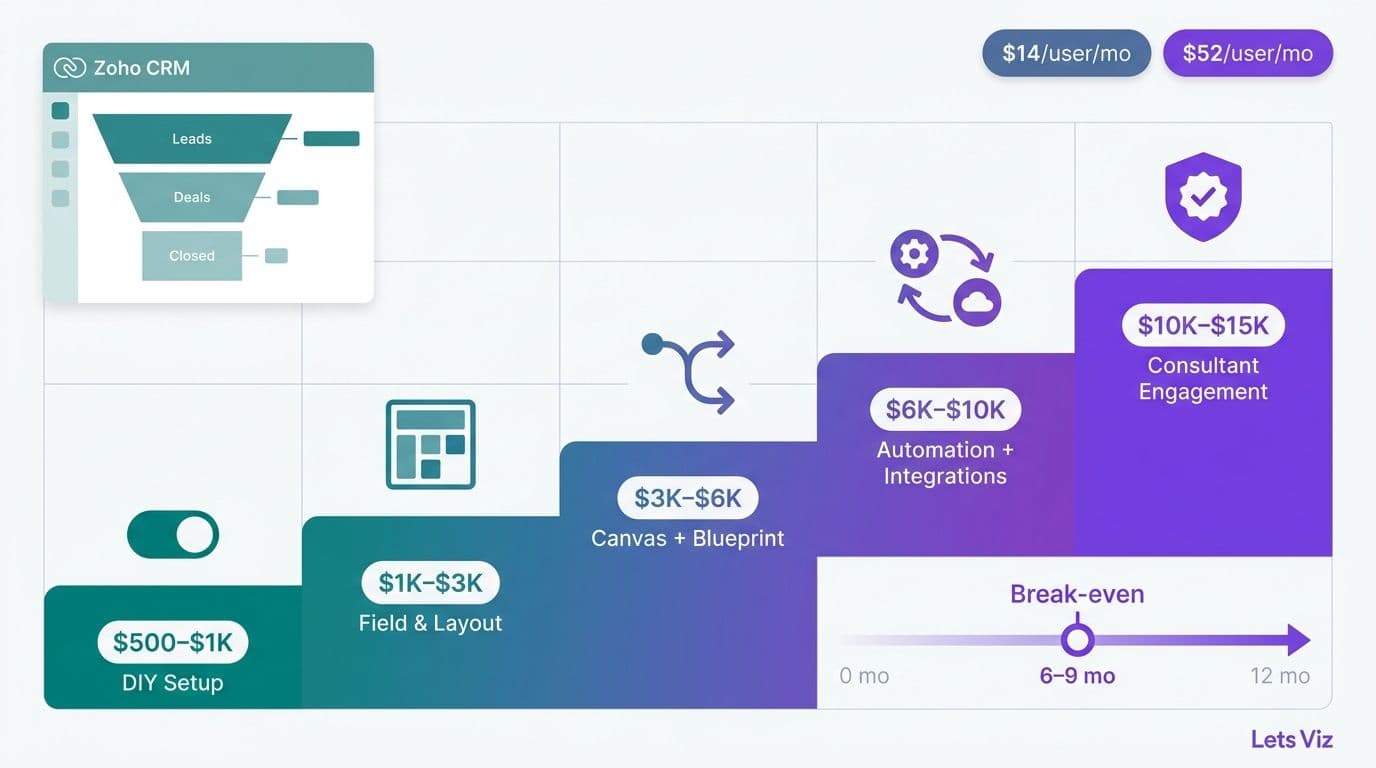
Zoho CRM customization for a small business typically costs between $500 and $15,000 depending on scope - from a self-configured weekend deployment to a full certified-consultant engagement covering Canvas layouts, Blueprint automation, and compliance configuration. Licensing runs $14 to $52 per user per month. For most healthcare and finance teams under 50 users, the break-even on professional services fees arrives within 6 to 9 months through recovered staff hours and measurable improvements in pipeline velocity.
Key Takeaways
Licensing tiers range from $14 to $52 per user per month; the Enterprise plan ($40/user/mo) unlocks Canvas, Blueprint, and field-level security - the three features SMBs customise most.
DIY configuration carries no direct fee but typically consumes 40-120 internal staff hours, an invisible cost averaging $4,000-$12,000 at a $100/hour blended rate.
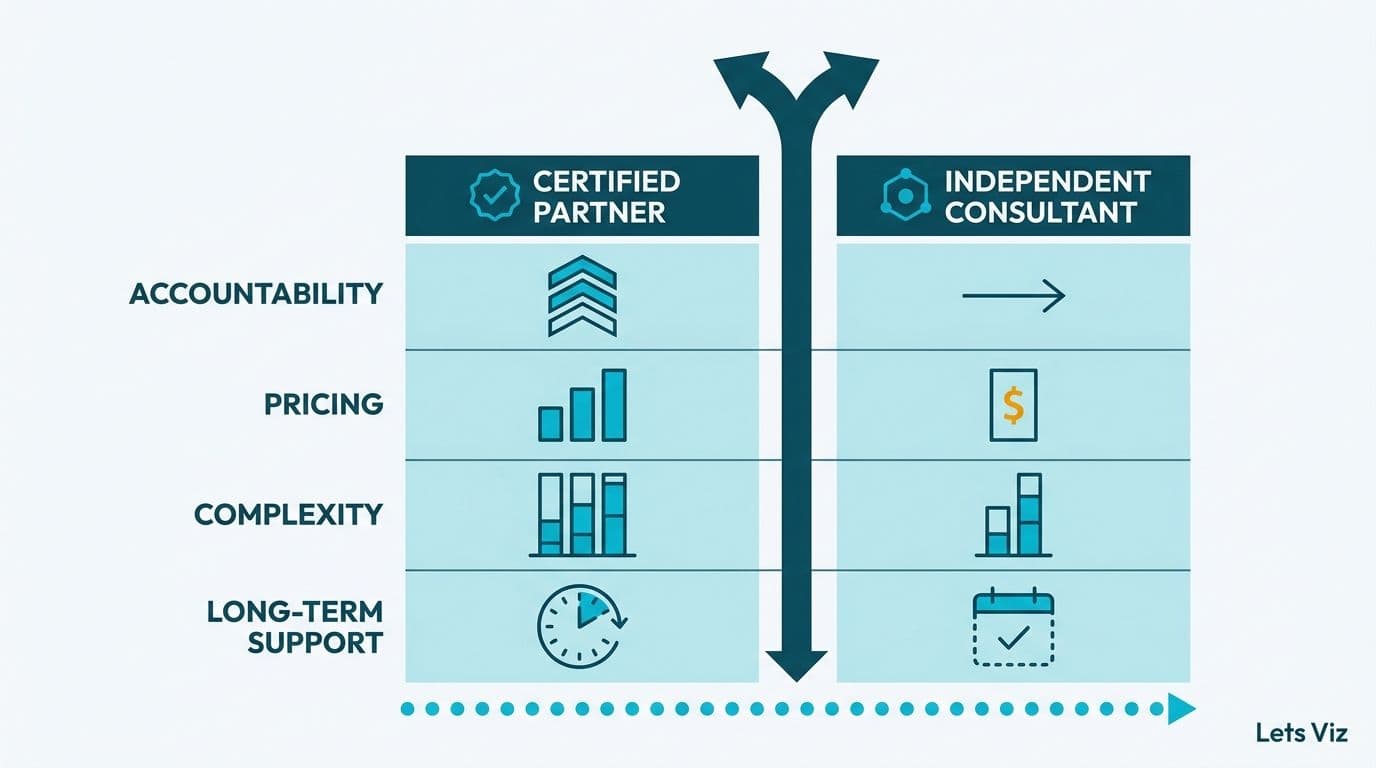
Certified Zoho consultants in North America charge $75-$175 per hour; scoped SMB project engagements typically run $2,500-$10,000 all-in.
Healthcare and finance teams face additional compliance configuration (HIPAA field masking, audit trails, role-based access) that adds 20-30% to baseline setup cost.
ROI typically materialises in 6-12 months; teams using Blueprint-driven automation commonly report 15-25% shorter sales or patient intake cycles.
What Does Zoho CRM Customization Actually Cost for a Small Business in 2026?
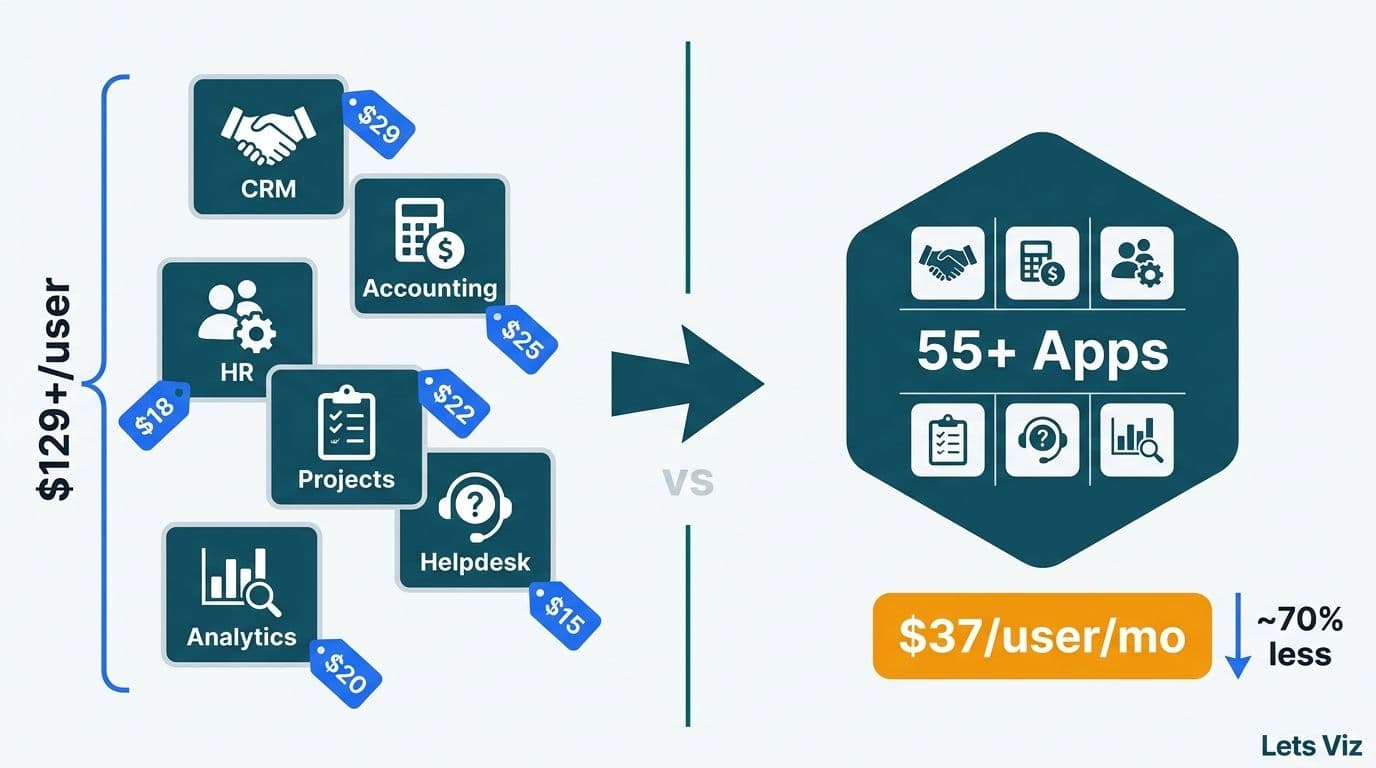
The total Zoho CRM customization cost for a small business breaks into two distinct layers: the licence fee paid directly to Zoho and the configuration cost paid either as internal staff time or consultant fees. Both layers are real; only one shows up in a procurement request.
Licence Tier Breakdown
| Plan | Price (per user/mo, annual billing) | Key Customization Features |
|---|---|---|
| Free | $0 (up to 3 users) | Basic fields, limited modules |
| Standard | $14 | Custom fields, list views, basic reports |
| Professional | $23 | Blueprint automation, scoring rules, webhooks |
| Enterprise | $40 | Canvas layouts, field-level security, multi-user portals |
| Ultimate | $52 | Built-in BI analytics, enhanced storage, advanced Zia AI |
For a 10-person sales team, upgrading from Standard to Enterprise costs an additional $260 per month - $3,120 annually. That licence delta pays for itself quickly when Canvas record views or Blueprint-driven workflows recover even 2-3 hours of manual admin per rep per week.
One-Time Configuration Cost Ranges
| Approach | Typical One-Time Cost | Monthly Licence | Time to Productive Use |
|---|---|---|---|
| DIY - Standard plan | $0-$2,000 (internal hours) | $14/user/mo | 2-4 months |
| DIY - Enterprise plan | $3,000-$8,000 (internal hours) | $40/user/mo | 6-10 weeks |
| Certified Consultant (scoped project) | $2,500-$10,000 | $40/user/mo | 3-6 weeks |
| Managed CRM retainer | $800-$2,500/mo | $40/user/mo | 1-2 weeks |
The internal-hour costs in the DIY rows are not hypothetical. A 120-hour self-implementation at an operations manager's blended rate of $80/hour equals $9,600 - more than most scoped consultant engagements. The cost advantage of DIY only exists when genuinely spare staff capacity is available and the opportunity cost of that time is low.
For a broader framework on how analytics and CRM consulting budgets compare across toolsets, the AI Analytics Consulting for Small Businesses: Budget Guide provides useful reference ranges across engagement models.
What Is Zoho CRM Canvas and How Does It Work?
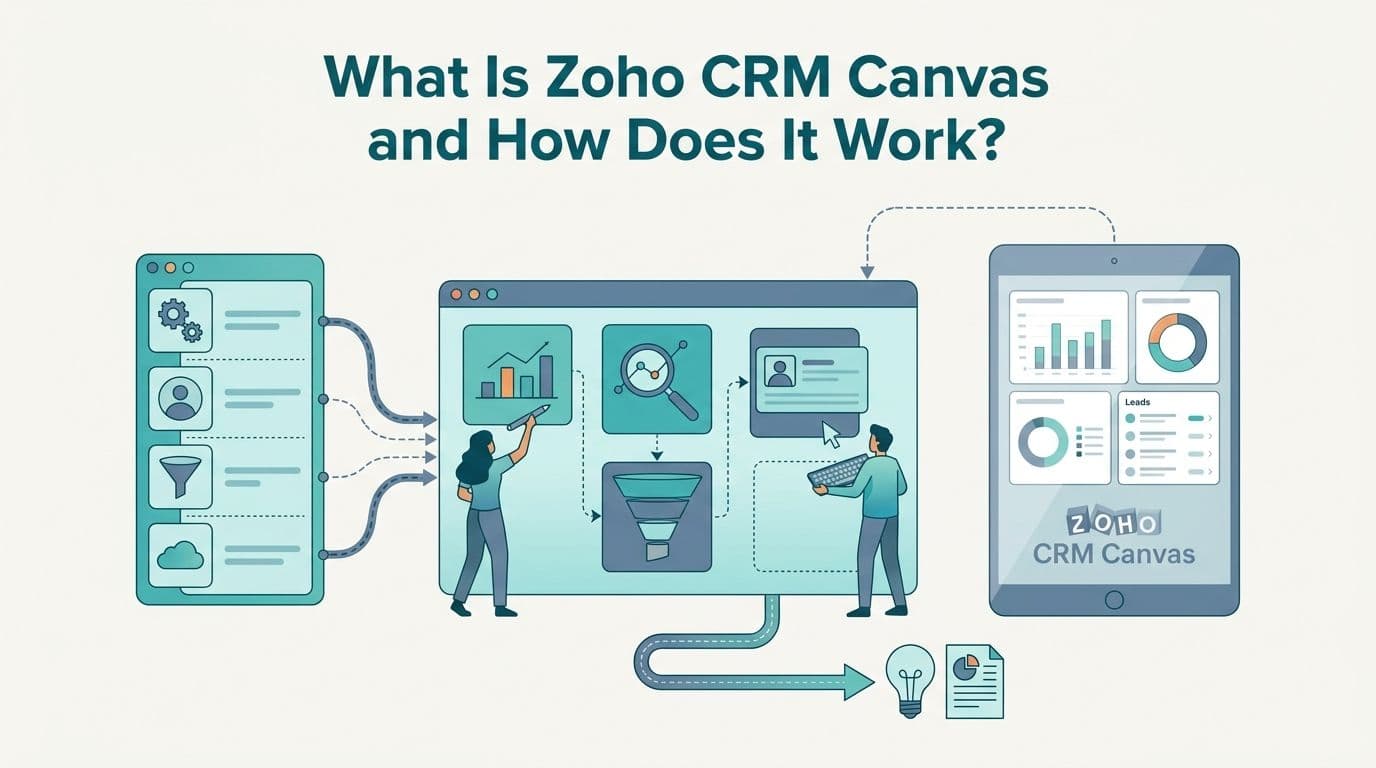
Zoho CRM Canvas is a no-code visual designer that allows administrators to rebuild the record view of any CRM module - contacts, deals, accounts, and leads - without writing code. Rather than accepting Zoho's default two-column field layout, you drag and drop fields, embed status indicators and images, apply conditional formatting, and create role-specific views that surface only what each user type needs to act on.
Canvas is available from the Enterprise plan ($40/user/mo) upward. The designer itself carries no additional licence fee at that tier, but the configuration time is a tangible cost regardless of who does the work.
Healthcare example: A patient services team can build a Canvas view that masks HIPAA-sensitive fields from front-desk staff, highlights appointment status and outstanding balances for billing coordinators, and restricts clinical notes access to credentialed care team members - all from a single module, controlled by role assignment.
Finance example: A wealth management team can design a Canvas layout that places AUM summary and last review date prominently for advisors, conceals compliance-flagged communication logs from junior associates, and surfaces the complete interaction timeline for compliance officers - without building three separate modules.
A well-designed Canvas layout for either of these scenarios takes a skilled administrator 8-20 hours to build, test across roles, and document. At a $100/hour blended internal rate, that is $800-$2,000 of configuration cost that never appears as a line item in the project budget but absolutely affects total cost of ownership.
According to Future Market Insights (2026), the global AI consulting services market has reached an estimated $13.6 billion in 2026 — ahead of earlier projections — on its way to an estimated $90.99 billion by 2035, reflecting how much value organisations are placing on specialist configuration expertise as CRM platforms add AI-powered features that require precise setup to deliver on their intended functionality.
How Do You Add Custom Fields in Zoho CRM Without Creating a Technical Debt Problem?
Custom fields are the fastest way to tailor Zoho CRM to your specific data model and are available from the Standard plan upward. Fields can be text, date, currency, picklist, lookup, formula, or multi-select, and can be added to any standard module from Settings - Customisation - Modules and Fields in under five minutes.
The common failure mode: adding fields reactively, one stakeholder request at a time. A 10-field contact form becomes a 45-field form within six months as every department adds its requirements. The result is adoption failure - reps skip fields, data quality degrades, and reports become unreliable because the underlying data is incomplete or inconsistent across records.
Recommended practice for healthcare and finance teams:
Audit your current data sources before building any fields. A 60-minute review of the spreadsheets and legacy systems you are replacing prevents months of rework and field duplication after go-live.
Cap fields per module at launch to 15-20 maximum. Add more only after demonstrating consistent adoption and identifying genuine data gaps.
Apply validation rules (Professional plan and above) to enforce data entry standards. In regulated environments, incomplete records create direct compliance exposure during audits and reviews.
Maintain a schema register outside the CRM - a shared document that records each field's purpose, data owner, accepted values, and downstream report dependencies.
Custom field work alone rarely justifies consultant fees. Where consultants earn their cost is in architecting a field schema that supports downstream reporting, integration, and analytics without requiring structural rebuilds after data is populated. A schema mistake caught before go-live takes one hour to correct; the same mistake caught after six months of populated records can take weeks to untangle.
For regulated industry teams managing analytics alongside CRM data, the HIPAA-Compliant Analytics Dashboard: Best Practices Checklist covers the compliance design layer that intersects directly with CRM field architecture decisions.
What Is Zoho CRM Blueprint for Sales Process Automation?
Zoho CRM Blueprint is a process automation tool that enforces a defined sequence of actions on a record - effectively a state machine for your sales, intake, or service workflow. Each defined state (for example: Lead Qualified, Proposal Sent, Contract Under Review, Closed Won) specifies which fields must be populated and which actions must be completed before a user can advance the record to the next stage. Blueprint prevents steps from being skipped, mandatory fields from being left blank, and follow-up tasks from being overlooked.
Blueprint is available from the Professional plan ($23/user/mo) upward.
Finance advisory example: A wealth management firm uses Blueprint to require that a signed engagement letter is uploaded before a deal advances to 'Client Onboarded,' then automatically triggers a personalised welcome email sequence, schedules a 30-day portfolio review task for the relationship manager, and logs a compliance-required initial contact record. Without Blueprint, each of those steps relies on individual rep discipline - which is inconsistent at scale by definition.
Blueprint configuration cost benchmarks:
Simple linear process (5-7 states, single module, no external integrations): 4-8 hours DIY, or $600-$1,200 via consultant
Moderate branching process (8-12 states, condition-based routing, automated email triggers): 10-20 hours DIY, or $1,500-$3,000 via consultant
Complex multi-module process (12+ states, webhook integrations, multi-team approval gates): 20-40 hours DIY, or $3,000-$6,000 via consultant
The Healthcare Financial Analytics Market is growing at an 8.58% CAGR through 2035, according to Market Research Future (2026 update) — a trajectory that 2026 adoption rates are tracking ahead of, reflecting the scale of investment regulated sectors are making in structured process tooling to meet audit, documentation, and compliance requirements. Blueprint delivers exactly this kind of enforceable, logged process structure at the CRM layer, making it one of the highest-ROI customizations available on the platform.
Deciding when outside expertise is worth the fee follows the same logic as the outsourcing decision framework that applies across analytics and operational tooling categories.
Zoho CRM vs. Bigin for Small Business: Which Platform Costs Less to Customise?
Zoho Bigin is Zoho's pipeline-focused CRM designed specifically for very small teams - typically under 10 users with a single product or service line and a straightforward, linear sales motion. The lower licence cost is the headline comparison, but the full customization cost picture changes significantly once compliance requirements and growth are factored in.
| Factor | Zoho Bigin | Zoho CRM (Standard/Enterprise) |
|---|---|---|
| Entry price | $7/user/mo | $14-$40/user/mo |
| Custom fields | Yes (limited depth) | Yes (extensive, with validation rules) |
| Blueprint automation | Not available | Yes (Professional plan+) |
| Canvas record layouts | Not available | Yes (Enterprise plan+) |
| Field-level security | Not available | Yes (Enterprise plan+) |
| Compliance configuration | Not recommended | Fully supported |
| Typical one-time setup cost | $200-$800 | $1,500-$10,000 |
| Best suited for | Solo practitioners, sub-10-person teams | Growing SMBs, regulated industries |
Practical decision rule: If your team has fewer than 5 users, a single pipeline, and no regulatory compliance requirements, Bigin is the cost-efficient starting point. If you have multiple departments, need field-level access controls, or plan to integrate with ERP, billing, or analytics platforms, start with Zoho CRM Professional or Enterprise from day one. The migration cost from Bigin - data export, field remapping, workflow rebuild - consistently exceeds the accumulated licence difference when organisations outgrow the platform within 18-24 months.
Healthcare practices and financial services firms operating under HIPAA, SOC 2, or FINRA requirements should default to Zoho CRM Enterprise regardless of team size, because field-level security, audit logs, and role-based portals are only available at that tier.
For healthcare teams building broader data infrastructure alongside CRM, the AI Consulting for Healthcare Data Analytics: 2026 Guide addresses how CRM data integrates with clinical and operational analytics platforms.
When Does Hiring a Zoho Consultant Pay for Itself?
The return on Zoho CRM consultant fees depends on three measurable levers: staff time recovered per week, pipeline or intake conversion rate improvement, and new-hire onboarding speed. Most engagements generate positive returns within one quarter when even one of these levers moves by more than 10%.
Sample ROI Scenario: 15-Person Healthcare Services Firm
Consultant engagement cost: $6,500 (Canvas layout, Blueprint for patient intake workflow, custom fields with HIPAA masking, admin training)
Time recovered per team member: 4 hours/week at $80/hour blended rate = $320/person/week
Team-level weekly savings: 15 members x $320 = $4,800/week
Simple break-even: $6,500 / $4,800 = 1.4 weeks of recovered time
Adjusted for adoption ramp - typically 60-70% in weeks one through four, rising to 85-90% by week eight - a realistic break-even falls at 5-8 weeks post-launch for a well-managed rollout with adequate change management.
Factors that extend payback periods:
Adoption below 70% in the first 90 days, which invalidates all time-recovery projections
Custom fields added without validation rules, causing data quality failures that cascade into report rebuilds
Blueprint designed around a process that is restructured within the first six months, requiring a rebuild that erases initial savings
Factors that compress payback periods:
ERP or billing system integration, which eliminates dual data entry and represents the single highest source of time savings in most deployments — a typical billing system sync for a 15-person practice eliminates 6-8 hours of weekly manual reconciliation, adding $25,000-$35,000 in annualised time savings at standard blended rates
Automated follow-up sequences via Blueprint combined with email templates, reducing rep overhead per lead by 30-50%
Manager dashboards built on clean, validated CRM data from go-live week, eliminating manual reporting lag
MedInsight (2026) identifies AI-driven analytics and structured care process tooling as the dominant operational investments across healthcare organisations in 2026, with 68% of mid-market healthcare firms citing CRM workflow automation as a top-three IT priority — up from 49% in 2024. This confirms why CRM process structure and analytics-ready data architecture are no longer optional for competitive healthcare and financial services operations.
For a parallel cost-benefit framework applied to business intelligence tooling, the Managed Power BI vs. In-House BI Team: Mid-Market Cost Guide uses the same build-vs-buy logic applied to a complementary tool category.
---
If your team is ready to scope a Zoho CRM customization project - whether a focused field architecture review or a full Enterprise implementation with Blueprint and Canvas - the Zoho consulting services page outlines engagement models, typical project timelines, and how to request a scoped estimate without commitment.
---
About Lets Viz: Lets Viz has delivered analytics and CRM consulting engagements for healthcare and financial services organisations since 2020, specialising in regulated-industry deployments where compliance configuration is as critical as feature delivery. Our consultants hold certifications in Zoho implementation and data governance, with hands-on project experience spanning standalone field architecture reviews, full Enterprise CRM rollouts, and integrated analytics pipelines across mid-market firms in the US and Canada.