Business Automation Process: Identify, Prioritise, Automate
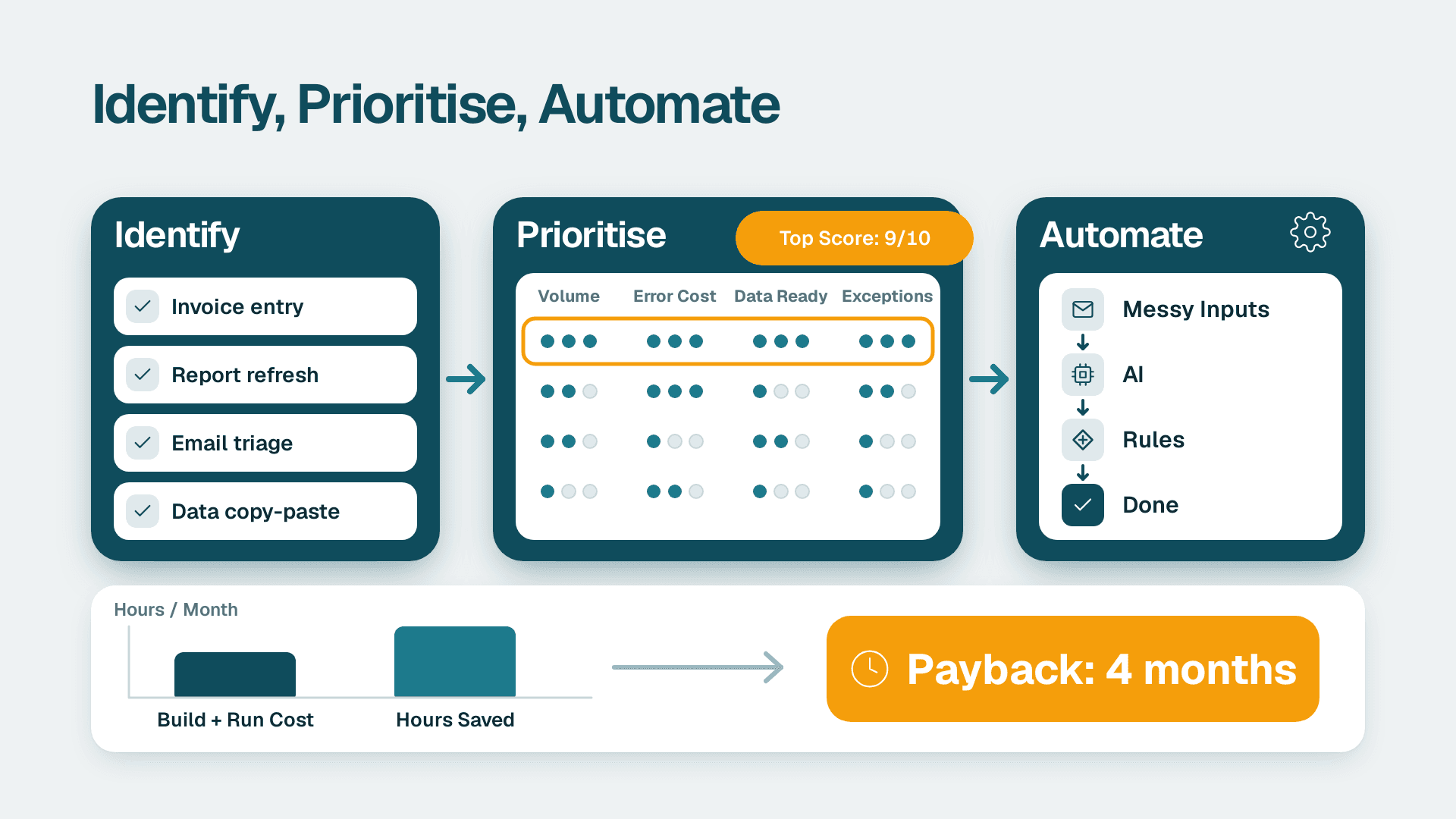
A business automation process starts with finding repetitive, rule-based work, scoring it on volume, error cost and data readiness, then automating the top scorer first. AI handles messy inputs such as emails and documents, while plain rules handle the decisions. Judge every candidate by payback: build and run cost against the hours or errors removed.
Key Takeaways
- Automate processes that are frequent, rule-based and painful, not the ones that are merely annoying.
- Score candidates on volume, error cost, data readiness and exception rate before you pick a tool.
- Use a simple payback test: total first-year cost divided by monthly value, compared with a window you set in advance.
- Build the monitoring and the compliance checks into the first release, not the second.
- Start with one process per department, prove it, then widen the scope.
What Is Business Process Automation and Where Does AI Fit?
Business process automation is the use of software to carry out a repeatable sequence of work steps with little or no manual handling. AI extends that reach to steps that used to need a person to read, classify or summarise something unstructured.
Classic automation of business process work is deterministic: if an invoice total is under a limit, route it to approver A. It breaks when inputs vary. Business automation AI adds a language or document model at the points where inputs are messy, such as extracting fields from a supplier PDF, drafting a reply to a customer query, or labelling an inbound request. The rules around that step stay explicit, so the outcome stays predictable.
A useful mental model is three layers:
1. Trigger and routing: something happens (a form is submitted, a file lands, a date arrives) and the work is sent to the right place.
2. Interpretation: an AI step reads, extracts, classifies or drafts.
3. Action and check: a rule writes to a system, notifies a person, or holds the item for review.
Most failed projects invest in layer two and neglect layers one and three. If your team is new to the field, the AI automation for SMBs starting guide covers the basics, and a specialist AI automation consulting engagement is usually worth considering when several departments want to move at once and need one shared standard.
What AI should not own
Keep AI away from steps where a wrong answer is expensive and hard to detect, such as final payment release, legal commitments or anything that changes a customer's contract. Use it to prepare and recommend, and let a person or a hard rule approve. The difference between an assistant and a fully self-directing system is covered in what autonomy really means in business.
How Do You Identify Processes Worth Automating?
Look for work that is frequent, rule-based, high-volume and tied to a measurable cost. The fastest way to find it is a two-week time-and-friction log kept by the people doing the work, not a workshop of managers guessing.
A practical discovery routine for a department head:
- Ask each team member to list their five most repeated tasks and roughly how many times a week each occurs.
- Trace the hand-offs. Work that moves between people, spreadsheets or inboxes is where delays and errors collect.
- Look at the rework. Anything corrected, re-keyed or chased more than once is a candidate.
- Read the exception pile. If a process has a large "special cases" folder, automate the standard path first and leave the exceptions with people.
Warning signs a process is not ready
Some processes look attractive and are not ready. If nobody can write the steps down, the process is still being invented. If three people do it three different ways, standardise first. If the source data is incomplete or lives in personal files, fix the data before you add automation, or the automation will simply produce wrong answers faster.
A Canadian manufacturing company, for example, might find that purchase-order matching looks like an ideal target, but supplier references are typed differently in every plant. The first job there is a naming standard, and only then the automation. The same pattern applies to a UK fintech reconciling payment files or a US SaaS finance team chasing invoice approvals.
How Do You Prioritise Which Process to Automate First?
Score each candidate on a small set of criteria and rank the totals. Four criteria are enough: volume, error or delay cost, data readiness and exception rate.
Give each criterion a score from 1 (poor) to 5 (strong). For exception rate, a low rate scores high.
| Criterion | What to ask | Score 1 | Score 5 |
|---|---|---|---|
| Volume | How often does it run each month? | A few times | Hundreds or more |
| Error or delay cost | What does a mistake or a late result cost? | Negligible | Material, visible to customers or auditors |
| Data readiness | Is the input digital, consistent and accessible? | Paper or personal files | Clean, in a system with an export or connector |
| Exception rate | How often does it fall outside the standard path? | Most of the time | Rarely |
Add the four scores. Anything at 16 or above is a strong first candidate, 11 to 15 deserves a pilot after clean-up, and 10 or below stays manual for now. These bands are a starting convention, so adjust them to your own appetite for risk.
Two tie-breakers help when scores are close. Prefer the process that feeds a report or decision people already use, because the value is easier to see. Prefer the one owned by a single named person, because processes with split ownership stall in review.
For ideas on where other teams have found early wins, see high-ROI AI agent use cases by department and the worked scenarios in AI workflow automation examples for business.
What Is the Payback Framework for Department Heads?
The payback framework compares the full first-year cost of an automation with the value it returns each month, then checks the result against a payback window you agreed before building. It gives a department head a yes or no in a single page.
Step 1: Count the value
Use only value you can defend:
- Time released: hours per month saved multiplied by the loaded hourly cost of the role.
- Errors avoided: number of errors per month multiplied by the average cost to fix.
- Delay cost: for example, late invoicing that slows cash collection. Include it only if finance agrees the figure.
Count released time only if it will be redeployed to other work or avoids a planned hire. Time that is merely freed and unmeasured is not a saving.
Step 2: Count the cost
Include everything in the first year:
- Build or configuration effort, internal or external.
- Licences and platform fees. Where a vendor price matters, take it from the vendor's current documentation. For instance, Microsoft lists Power BI Pro at $14 per user per month and Premium Per User at $24 per user per month (list prices since 1 April 2025).
- AI usage charges, which scale with volume.
- Monitoring, maintenance and review time, which is the cost most often forgotten.
Step 3: Run the test
Payback period (months) = total first-year cost / monthly net value
Suppose, purely as an illustration, that a team spends 40 hours a month on a task, a build would cost the equivalent of 12 months of 10 hours of that time, and review would take 5 hours a month. Net monthly value is 35 hours, so the build pays back in just over a third of a year. Your own numbers will differ, which is the point: write them down before you start.
Step 4: Apply the gate
Set the window before you build. Many small and mid-market teams use six to twelve months for process work and shorter for pure admin. If a candidate exceeds the window, either shrink the scope or drop it. Review actual values at 90 days and compare them with the forecast, so the next proposal is better calibrated.
What Are the Four Stages of Process Automation?
The four stages are discover, design, deploy and sustain. Most teams spend their energy on the third and pay for it in the fourth.
| Stage | What happens | Output |
|---|---|---|
| Discover | Log tasks, map hand-offs, score candidates | Ranked shortlist |
| Design | Write the steps, define exceptions, choose where AI is used and where rules decide | One-page process spec |
| Deploy | Build, test with real samples, run in parallel with the manual process | Live automation with a rollback plan |
| Sustain | Monitor, review exceptions, retrain or retune, re-score | Owner-signed review each quarter |
If you want a tooling view of the deploy stage, no-code AI agent builders for ops teams compares the options by team skill level.
What Are the 7 Steps of the Business Process?
Frameworks differ, but a business process in practice follows seven steps: trigger, intake, validation, processing, approval, output and review. Mapping your candidate against these seven shows exactly which steps are automatable.
1. Trigger: what starts the work. Almost always automatable.
2. Intake: capturing the request or document. Ideal for AI extraction.
3. Validation: checking completeness and rules. Best handled with explicit rules.
4. Processing: the core calculation or transformation. Automatable when rules are stable.
5. Approval: a human or threshold decision. Keep a person here when stakes are high.
6. Output: the report, record, message or payment. Automatable with checks.
7. Review: measuring results and exceptions. Often skipped, and the source of silent decay.
Should You Build Dashboards or Automations First When Leaving Spreadsheets?
Build the dashboard first if the spreadsheet's main job is answering questions, and the automation first if its main job is moving or re-keying data. Many teams need both, in a deliberate order.
Here is a simple rule. If people argue about what the numbers are, you have a reporting problem: connect the sources, define the measures, then build the view. If people agree on the numbers but spend days assembling them, you have an automation problem: automate the collection and cleaning, then report on the result. Automating a broken definition just distributes the confusion faster.
A sensible sequence for a team leaving spreadsheets:
- Clean and standardise the data with a repeatable transformation step. The guide to using Power Query to clean data before modelling shows how.
- Build the one dashboard leaders will actually open. Which Power BI dashboard to build first ranks the options by function.
- Automate the refresh, the distribution and the alerts.
- Only then add AI to summarise, flag anomalies or draft commentary.
How Do You Monitor Automated Reports for Silent Failures?
Monitor the outcome, not just the job. A report that runs on schedule but pulls stale or empty data is the classic silent failure, and a green status light will not catch it.
Put four checks around every automated report:
- Freshness check: compare the latest source timestamp to the report date and alert if the gap is larger than expected.
- Volume check: alert when row counts fall outside a normal range. A sudden drop to zero is the clearest sign of a broken connection.
- Reconciliation check: tie one headline figure back to a trusted source total each run.
- Delivery check: confirm the report reached its recipients, and have a named person own the alert inbox.
Keep a record of what ran and who changed what. For example, Microsoft documents that Purview Audit (Standard) keeps audit logs for 180 days (Microsoft Purview documentation, 2025), so schedule your reviews inside that window if you rely on those logs to trace a change. Add a short monthly sample check where a person compares one automated output with the manual result. AI-generated commentary needs the same treatment: spot-check it against the numbers it describes.
How Do You Choose Between Self-Hosted and Cloud AI for Business Reporting Automation?
Choose cloud AI when speed, low maintenance and managed security matter most, and self-hosted when data cannot leave your environment or usage is high and predictable. For most small and mid-market teams in non-regulated sectors, a managed cloud service is the practical default.
| Factor | Cloud AI service | Self-hosted model |
|---|---|---|
| Setup effort | Low | High |
| Ongoing maintenance | Vendor handles it | Your team handles it |
| Data location control | Depends on vendor region and terms | Full control |
| Cost pattern | Usage-based, scales with volume | Fixed infrastructure plus staff time |
| Skills needed | Configuration | Engineering and security operations |
Check what you will actually pay for the features you want. For example, Microsoft states that Copilot in Power BI and Fabric needs a paid Fabric capacity of F2 or higher, or Power BI Premium P1 or higher, and that a Pro or Premium Per User licence alone is not enough (Microsoft documentation, 2025). Trial capacities are excluded. For any other vendor, confirm the current tier and limits on the vendor's own pricing page before you commit.
Whichever route you choose, write down who is accountable for it. The AI governance strategy for companies without a compliance team is a good place to start if you have no dedicated function.
What Belongs in an AI Report Generation Compliance Checklist for GDPR, HIPAA and PIPEDA?
Cross-industry teams should check data minimisation, lawful basis or consent, vendor agreements, access control, retention and human review. The exact obligations depend on your sector and location, so treat this as a prompt for a conversation with your legal adviser, not as legal advice.
- Minimise what the AI sees. Send only the fields the report needs. Remove or mask names and identifiers where they are not essential.
- Know the legal basis. UK and EU readers should confirm the basis for processing under GDPR. Canadian organisations should confirm consent and purpose under PIPEDA.
- Check the vendor terms. Confirm whether your data is used to train models, where it is processed, and whether a data processing agreement is in place. US organisations handling protected health information need a business associate agreement under HIPAA before any such data reaches a vendor.
- Control access. Limit who can edit prompts, templates and data connections, and use named accounts rather than shared logins.
- Set retention. Decide how long inputs, outputs and logs are kept, and delete on schedule.
- Keep a person in the loop. For anything that affects individuals, a reviewer should approve before release.
- Document it. A one-page record of the data used, the vendor, the purpose and the owner saves days when a customer or auditor asks.
A US SaaS finance team seeking SOC 2 evidence, a UK fintech with GDPR duties and a Canadian manufacturer subject to PIPEDA will each emphasise different items. The list is the same, and the weight differs.
What Does an Automated Reporting With AI Template Look Like?
A good template fixes the structure so the AI only fills in the narrative. It separates numbers, which come from the data, from commentary, which the model drafts and a person checks.
Use this skeleton for each recurring report:
1. Header: report name, period, data sources and last refresh time.
2. Headline figures: three to five measures pulled directly from the data, never typed by the model.
3. Movement: change against the prior period and against target.
4. Drivers: the AI drafts two or three sentences on what changed, using only the figures supplied.
5. Exceptions: items outside tolerance, listed by rule.
6. Actions: a named owner and date for each follow-up, entered by a person.
7. Checks: the freshness, volume and reconciliation results from the monitoring step.
A prompt that constrains the model works best: tell it to use only the supplied figures, to say "not enough data" instead of guessing, and to avoid causes it cannot see in the data. Version the template, and record who approved each change.
AI automation consulting can help you apply this payback framework across departments and set up monitoring that holds.
---
About Lets Viz: Lets Viz has delivered analytics and AI automation since 2020, working with US healthcare, UK fintech, Canadian manufacturing and global SaaS teams. We hold a 5.0 Clutch rating, and our approach pairs a clear payback case with monitoring and governance built in from day one.
Sources
Facts and prices checked November 2026.