Zoho Expense: Policies, Approvals, Reimbursements and Books Sync
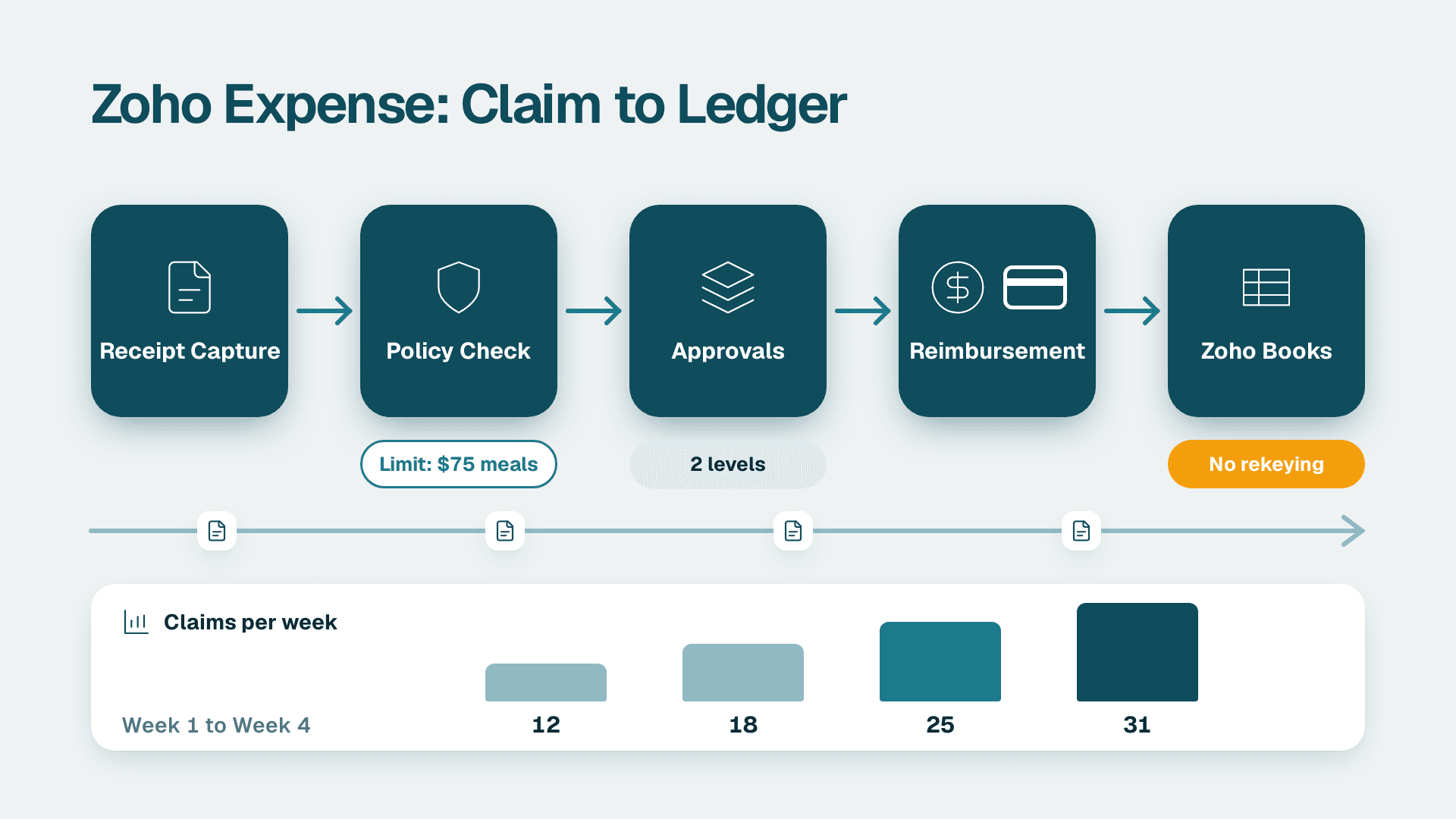
Zoho Expense is Zoho's expense and travel management app. Finance teams use it to set spending policies, route claims through multi-level approvals and reimburse employees, then send approved reports into Zoho Books automatically so the ledger updates without rekeying. It suits small businesses that already run other Zoho apps.
Key Takeaways
- Zoho Expense combines receipt capture, policy checks, approvals, travel booking and corporate card matching in one app.
- Policies and budgets stop problems before approval, so reviewers spend time on exceptions instead of every line.
- Approval flows support multi-level review, escalations, delegates and parallel review without engineering help.
- Approved expense reports import into Zoho Books automatically, which removes the manual re-entry step from month-end.
- Test policies in the sandbox first, and match expense categories to your chart of accounts before go-live.
What is Zoho Expense used for?
Zoho Expense is used to capture employee spending, check it against company policy, get it approved and reimburse it, while keeping finance informed in real time. It replaces the spreadsheet, the shoebox of receipts and the email chain asking who approved a taxi fare.
According to the vendor's US product page, the app covers AI receipt capture in 38+ languages, automated GSA-compliant per diem and IRS-compliant automatic mileage tracking. It also includes native online travel booking across 500+ airlines and 1.6M+ hotels worldwide, with corporate negotiated rates, guest and group booking, loyalty program compatibility and 24/7 global travel support.
For a small business, the practical value is control without a large finance department. One person in operations can define the rules, and the system applies them to every claim. If your team is still deciding how this fits into a wider suite, the guide on what Zoho One includes and whether it is worth it for a small business puts the app in context.
Expense rules touch accounting, HR and sales at once, so many teams get the design right before they switch it on. Specialist Zoho consulting services are one way to map those rules across apps, and the sections below cover what that mapping involves.
How do finance teams set expense policies in Zoho Expense?
Finance teams set policies by defining what is allowed per category, per role and per trip, then letting the system flag or block anything outside those limits. The aim is to catch problems at submission, not three weeks later in a review meeting.
Which policy controls matter most?
Start with the rules that cause the most arguments. The table below lists the controls most small finance teams define first and the reason each one earns its place.
| Policy area | What to define | Why it matters |
|---|---|---|
| Category limits | Maximum amounts for meals, lodging, transport | Stops overspend before approval |
| Receipt rules | Which expenses need a receipt and above what amount | Keeps audit evidence complete |
| Per diem | Daily allowances by location | Replaces itemised small claims |
| Mileage | Rate basis and tracking method | Keeps tax treatment consistent |
| Budgets | Limits by category, department or user | Warns or blocks when exceeded |
| Merchant rules | Restricted or risky merchant types | Reduces policy exceptions |
How does Zia help with policy checks?
Zoho's AI engine, Zia, reviews every expense against company policies to flag duplicate claims, risky merchants and unusual spend patterns. That gives a reviewer a short list of exceptions rather than a full pile of claims. It is part of a broader shift toward machine-assisted review: the global AI-powered data analysis in audits market was valued at USD 2.9 billion in 2025 and is projected to reach USD 20.1 billion by 2035, growing at a CAGR of 21.5% (Market.us, AI-Powered Data Analysis in Audits Market Size Report). Automated flags do not replace judgement, but they point it at the right claims.
Can budgets be enforced as well as reported?
Yes. Zoho's expense management page says budgets can be configured per category, department or user, with warning notifications or blocked approvals when limits are exceeded. A warning suits a manager who needs flexibility. A block suits a restricted cost centre. Decide which one applies to each budget before you configure it, because the choice changes how people behave.
Zoho also states that teams can configure and test changes in a sandbox environment before rolling them out. Use it. A policy that rejects every hotel claim on launch day damages trust in the whole system.
How do approvals work in Zoho Expense?
Approvals work through configurable workflows that route each report to the right people in the right order. According to the vendor, these support multi-level approvals, escalations, delegates and parallel review flows without engineering support.
What does a multi-level flow look like?
Suppose a 40-person services firm sets a simple rule: line managers approve anything within policy, and the finance lead approves anything above a threshold or outside policy. That is a two-level flow. A hypothetical third level might add a director for travel above a set amount. Each level is a decision the owner makes once and the system then enforces.
What are escalations and delegates for?
Approvals stall when a manager is on holiday or buried in meetings. Escalations push a pending report to someone else after a set period. Delegates let a manager hand over approval authority while away. Both features address the most common complaint finance teams hear: reimbursements arriving late because one person was out.
When is parallel review useful?
Parallel review sends a report to more than one reviewer at once. A project expense might need the project lead to confirm it was work-related and finance to confirm it follows policy. Running both checks at the same time shortens the cycle compared with passing the report from one person to the next.
A tip from experience with small teams: keep the flow shallow. Every extra level adds waiting time and a new place for claims to sit. Add a level only when it prevents a real risk.
How do reimbursements and corporate cards work?
After a report is approved, it moves to reimbursement, where finance pays the employee back for out-of-pocket spending. Spending on company cards is handled differently, because the card issuer is already paid and the job is matching each transaction to a receipt and a category.
How are out-of-pocket claims reimbursed?
Employees capture receipts on their phone, add them to a report and submit it. The App Store listing says the mobile receipt scanner supports 15 languages and that expenses can be added offline and synced once the device is back online. That matters for people travelling through airports and rural sites with poor signal. Check which payout methods and currencies your edition supports before promising staff a specific payment route, since this varies by region.
How do corporate card feeds fit in?
According to the vendor's product overview, Zoho Expense connects to existing corporate cards through real-time card feeds, with automated expense matching and auto-categorised transactions, so customers keep their bank and card program. You do not have to change card provider to use the app. For finance, the benefit is that card spend arrives already categorised, and the remaining task is confirming the business purpose.
Does the time saving hold up?
Zoho reports headline results such as 46+ hours saved per employee annually, a 70% reduction in expense processing time and 3x faster monthly financial closing. These figures are based on case studies shared by its customers, so treat them as vendor-reported outcomes, not a benchmark. Your result depends on how many claims you process and how messy your current method is.
How does Zoho Expense sync to Zoho Books?
Approved expense reports are automatically imported into Zoho Books. The Google Workspace Marketplace listing states this directly, and it is the main reason finance teams on the Zoho suite choose this app over a standalone tool.
What happens at each stage?
| Stage | Where it happens | Who acts |
|---|---|---|
| Capture | Zoho Expense (mobile or web) | Employee |
| Policy check | Zoho Expense | System and Zia flags |
| Approval | Zoho Expense | Managers, finance |
| Import | Zoho Books | Automatic after approval |
| Reconciliation and close | Zoho Books | Finance |
Because only approved reports travel to the ledger, Books holds reviewed spending and not raw claims. That keeps draft or disputed expenses out of your accounts.
What should you set up before turning the sync on?
Match your expense categories to accounts in your chart of accounts first. If Meals and Entertainment in the expense app does not map cleanly to a ledger account, someone will recode entries by hand at month-end, and the time saving disappears. Agree who owns the mapping, and review it whenever you add a category.
Also decide how reviewers record notes. The article on month-end close review notes and the audit trail explains how to keep that evidence tidy so the approved reports and the ledger entries tell one consistent story.
What if the numbers still disagree?
A sync removes retyping, not every discrepancy. Timing differences, split transactions and card feeds posted on different dates can still cause gaps. If your management reports and your ledger disagree, work through a structured reconciliation instead of adjusting figures until they match.
How do Zoho expenses connect to CRM, People, Flow and Analytics?
Zoho Expense connects to the rest of the suite through pre-built integrations and automation. The marketplace listing says it comes pre-integrated with Zoho CRM, allowing users to be imported from CRM into Expense. That saves you recreating your team list by hand.
Zoho also cites 2,500+ integrations and support for multi-entity management, and says the integration page covers ERP, HRMS, accounting tools and travel platforms out of the box. For a growing business with more than one legal entity, multi-entity support is worth testing early.
Where do the other Zoho apps fit?
- Zoho People: employee records, leave and payroll data sit with HR, so the same people appear in both places. See the overview of Zoho People for leave, attendance and payroll.
- Zoho Flow: use it to trigger actions across apps, such as notifying a channel when a large claim is submitted. The guide to automating work across Zoho and other apps with Zoho Flow shows the pattern.
- Zoho Analytics: once expenses and ledger data are clean, reporting on spend by department or project becomes straightforward. Start with the explainer on what Zoho Analytics does.
The Zoho Spend page also lists workflow rules, custom functions and webhooks, plus customisation through custom buttons, links and modules. These suit teams that need a rule the standard settings do not cover. Use them sparingly, because every custom rule is something you must maintain.
Is Zoho Expense free, and how much does it cost?
Zoho Expense is not simply free. The App Store listing shows the mobile app as free with in-app purchases, rated 4.8 from 8.3K ratings, with a 14-day free trial. The same listing says the Premium plan includes a minimum of five users, with unlimited receipt scanning, travel desk availability, automated per diem and custom approvals.
I am not quoting a monthly price here because Zoho adjusts pricing by edition, region and currency, and a figure copied into an article goes stale quickly. Check the current pricing page for your country before budgeting. The same applies to the broader question of how much Zoho costs: it depends on which apps you buy individually and whether you take the bundled suite, so compare both against the apps you will use in practice.
A fair way to evaluate cost is to count active submitters and approvers, then ask whether the Premium features (per diem, custom approvals, travel desk) match your real needs. Five users is the stated minimum, so very small teams should check that the plan size fits.
What should you set up first? An expense Zoho rollout in five steps
The order you configure things in matters more than the number of features you switch on. This sequence works for most small teams running expenses Zoho for the first time.
1. Write the policy on one page. Limits by category, receipt thresholds and who approves what. If it does not fit on a page, simplify it.
2. Map categories to your chart of accounts. Do this before any live claims reach Books.
3. Build approval flows in the sandbox. Test normal claims, out-of-policy claims and an absent approver.
4. Connect cards and import users. Bring in the CRM or HR user list and attach card feeds.
5. Pilot with one department for a month. Fix the friction, then roll out to everyone.
What mistakes do teams make most often?
The common failures are over-engineered approval chains, categories that do not map to the ledger and policies that nobody explained to staff. Each one is cheap to avoid and expensive to fix after launch. A short briefing for employees on what to submit, how to photograph a receipt and when a claim will be paid prevents most support questions.
What should US, UK/EU and Canadian teams check?
The core workflow is the same everywhere, but local rules shape the settings. Here are the points to confirm in each market.
- United States: the product page lists GSA-compliant per diem and IRS-compliant mileage tracking. A US finance team handling sensitive financial data may also ask vendors about SOC 2 reports as part of vendor review.
- United Kingdom and EU: employee expense data is personal data, so GDPR applies. A UK or EU firm should confirm where data is stored, how long receipts are retained and who can access them.
- Canada: Canadian organisations should consider PIPEDA when employee and card data is processed, and confirm that tax handling in the ledger matches provincial requirements.
Zoho states that it owns and operates its own data centers and that customer data never passes through a third-party cloud provider. That is a vendor claim worth noting in a data protection assessment, though your compliance team should still request the documents and certifications it needs rather than relying on a marketing page. The Zoho Spend page mentions 15+ languages and 15 editions for regional compliance, which suggests regional variation, so confirm which edition applies to you.
A UK services firm, a Canadian manufacturer and a US software company might all use the same approval logic but different mileage, tax and retention settings. Treat region as a configuration task from the start.
If you are planning expenses as one piece of a wider Zoho rollout, consider where it sits among your other tools. Zoho consulting services can help design the policy, approval and Books mapping so the finance workflow runs cleanly from the first claim.
---
About Lets Viz: Lets Viz is a data analytics and business systems consultancy that has served clients since 2020, including US healthcare providers, UK fintech firms, Canadian manufacturers and global SaaS companies. Our team holds a 5.0 Clutch rating for delivery across Zoho, BI and automation projects.
Sources
- Zoho Expense - AI-native travel and expense management
- Zoho Expense - product overview
- Zoho Expense - Google Workspace Marketplace listing
- Zoho Expense: Travel and Expense - App Store listing
- Zoho Spend - expense management
Facts and prices checked November 2026.