Best No-Code AI Agents Builders for Ops Teams, Ranked
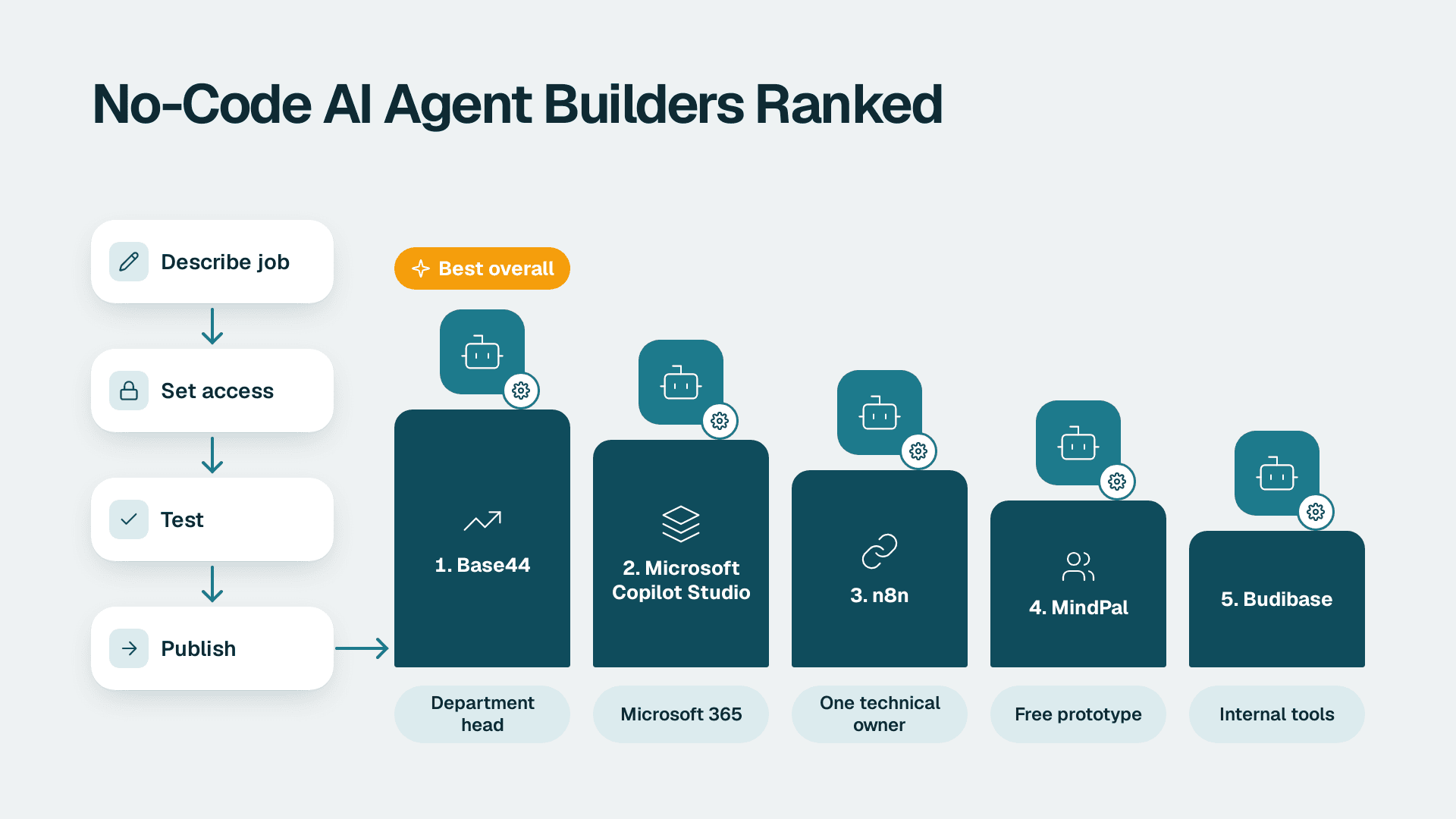
The best AI agents builder for a non-technical department head is Base44. You describe the job in chat, decide what the agent can reach and change, test it on real work, then publish. Microsoft Copilot Studio is the pick if you live in Microsoft 365, and n8n suits teams with one technical owner.
Key Takeaways
- Base44 ranks first because a non-technical owner can build, restrict, test and publish an agent without engineering help.
- Microsoft Copilot Studio is the safest choice when identity, auditing and admin tooling already sit in Microsoft 365.
- n8n is powerful, but someone technical has to own it after launch.
- A free builder is a fine prototype and a risky production bet until you have checked logging and permissions.
- Judge every builder on who fixes it on a Monday morning, not on how good the demo looks.
Our Ranking Criteria
A demo proves an agent can work once. We ranked these builders by whether a department head with no engineering support can ship an agent, limit what it touches and keep it healthy for months. That is the lens we use when scoping AI automation consulting work, and it assumes you have read the basics in AI Automation for SMBs: What It Is and How to Start.
- Time to a first working agent: good means a non-technical person gets a real task running in days, not a quarter.
- Control over what the agent can change: good means you can allow or block create, update and delete actions and limit which records the agent can see.
- Maintainability: good means run logs, easy debugging and a way to roll back a bad change.
- Fit with the tools you already use: good means connectors for your email, chat, documents and data that use your own accounts.
- Cost transparency: good means you can tell what you will pay before you build, and the vendor publishes it.
Budibase's guide to no-code and low-code agent builders defines the category as platforms that help you create, deploy or manage agents without building them from scratch in hard code, usually through drag-and-drop, flowchart or prompt interfaces. It also lists the operational checks worth demanding: run logs, debugging, performance tracking, roll-back, hosting, deployment and security features. We weighted those heavily, because they decide whether an agent survives past month two.
We learned the reason the hard way. Our interlinking agent claimed it had found anchor text in our articles. A spot-check showed only 3 of 30 anchors actually existed in the text - the AI was hallucinating roughly 90% of them. We rebuilt it to verify every anchor against the real article before patching anything. Any builder you choose should let you check outcomes, not just trust outputs.
1. Base44: Best overall for a non-technical department head
Base44 is a chat-first builder where you describe the job and it assembles the agent. Its vendor page says it builds the whole app (login, roles, database, hosting, custom domain), not just the agent, and that it runs on Wix's enterprise security infrastructure.
The five build steps are simple: describe the job in chat, choose what the agent can reach, set what it can change, test it on real work in the preview, then publish and share. That sequence maps almost exactly to how an ops leader already thinks about delegating work to a new hire.
Best for: an ops lead or founder at a 20 to 200 person company who wants an agent plus a small internal tool around it, such as an intake queue or approval tracker.
Pros:
- You allow create, update or delete per data table, and row-level permissions decide what the agent can see.
- You can upload up to 10 context files, such as policies, price lists and procedures, as reference material.
- Connectors cover Slack, Google Workspace and Notion using your own account on each, with no API keys to set up. WhatsApp is also available and the vendor states it is free on all plans.
Cons:
- Agent memory is on by default, so it remembers preferences, past choices and shared context across conversations. Decide up front what you do not want it to retain.
- Because it builds a full app, you inherit an app to own, not just a prompt. We have not verified current plan pricing, so check the vendor's plan page before committing.
2. Microsoft Copilot Studio: Best if you already run Microsoft 365
Copilot Studio is Microsoft's builder for agents that live inside the Microsoft 365 ecosystem. It is a different thing from the assistant features you meet inside individual apps, such as summarising a long email thread with Copilot in Outlook. Those are features you switch on. Copilot Studio is where you design an agent with its own instructions, knowledge and actions.
Best for: companies with an IT admin, Entra identities and SharePoint content already in place, where governance matters more than speed.
Pros:
- Identity, permissions and admin tooling already exist, so you are extending a governed environment rather than creating a new one. The Microsoft 365 admin center also offers Copilot usage reports, which help you track adoption.
- Microsoft Purview Audit (Standard) keeps audit logs for 180 days, which gives you a trail when someone asks what an agent did.
- Actions can run through Power Automate, so one agent can touch many systems.
Cons:
- Licensing is layered and easy to misjudge. Our breakdown of Microsoft 365 Copilot cost per seat and per year shows where the spend lands, and we do not quote numbers here that we have not verified.
- It rewards people who already know the Microsoft stack. If you operate under GDPR, HIPAA or PIPEDA, have a privacy review done before connecting mailboxes or customer data.
3. n8n: Best for teams with one technical owner
n8n is a visual workflow builder with AI steps, and it can run as a hosted service or on your own infrastructure. You wire an AI model into a flow, give it tools, and let it decide which branch to take.
Best for: a mid-market team with one technically minded operations analyst or developer who will own every flow.
Pros:
- The visual canvas makes it easy to see what the agent does at each step, which helps debugging.
- You can choose between cloud, community edition and self-hosting. Our n8n pricing guide explains the trade-offs.
- It handles complex, multi-step logic that chat-first builders struggle with.
Cons:
- A non-technical department head will rarely be able to fix a failing node or an API error alone. Plan for a named technical owner.
- Self-hosting adds updates, backups and security work that someone has to do.
If you are weighing it against a vendor-hosted agent product, our comparison of OpenAI Agent Builder vs n8n for business automation goes deeper.
4. MindPal: Best free way to prototype an agent
MindPal's AI agent builder is described by the vendor as 100% free, with no coding skills required and no hidden costs or fees. It says you can create as many agents as you need, add a created agent into a MindPal workspace to edit it afterward, and that no credit card is required and you can cancel anytime.
Best for: a department head who wants to test whether an agent is useful before spending budget or involving IT.
Pros:
- Zero cost to start removes the usual approval step.
- No coding and no credit card keeps the barrier low for a pilot.
- Moving an agent into a workspace gives you a place to refine it after the first draft.
Cons:
- Free to build is not the same as ready to run. We have not verified its permission controls, logging or limits, so check them before connecting real company data.
- You are depending on a vendor's free offer, so keep your prompts and knowledge files stored somewhere you own.
5. Budibase: Best when agents belong inside internal tools
Budibase is a platform vendor that publishes guidance on the agent builder category. Its framing is useful on its own. It groups builders into three types: dedicated agent builders, traditional automation tools with agentic functionality, and advanced AI agent frameworks or SDKs with some no-code or low-code support.
That framing is the right way to shortlist. If you want an agent that sits inside an internal tool your team already uses for approvals or data entry, a platform built around internal apps can be a natural home.
Best for: operations teams that want agents embedded in custom internal tools, with hosting and deployment choices that IT can sign off.
Pros:
- It pushes the operational criteria that matter: run logs, debugging, performance tracking, roll-back and security.
- It suits teams that think in terms of internal apps and data, not just chat.
- It gives you a clear vocabulary for comparing builders by type before you compare by feature.
Cons:
- A first agent typically takes longer to ship than in a chat-first tool, because you are configuring a platform and not just describing a task.
- We have not verified current pricing or plan limits, so confirm them with the vendor.
Quick Comparison Table
| Builder | Best for | Technical skill needed | Permission controls | Cost visibility | Maintainability |
|---|---|---|---|---|---|
| Base44 | Non-technical ops lead | Low | Per-table actions, row-level | Check plan page | High |
| Copilot Studio | Microsoft 365 shops | Medium | Inherits Microsoft admin | Layered licensing | High with IT support |
| n8n | One technical owner | Medium to High | Flow-level, you design | Cloud or self-host | Medium |
| MindPal | Free prototypes | Low | Verify before use | Free (per vendor) | Verify before use |
| Budibase | Agents inside internal tools | Medium | Platform-level | Check with vendor | Medium to High |
How to Choose an AI Agents Builder
- If nobody on your team writes code: start with Base44. It is the most direct route for no-code AI agents that a department head can build, restrict and own.
- If your company runs on Microsoft 365 and has an IT admin: choose Copilot Studio so identity, auditing and permissions stay in one place.
- If one technical person will own every flow: choose n8n and give that person the time to document and monitor it.
- If you only want to test an idea this week: prototype in MindPal, then rebuild in a governed tool once the use case proves itself.
- If the agent should live inside an internal app: shortlist Budibase and compare it by type first.
Whichever you pick, start with a task that has a clear owner and a checkable result. Our guide to AI agents for business by department shows where to begin, and our roundup of low-code AI tools for automating operations covers adjacent options. Then ask the one question that decides success: how will we know the agent actually did the job, and not just said it did?
If you want help choosing, scoping and governing your first agents, talk to our team about AI automation consulting.
---
About Lets Viz: Lets Viz is a data analytics and AI consulting firm that has served cross-industry SMB and mid-market clients since 2020. We build dashboards, data pipelines and AI automation for operations, finance and sales teams, and we hold a 5.0 Clutch rating from client reviews.
Sources
Facts and prices checked November 2026.