Power BI Pro vs PPU vs Fabric: Which Licence You Need
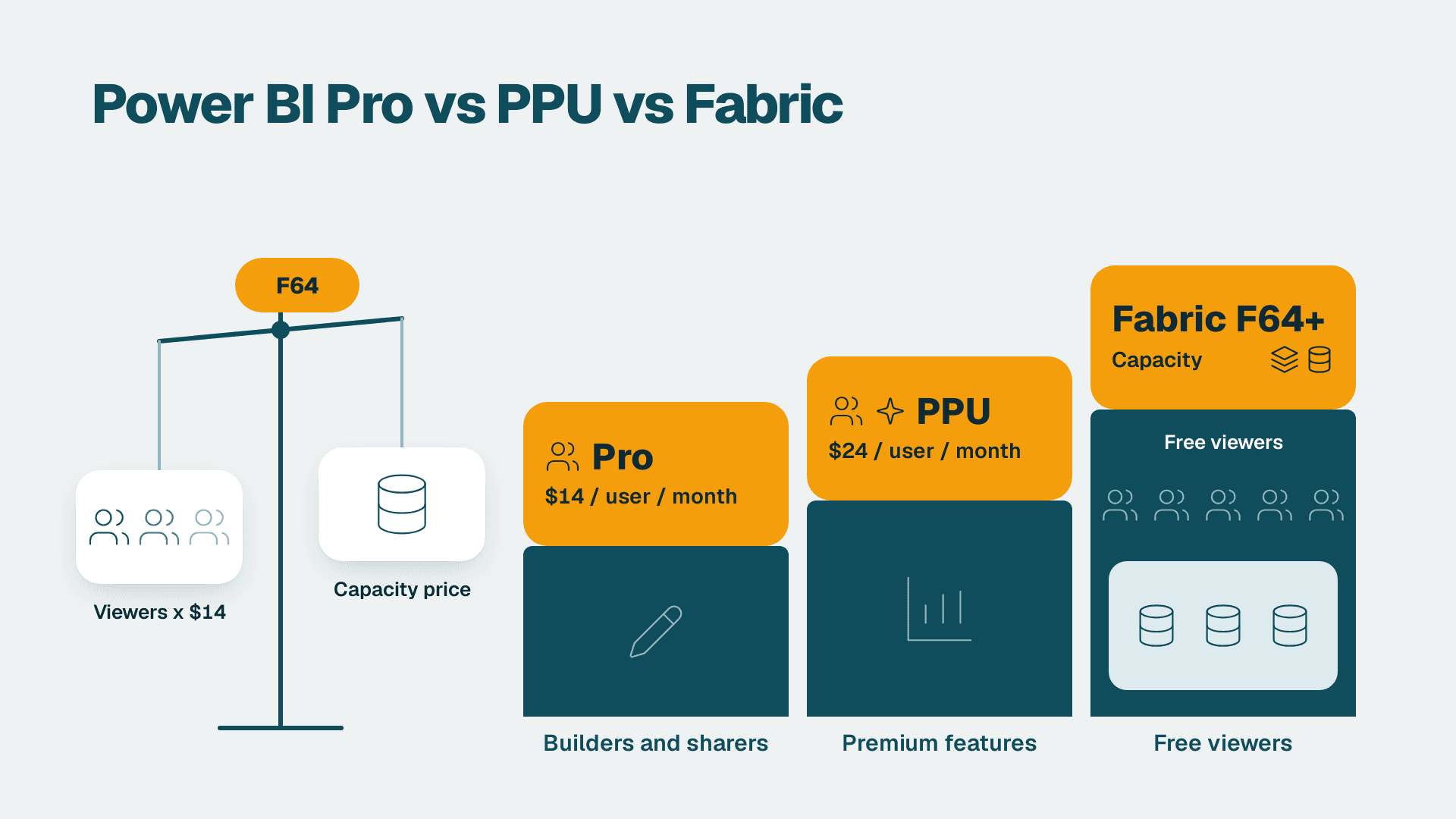
Give report builders a Power BI Pro licence at $14 per user per month, give the few people who need premium features Premium Per User at $24, and let viewers run free only once you own Fabric capacity at F64 or above. Below that size, Pro for everyone is usually cheaper. Capacity wins when your viewer count times $14 exceeds the monthly capacity price.
Key Takeaways
- Free licences build in Desktop but cannot share or view shared content unless that content sits on F64 or higher capacity.
- Pro at $14 per user per month is the default for anyone who publishes or shares, and publishers need it even on capacity.
- Premium Per User at $24 suits small teams that need premium features without buying a capacity.
- Fabric capacity tips the math when many read-only viewers would otherwise each need a Pro licence.
- Copilot needs capacity (F2 or higher); a Pro or PPU licence alone is not enough.
Quick Comparison
Microsoft publishes the list prices on its Power BI pricing page, and the table below puts the four options side by side. If you want a second opinion on your own user mix, our Power BI consulting team can model it with you.
| Criteria | Free | Pro | Premium Per User (PPU) | Fabric capacity |
|---|---|---|---|---|
| Cost | $0 | $14 per user/month | $24 per user/month | Flat monthly price by SKU size, not per viewer |
| Build reports in Desktop | Yes (free download) | Yes | Yes | Yes |
| Publish and share in the service | No | Yes | Yes | Publishers still need Pro |
| Viewing shared content | Only on F64+ or P1+ capacity | Yes, in shared workspaces | Yes, PPU content for PPU users | Free viewers at F64 and above |
| Setup time | Minutes | Minutes, self-service or admin center | Minutes | Hours to days (sizing, workspace assignment, governance) |
| Scalability | Not applicable | Cost rises with every user | Cost rises with every user, at a higher rate | Cost stays flat as viewers grow, rises with compute |
| Best fit | Individual exploration | Teams of builders and viewers | Small groups needing premium features | Large viewer populations, Fabric workloads, Copilot |
What Is the Difference Between Power BI and Power BI Pro?
Verdict: the free tier is for building alone; Pro is what makes Power BI a shared reporting system.
When people ask about Power BI and Power BI Pro, they are really asking where collaboration starts. Power BI Desktop is a free download for data exploration and report authoring, so anyone can build a model on their laptop at no cost. The moment you want to publish to the service, share a report with a colleague or let others consume it, a paid per-user licence enters the picture. Microsoft positions Power BI Pro as the self-service tier for sharing and collaborating on interactive visualisations.
Power BI professional license: who counts as a creator
People search for it as "power bi professional" or "pro power bi", but the product is simply Power BI Pro. A creator is anyone who publishes datasets or reports, builds apps, or manages shared workspaces. Every creator needs Pro, and that holds even when you later buy capacity. Microsoft states that a Pro licence is required for all Premium (P) and Fabric (F) SKUs to publish Power BI content to Fabric.
If your authors are finance staff who choose between the paginated and interactive authoring tools, our Power BI Report Builder vs Desktop finance guide explains which tool fits which report.
What a free licence can and cannot do
A free user can authenticate, build in Desktop and work in a personal workspace. They cannot receive shared content in a standard Pro workspace. The exception is content hosted on Fabric F64 and above or Premium P1 and above, where viewers need no paid per-user licence. That single exception is the lever that makes capacity economical at scale.
How Much Does a Power BI Pro Licence Cost, and Is It Included in Office 365?
Verdict: budget $14 per user per month, and check whether your Microsoft 365 plan already includes it before you buy anything.
The Power BI Pro licence lists at $14 per user per month, and Premium Per User at $24 per user per month, both list prices since 1 April 2025. Both are available for self-service purchase and through the Microsoft 365 admin center. Pro is bundled into Microsoft 365 E5 and Office 365 E5. Other plans generally need it bought separately, so audit your tenant before purchasing. Teams on E5 often pay twice for Pro without knowing it.
Three practical points on Power BI licensing cost:
- Pro is a per-user subscription, so cost scales with headcount, not with report usage. A licence assigned to someone who opens one dashboard a quarter costs the same as one used daily.
- Unassigned licences are the most common waste. Reconcile assigned licences against sign-in activity quarterly.
- Capacity is priced differently: a flat monthly rate by SKU. Microsoft says a Fabric capacity reservation (annual purchase) saves 40.5% over pay-as-you-go prices, so steady workloads should be reserved, not billed on demand.
When Does Premium Per User Beat Pro?
Verdict: PPU wins only for small groups that need premium features; it rarely makes sense for a whole company.
The Power BI license ladder has a middle rung that people often misjudge. PPU at $24 per user per month gives an individual the premium feature set without a capacity purchase. The catch is that PPU content is consumed by PPU users, so every reader of that content needs the higher licence too. Put 40 readers on a PPU workspace and you pay the premium rate 40 times.
PPU is the right call when:
- A team of roughly a dozen analysts needs larger models or premium capabilities, and the audience is the same dozen people.
- You want to prove a premium workload before committing to a capacity.
- Your company is too small for capacity but one group has outgrown standard Pro limits.
PPU stops being sensible once viewers outnumber builders. At that point you are paying the premium rate for people who only read. Move to capacity and keep Pro only for publishers.
Where Does Fabric Capacity Tip the Math?
Verdict: capacity wins when monthly viewer-licence spend exceeds the capacity price, and it only removes viewer licences at F64 and above.
This is the section most licensing guides skip. Under F64, a capacity does not free your readers from paid licences. Microsoft states that consuming content without a paid per-user licence applies to Fabric SKUs F64 and above and Premium per-capacity SKUs P1 and above. For Power BI Embedded it applies in the App Owns Data model only. So the break-even question has a clear shape.
The break-even formula
Use this calculation:
1. Count viewers who only read reports and never publish.
2. Multiply that count by $14. This is the per-user cost you would avoid.
3. Compare it with the monthly price of an F64 capacity (use the reserved price if the workload runs all year).
4. Add Pro for every publisher, because those users are not free on any capacity.
A hypothetical example: 300 read-only viewers on Pro would cost $4,200 per month ($14 times 300). If your reserved F64 price is below that, capacity wins on licensing alone, and you also gain compute headroom. At 100 viewers the same Pro bill is $1,400, and an F64 almost certainly costs more, so Pro wins. Plug in your own reserved quote; the crossover point moves with the discount you negotiate.
Why not just count users?
Viewer count is the main driver, but it is not the only one. Capacity also carries refresh and query compute, so a heavy model on a small SKU can throttle. Per-user licences hide that issue because compute is pooled by Microsoft. Size capacity to the busiest refresh window, not the average day. Our guide to migrating a Power BI workspace to Microsoft Fabric walks through assigning workspaces and testing load before you cut over.
Microsoft Fabric cost for a small business
Smaller capacity sizes exist, but below F64 you still pay Pro for every reader, so they rarely replace per-user licences. They make sense when you need Fabric workloads such as lakehouses, pipelines or Copilot. A small business using Power BI purely for dashboards should stay on Pro. Ask what Fabric is used for in your plan: if the answer is only report viewing, capacity is premature.
Power BI Licensing: Which Licence Does Each User Type Need?
Verdict: map licences to roles, not departments; most organisations need three or four distinct profiles.
| User type | Typical activity | Licence on a Pro-only estate | Licence with F64+ capacity |
|---|---|---|---|
| Executive or branch manager | Reads dashboards | Pro | Free |
| Finance or ops analyst | Builds and publishes reports | Pro | Pro |
| BI developer | Models, datasets, deployment | Pro (PPU if premium features are needed) | Pro |
| External stakeholder | Views an embedded report | Pro, or embedded arrangement | Embedded in App Owns Data model |
| Auditor or reviewer | Read-only access | Pro | Free, in a Viewer role |
| Casual explorer | Desktop only, no sharing | Free | Free |
The table shows why capacity changes the whole shape of your licence bill: the largest group, readers, moves to free, while builders stay on Pro.
Read-only access and least privilege
Licence and permission are separate controls. A licence determines whether someone can open shared content at all; the workspace role determines what they can do with it. For reviewers, auditors and executives, assign the Viewer role so they can read but not edit, and keep Member and Admin roles for the few people who maintain content. This least-privilege habit matters more once capacity makes it cheap to add readers. Pair it with a change trail; our article on an AI change log for Power BI reports shows how to record who changed what. Microsoft Purview Audit (Standard) keeps audit logs for 180 days, so export anything you need to retain longer.
What About Copilot and Fabric Workloads?
Verdict: if Copilot is on your roadmap, capacity is not optional, and a Pro or PPU licence alone will not unlock it.
Copilot in Power BI and Fabric needs a paid Fabric capacity of F2 or higher, or Power BI Premium P1 or higher. Trial capacities are excluded. There is no F64 minimum for Copilot itself; Fabric Copilot Capacity is a separate F64+ feature. This matters because many teams assume their Pro licences already cover it. They do not.
Beyond Copilot, capacity is what unlocks the rest of the platform. If you are asking what Microsoft Fabric is used for, the short answer is unified data engineering, warehousing, pipelines and reporting on one capacity. Writing data back to a database or reconciling two large tables are Fabric-side tasks, and they run on capacity compute, not on a Pro licence. For a finance-oriented view of how the pieces fit, read Microsoft Fabric architecture: a CFO's finance reporting guide.
Storage is rarely the constraint. Native storage for Power BI datasets has a 100 TB aggregate limit across workspaces with a Pro licence, including combinations of Pro, Premium Per User and Fabric capacity. Most mid-market companies will hit governance and compute questions long before that ceiling.
When to Choose Per-User Licences (Free, Pro and PPU)
- A finance team of 15 to 60 people where nearly everyone both builds and reads reports. Pro for all is simple and cheap.
- A company with a small BI team and a viewer base under a few hundred, where the per-viewer bill stays below the cost of an F64.
- A department pilot that needs premium features for one group of about ten analysts, where PPU avoids a capacity purchase.
- A first-year Power BI rollout, where you are still learning usage patterns and do not want a fixed monthly commitment.
- Individual contributors who only experiment in Desktop and never share, who can stay on a free licence.
When to Choose Fabric Capacity
- A mid-market operator with hundreds of read-only viewers, such as branch managers or store leads, where $14 per reader dwarfs the capacity price.
- A team that wants Copilot in Power BI or Fabric, since it needs F2 or higher.
- A company building on Fabric workloads such as lakehouses, pipelines and warehouses alongside reports, so the capacity does double duty.
- An organisation embedding reports for external users in the App Owns Data model, where per-user licensing is impractical.
- A steady, year-round workload that can use a reservation and its 40.5% saving over pay-as-you-go.
If you are unsure which side you sit on, our BI readiness assessment is a quick way to gauge your user mix and data maturity before committing.
The Verdict
For most mid-market companies, start with Pro and move to capacity only when viewer licences cost more than an F64. Pro at $14 per user per month is the right default: it is cheap, fast to roll out and required for publishers regardless of what else you buy. PPU is a narrow tool for small premium-feature groups. Capacity is the right answer once readers dominate your headcount, or once Copilot and Fabric workloads enter the plan. Do the break-even arithmetic with your own reserved quote before you decide, and revisit it every year as headcount changes.
The one scenario where the loser still wins: a large company with many viewers but a small, stable group of authors can sometimes still be better off on Pro if it cannot keep an F64 busy. Capacity is a fixed monthly cost whether anyone opens a report or not, and a capacity that sits at low utilisation is just an expensive way to avoid licensing. If your viewers are close to the break-even point and your compute needs are light, Pro keeps the bill proportional to real use.
If you want the licence model built around your actual user list rather than rules of thumb, talk to our Power BI consulting team, or look at managed Power BI services if you would rather hand over licence governance and capacity monitoring.
---
About Lets Viz: Lets Viz has been a data analytics consulting firm since 2020, serving finance, healthcare, distribution, professional services and other mid-market industries with Power BI, Microsoft Fabric and Zoho analytics work. We hold a 5.0 rating on Clutch, and our consultants design licensing, governance and reporting models for teams that need straight answers, not vendor slides.
Sources
Facts and prices checked October 2026.