Zoho CRM User Adoption Strategies for Sales Teams
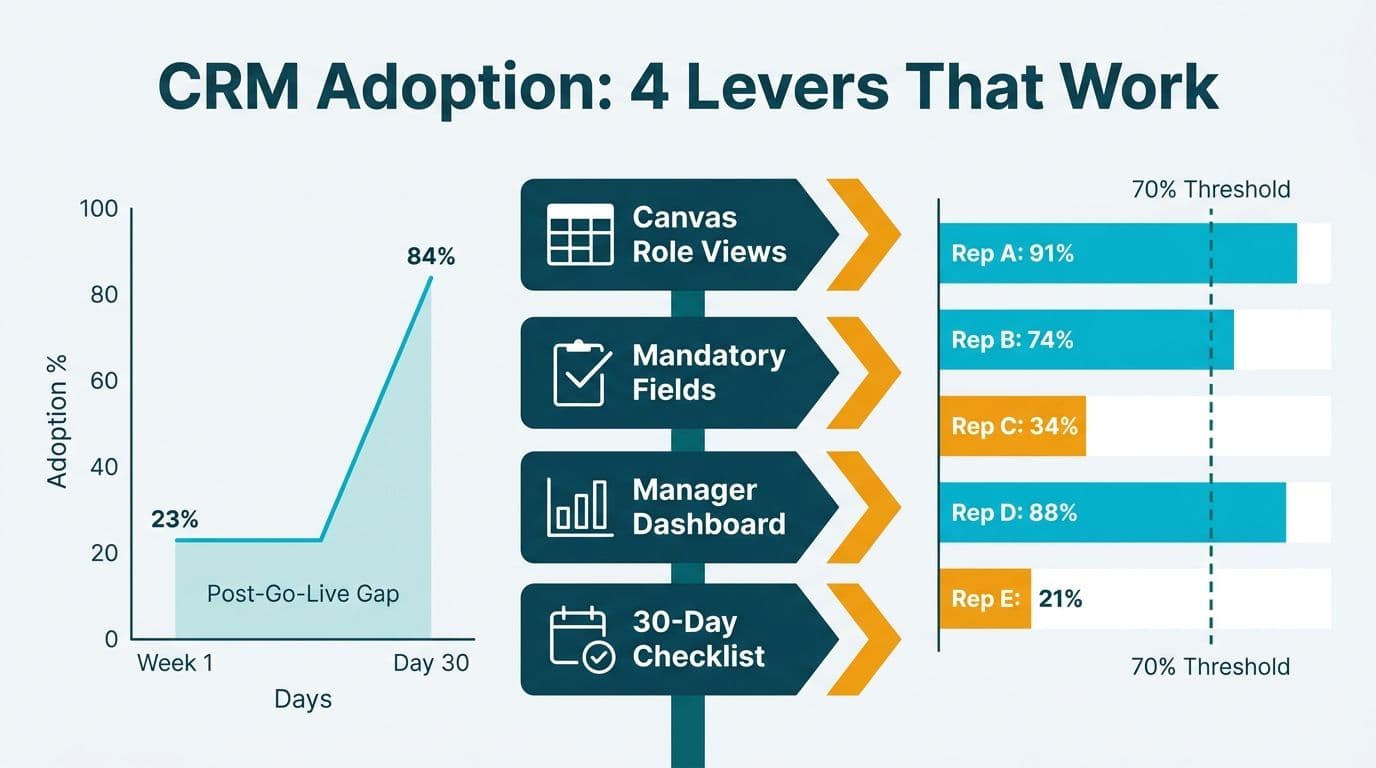
The most reliable Zoho CRM user adoption strategies for sales teams address the post-go-live gap through role-specific Canvas views, mandatory-field enforcement on a minimum viable data set, and manager-visible dashboards that make non-adoption visible to leadership. Paired with a structured 30-day habit-formation checklist drawn from SMB implementation practice, these four levers convert a system that reps tolerate into one they actively use to move deals.
Key Takeaways
Canvas role views give each sales persona a purpose-built screen, cutting the cognitive load that kills daily CRM use.
Mandatory fields enforce minimum viable data entry at the deal level, protecting forecast accuracy from day one.
Manager dashboards surface who is logging activity and who is not, turning adoption into a measurable team performance metric.
A 30-day checklist builds micro-habits that become automatic by week five, long before management attention fades.
Healthcare and financial services teams in the US, UK, and Canada can tie mandatory fields directly to HIPAA, GDPR, and PIPEDA requirements, embedding compliance into the adoption habit itself.
What Is the Post-Go-Live Adoption Gap in Zoho CRM?
The post-go-live adoption gap is the period - typically the first 60 to 90 days after launch - when CRM usage falls sharply from go-live enthusiasm to a fraction of the licensed user base. Sales reps revert to spreadsheets, personal email threads, and notebooks because the system has not yet been configured around their actual workflow. Across SMB and mid-market Zoho deployments, active usage rates typically fall below 35% of licensed seats within the first 60 days without structured intervention (as of 2026) — meaning most organizations are paying for capacity their teams are not using.
Working with a Zoho consulting services partner in the first 30 days post-launch significantly compresses this gap, because the right configuration adjustments are made while usage data is still fresh and habits are still forming.
For teams still in the planning phase, the Zoho CRM implementation checklist: phase-by-phase guide covers the full setup sequence before go-live. This article picks up where that checklist ends.
How Do Canvas Role Views Drive Zoho CRM User Adoption?
Canvas Designer - Zoho CRM's native record layout builder - allows administrators to create entirely different record views for different sales roles, all pointing to the same underlying data. A business development rep qualifying inbound leads does not need to see the same fields as a senior account executive closing a six-month enterprise contract. When each persona sees only what is relevant to their stage, adoption friction drops immediately.
Map Workflows Before Building Layouts
Before opening Canvas Designer, document the three to five data points each sales role checks at every pipeline stage. A US healthcare SaaS team selling to hospital systems needs HIPAA-relevant fields - BAA status, authorized contact, covered entity type - visible on every contact record without scrolling. A UK fintech team with GDPR obligations needs lawful basis for processing and consent timestamp accessible on the lead view from the first interaction. Embedding compliance requirements at the layout level removes the "fill it in later" pattern that corrupts audit records and surfaces as a gap during regulatory review.
Use Role-Based Layout Assignment
Zoho CRM's Canvas layouts can be assigned per profile, not just per module (as documented in Zoho CRM Canvas Designer Help, 2026). A sales manager's view can expose pipeline aging and forecast roll-up data that are hidden from individual contributors, removing noise for reps while giving leadership the full picture within the same system.
Treat the First Canvas Version as a Prototype
During week two of the post-go-live period, pull usage logs from the CRM audit trail and identify which fields are consistently left blank. Fields with high skip rates are either positioned incorrectly or irrelevant to that role's actual workflow. Iterate the layout based on observed behavior, not on the assumptions made during requirements gathering.
For teams looking to extend customization beyond CRM records, see what Zoho Creator is used for - its no-code app layer connects Zoho CRM data to external business processes without requiring developer resources.
How Does Mandatory-Field Enforcement Improve Forecast Accuracy?
Mandatory fields are the most effective lever for protecting forecast accuracy and building the data-entry habit at the point of sale - but only when applied selectively. Making every field mandatory creates compliance rebellion. Making the wrong fields mandatory creates garbage data. The correct approach is to define the minimum viable data set (MVDS): the smallest number of fields that makes a record useful for forecasting, compliance, and follow-up.
MVDS candidates for a typical mid-market B2B sales team:
| Field | Module | Purpose |
|---|---|---|
| Deal Name + Account | Deals | Basic traceability |
| Close Date + Stage | Deals | Forecast accuracy |
| Deal Value | Deals | Pipeline reporting |
| Lead Source | Deals / Leads | Marketing attribution |
| Next Scheduled Activity | Deals | Prevent deal stagnation |
| Consent Type | Leads | GDPR / PIPEDA compliance |
| BAA Status | Contacts | HIPAA compliance (US healthcare) |
Zoho CRM supports mandatory fields at the module level through field properties, and at the workflow level through validation rules (as documented in Zoho CRM Validation Rules Help, 2026). Workflow-level rules are more powerful because they are conditional: requiring a "Loss Reason" field only when a deal moves to "Closed Lost" prevents the friction of enforcing that field on every record from day one - a common configuration mistake that generates rep resistance before habits have formed.
A Canadian financial services firm subject to PIPEDA should enforce "Consent Date" and "Purpose of Processing" at lead creation. This builds the required regulatory audit trail into the rep's normal workflow rather than handling it as a separate compliance step - critical for firms in wealth management, insurance, and mortgage brokerage operating under federal private-sector data rules.
What Manager-Visible Dashboards Accelerate Team Habit Formation?
A manager who cannot see which reps are logging activities, updating deal stages, and meeting MVDS standards cannot coach to adoption. Manager-visible dashboards convert CRM adoption from an individual behavior into a visible team performance metric that can be reviewed, recognized, and coached on a weekly cadence.
Four dashboards every sales manager needs in the first 30 days:
| Dashboard | Key Metrics | Why It Matters |
|---|---|---|
| Activity Leaderboard | Calls, emails, meetings logged per rep this week | Shows real-time CRM use vs. retroactive logging |
| Pipeline Hygiene Score | Deals with missing MVDS fields, by owner | Catches data gaps before forecast review |
| Stage Velocity Report | Average days per stage vs. benchmark | Surfaces stuck deals before they go silent |
| Adoption Rate Tracker | Records updated in last 7 days / total assigned | Single adoption compliance metric for weekly review |
Build these dashboards in Zoho CRM's Analytics module and set them as the manager's default opening view. When managers open their weekly pipeline review inside Zoho CRM rather than in a downloaded spreadsheet, they model the behavior they expect from their team.
The accountability loop: Conduct the weekly pipeline review entirely inside Zoho CRM with the manager sharing their screen. Reps with incomplete records are coached in that moment, not in a separate training session scheduled weeks later. This removes the mental separation between "doing my job" and "updating the CRM" - the distinction that kills adoption across SMB and mid-market sales organizations alike.
For teams evaluating how Zoho CRM's management reporting compares to enterprise alternatives at this scale, the Zoho CRM vs Salesforce comparison covers where each platform's analytics capabilities diverge for mid-market buyers.
How Do You Build a 30-Day Zoho CRM Habit-Formation Checklist?
Behavioral science on workplace habits consistently shows that new tool behaviors require daily reinforcement for three to four weeks before becoming automatic. A structured 30-day checklist replaces reliance on willpower with a repeatable system that any sales manager can run without external support.
Week 1 - Configuration lock-in and baseline:
Day 1: All user profiles activated; Canvas layouts assigned by role
Day 2: MVDS mandatory fields enforced in the live environment
Day 3: Manager dashboards deployed; weekly review cadence scheduled
Days 4-5: Each rep completes a live deal entry with a manager present
Day 7: First adoption rate report pulled and baseline recorded
Week 2 - Coaching and layout adjustment:
Day 8: Canvas layout feedback session (15 minutes per team)
Day 10: Identify the top three missing-field patterns from audit logs
Day 12: Adjust layouts based on observed gaps, not original assumptions
Day 14: Second weekly pipeline review conducted inside Zoho CRM
Week 3 - Habit reinforcement:
Day 15: Activity notifications activated (deal stage change triggers next scheduled task)
Day 17: Mobile app configuration completed for field-based reps
Day 19: Loss reason validation rule activated for "Closed Lost" stage transitions
Day 21: Adoption scores shared with team; public recognition for top updaters
Week 4 - Stabilization:
Day 22: Canvas layouts frozen for 30 days (no layout changes during habit consolidation period)
Day 24: First automation deployed (follow-up task auto-created on deal stage advance)
Day 28: Full adoption report vs. day-7 baseline
Day 30: Formal review; targeted coaching plan for any rep below the adoption threshold
If your team completed a thorough pre-launch data preparation process, the guide to migrating to Zoho CRM: data import, deduplication, and validation explains how a clean data foundation at go-live allows the 30-day checklist to focus entirely on behavioral reinforcement rather than retroactive data repair.
Zoho CRM Adoption Strategies for Regulated Industries
Healthcare and financial services sales teams face a specific adoption challenge: compliance requirements add fields and processes that feel bureaucratic to reps accustomed to lighter-weight tools. The solution is to configure compliance into the natural deal progression rather than treating it as a separate audit exercise bolted onto the side of the CRM.
US healthcare sales teams: A US health technology company selling to hospital systems must track deal-level HIPAA obligations - BAA requirements, covered entity type, and authorized representative status. Rather than building a separate compliance tab that reps skip, configure HIPAA-relevant fields to appear at the deal stages where they become actionable. BAA status surfaces at the proposal stage; authorized contact appears at the contract stage. Compliance becomes a closing step, not an administrative afterthought, and adoption of those fields rises accordingly.
UK and EU-regulated teams: A UK fintech firm processing personal data for sales prospecting must record a lawful basis for processing under UK GDPR (as outlined in ICO guidance, 2026). Zoho CRM's consent management fields, surfaced through a GDPR-specific Canvas layout, allow reps to log consent date and processing basis at the moment of lead entry - making the compliance record automatic rather than a retroactive audit exercise conducted under pressure.
Canadian financial services teams: Under PIPEDA, organizations collecting personal information for commercial purposes must demonstrate consent or a recognized legitimate interest. For a Canadian wealth management firm or insurance brokerage, a mandatory "Consent Type" field on the Lead module - enforced at record creation - builds the required audit trail without requiring reps to understand the regulatory framework behind the requirement. The rep logs the field; the compliance team has what they need for a PIPEDA review.
For organizations managing compliance across a broader reporting stack, the GDPR-compliant SaaS financial reporting checklist covers the BI layer above CRM data where cross-border compliance requirements compound.
Common Zoho CRM Adoption Blockers and How to Remove Them
Even well-configured Zoho CRM deployments encounter predictable adoption blockers. Recognizing them in advance allows leadership to intervene before they harden into organizational resistance that no configuration change can undo.
The "I'll update it later" habit: Retroactive logging creates data lag and trains reps to treat CRM entry as administrative overhead rather than a selling tool. The fastest fix is social rather than technical: when a manager asks "is this in the CRM?" within 24 hours of a customer interaction, the update habit forms faster than any system-level enforcement rule can produce.
The overconfiguration spiral: Implementation teams sometimes add every possible field "just in case," creating record screens that take longer to complete than the meeting they are documenting. If a field has been blank on more than 50% of records after 14 days, remove it from the mandatory set or make it optional. Fewer required fields with consistent completion beats comprehensive fields with sporadic data every time.
The mobile adoption cliff: Field-based sales teams - common in US healthcare device sales, UK insurance, and Canadian financial advisory - complete much of their selling activity away from a desk. If the Zoho CRM mobile experience replicates the desktop Canvas layout without separate optimization for smaller screens and on-the-go entry, adoption collapses for these users. In one UK insurance brokerage deployment, building a mobile-specific Canvas layout with five fields instead of the desktop's fourteen reduced field-level skip rates by over 60% within the first 30 days. Zoho CRM supports independent mobile layout configuration, and this should be treated as a parallel workstream within the 30-day period, not a phase-two item.
For teams assessing whether their current Zoho plan includes the advanced Canvas Designer and validation rule capabilities described throughout this article, the Zoho CRM free plan limitations vs. paid breakdown clarifies which features require a paid tier.
---
About Lets Viz: Lets Viz is a data analytics and CRM consulting firm serving US healthcare organizations, UK fintech companies, Canadian manufacturing businesses, and global SaaS teams since 2020. With a 5.0 Clutch rating, the team specializes in Zoho CRM post-go-live adoption programs, implementation delivery, and regulated-industry data governance across North America and Europe.
Ready to close your sales team's adoption gap? A structured engagement with Zoho consulting services delivers a configured, habit-ready Zoho CRM environment within 30 days. Or Try Zoho CRM free and explore the Canvas Designer and workflow configuration tools firsthand.


