Data Lakehouse Architecture Best Practices: The Fabric Playbook
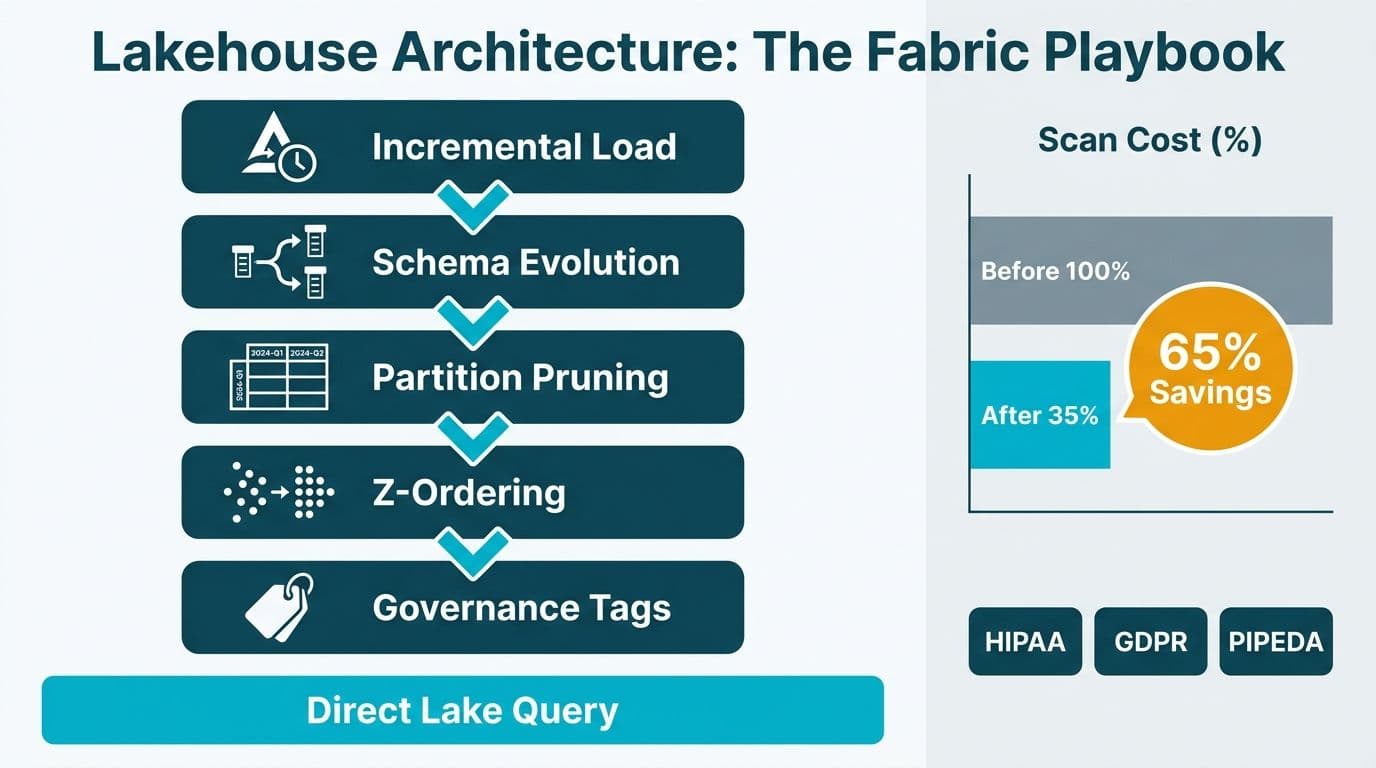
Data lakehouse architecture best practices center on five disciplines: partition pruning to reduce scan cost, Delta Z-ordering to cluster related rows on disk, schema evolution to absorb upstream changes without breaking pipelines, governance tagging for regulatory compliance, and incremental load patterns to minimize compute usage. In Microsoft Fabric, these same practices unlock Direct Lake query performance and keep your data auditable under HIPAA, GDPR, and PIPEDA.
Key Takeaways
- Partition on the column your queries filter most - date, region, or entity - and scan savings compound as tables grow beyond a few hundred gigabytes.
- Delta Z-ordering rewrites row groups to co-locate related records; run it after large batch loads, not after every micro-batch ingestion.
- Schema evolution should be explicit and version-controlled - Fabric Lakehouse supports Delta's merge schema option, but column drops need a controlled migration path.
- Governance tagging at the table and column level before reports are built saves weeks of retroactive remediation when a HIPAA or GDPR audit arrives.
- Incremental load patterns cut Fabric capacity consumption by processing only changed rows, which directly lowers your monthly F-SKU spend.
How Does Partition Pruning Reduce Query Cost in a Fabric Lakehouse?
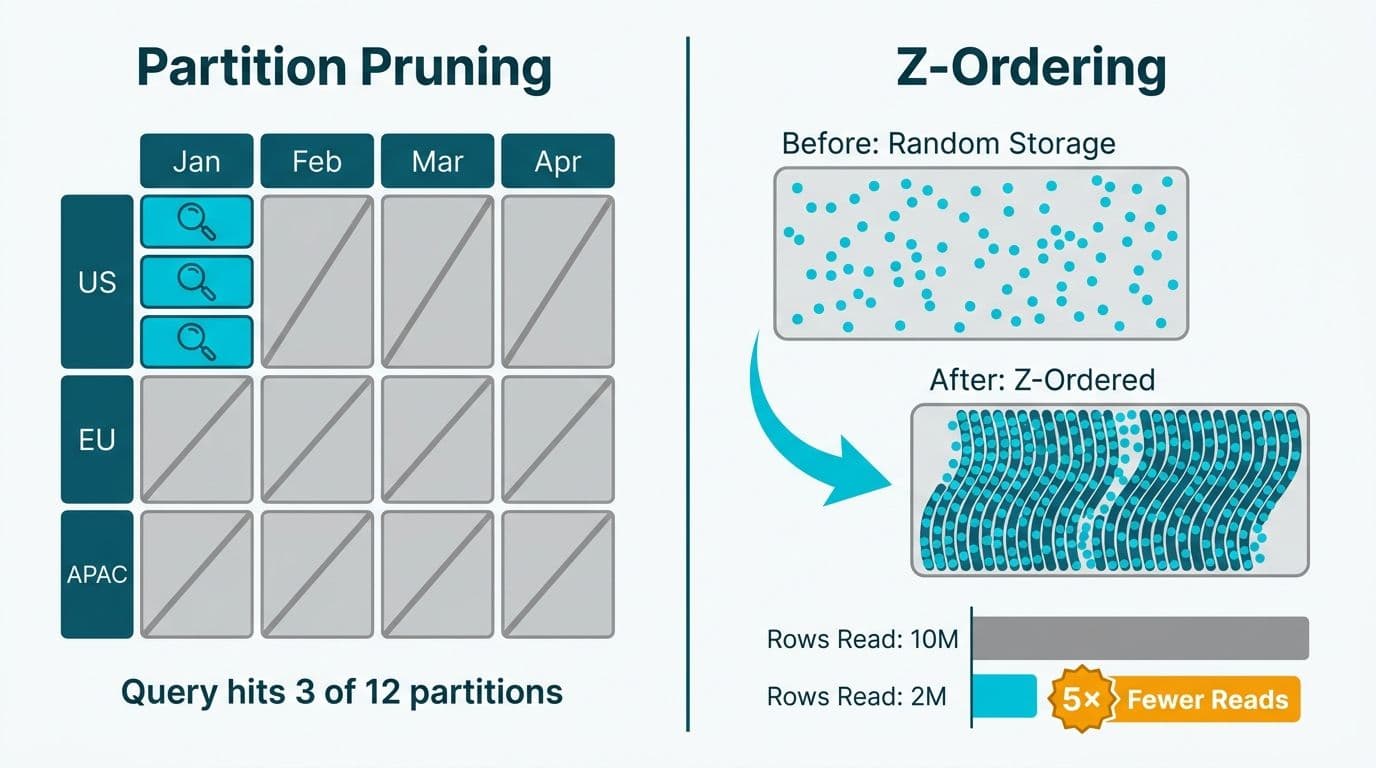
Partition pruning is the single highest-leverage storage optimization in a Delta-based lakehouse. When a table is partitioned by a column - typically a date field like `ingestion_date` or a categorical column like `region` - the query engine skips entire file directories that fall outside the filter predicate, reading only the relevant partitions.
In Microsoft Fabric, partition pruning operates across both Spark notebooks and the SQL analytics endpoint. A Fabric Lakehouse stores Delta tables as Parquet files in OneLake; when a Power BI report with a date slicer queries the SQL endpoint, the engine reads the partition metadata in the Delta transaction log first and skips non-matching directories entirely.
Partitioning guidelines for mid-market teams:
- Partition date-heavy fact tables by year and month (`year=2025/month=08`) rather than by day to avoid creating thousands of small files that degrade scan performance.
- For healthcare claims or financial transaction tables in scope for HIPAA or SOX reporting, add a secondary partition by `source_system` to isolate data lineage and simplify audit extracts.
- Avoid partitioning on high-cardinality columns such as patient ID or transaction ID - this creates a small files problem that degrades both write and read performance.
A UK fintech firm processing daily FX settlement files could partition by `settlement_date` and `currency_pair`. Queries scoped to a single week would touch a small fraction of total files rather than scanning the entire dataset - a meaningful difference at reporting scale under GDPR data minimization constraints.
Our Power BI and Fabric consulting engagements consistently show that fixing partition strategy before tuning DAX or report design yields faster and more durable performance gains.
What Is Delta Z-Ordering and When Should You Run It?
Z-ordering is a multi-dimensional data-skipping technique built into the Delta Lake protocol. Unlike partitioning, which organizes files at the directory level, Z-ordering reorganizes the physical layout of rows within Parquet files so that rows sharing common values for a target column cluster together on disk. The query engine then uses column-level statistics in the Delta transaction log to skip entire row groups during a scan.
In Fabric Lakehouse, you apply Z-ordering through a Spark notebook using the `OPTIMIZE ... ZORDER BY` command, as documented in Microsoft Fabric documentation (2025). The column you Z-order on should be your most selective non-partition filter predicate - for example, `claim_id` in a healthcare claims table partitioned by month, or `account_number` in a banking ledger partitioned by year.
Practical rules for Z-ordering:
- Run `OPTIMIZE` with Z-ordering after large batch loads such as a nightly ETL, not after each micro-batch. The file rewrite is compute-intensive.
- Z-order on one to three columns maximum. Additional columns yield diminishing returns and increase rewrite cost.
- A Canadian financial services firm processing PIPEDA-governed customer records could Z-order on `customer_province` and `product_type` to accelerate provincial regulatory extracts without full table scans.
- Combine `OPTIMIZE` with `VACUUM` to remove obsolete file versions. Microsoft recommends a minimum retention period of seven days to preserve time-travel capability (Microsoft Fabric documentation, 2025).
For a broader look at how these storage optimizations fit the Fabric platform, see Microsoft Fabric Architecture Components Explained.
How Do You Implement Schema Evolution Without Breaking Downstream Pipelines?
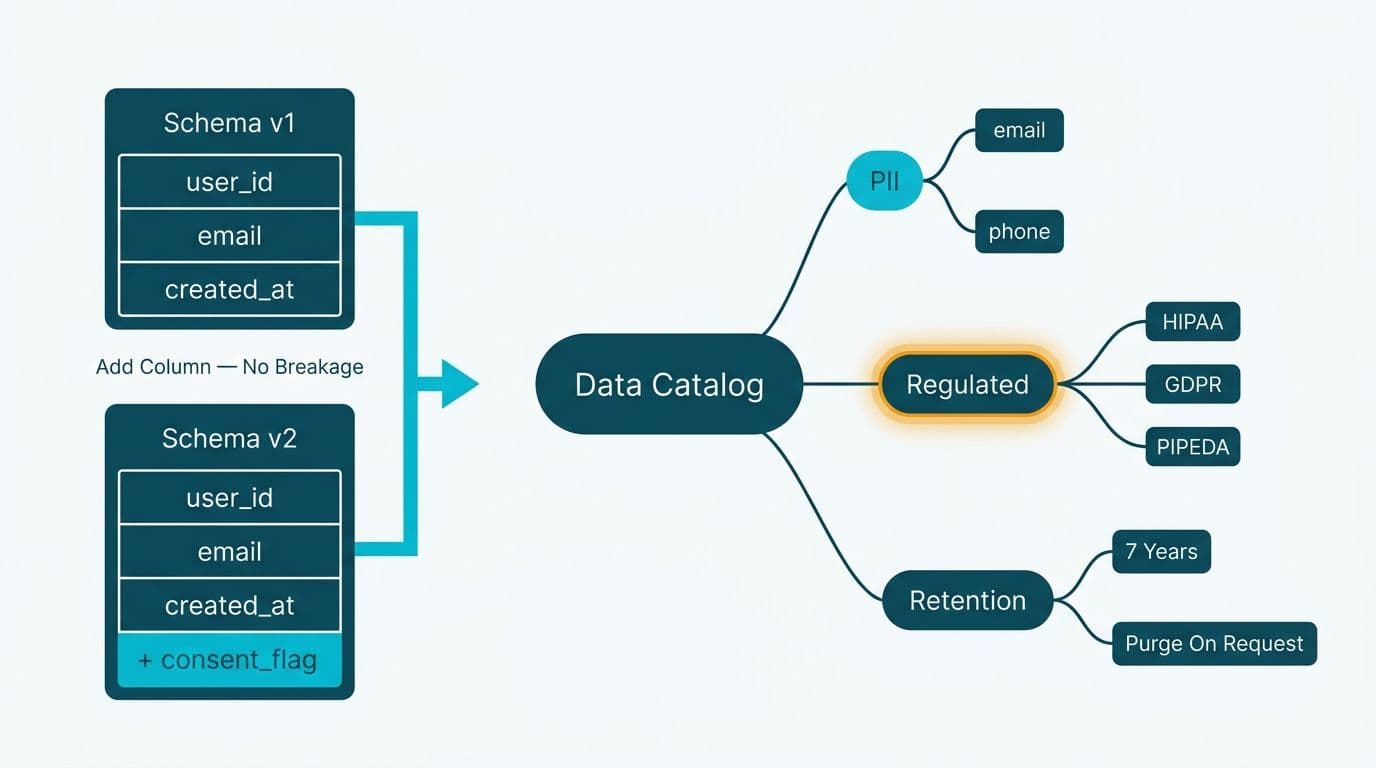
Schema changes are inevitable. Upstream systems add columns, rename fields, or change data types as products evolve. Schema evolution in Delta Lake lets your lakehouse absorb these changes gracefully - but only if you define a policy before the first production load.
Fabric Lakehouse inherits Delta Lake's main schema-handling modes:
- Schema enforcement (the default): rejects writes that introduce new or mismatched columns, protecting existing downstream consumers from silent breakage.
- Merge schema (the `mergeSchema` write option in Spark): automatically adds new columns from an incoming DataFrame to the Delta table definition. Power BI Direct Lake semantic models pick up the new columns on the next model refresh.
- Schema overwrite (`overwriteSchema`): replaces the entire table schema. Gate this behind a change-control ticket in any HIPAA- or GDPR-regulated environment.
Use merge schema for additive changes and require a controlled migration notebook for breaking changes such as column renames or type widening. Store a schema version log as a small Delta table in OneLake with columns for `table_name`, `version`, `change_type`, `change_date`, and `owner`. For Canadian organizations subject to PIPEDA, this log also serves as the data-element inventory required for breach notification readiness.
A US SaaS finance team migrating ERP exports to Fabric Lakehouse can apply merge schema to absorb the quarterly column additions that vendors routinely ship in patch releases - avoiding the pipeline failures that most often delay financial close reporting.
What Does Governance Tagging Look Like for HIPAA, GDPR, and PIPEDA?
Governance tagging means attaching sensitivity metadata - classification labels, data owner, retention period, and regulation scope - to tables and columns at the storage layer before any BI tool consumes them. In Fabric, Microsoft Purview is the native governance layer; it integrates directly with OneLake to apply sensitivity labels and data classifications (Microsoft Purview documentation, 2025).
A practical tagging taxonomy for regulated industries:
| Tag | Values | Applies To |
|---|---|---|
| Sensitivity | Public / Internal / Confidential / Restricted | All columns |
| Regulation Scope | HIPAA / GDPR / PIPEDA / SOX / None | Columns containing PII or PHI |
| Data Owner | Team or individual responsible | Table level |
| Retention Class | 7yr-Financial / 6yr-HIPAA / 3yr-Operational | Table level |
| PII Flag | True / False | Column level |
For US healthcare organizations, HIPAA's Minimum Necessary standard requires that BI reports expose only the PHI fields needed for a specific clinical or operational purpose. Tagging columns with a HIPAA scope label in Purview enables column-level security policies in Power BI semantic models to enforce this automatically.
For UK and EU organizations under GDPR, sensitivity labels feed into Microsoft's data subject access request workflows and help demonstrate Article 30 record-of-processing obligations. For Canadian organizations under PIPEDA, the same column-level tags support the accountability principle and breach-reporting obligations under the Breach of Security Safeguards Regulations.
The governance structure you build at the lakehouse layer extends directly into Power BI. Our Power BI Governance Best Practices: 12-Point Checklist explains how sensitivity labels propagate from Purview into semantic models and what to verify before a compliance audit.
Fabric Lakehouse vs Fabric Data Warehouse: When to Use Each?
This is among the most common architecture decisions for teams migrating to Microsoft Fabric. The choice affects query performance, tooling flexibility, and per-capacity spend.
| Dimension | Fabric Lakehouse | Fabric Data Warehouse |
|---|---|---|
| Primary format | Delta Parquet (open format, OneLake) | SQL tables (Fabric-proprietary storage) |
| Query interface | SQL analytics endpoint + Spark | T-SQL only |
| Schema handling | Flexible (merge schema) | Strict DDL |
| Streaming ingest | Native via Spark or Eventstream | Limited |
| Power BI connection | Direct Lake (fastest) or DirectQuery | DirectQuery or Import |
| Best for | Raw + curated pipelines, ML, mixed workloads | Pure SQL analytics, stable star schema |
| Governance layer | Purview + Delta transaction log | Purview + SQL object permissions |
Choose a Fabric Lakehouse when your team includes Python or Spark engineers, when you handle streaming or semi-structured data, or when you need to preserve raw data for machine learning. Choose a Fabric Data Warehouse when your primary consumers are SQL-fluent analysts working with a stable, well-defined dimensional model.
Many mid-market organizations use both: a Lakehouse for ingestion, transformation, and Gold-layer storage, with Power BI connecting to the Gold layer via Direct Lake mode. For a worked finance-analytics example, see Fabric Lakehouse Finance Analytics: Power BI Reporting for FP&A.
How Does Power BI Direct Lake Mode Work with a Fabric Lakehouse?
Power BI Direct Lake mode is the primary reason to build your BI serving layer on a Fabric Lakehouse. Unlike DirectQuery, which issues SQL to the SQL analytics endpoint at query time, and Import mode, which copies data into the Power BI semantic model on a scheduled refresh, Direct Lake reads Parquet files directly from OneLake using a memory-mapped technique Microsoft calls transcoding (Microsoft Fabric documentation, 2025). This delivers near-real-time data freshness with query performance that approaches Import mode.
Power BI Direct Lake vs DirectQuery vs Import mode:
| Mode | Data Freshness | Query Speed | Capacity Impact |
|---|---|---|---|
| Import | Scheduled refresh lag | Fastest - in-memory VertiPaq engine | High: data stored inside the model |
| DirectQuery | Real-time | Slowest - per-query SQL to source | Low |
| Direct Lake | Near real-time via Delta transaction log | Fast - direct Parquet read from OneLake | Medium |
Direct Lake falls back to DirectQuery automatically when a query exceeds the in-memory framing limits for the current F-SKU, as documented in Microsoft Fabric capacity limits (2025). Teams should monitor the Fabric Capacity Metrics app to catch frequent fallbacks - they signal that the SKU is undersized or the semantic model needs partition trimming.
For mid-market teams evaluating Fabric capacity spend, our Microsoft Fabric Pricing: F-SKU vs P-SKU Capacity Cost Guide explains how Direct Lake mode changes the capacity math compared to traditional Import-mode workloads.
How Do Incremental Load Patterns Fit Into Data Lakehouse Architecture Best Practices?
Incremental load is an architectural requirement once source tables exceed a few million rows. Full-load pipelines reprocess unchanged data on every run, consuming Fabric capacity units that translate directly to monthly cost.
Two primary incremental patterns in Fabric:
- Watermark-based ingestion: track the maximum value of an `updated_at` timestamp after each load. On the next run, select only rows where `updated_at > last_watermark`. Simple to implement in Dataflow Gen2 or a Spark notebook, but requires reliable source-system timestamps.
- Change data capture (CDC): subscribe to the source database's change stream - SQL Server CDC, Oracle LogMiner, or Debezium for open-source databases. More complex to configure, but captures hard-deletes and handles tables without an updated-at column.
In Fabric, watermark state lives in a small Delta metadata table in the same Lakehouse. Each pipeline run reads the watermark, ingests the delta, applies a `MERGE` into the target Delta table, and writes the new watermark. This pattern works equally well for a US healthcare organization refreshing daily claims data or a UK financial firm processing intraday settlement records.
Teams migrating from Azure Data Lake Storage to Microsoft Fabric Lakehouse can mount existing ADLS Gen2 containers as OneLake shortcuts, preserving Delta tables and watermark state without a full data copy - significantly reducing migration risk and cutover complexity.
Microsoft Fabric implementation cost and timeline for mid-market teams:
A typical 50-100 seat mid-market Fabric Lakehouse rollout follows three phases: foundation and Lakehouse setup in weeks one through four, Gold layer and semantic model build in weeks five through eight, and governance configuration, testing, and user training in weeks nine through twelve. Production capacity typically starts at F64, as noted in Microsoft Fabric capacity planning documentation (2025). For a detailed cost breakdown by SKU, see our Microsoft Fabric Pricing: F-SKU vs P-SKU Capacity Cost Guide.
---
About Lets Viz: Lets Viz is a data analytics consultancy serving US healthcare organizations, UK fintech firms, Canadian manufacturing companies, and global SaaS businesses since 2020. Our team holds Microsoft Fabric and Power BI certifications and maintains a 5.0 Clutch rating. We specialize in lakehouse architecture, governed BI deployments, and end-to-end Fabric implementations that meet HIPAA, GDPR, and PIPEDA requirements.
If your team is planning a Fabric Lakehouse build, evaluating Direct Lake readiness, or needs an architecture review before sizing your F-SKU, our Power BI and Fabric consulting practice provides scoped assessments, managed builds, and ongoing optimization support.


