Zoho CRM Free Plan Limitations vs Paid: 2026 Breakdown
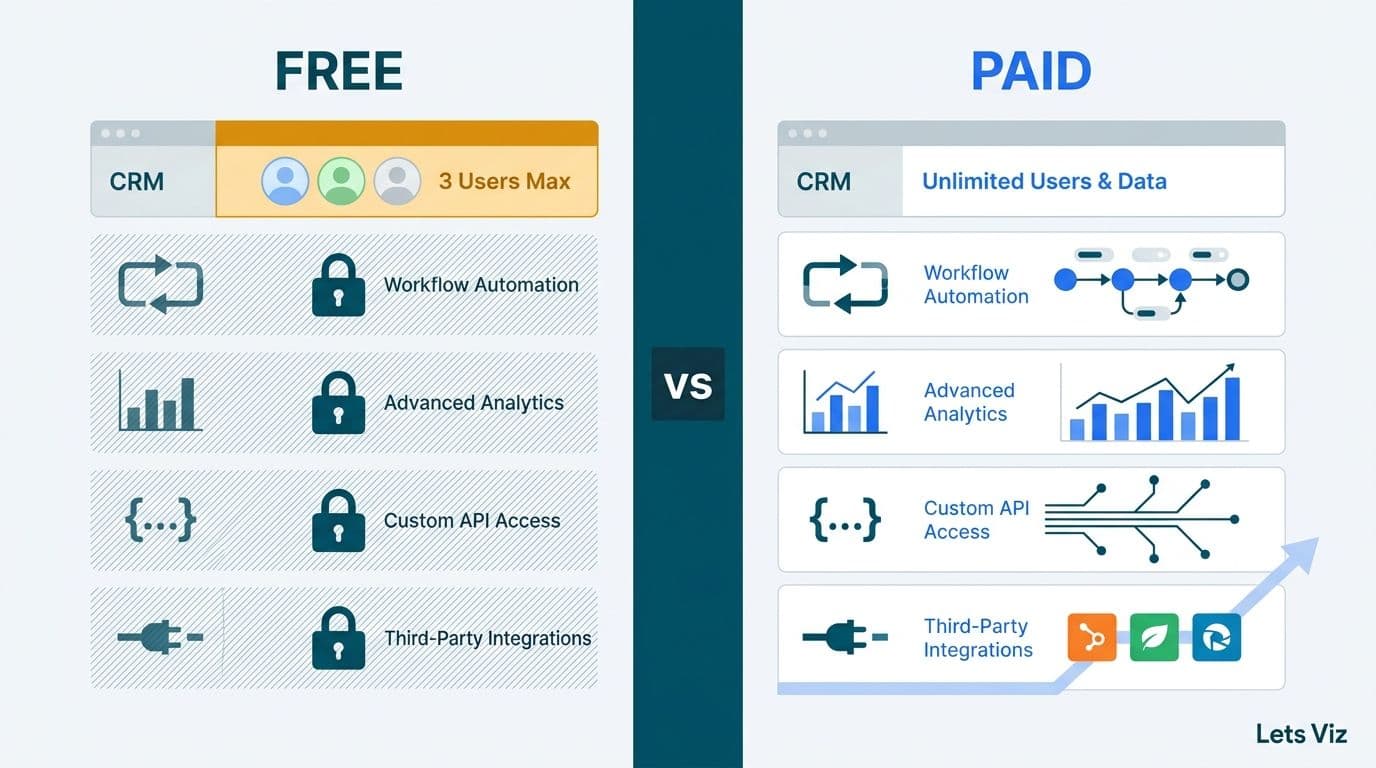
Zoho CRM's free plan supports up to three users and covers basic contact and deal management, but it blocks workflow automations, custom reports, API access, and most third-party integrations - the features that mid-market sales and operations teams depend on. For growing teams in healthcare, finance, and professional services, these free plan limitations typically force an upgrade decision within 6 to 12 months of adoption.
Key Takeaways
The free plan enforces a hard 3-user cap with no option to add seats without upgrading the entire organisation.
Workflow automations are completely unavailable on the free tier - they begin at the Standard plan.
Custom reports and dashboards are locked behind paid tiers, leaving teams reliant on manual spreadsheets for pipeline visibility.
Most third-party integrations - including accounting platforms, marketing automation tools, and EHR systems - require at minimum the Professional plan and full API access.
Compliance-grade controls for HIPAA (US healthcare), GDPR (UK and EU), and PIPEDA (Canadian organisations) are only fully available at the Enterprise tier.
What Does Zoho CRM's Free Plan Actually Include?
The free plan is a permanent no-cost tier, not a time-limited trial. It includes basic contact, lead, and deal management for up to three users, along with task scheduling, event tracking, a single pipeline view, and kanban-style deal boards. Organisational storage is capped at 1 GB.
What the free plan excludes is the operational infrastructure that mid-market teams build around: no bulk email functionality, no workflow automation rules, no API access, no territory management, no custom modules, and no analytics beyond five pre-configured standard reports that cannot be modified or scheduled.
For a two-person team piloting Zoho CRM before committing to a wider rollout, the free plan is a reasonable evaluation environment. For a US SaaS finance team managing 300-plus accounts and maintaining individual activity logs for SOC 2 audit readiness, the free plan fails the minimum viable threshold before the first quarter closes.
The free plan also withholds email analytics entirely, meaning sales managers have no visibility into open rates, reply rates, or click-through performance from within the CRM. Teams that rely on email sequences to advance deals through the pipeline are operating without engagement data on the free tier.
If you are evaluating Zoho CRM as part of a broader platform decision that includes finance, HR, or project management tools, What Is Zoho One and Is It Worth It for Small Business? covers how the bundled suite compares to individual plan purchases and when the all-in-one approach delivers better unit economics.
Where Do Zoho CRM Free Plan Limitations Break Growing Teams?
The zoho crm free plan limitations that disrupt mid-market operations fall into four hard ceilings: user capacity, automation, reporting, and integrations. Each represents a structural constraint rather than a soft limit workable through process changes.
Across engagements managed through our Zoho consulting services practice, we consistently observe the same adoption arc: a company starts on the free plan to minimise initial commitment, grows past three active users within six months, and discovers that scaling requires a full plan upgrade - with no incremental seat-addition path available.
User Cap: The First Operational Wall
The free plan enforces a hard 3-user ceiling. There is no option to purchase an additional seat without upgrading the entire organisation to a paid tier. When a fourth rep joins the team, the shared-login workaround - three accounts divided among four or five users - creates accountability gaps, pollutes the activity timeline, and breaks deal ownership at the pipeline level.
For regulated organisations, the problem is disqualifying. HIPAA (US healthcare), GDPR (UK and EU companies), and PIPEDA (Canadian organisations) each require individual user traceability in systems that store client or patient contact data. A shared-login arrangement does not meet that standard under any reasonable interpretation of those frameworks.
Workflow Automations: The Productivity Ceiling
The free plan provides zero workflow automation rules across all modules. Standard introduces one rule per module; Professional adds five; Enterprise raises that ceiling to ten per module and unlocks Blueprints - structured process flows with mandatory completion gates at each stage.
For a UK fintech firm running a multi-step client onboarding sequence, manually triggering follow-up tasks, status updates, and internal notifications across a five-stage process adds 45 to 90 minutes of administrative overhead per rep per day. At 10 reps, that is 7.5 to 15 hours of unproductive daily effort - work that a Standard or Professional plan eliminates on day one of automation going live.
The per-user cost delta between free and Standard ($14/user/month billed annually) recovers within the first two weeks for any team where automation removes more than 30 minutes of daily manual effort per rep. For a 10-rep team at a blended $35/hour rate, recapturing 30 minutes per rep per day yields approximately $76,650 in annual labor savings against a Standard plan cost of $16,800 for that headcount — a 4.6x return before accounting for revenue recovered from faster deal progression.
Custom Reports and Dashboards: The Visibility Gap
Free plan users are limited to five pre-built standard reports with no ability to create custom definitions, build cross-module dashboards, filter by custom fields, or schedule report delivery by email. A sales manager on the free tier cannot construct a pipeline-by-territory view, a conversion funnel by lead source, a revenue forecast by product line, or a time-to-close analysis by rep.
The five-report ceiling means these foundational revenue-review views are simply unavailable — not limited, but absent. According to Future Market Insights (as of 2026), the AI consulting services market is expanding from USD 13.4 billion toward USD 90.99 billion by 2035, driven substantially by demand for intelligent data pipelines and CRM-connected analytics. That downstream analytics investment produces no usable output when the CRM feeding it cannot generate segmented reports — teams that attempt to layer BI tooling on top of a free-tier CRM consistently find themselves enriching incomplete, manually curated data rather than a clean system-of-record pipeline.
A Canadian manufacturing company we worked with was building weekly pipeline forecasts entirely in spreadsheets because the free plan blocked cross-module data joins. Moving to the Enterprise tier and enabling Canvas custom views recovered approximately four hours of finance analyst time per week previously spent on manual data extraction and formatting.
For a closer look at what those advanced reporting interfaces look like in practice, What Is Zoho CRM Canvas and How Does It Work? explains how Canvas replaces default list views with fully customisable, role-specific interfaces.
Integrations: The Revenue-System Disconnect
On the free plan, Zoho CRM connects natively only to other Zoho applications, and even those connections carry constrained field-mapping capability. API access, webhooks, and middleware integrations are entirely unavailable on the free tier.
For a US healthcare revenue cycle team, this means the CRM cannot sync with EHR systems, insurance verification platforms, or HIPAA-compliant communication tools without upgrading to at minimum the Professional plan. For a finance team in any geography, it means the CRM operates in isolation from accounting software, payment processors, and financial data feeds - creating exactly the data silo problem that CRM adoption was intended to eliminate.
Zoho CRM Free vs Paid: Side-by-Side Feature Comparison
The table below maps key capability categories to their availability across Zoho CRM's four main tiers as of 2026. Pricing is per user per month billed annually; month-to-month billing carries an approximately 20-25% premium.
| Feature | Free | Standard ($14/user/mo) | Professional ($23/user/mo) | Enterprise ($40/user/mo) |
|---|---|---|---|---|
| Max users | 3 | Unlimited | Unlimited | Unlimited |
| Workflow automation rules | 0 | 1 per module | 5 per module | 10 per module |
| Blueprints (process flows) | No | No | Yes | Yes |
| Custom reports | No | Yes (basic) | Yes | Yes (advanced) |
| Custom dashboards | No | Yes | Yes | Yes + Canvas |
| API access | No | Limited | Yes (full) | Yes (full) |
| Webhooks | No | No | Yes | Yes |
| Territory management | No | No | No | Yes |
| Zia AI lead scoring | No | No | No | Yes |
| Email open/click analytics | No | Yes | Yes | Yes |
| Third-party integrations | Zoho apps only | Limited | Full | Full |
| HIPAA BAA available | No | No | No | Yes |
| GDPR compliance module | Basic | Standard | Standard | Advanced |
When Should a Mid-Market Team Upgrade from Free to Paid?
The upgrade decision clarifies quickly once a team identifies which operational ceiling it has hit. The clearest upgrade triggers are:
Team size reaches four users. The free plan's ceiling is absolute - a fourth active user requires a paid tier with no alternative path.
Reps are manually routing tasks and follow-ups. If each rep spends 30 or more minutes per day on work that workflow rules would automate, the Standard plan pays back its cost within the first week of automation going live.
Leadership requires pipeline reporting. Sales reviews, revenue forecasts, and territory breakdowns all depend on custom reports unavailable on the free tier.
Compliance obligations apply from day one. Any regulatory framework requiring individual user accountability and data traceability - HIPAA, GDPR, PIPEDA - makes the free plan inadequate at the point of adoption, not just after a team outgrows it.
According to Market Research Future (2026), the Healthcare Financial Analytics Market is projected to grow at an 8.58% CAGR from 2026 to 2036. Healthcare finance directors building analytics capabilities on top of CRM data are operating from a brittle foundation if that CRM data is produced by shared logins, manual entry, and zero automation. Upgrading the CRM tier is an upstream prerequisite for the analytics investment to return accurate output.
For US healthcare revenue cycle teams processing 200 or more account interactions per week, the Professional plan at $23 per user per month pays back its cost if automation eliminates 30 minutes of manual work per rep per day - a threshold most teams exceed within the first full week of workflow rules being active.
How Do Zoho CRM Workflow Rules vs Blueprints Differ on Paid Plans?
Understanding the difference between workflow rules and Blueprints is essential when choosing between the Standard, Professional, and Enterprise tiers - and this distinction is invisible on the free plan, where neither feature is available.
Workflow rules are trigger-action pairs. When a deal stage changes to "Proposal Sent," a rule automatically creates a follow-up task, updates a field value, and sends a notification. They operate on a single record, fire without user action, and are linear by design. Standard users get one rule per module; Professional gets five.
Blueprints are multi-state process maps available from the Professional plan upward. A Blueprint defines the stages a record must pass through, the conditions required to advance between states, and the mandatory actions a user must complete before progression is permitted. A Blueprint can prevent a deal from advancing to "Contract Sent" until the rep has logged a qualifying call and attached signed documentation - enforcing process compliance rather than just notifying.
This enforcement model makes Blueprints the standard choice for regulated industries. A UK fintech firm running FCA-compliant KYC onboarding through Zoho CRM used Blueprints to require document verification at each stage before any deal could progress past the qualification gate. That process discipline and associated audit trail are unavailable on the free or Standard plans.
According to Medinsight (2026), the leading themes across healthcare operations in 2026 are value-based care delivery, AI-driven clinical analytics, and payer analytics innovation - all of which require auditable, stage-gated workflows in the systems managing patient and payer relationships. A US health system we worked with reduced CMS audit preparation time by approximately 30% after implementing Blueprints to enforce mandatory documentation gates at each care coordination stage, replacing ad-hoc CRM entries with a structured, time-stamped audit trail. That process discipline is unavailable on the free or Standard plans.
For context on the cost and timeline of building workflow architecture after a plan upgrade, Zoho CRM Customization Cost for Small Business: 2026 Guide covers typical configuration scopes and engagement structures.
What Are the Compliance Implications for Healthcare and Finance Teams?
The free plan's compliance posture is inadequate for most regulated industries. There are no field-level audit logs, no IP-based access restrictions, no configurable data encryption settings, no data residency controls, and no HIPAA Business Associate Agreement available under any circumstance on the free tier.
For US healthcare organisations, the absence of a BAA means Zoho CRM on the free plan cannot legally store or process protected health information (PHI). This is a hard disqualifier for any team using CRM to manage patient contacts, referral relationships, insurance payer correspondence, or care coordination records. A BAA is available only on the Enterprise plan through a dedicated enterprise agreement with Zoho.
For UK and EU organisations under GDPR, the free plan lacks the data subject access controls, consent audit trails, processing basis documentation, and deletion request workflows that a Data Protection Officer would require before approving a CRM deployment at scale. In 2026, EU supervisory authorities have continued escalating enforcement scrutiny on customer data systems that lack documented legal bases and deletion workflows — with fines in high-profile cases reaching into the tens of millions of euros. Zoho's GDPR compliance module is accessible from the Professional plan upward and provides a structured data subject rights management interface; for most DPOs, this module represents the minimum viable compliance floor, not an optional add-on.
Canadian organisations subject to PIPEDA face equivalent requirements around consent capture, purpose limitation documentation, and breach notification readiness. The shared-login workaround common on the free plan is incompatible with PIPEDA's expectation of individual data stewardship - each user must be individually identifiable and accountable for the records they access and modify.
For a detailed look at the compliance controls typically required alongside a CRM upgrade in US healthcare settings, HIPAA-Compliant Analytics Dashboard: Best Practices Checklist covers the audit, access, and encryption standards that apply to the full analytics stack surrounding your CRM system.
How to Select the Right Zoho CRM Plan for Your Organisation
The plan selection decision follows a predictable pattern based on team size, process complexity, integration requirements, and regulatory exposure.
Free is appropriate only for pre-revenue teams or individuals running a structured product evaluation before committing. It is not a sustainable operating environment for any team with more than two active sales reps or any compliance obligation.
Standard ($14/user/month, billed annually) suits teams of 4-10 users who need basic custom reporting, email analytics, and one automation rule per module. Appropriate for low-regulated industries with linear sales processes and minimal third-party integration requirements.
Professional ($23/user/month) is the entry point for most mid-market sales operations. Full API access, webhooks, Blueprints, and five automation rules per module address the majority of requirements for professional services firms, fintech companies, and light healthcare use cases. This is the minimum viable tier for teams that need third-party integrations with accounting, marketing, or communication platforms.
Enterprise ($40/user/month) is required for territory management, Zia AI lead scoring, Canvas custom interfaces, multi-level approval workflows, and the HIPAA BAA. Most mid-market healthcare and finance organisations across the US, UK, and Canada reach this tier once full compliance scoping and advanced reporting requirements are mapped.
Ready to identify which Zoho CRM plan matches your team's workflow requirements and regulatory obligations? The Zoho consulting services team at Lets Viz conducts a structured capability gap analysis - covering user count, automation complexity, reporting depth, and compliance exposure - and delivers an implementation roadmap that moves your team off the free tier and into mid-market operations from day one.
---
About Lets Viz: Lets Viz is a data analytics and CRM consulting firm that has served US healthcare providers, UK fintech companies, Canadian manufacturing organisations, and global SaaS businesses since 2020. The team holds a 5.0 Clutch rating and specialises in Zoho CRM implementation, workflow architecture, and compliance-grade analytics infrastructure across regulated industries.