Migrating to Zoho CRM: Data Import, Deduplication & Validation
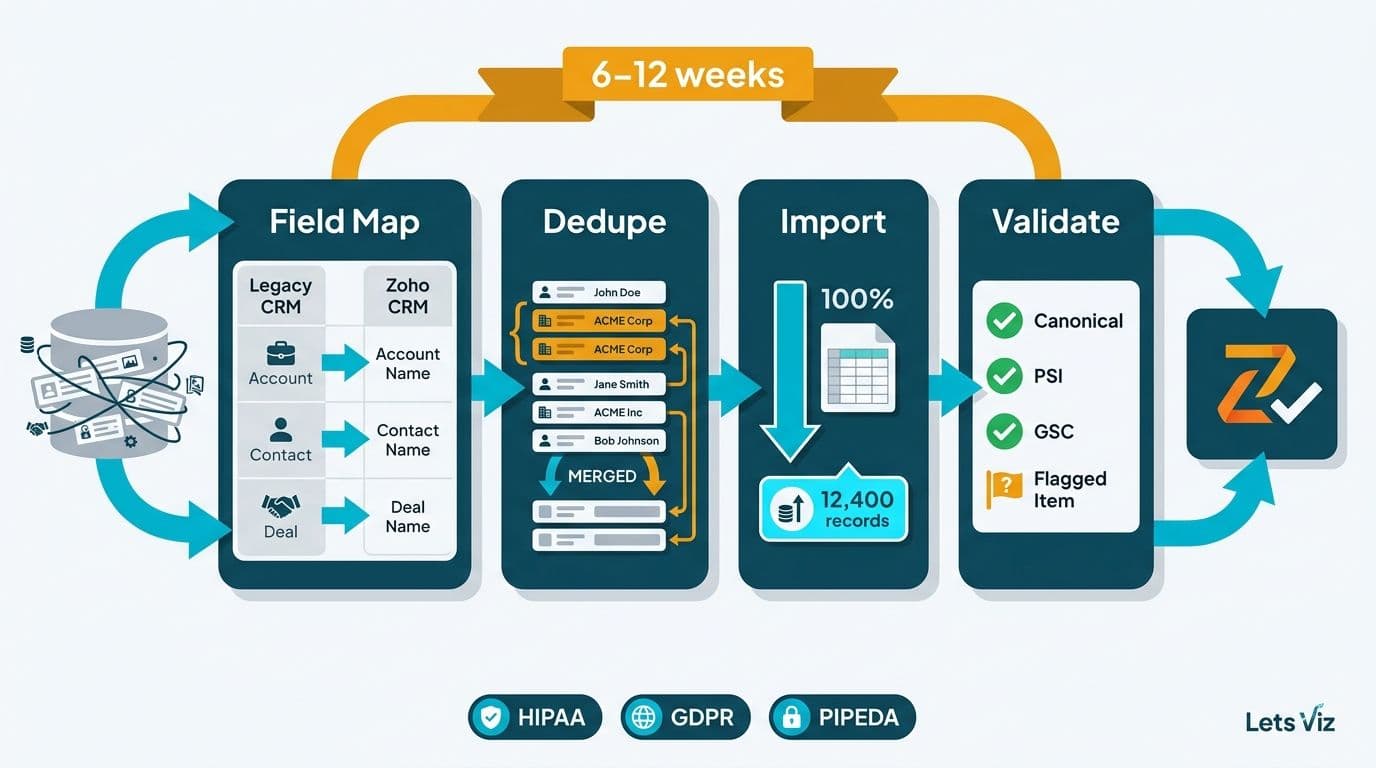
Migrating to Zoho CRM from an existing system requires four disciplined phases: field mapping, deduplication, history-records import, and post-migration validation. Mid-market teams in healthcare and finance typically complete the process in six to twelve weeks when each phase is executed in sequence. Skipping deduplication before import, or bypassing validation before go-live, multiplies cleanup costs and creates compliance exposure under HIPAA, GDPR, or PIPEDA.
Key Takeaways
Build a field-mapping document before exporting a single row from your legacy CRM
Run deduplication in the source system - not after import into Zoho CRM
Import history records (notes, emails, activities) in separate passes after contacts and accounts are stable
A three-layer validation framework - record counts, field-level spot audits, and user acceptance testing - catches data errors before go-live
HIPAA, GDPR, and PIPEDA requirements apply to data in transit; confirm encryption and access controls before any PHI or PII moves
What Does Migrating to Zoho CRM From an Existing CRM Actually Involve?
Migrating to Zoho CRM from an existing CRM is a structured data project, not a one-click export. It moves through four phases: schema analysis and field mapping, source-system cleanup and deduplication, staged import of records and history, and post-migration validation before the old system goes offline.
For teams in regulated industries - US healthcare providers managing protected health information, UK fintech firms under GDPR, or Canadian financial services firms subject to PIPEDA - each phase carries compliance implications. Data in transit must be encrypted, access events logged, and audit trails preserved. Our Zoho consulting services team works across all three regulatory environments and can structure the migration to satisfy each framework's requirements from day one.
According to Future Market Insights (as of 2026), the AI consulting and data services market is tracking from USD 11.07 billion in 2025 toward USD 90.99 billion by 2035 - reflecting how seriously mid-market organizations now treat data infrastructure decisions. A CRM migration is one of the highest-leverage data decisions a revenue or operations team will make.
How Do You Map Fields When Importing Data Into Zoho CRM?
Field mapping is the translation layer between your legacy CRM's schema and Zoho CRM's module structure. The output is a document that lists every source field, its data type, its Zoho CRM equivalent, and any transformation rules required before import.
Standard field mapping steps:
1. Export your legacy CRM's full schema - field names, data types, and picklist values
2. Audit Zoho CRM's default fields in the Contacts, Accounts, Leads, and Deals modules
3. Create custom fields in Zoho CRM for anything the default schema cannot absorb
4. Document transformation rules - for example, converting a free-text "Industry" field into Zoho CRM's picklist format
5. Map owner fields to Zoho CRM user IDs, not user names, which change and break assignment rules
The most common field-mapping error is treating record ownership as a text field. Zoho CRM assigns records to internal user IDs; importing owner names as plain text breaks workflow automation triggers, territory rules, and pipeline reports. For the actual import step, Zoho CRM's native wizard is at Settings > Data Administration > Import. The wizard accepts CSV and XLS files, and its column-mapping screen is where your field-mapping document becomes executable configuration.
Two field types require particular care. Date fields are frequently stored in different formats - MM/DD/YY in one system, YYYY-MM-DD in another. A systematic date offset (where every date imports one day early, for example) points to a timezone conversion error in the transformation rule. Multi-select fields in older CRMs are often stored as comma-separated strings; Zoho CRM expects these as individual tag values, requiring a split operation before import. Testing the field mapping on a 200-record sample batch before the full migration run catches both issues before they affect tens of thousands of records.
| Source Field | Data Type | Zoho CRM Field | Module | Transformation Rule |
|---|---|---|---|---|
| Account Name | Text | Account Name | Accounts | None |
| Owner (Name) | Text | Record Owner | Contacts | Map to Zoho User ID |
| Industry | Free text | Industry | Accounts | Map to picklist values |
| Close Date | Date (MM/DD/YY) | Closing Date | Deals | Reformat to YYYY-MM-DD |
| Annual Revenue | Currency ($) | Annual Revenue | Accounts | Strip currency symbol before import |
| Lead Source | Picklist | Lead Source | Leads | Reconcile legacy values to Zoho picklist |
| Custom Tags | Comma-delimited text | Tags (multi-select) | All | Split on comma before import |
How Should You Handle Deduplication Before a CRM Migration?
Deduplication belongs in the source system, before you export. Running deduplication after import into Zoho CRM multiplies the work and introduces risk if merge rules are misconfigured.
A practical deduplication sequence:
1. Profile the source data. Export all contacts and accounts. Count total records, unique email addresses, and unique phone numbers to establish a clean baseline before any cleanup begins.
2. Define your golden record. Decide which record wins when two duplicates are merged - typically the one with more recent activity or a higher data-completeness score.
3. Run matching logic. Use email address as the primary match key for contacts; use company name plus domain for accounts. As of 2026, Zoho DataPrep's AI-powered similarity scoring can also flag phonetic name variants and common abbreviations — for example, "Int'l" and "International" appearing as separate account records — reducing the manual review queue by up to 40% compared to keyword-only matching alone. A pre-migration spreadsheet works for smaller datasets where DataPrep is not warranted.
4. Create a manual review queue. Flag records where email addresses match but names differ significantly - common with shared inboxes, role accounts like info@, or admin aliases. Route these to a human reviewer before merging.
5. Freeze and re-export. Once deduplication is complete, freeze the source system against new entries for a short window and export the clean dataset for import.
A US healthcare provider migrating off a legacy practice management system discovered that 23% of its patient contact records were duplicates - created when patients completed intake forms at different clinic locations. Running deduplication before import eliminated two weeks of post-migration cleanup and removed the risk of sending duplicate communications to patients, a scenario that would have triggered HIPAA breach notification review.
Deduplication scope also affects migration cost. The Zoho CRM customization cost guide covers how custom field creation expands during the deduplication phase, since unmapped legacy values frequently require new Zoho CRM fields to absorb them correctly.
How Do You Import History Records - Notes, Emails, and Activities - Into Zoho CRM?
History records are the hardest part of any CRM migration. Contacts and accounts are structured and portable; notes, email threads, call logs, and activity timelines are often stored in proprietary formats or linked through internal IDs that do not transfer cleanly.
Recommended import sequence:
1. Contacts and Accounts first. Import parent records before anything else - you need Zoho CRM's auto-generated record IDs to link all subsequent imports correctly.
2. Deals and Leads second. These reference contacts and accounts, so they must come after parent records are live and confirmed clean.
3. Notes and Tasks third. Zoho CRM accepts notes via its Notes module import (CSV). Each note row must include the parent module name and the Zoho CRM record ID generated in step one.
4. Emails last. Zoho CRM does not support bulk import of legacy email archives natively through the UI. Practical options include: connecting a legacy inbox to Zoho CRM's email sync to pull in recent threads; converting key email conversations into structured notes prefixed with "Migrated Email"; or archiving legacy emails in a linked document repository and referencing them via a custom URL field in Zoho CRM. As of 2026, teams already on Zoho Mail gain a further option: Zoho CRM's native retrospective email sync can link historical threads directly to contact records without a manual conversion step, making the "convert to notes" workaround largely unnecessary within the Zoho ecosystem.
A UK fintech firm migrating from a proprietary CRM had 40,000 historical email records that could not be imported directly. The team converted the 200 highest-value email threads into structured notes and archived the remainder in a linked SharePoint library. This satisfied both the sales team's need for deal history and GDPR's data minimization principle by not duplicating records unnecessarily.
For large-volume imports, Zoho CRM's Bulk Write API handles batches of up to 25,000 records per call and is significantly faster than the UI import wizard for history-records migration. A Canadian financial services team used the Bulk Write API to migrate 180,000 activity records across three weekends, staying within their PIPEDA-compliant data processing windows and meeting their go-live deadline without business disruption.
The Healthcare Financial Analytics Market is projected to grow at an 8.58% CAGR through 2035 (Market Research Future, as of 2026). As healthcare organizations integrate CRM and analytics systems, preserving complete patient relationship histories - not just current contact details - becomes a competitive differentiator for revenue cycle and population health management teams.
What Is a Post-Migration Validation Framework for Zoho CRM?
A post-migration validation framework has three layers: quantitative record-count reconciliation, qualitative field-level spot audits, and structured user acceptance testing (UAT). Running all three before decommissioning the legacy system is non-negotiable.
Layer 1 - Record-Count Reconciliation
Compare every object type side by side:
Total contacts: source system vs. Zoho CRM
Total accounts: source system vs. Zoho CRM
Total deals (open and closed): source system vs. Zoho CRM
Total notes and activities linked vs. total migrated
An acceptable variance is less than 0.5%. A larger gap signals a failed import batch, a mapping error that silently dropped records, or an export filter that excluded records unintentionally.
Layer 2 - Field-Level Spot Audit
Select a random sample of 50-100 records per module. For each record, manually verify five to ten critical fields against the legacy system. Pay close attention to: owner assignment (correct user IDs), picklist values (no null or unmapped values), date fields (correct format and no systematic offset), currency fields (correct values with no shifted digits), and custom fields (values present and correctly typed).
Layer 3 - User Acceptance Testing
Assign power users from sales, finance, and operations to work exclusively in Zoho CRM for five to ten business days before the legacy system goes offline. A structured UAT checklist should include: finding a key account by name, email, and phone; confirming open deals show the correct stage and close date; verifying that workflow automation and Blueprint rules trigger correctly on stage changes; and confirming that reports return numbers matching known benchmarks.
A Canadian manufacturing company migrating its dealer network data discovered during UAT that province codes had been imported as US state abbreviations - a systematic mapping error that would have broken territory-based routing and reporting under their PIPEDA-compliant data governance policy. The UAT caught the error before go-live; correcting it post-decommission would have required re-importing 12,000 records.
For US healthcare organizations, a fourth validation layer is advisable: a HIPAA audit trail review. Confirm that the Zoho CRM audit log shows only authorized users accessed PHI records during the migration window, and that no records containing PHI were exported to unencrypted intermediate staging files. UK and EU organizations should verify that all data processed during migration is documented under GDPR Article 30 records of processing activities, naming each system the data transited through and the legal basis for processing.
Zoho CRM's built-in Audit Log (Settings > Security Control > Audit Log) records every record creation and modification event with timestamps - useful for confirming import volumes and identifying records that were created with errors during the migration window.
How Long Does a Zoho CRM Migration Take for Mid-Market Teams?
Migration timelines depend on data volume, source data quality, custom field count, and integration complexity. Healthcare and finance teams should add two to four weeks for compliance review - confirming HIPAA Business Associate Agreements, GDPR Article 30 processing records, or PIPEDA privacy impact assessments before any production data moves.
According to the World Economic Forum (as of 2026), over 100 experts from more than 50 financial services organizations have developed frameworks requiring CRM data lineage to be documented end-to-end - meaning migration logs, field transformation records, and deduplication audit trails must now be retained as compliance artifacts, not discarded once go-live is confirmed. For mid-market teams, this makes the validation framework described above a regulatory deliverable, not just an internal quality check.
For mid-market teams, the typical planning benchmarks are:
| Team Size | Record Volume | Estimated Timeline |
|---|---|---|
| 10-50 users | Up to 50,000 records | 4-6 weeks |
| 50-200 users | 50,000-250,000 records | 6-10 weeks |
| 200+ users | 250,000+ records or complex integrations | 10-16 weeks |
As of 2026, teams that complete automated data profiling and deduplication before the migration project formally begins — using tools such as Zoho DataPrep or a dedicated data-quality pipeline — are consistently finishing 20–30% faster than these benchmarks suggest, landing at the lower end of each range.
The single largest time variable is source data quality. Legacy systems with years of accumulated duplicates and inconsistent picklist values can double the preparation phase. Teams that complete a thorough deduplication and field-mapping exercise before the project officially begins consistently land at the lower end of these ranges.
For teams evaluating where Zoho CRM fits within a broader product suite, the Zoho One overview covers how CRM integrates with Zoho Books, Zoho Desk, and other modules. For teams weighing entry-level options, the Zoho CRM vs Bigin comparison and Zoho CRM Canvas overview provide useful context before committing to a full migration project.
---
About Lets Viz: Lets Viz is a data analytics and CRM consulting firm serving US healthcare organizations, UK fintech companies, Canadian manufacturers, and global SaaS businesses since 2020. Our team holds a 5.0 rating on Clutch and has guided mid-market clients through Zoho CRM implementations, Power BI deployments, and enterprise data migrations across HIPAA, GDPR, and PIPEDA regulatory environments.
Our Zoho consulting services team can audit your legacy CRM data, build your field-mapping document, manage deduplication, and run the full migration so your teams go live on clean, validated data. Try Zoho CRM free to explore the platform before committing to a full migration project.